Dessau WordPress Theme
by Select-Themes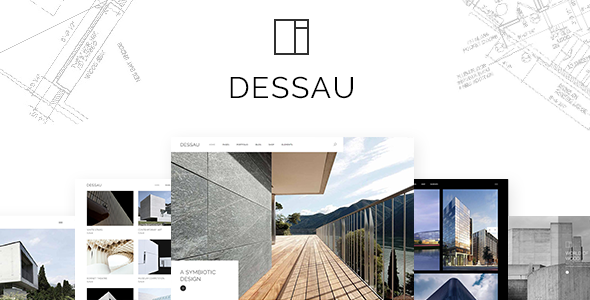
Stuck on your Dessau WordPress theme? Let's fix it.
No endless back-and-forth. Just send us the details and we'll get it done.
No obligation · Replies within 1 hour · Quote within 1 day
Setup · Customization · Bug fixes · WooCommerce integration
About Dessau WP Theme
Dessau is a WordPress theme by Select-Themes built for creative agencies, studios, and portfolio-driven businesses. It ships with a clean grid layout, strong typographic hierarchy, and a minimal aesthetic that keeps the focus on the work being presented.
The theme supports the WordPress block editor and includes multiple demo layouts you can import and adapt. Page speed is reasonable out of the box, and the codebase follows standard WordPress conventions, making it easier for a Dessau developer to extend without fighting the theme’s structure.
Select-Themes has a track record of well-documented, regularly updated themes. Dessau fits that pattern. It is a solid starting point for anyone who needs a polished creative portfolio without building from scratch.
Get matched with a Dessau developer in under one day
Tell us about your Dessau project. Small fixes, Dessau theme customization, or a full website build, whatever you need, we've got it covered.
We'll connect you to the right Dessau developers, define the scope, and get everything 100% clear.
You'll get one estimate, hire your preferred developer, and start collaborating.
Dessau looks straightforward until you need it to do something the demos do not show. Custom portfolio structures, multilingual setups, WooCommerce integration, or client editing workflows all require someone who knows the theme’s template hierarchy and how Select-Themes has structured things under the hood.
Through Codeable, you get matched with a vetted WordPress developer who has worked with themes like Dessau before. No junior freelancers, no agencies that outsource. Post your project and get a free estimate with no obligation to proceed.
Pros
- Clean minimal layout that works well for creative and portfolio sites without heavy styling overhead
- Multiple demo layouts included, reducing the time needed to get a starting point that is close to the target design
- Compatible with the WordPress block editor, making content editing straightforward for non-technical users
- Select-Themes maintains the theme with regular updates and provides documentation that covers most common setup steps
- Lightweight codebase with no excessive plugin dependencies bundled in, keeping the baseline load time manageable
Cons
- Customizer options are limited for advanced layout changes, so most non-trivial modifications require a developer
- Portfolio filtering relies on specific markup that can conflict with third-party page builders if you attempt to mix them
- Demo import can bring in placeholder content that takes time to clean up before a site is ready for real content
- Typography options in the Customizer are limited to preset choices, and custom font pairing requires CSS or a plugin
- Select-Themes support is theme-level only and does not cover customizations, so any bespoke changes need developer support
Who is Dessau for?
Creative Agency Portfolio
Dessau’s grid-based layout and strong whitespace handling make it a natural fit for agencies presenting case studies, client work, and team profiles. A Dessau developer can set up custom post types for projects and configure filtering by service type or industry, giving the agency full editorial control over how work is categorized and displayed.
Freelance Photographer
Photographers need fast-loading galleries and a layout that does not compete with the images. Dessau’s minimal aesthetic supports this well. A Dessau specialist can integrate a gallery plugin, configure lazy loading, and set up category-based portfolio sections for different genres like weddings, editorial, or commercial work.
Architecture or Interior Design Studio
Architecture and interior design studios often need large image displays with project detail pages that include specs, location, and credits. A Dessau expert can build out a custom project template using ACF to give editors a structured way to fill in details without touching code on every new project entry.
Graphic Designer or Illustrator
Dessau’s clean typographic base works for designers who want their work to speak without a busy interface getting in the way. A Dessau developer can add a filterable portfolio grid organized by medium or client type, along with a simple contact form setup that handles project inquiry submissions directly.
Digital Product Studio
Studios selling digital products like fonts, UI kits, or templates can use Dessau as a front-end showcase alongside WooCommerce handling the commerce layer. A Dessau specialist can integrate the two cleanly, styling product pages to match the rest of the theme and keeping the overall experience consistent for buyers.

Customizing Dessau
Dessau gives you access to the WordPress Customizer for global settings like colors, fonts, header layout, and footer structure. For deeper changes, a Dessau expert will typically work directly with child theme CSS or block patterns to avoid losing edits on updates.
Custom post types, portfolio filtering, and homepage section ordering are areas where many clients want changes that go beyond what the Customizer exposes. A Dessau specialist can register custom fields, adjust template files, and wire up ACF or similar plugins to give editors more control without touching code themselves.
If you need a layout that does not exist in the demo set, a Dessau developer can build it as a custom block pattern or page template that integrates cleanly with the rest of the theme.
Recommended plugins for Dessau
Dessau pairs well with performance and SEO plugins, but how you configure them matters. Poorly tuned caching or minification settings can break the theme’s scripts or gallery layouts.
For site speed, image optimization, proper caching layers, and Core Web Vitals improvements specific to Dessau are covered in our WordPress performance service. For search visibility, structured data, meta configuration, and on-page SEO aligned with your portfolio content are handled through our WordPress SEO service. Both are worth addressing early rather than retrofitting later.
Not sure which plugins to use? This WordPress plugins directory covers the most popular options with reviews and setup guides.
Dessau common issues
Dessau portfolio grid not loading correctly after plugin update
Portfolio grid failures after a plugin update usually point to a JavaScript conflict. A plugin may have updated a dependency that the theme’s filtering script relies on, causing the grid to initialize without rendering correctly. Start by deactivating recently updated plugins one at a time and checking the browser console for JS errors. If the grid uses Isotope or a similar library, check for duplicate script registrations. For persistent conflicts, our WordPress bug fixing service can diagnose and resolve the issue without disrupting live content.
Dessau theme customizer changes not saving or showing on front end
Customizer changes failing to save or not appearing on the front end are often caused by caching layers intercepting requests before changes are written, or a permissions issue with the WordPress filesystem. Clear all caching at the server, plugin, and CDN level first. If the issue persists, check that the active user role has full admin capabilities and that no security plugin is blocking Customizer AJAX calls. Our WordPress bug fixing service can trace the exact point of failure.
Dessau demo import failing or importing blank pages
Demo import failures in Dessau typically happen because the required plugins were not installed and activated before importing, or because the server’s PHP memory limit or execution time is too low to complete the import process. Install all required plugins first, then raise PHP limits in your server config or wp-config.php. If the importer runs but pages come through blank, check that the XML file transferred completely and that no firewall rule is blocking the import request.
Dessau theme layout breaking on mobile or tablet screens
Layout breaks on mobile with Dessau usually come from custom CSS that was written without responsive breakpoints, or from a third-party plugin injecting markup that disrupts the theme’s flex or grid container structure. Use browser DevTools to inspect which element is overflowing or collapsing incorrectly. Check that no fixed-width values have been added in the Customizer or custom CSS field. If the issue appeared after a theme update, compare the current stylesheet against the previous version’s responsive rules.
Dessau FAQ
Yes. Dessau is built to work with the WordPress block editor. You can use core blocks for most content areas, and the theme’s styles apply consistently to block-based layouts. For more structured content like portfolio entries, a Dessau developer can extend this further using custom block patterns or ACF blocks.
Dessau does not include WooCommerce templates by default, so the default WooCommerce styling will apply to shop pages. A Dessau specialist can build custom WooCommerce templates that match the theme’s design, covering product listings, single product pages, cart, and checkout. This is a common integration request handled through our development service.
Dessau’s portfolio filtering is typically handled through taxonomy terms assigned to portfolio post types. To add or modify filter categories, you register new terms in the relevant taxonomy and ensure the filter script is set to recognize them. A Dessau developer can adjust the filter markup and script configuration to match your specific categorization needs.
Dessau can technically be used with Elementor, but mixing a theme with strong structural opinions with a page builder often creates conflicts, particularly in portfolio and archive layouts. A Dessau expert would generally recommend using the block editor or custom templates rather than a page builder to keep the theme’s grid and filtering behavior intact.
Always use a child theme for any CSS or template file changes. This ensures theme updates from Select-Themes do not overwrite your work. Settings stored in the Customizer and the database are not affected by theme file updates. If you have not been using a child theme, a Dessau developer can set one up and migrate your existing changes before the next update.
Hire a Dessau Developer for Your WordPress Project
Whether you need a Dessau expert for a full build, a specific customization, or a problem that needs fixing, FoxyConcept delivers through Codeable’s vetted developer network. Projects are matched within 24 hours. You get a clear estimate before any work begins, and you only proceed if it makes sense for you.
Get a Free Estimate and describe what you need. No commitment required.
You'll need a free Codeable account so developers can ask questions and send their quotes.