Moderno – Fashion & Clothing, Furniture WordPress Theme
by park_of_ideas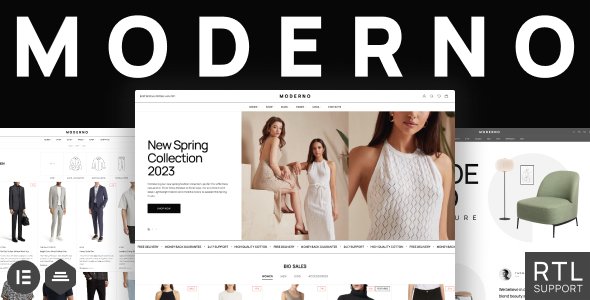
Stuck on your Moderno – Fashion & Clothing, Furniture WordPress theme? Let's fix it.
No endless back-and-forth. Just send us the details and we'll get it done.
No obligation · Replies within 1 hour · Quote within 1 day
Setup · Customization · Bug fixes · WooCommerce integration
About Moderno – Fashion & Clothing, Furniture WP Theme
Moderno is a WordPress theme by park_of_ideas built for fashion boutiques, clothing brands, and furniture retailers. It ships with multiple homepage layouts, WooCommerce integration, and demo content that covers both apparel and home goods stores. The design leans minimal and image-forward, which suits product-heavy catalogues where photography does the selling.
Out of the box you get a mega menu, AJAX cart, wishlist functionality, and product filtering. The theme is built on Elementor, so page layouts are drag-and-drop. It also includes Revolution Slider and WPBakery in some bundles, depending on the version purchased. For stores that want a polished retail look without building from scratch, Moderno covers a lot of ground before any customization begins.
Get matched with a Moderno – Fashion & Clothing, Furniture developer in under one day
Tell us about your Moderno – Fashion & Clothing, Furniture project. Small fixes, Moderno – Fashion & Clothing, Furniture theme customization, or a full website build, whatever you need, we've got it covered.
We'll connect you to the right Moderno – Fashion & Clothing, Furniture developers, define the scope, and get everything 100% clear.
You'll get one estimate, hire your preferred developer, and start collaborating.
Moderno is well-documented, but store builds rarely go exactly to plan. Conflicts between plugins, custom layout requests, and WooCommerce configurations can stall a launch. Developers on Codeable have worked across fashion and furniture builds and know where Moderno tends to need extra attention. You post your project, get matched with a vetted Moderno developer within 24 hours, and receive a free estimate before any work starts. No commitment required.
Pros
- Multiple demo layouts covering both fashion and furniture niches reduce initial setup time
- Full WooCommerce support including AJAX cart, wishlist, and product quick view out of the box
- Elementor compatibility allows visual page editing without custom code
- Mega menu with image support suits large product catalogues with many categories
- Lookbook and shop-the-look modules built in, useful for apparel and styled room photography
Cons
- Bundled plugins like Revolution Slider add page weight and require separate performance tuning
- Switching between fashion and furniture demo styles often requires manual content replacement
- Heavy use of Elementor widgets can slow the builder interface on large pages
- Some advanced WooCommerce features like product bundles or subscriptions need additional plugins and configuration
- Theme updates from park_of_ideas can occasionally break custom CSS or layout overrides
Who is Moderno – Fashion & Clothing, Furniture for?
Online Fashion Boutique
Moderno’s fashion demo includes category banners, seasonal promotion sections, and a product grid designed for apparel. Size and color variation displays work well for clothing catalogues. A Moderno Fashion expert can configure filters by fit, fabric, or collection so shoppers find products quickly without leaving the catalogue page.
Furniture & Home Goods Store
The furniture layout ships with large hero images, room-scene photography sections, and a product detail page suited to high-consideration purchases. A Moderno Furniture developer can add 360-degree views, dimension tables, or delivery estimate fields to the product page without disrupting the theme’s design structure.
Clothing Brand with Lookbook
The lookbook module lets you tag products directly on editorial photography, connecting inspiration to purchase in one step. This works for seasonal campaigns or capsule collections. A Moderno specialist can build out full lookbook archives, set up campaign landing pages, and link them to sale events or email flows.
Multi-Category Retail Store
Moderno handles mixed catalogues reasonably well, supporting separate department headers and category-specific layouts. For stores selling both clothing and furniture, a developer can configure conditional menus, department-specific filter sets, and homepage sections that switch context without confusing the customer journey.
Interior Design Studio Shop
Interior design studios selling furniture, textiles, or decorative accessories can use Moderno’s clean grid and editorial sections to present curated collections. A Moderno developer can integrate booking or consultation request forms alongside the shop, turning the site into both a catalogue and a service inquiry tool.

Customizing Moderno – Fashion & Clothing, Furniture
Moderno’s customization options go well beyond color and font changes. The theme panel gives you control over header styles, sticky navigation behavior, product card layouts, and category page grid density. For fashion stores, lookbook-style pages can be built using the bundled page builder without touching code.
That said, deeper work like custom checkout flows, brand-specific animations, or integrating third-party inventory tools requires developer input. A Moderno Fashion Clothing Furniture expert can wire up size guides, configure multi-currency plugins, or extend the furniture section with room visualizer tools. If your store has requirements the demo doesn’t cover, working with a Moderno specialist saves significant trial-and-error time.
Recommended plugins for Moderno – Fashion & Clothing, Furniture
Moderno pairs well with performance and SEO plugins, but configuration matters. Lazy loading product images, setting up a caching layer, and optimizing WooCommerce queries can significantly cut load times on large catalogues. A WordPress performance audit is worth running before launch if your store carries hundreds of SKUs.
On the visibility side, schema markup for products, breadcrumbs, and collection pages helps Google index your inventory correctly. Pairing Moderno with a structured WordPress SEO setup ensures product pages compete in search rather than just sitting in your catalogue.
Not sure which plugins to use? This WordPress plugins directory covers the most popular options with reviews and setup guides.
Moderno – Fashion & Clothing, Furniture common issues
Moderno theme WooCommerce product images not displaying correctly
This usually comes down to image size settings in WooCommerce conflicting with Moderno’s declared thumbnail dimensions. Go to WooCommerce > Settings > Products > Display and regenerate thumbnails after adjusting. If cropping is still off, the theme may be overriding image sizes via functions.php. A WordPress bug fix can trace which size declaration is winning and align both correctly.
Moderno theme slow loading on mobile with large product catalogue
Large catalogues on Moderno often suffer from unoptimized product images, multiple render-blocking scripts from bundled plugins, and uncached WooCommerce pages. Start by enabling a caching plugin and confirming it excludes cart and checkout. Compress images using a tool like ShortPixel, then defer non-critical scripts. If load time is still poor, a developer can audit the exact bottlenecks. See our WordPress bug fixing service for performance-related issues.
Moderno fashion theme mega menu not working after update
Mega menu failures after a Moderno update typically point to a JavaScript conflict with an updated plugin or a CSS class rename in the new theme version. Open the browser console and check for JS errors on the nav element. Compare the menu markup against the previous version’s output. If a plugin like WPBakery or a custom script is interfering, isolating it in a staging environment will identify the source quickly.
Moderno theme Elementor layout broken on category pages
Elementor category page layouts breaking usually means a saved template is referencing a widget or dynamic tag that no longer resolves correctly after a theme or plugin update. Open the affected page in Elementor, check for deprecated widgets flagged in yellow, and re-save after replacing them. If the layout collapse is structural rather than widget-level, the page template assignment in the theme settings may have reset during the update.
Moderno – Fashion & Clothing, Furniture FAQ
Yes. Moderno was built with fashion retail in mind. It includes product filtering, lookbook modules, AJAX cart, and wishlist functionality that most apparel stores need. WooCommerce integration is tight across all demo layouts. For stores with specific requirements like virtual try-on or size recommendation tools, a Moderno Fashion expert can integrate third-party solutions on top of the base theme.
Moderno ships with separate demo packs for fashion and furniture, but running both categories under one installation is possible. You’ll need a developer to configure separate category templates, navigation logic, and homepage sections that serve both audiences without making the store feel unfocused. It’s a common request for multi-niche retailers.
Yes, Moderno is built on Elementor. Most page layouts are constructed with Elementor widgets and templates, so the visual editor is central to how the theme works rather than an add-on. This makes layout changes accessible without code, but also means Elementor must be kept updated and compatible with the theme version in use.
After installing the theme, go to Appearance > Import Demo Data and select the layout pack you want. The importer handles pages, widgets, and menu structure. Note that dummy images are placeholders and must be replaced. A slow or incomplete import is usually caused by server timeout limits. Increasing PHP max execution time before importing helps avoid partial installs.
Yes, if customizations are applied correctly. A good Moderno developer will use a child theme for CSS and template overrides, keeping changes separate from the parent theme files. This way, updating Moderno doesn’t wipe custom work. Plugin-level customizations via hooks are handled similarly. This approach is standard practice and protects your investment through future updates.
Hire a Moderno Fashion Clothing Furniture Developer
Whether you need a full store build, a layout fix, or help extending Moderno beyond its defaults, a vetted WordPress developer can move faster than working through it alone. From WooCommerce setup to custom product page templates, the right Moderno specialist makes a measurable difference. Get a Free Estimate and describe what you need. No obligation, no upfront cost.
You'll need a free Codeable account so developers can ask questions and send their quotes.