Moose WordPress Theme
by Elated-Themes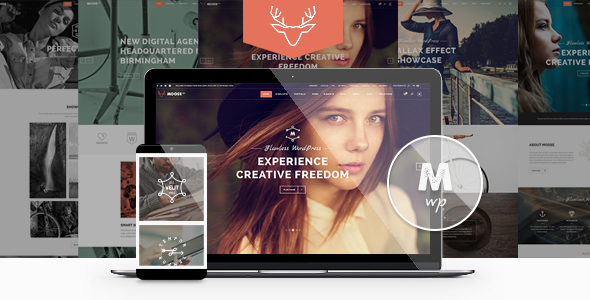
Stuck on your Moose WordPress theme? Let's fix it.
No endless back-and-forth. Just send us the details and we'll get it done.
No obligation · Replies within 1 hour · Quote within 1 day
Setup · Customization · Bug fixes · WooCommerce integration
About Moose WP Theme
Moose is a multipurpose WordPress theme built by Elated-Themes, a studio known for polished, feature-rich commercial themes. Moose ships with over 30 pre-built demo sites covering creative agencies, portfolios, corporate sites, restaurants, and more. It uses a custom page builder layer on top of WPBakery, giving you drag-and-drop control without needing to touch code.
The theme includes Slider Revolution, Essential Grid, and Layer Slider in the purchase price, which adds real value compared to buying those plugins separately. Typography controls, header builder options, and extensive color settings mean most visual changes stay inside the customizer. Performance out of the box is moderate — Moose loads a lot of assets by default, so optimization is usually needed on live projects. It suits designers and agencies who want a starting point that looks finished quickly.
Get matched with a Moose developer in under one day
Tell us about your Moose project. Small fixes, Moose theme customization, or a full website build, whatever you need, we've got it covered.
We'll connect you to the right Moose developers, define the scope, and get everything 100% clear.
You'll get one estimate, hire your preferred developer, and start collaborating.
Elated-Themes documents Moose well, but documentation only goes so far when you are trying to match a specific design or fix a conflict between a bundled plugin and a new integration. Codeable connects you with vetted WordPress developers who have worked across multipurpose themes like Moose and know where the common friction points are. You get a real estimate before any work starts, and you only hire if you are comfortable with the scope and cost.
Pros
- Bundles Slider Revolution, Layer Slider, and Essential Grid at no extra cost
- 30+ demo sites covering a wide range of industries and layout styles
- Per-page control over headers, footers, and sidebars without custom code
- Active development from Elated-Themes with regular compatibility updates
- WooCommerce and WPML compatibility included out of the box
Cons
- Heavy default asset load requires deliberate optimization before going live
- Relies heavily on WPBakery, which creates shortcode lock-in if you ever switch themes
- Options panel is large and can be confusing for non-technical clients managing their own site
- Bundled plugin versions sometimes lag behind the latest releases, causing compatibility warnings
- Child theme documentation is limited, making deep customization harder to approach solo
Who is Moose for?
Creative Agency
Moose’s agency demo sites come with full-width hero sections, animated counters, team grids, and case study portfolio layouts. A Moose developer can strip a demo down to your branding and content in a fraction of the time it would take to build from scratch, while keeping the polished visual feel agencies expect from their own site.
Restaurant or Food Business
The restaurant demo includes a menu page template, reservation section, gallery grid, and opening hours widget. These are built with WPBakery elements, so a Moose specialist can rearrange and restyle them without touching PHP. Pair it with a booking plugin and you have a functional site that looks custom-built.
Freelance Portfolio
Moose’s portfolio post type supports filterable grids, full-screen project pages, and multiple thumbnail styles. For freelancers who want a site that showcases work without a lengthy build process, starting from one of the portfolio demos cuts setup time significantly. A Moose expert can tailor hover effects and layout density to match your style.
Corporate or Business Site
Corporate demos in Moose include service pages, team sections, client logo sliders, and contact page templates. The theme’s header builder handles sticky navigation and transparent header effects that corporate clients often request. Most of this is configurable through the panel, but a Moose developer speeds up the setup and avoids common configuration errors.
Online Store
Moose’s WooCommerce templates cover shop archive, single product, cart, and checkout pages with styling that matches the rest of the theme. A Moose specialist can extend these with custom product layouts, filtered category pages, or upsell sections built with WPBakery — without breaking the checkout flow or introducing payment gateway conflicts.

Customizing Moose
Moose gives you a lot of knobs to turn — header styles, sticky nav behavior, footer columns, sidebar layouts, and per-page settings for most options. That flexibility is useful, but it also means the learning curve is steeper than simpler themes. A Moose expert can work through the panel structure quickly and get to actual build work faster.
Custom post types for portfolio and team members are built in. WooCommerce compatibility is included, with basic shop templates that can be restyled through the theme options. If you need something outside the built-in options — a custom header layout, modified WPBakery elements, or integration with a third-party plugin — you will likely need a Moose specialist who knows where Elated-Themes hooks into WordPress core and how the theme’s child theme structure works.
Recommended plugins for Moose
Moose bundles several premium plugins, but long-term site health depends on how those extensions are configured. WPBakery shortcodes can bloat page weight quickly. Pairing Moose with a proper caching setup and asset optimization is important — see our WordPress performance services for details on what that involves.
If you are running a business site on Moose and want search visibility, the theme is compatible with Yoast SEO and Rank Math, but schema, meta structure, and crawl optimization still need deliberate setup. Our WordPress SEO service covers that end to end.
Not sure which plugins to use? This WordPress plugins directory covers the most popular options with reviews and setup guides.
Moose common issues
Moose theme not updating or showing update available after Envato purchase
Moose updates are delivered through the Envato Market plugin, not the standard WordPress update screen. If updates are not appearing, the most common causes are an expired or incorrectly entered purchase code, or the Envato Market plugin not being installed. Go to Appearance > Envato Market, verify your token, and re-save. If the theme still shows as up to date when it should not, clearing your site’s transient cache usually resolves it. For persistent issues, our WordPress bug fixing service can investigate your specific setup.
WPBakery shortcodes showing as plain text after switching to Moose
This usually happens when WPBakery is deactivated or not installed when Moose content is imported, or when content is migrated from another theme. WPBakery shortcodes are stored as raw text in the database and only render when the plugin is active. Reactivate WPBakery and ensure the version bundled with Moose is running. If shortcodes still appear broken, check whether a third-party WPBakery extension added by a previous developer is missing. Our WordPress bug fixing service can audit and restore the correct output.
Moose theme slow to load on mobile after adding demo content
Moose demo imports load all bundled plugin assets by default, even on pages that do not use them. Start by disabling scripts and styles from Layer Slider and Essential Grid on pages where those elements are not present — both plugins have settings for this. Next, set up a caching plugin and enable lazy loading for images. Slider Revolution’s static files are another common culprit. Removing unused revolution sliders and disabling their global CSS output reduces load time noticeably on mobile connections.
Slider Revolution not working in Moose after WordPress update
Slider Revolution breaks most often after WordPress core updates because of JavaScript conflicts introduced by updated jQuery handling. First, check whether Moose’s bundled version of Slider Revolution is behind the current release — Elated-Themes occasionally ships an older bundled copy. Update through the Slider Revolution plugin screen if a newer version is available. If sliders still fail to initialize, check the browser console for JS errors pointing to a conflicting script. A plugin loading in the footer and conflicting with RevSlider’s init order is a frequent cause.
Moose FAQ
Moose was built around WPBakery and its own front-end editor, so Gutenberg support is partial. Basic blocks work on standard pages, but the theme’s core layouts and design elements rely on WPBakery shortcodes. Elated-Themes has not fully migrated Moose to a block-first architecture, so if Gutenberg compatibility is a hard requirement, you will need a developer to assess how far it can be pushed.
Technically yes, but practically very limited. All demo content, most layout options, and the majority of Moose’s built-in elements depend on WPBakery being active. Without it, pages built with the bundled demos will show raw shortcode text. You can use standard WordPress page templates for basic pages, but you lose the visual flexibility that makes Moose worth using in the first place.
Moose’s demo importer gives you the option to import content, widgets, and settings separately. To avoid overwriting existing pages, import only the widgets and theme options from the demo you want, then manually copy across specific pages or templates. There is no selective page import built in, so a Moose developer is useful here if your existing content needs to coexist with new demo layouts.
Yes. Moose includes WooCommerce-compatible templates for shop, product, cart, and checkout pages. The styling integrates with the active Moose demo skin. Basic shop functionality works without extra configuration. More complex setups — custom product page layouts, filtered shop archives, or checkout customizations — typically need a Moose specialist to implement without breaking the default WooCommerce flow.
Create a folder in wp-content/themes/ named moose-child, add a style.css with the correct Template: moose header, and a functions.php that enqueues the parent stylesheet. Elated-Themes recommends this approach for any code-level customizations. Activate the child theme from Appearance > Themes. All theme option settings carry over automatically since they are stored in the database, not the theme files.
Hire a Moose WordPress Developer
Whether you need a Moose expert to build a site from one of the included demos, customize layouts beyond what the options panel allows, or fix something that broke after an update, we can match you with the right developer. Work is scoped before it starts and delivered through Codeable, so there are no surprises. Get a free estimate and describe what you need — no commitment required.
You'll need a free Codeable account so developers can ask questions and send their quotes.