Vertikal WordPress Theme
by ThemeGuri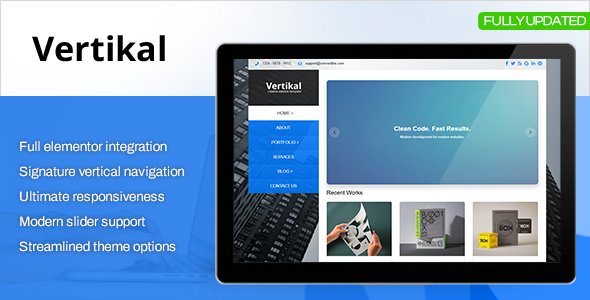
Stuck on your Vertikal WordPress theme? Let's fix it.
No endless back-and-forth. Just send us the details and we'll get it done.
No obligation · Replies within 1 hour · Quote within 1 day
Setup · Customization · Bug fixes · WooCommerce integration
About Vertikal WP Theme
Vertikal is a free WordPress theme by ThemeGuri, built around a clean vertical navigation layout. Instead of a top horizontal menu, it places the sidebar and navigation on the left, giving the main content more breathing room. It’s designed for blogs, magazines, and news-style sites that want a structured layout without heavy page builder dependency.
The theme is Gutenberg-compatible and works with most standard plugins. It loads light, follows WordPress coding standards, and is translation-ready. The vertical panel approach suits sites with deep navigation structures or writers who want a distinct look from the typical header-menu format. It’s a solid starting point, though most sites will need a Vertikal specialist to push it beyond the defaults.
Get matched with a Vertikal developer in under one day
Tell us about your Vertikal project. Small fixes, Vertikal theme customization, or a full website build, whatever you need, we've got it covered.
We'll connect you to the right Vertikal developers, define the scope, and get everything 100% clear.
You'll get one estimate, hire your preferred developer, and start collaborating.
Most Vertikal issues come down to one thing: the theme does the basics, but production-ready sites need more. A vetted Vertikal developer through Codeable can handle child theme builds, layout modifications, plugin conflicts, and performance tuning. Codeable screens every developer before they join, so you’re not rolling the dice on quality. Post a project, get an estimate within 24 hours, and only proceed if it makes sense for your budget.
Pros
- Unique vertical navigation layout stands out from standard WordPress themes
- Lightweight codebase with fast default load times
- Gutenberg block editor compatible without plugin conflicts
- Translation-ready with .pot file included for multilingual builds
- Clean, well-structured code that follows WordPress coding standards
Cons
- Limited Customizer options compared to premium themes
- Vertical sidebar navigation can be awkward on mobile without custom CSS
- No built-in mega menu or dropdown depth support
- WooCommerce integration requires additional styling work
- Sparse documentation makes advanced customization harder without developer help
Who is Vertikal for?
Personal Blog
Vertikal’s left-panel navigation keeps the reading experience clean. Writers get a distraction-free content area with categories and recent posts tucked into the vertical sidebar. A Vertikal specialist can add author bio widgets, related posts sections, and custom typography to make the blog feel more personal without bloating the layout.
Online News & Magazine
News sites with multiple categories benefit from Vertikal’s structured sidebar. The layout keeps section navigation visible without a sprawling top bar. A Vertikal developer can set up custom post types for breaking news, configure ad widget areas, and build category archive templates that match editorial needs.
Portfolio Site
The minimal design gives portfolio content room to breathe. Vertikal’s sidebar navigation handles project categories well. A developer can add custom gallery templates, client-facing case study layouts, and a contact form integration. The theme’s clean HTML structure makes it straightforward to style without fighting default overrides.
Niche Content Site
Sites focused on a single topic, such as recipes, travel, or finance, benefit from Vertikal’s clear navigation hierarchy. A Vertikal expert can build topic-specific archive pages, custom widgets for popular content, and ad placements that fit the layout without disrupting the reading flow on long-form posts.
Small Business Website
Small businesses that need a clean, professional web presence without heavy plugin stacks find Vertikal a practical base. A Vertikal developer can configure service pages, a contact form, and basic SEO structure. It works well as a lean site that loads fast and doesn’t require ongoing maintenance of a complex theme framework.

Customizing Vertikal
Out of the box, Vertikal gives you basic Customizer controls: logo upload, color settings, typography options, and widget areas. That covers the surface level. If you need custom layouts, modified sidebar behavior, conditional templates, or a design that reflects your brand rather than the theme defaults, you’ll need to go further.
A Vertikal expert can build child theme customizations without touching core files, adjust the vertical panel for mobile responsiveness, create custom page templates, and wire up Advanced Custom Fields for structured content. Changes like restructuring the header area, adding sticky sidebar behavior, or integrating a WooCommerce shop require hands-on PHP and CSS work. That’s where a Vertikal developer earns their place.
Recommended plugins for Vertikal
Vertikal pairs well with standard WordPress plugin stacks. WooCommerce works with styling adjustments. Contact Form 7 and Gravity Forms integrate without conflicts. For content-heavy sites, adding a caching layer and image optimization is worth doing early. A proper setup guide is available on the WordPress performance page.
If you’re running a blog or news site on Vertikal, schema markup, XML sitemaps, and on-page SEO structure matter. The theme doesn’t include these natively, so pairing it with Yoast or Rank Math is standard practice. More detail on that is covered in the WordPress SEO optimisation section.
Not sure which plugins to use? This WordPress plugins directory covers the most popular options with reviews and setup guides.
Vertikal common issues
Vertikal theme vertical sidebar not showing on mobile
The vertical sidebar in Vertikal collapses or disappears on smaller screens due to missing responsive CSS rules. By default, the theme doesn’t always include a reliable mobile toggle for the left panel. The fix involves adding breakpoint-specific CSS in your child theme and, if needed, a small JavaScript toggle for the mobile menu. Check your child theme’s stylesheet before touching anything in the parent theme files. If this is causing a live site issue, the WordPress bug fixing service can resolve it quickly.
Vertikal WordPress theme menu not working after update
Menu problems after a WordPress core or theme update usually come from a registered menu location conflict or a cached nav output. First, go to Appearance > Menus and confirm the correct menu is assigned to the Vertikal navigation location. Clear any server-side or plugin cache. If the menu still doesn’t render, check for JavaScript errors in the browser console. A plugin conflict with a menu enhancement plugin is a common cause. The WordPress bug fixing service covers this type of issue.
Vertikal theme layout broken with WooCommerce
WooCommerce adds its own template files, and Vertikal doesn’t include WooCommerce template overrides by default. This means shop pages, product archives, and cart pages often inherit mismatched styles. The fix is to copy WooCommerce templates into your child theme’s woocommerce folder and apply targeted CSS. Column layouts, button styles, and the cart sidebar usually need manual adjustments to align with Vertikal’s vertical panel design.
Vertikal theme widgets not saving in Customizer
Widget settings that don’t save in the Customizer are usually caused by a PHP error suppressed in the background, a plugin conflict with the Customizer API, or a browser session issue. Start by deactivating plugins one at a time to isolate the conflict. Check the PHP error log for any output before the JSON response. If the issue only appears with a specific widget, the widget plugin itself may have a Customizer compatibility bug that needs a code-level fix.
Vertikal FAQ
Vertikal is a free theme available from the WordPress.org repository. ThemeGuri developed it as a no-cost option with standard features. There is no official premium version with additional features. Any extended functionality needs to come from plugins or custom development by a Vertikal specialist working with a child theme.
Vertikal works with Elementor, but the vertical sidebar layout can interfere with full-width page builder sections. You may need to set specific pages to a blank or no-sidebar template before building with Elementor. A Vertikal developer can configure this so page builder pages and standard blog pages coexist without layout conflicts.
Create a new folder in wp-content/themes, add a style.css with a Template header pointing to vertikal, and include a functions.php that enqueues the parent stylesheet. Activate the child theme from Appearance > Themes. All custom CSS and PHP changes go in the child theme. This keeps your changes intact when the parent theme updates.
Vertikal does not include built-in WooCommerce support or template overrides. It will run WooCommerce, but shop pages will use default WooCommerce styling that may not match the theme. A Vertikal developer can add a woocommerce folder to your child theme with customized templates and CSS to bring the store in line with the rest of your site design.
Vertikal’s Customizer includes basic typography options, but font choices are limited. For Google Fonts or custom font stacks, you’ll need to enqueue them via your child theme’s functions.php and apply them through CSS. Some sites use a plugin like Custom Fonts or Easy Google Fonts as a quicker route, though direct code control gives more precise results.
Hire a Vertikal Developer for Your WordPress Project
Whether you need a Vertikal expert to build a child theme, fix a layout issue, or extend functionality with custom code, working with a specialist saves time. Vague briefs and back-and-forth slow everything down. Our developers ask the right questions upfront and scope accurately. Get a Free Estimate and find out what your project actually needs before committing to anything.
You'll need a free Codeable account so developers can ask questions and send their quotes.