Ecomall WordPress Theme
by skygroup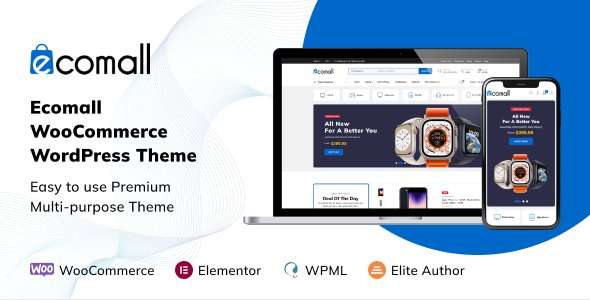
Stuck on your Ecomall WordPress theme? Let's fix it.
No endless back-and-forth. Just send us the details and we'll get it done.
No obligation · Replies within 1 hour · Quote within 1 day
Setup · Customization · Bug fixes · WooCommerce integration
About Ecomall WP Theme
Ecomall is a multi-vendor marketplace theme by skygroup, built for stores that need to run multiple sellers under one roof. It ships with WooCommerce compatibility, a clean product grid layout, and front-end vendor dashboards that reduce admin overhead. The theme targets large-catalogue stores where filtering, search speed, and product organisation matter most.
Out of the box, Ecomall includes pre-built demo content, multiple homepage layouts, and a mega menu suited to deep category trees. It works with popular plugins like Dokan and WC Vendors, making it a practical starting point for marketplace builds. That said, most serious stores will need a developer to tailor the theme beyond what the panel options allow.
Get matched with a Ecomall developer in under one day
Tell us about your Ecomall project. Small fixes, Ecomall theme customization, or a full website build, whatever you need, we've got it covered.
We'll connect you to the right Ecomall developers, define the scope, and get everything 100% clear.
You'll get one estimate, hire your preferred developer, and start collaborating.
Ecomall has enough moving parts that trial and error gets expensive quickly. An experienced Ecomall developer knows the theme’s quirks with Dokan, how Visual Composer interacts with WooCommerce templates, and where vendor permission logic breaks under certain plugin combinations.
Through Codeable, you get matched with vetted WordPress developers who have worked on marketplace builds before. You post your project, receive an estimate within 24 hours, and only proceed if the scope and price make sense. No obligation, no guesswork.
Pros
- Built-in multi-vendor support compatible with Dokan and WC Vendors plugins
- Includes front-end vendor dashboard so sellers can manage listings without wp-admin access
- Mega menu handles deep category trees without third-party plugins
- Multiple pre-built homepage demos reduce initial setup time
- WooCommerce template structure follows conventions, making targeted overrides straightforward
Cons
- Visual Composer dependency adds bloat and complicates front-end customisation
- Demo import can leave orphaned shortcodes that break pages when plugins are swapped out
- Default performance footprint is heavy; requires optimisation before going live
- Documentation gaps around vendor permission edge cases lead to trial-and-error config
- Theme update frequency has slowed, which creates compatibility risk with newer WooCommerce releases
Who is Ecomall for?
Multi-Vendor Fashion Marketplace
Ecomall’s product card layouts and mega menu handle large clothing catalogues with many size and colour variants. An Ecomall specialist can configure vendor storefronts so each seller gets a branded page while the parent store maintains consistent navigation and checkout design.
Electronics and Gadgets Store
Electronics stores need strong filtering by spec and brand. Ecomall’s layered navigation integrates with WooCommerce attributes to support this. A developer can extend the comparison feature and add structured data to product pages, which matters for visibility in competitive search categories.
Handmade and Artisan Products
Marketplaces for handmade goods often need storytelling on vendor profile pages. Ecomall’s front-end vendor dashboard lets sellers update their own bios and featured images. An Ecomall developer can extend these templates to include portfolio-style layouts without touching core theme files.
Local Business Directory with Products
Some local marketplace builds combine a vendor directory with purchasable products or services. Ecomall’s flexible homepage blocks and vendor archive pages support this hybrid model. A developer familiar with the theme can wire up location-based filtering and map integrations on top of the existing structure.
Digital Downloads Marketplace
Ecomall works with WooCommerce’s digital product delivery alongside Dokan’s commission tracking for digital downloads. An Ecomall specialist can configure file delivery rules per vendor, set up licence key delivery via third-party plugins, and lock down front-end access to purchased files correctly.

Customizing Ecomall
Ecomall ships with a Visual Composer-based page builder and a set of theme options that cover typography, colours, and layout widths. For straightforward stores, that gets you far. For anything more specific, an Ecomall expert will need to work directly with the child theme.
Common customisation work includes restructuring vendor profile pages, adjusting the checkout flow, building custom product card layouts, and connecting third-party shipping or payment plugins cleanly. The theme’s template hierarchy follows standard WooCommerce conventions, which makes targeted overrides manageable. However, Visual Composer markup can complicate front-end changes if it wasn’t accounted for from the start. A developer familiar with Ecomall will know where those friction points are before they become problems.
Recommended plugins for Ecomall
Ecomall pairs well with caching solutions, image optimisation plugins, and a CDN layer. Marketplace themes carry heavier page weights than single-vendor stores, so performance work is not optional. See our WordPress performance service for what that involves in practice.
On the SEO side, Ecomall’s category and vendor archive pages need structured data and proper canonical handling to perform well in search. Product schema, breadcrumb markup, and pagination logic all need attention. Our WordPress SEO optimisation service covers all of this for WooCommerce-based stores including Ecomall builds.
Not sure which plugins to use? This WordPress plugins directory covers the most popular options with reviews and setup guides.
Ecomall common issues
Ecomall vendor dashboard not loading after WooCommerce update
This usually happens when a WooCommerce update changes template hooks that Dokan or WC Vendors rely on through Ecomall’s overrides. Check the vendor dashboard template files in your child theme against the updated plugin versions. If the mismatch is deep, a WordPress bug fixing service can trace the conflict and update only the affected templates without disrupting the rest of the setup.
Ecomall product pages showing wrong layout or broken shortcodes
Broken shortcodes on product pages in Ecomall typically point to Visual Composer content that references a deactivated plugin or a removed element. Open the page in the backend editor to identify which element is missing. In many cases, switching to a block-based approach during a rebuild resolves this permanently. A WordPress bug fixing specialist can clean up orphaned shortcode output without data loss.
Ecomall checkout not working with specific payment gateway
Checkout issues in Ecomall often come down to a conflict between the payment gateway plugin and the theme’s custom checkout template. First, test by switching to Storefront temporarily to confirm it’s theme-specific. Then compare Ecomall’s checkout template files against the current WooCommerce version. If hooks are misaligned, the gateway’s JS won’t fire correctly. A developer can patch the template and retest against your specific gateway.
Ecomall mega menu broken on mobile after theme update
Ecomall’s mega menu uses a combination of CSS and JS that can break when the theme updates its enqueue order. On mobile, this often shows as the menu toggle doing nothing or the sub-menus overlapping content. Check the browser console for JS errors tied to the menu script. Clear any caching layer before testing. If the issue appeared after a theme update, compare the updated menu JS against your child theme overrides.
Ecomall FAQ
Ecomall is available on ThemeForest and receives periodic updates, but the release cadence has slowed compared to earlier years. Before purchasing or building on it, check the changelog on the ThemeForest listing and verify compatibility with the current WooCommerce version. For live stores, an ongoing WordPress maintenance plan helps catch compatibility issues before they affect customers.
Yes. Ecomall was designed with Dokan compatibility in mind. The front-end vendor dashboard, commission settings, and vendor storefront pages all work with Dokan’s free and pro tiers. That said, specific Dokan add-ons may require template adjustments in Ecomall to display correctly. Testing in a staging environment before enabling new Dokan modules is strongly recommended.
Technically yes, but Ecomall’s demo content and most pre-built layouts are built with Visual Composer shortcodes. Removing it means rebuilding those pages with another page builder or Gutenberg blocks. Some stores do this as part of a performance improvement project. An Ecomall developer can scope out what that migration involves for your specific setup before you commit to it.
Migrating an existing WooCommerce store to Ecomall involves moving product data, vendor accounts, order history, and media, then rebuilding page layouts within the new theme. The product and order data migration is straightforward. The layout work depends on how customised your current theme is. See our WordPress migration service for a full breakdown of what’s involved.
Ecomall developer rates through Codeable typically range based on project scope. A bug fix or single-page customisation costs less than a full marketplace build. You post your project, describe the work, and receive a fixed estimate before any work begins. There’s no obligation to proceed. Rates reflect the expertise of vetted developers rather than the lowest available bid.
Hire an Ecomall Developer for Your Marketplace
Whether you need a full Ecomall setup, vendor workflow changes, performance fixes, or a stalled build rescued, a dedicated Ecomall specialist will get it done without back-and-forth. Post your project and get a scoped estimate with no commitment required. Get a Free Estimate and describe exactly what your store needs.
You'll need a free Codeable account so developers can ask questions and send their quotes.