Stoni WordPress Theme
by WebGeniusLab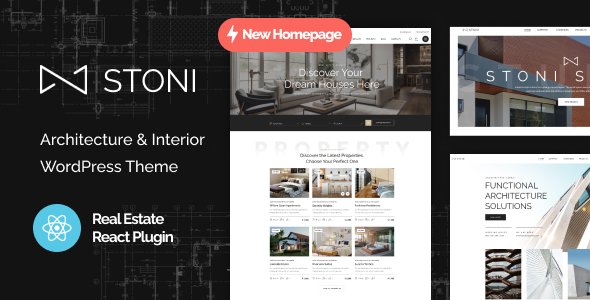
Stuck on your Stoni WordPress theme? Let's fix it.
No endless back-and-forth. Just send us the details and we'll get it done.
No obligation · Replies within 1 hour · Quote within 1 day
Setup · Customization · Bug fixes · WooCommerce integration
About Stoni WP Theme
Stoni is a WordPress theme built by WebGeniusLab, designed for stone, marble, and construction material businesses. It ships with a clean, image-forward layout that puts product photography front and center. The theme includes multiple homepage variations, WooCommerce support, and Elementor compatibility, making it a practical choice for showrooms and material suppliers who need to present their catalog without relying on heavy custom development.
WebGeniusLab has built Stoni with attention to typography and whitespace, giving it a premium feel that suits high-end stone retailers. Out of the box, you get portfolio grids, product filtering, and contact sections that cover most of what a stone or tile business needs. Setup is manageable for someone comfortable with WordPress, though getting the most from Stoni’s layout options often calls for a Stoni specialist who knows the theme inside out.
Get matched with a Stoni developer in under one day
Tell us about your Stoni project. Small fixes, Stoni theme customization, or a full website build, whatever you need, we've got it covered.
We'll connect you to the right Stoni developers, define the scope, and get everything 100% clear.
You'll get one estimate, hire your preferred developer, and start collaborating.
Finding a developer who knows Stoni specifically is not straightforward. Codeable connects you with vetted WordPress specialists who have worked with WebGeniusLab themes and similar builds. Every developer on Codeable is reviewed before being accepted, so you skip the trial-and-error of hiring from general freelance marketplaces. Whether you need a Stoni developer for a full build, a specific customization, or ongoing fixes, you get a free estimate with no obligation to proceed.
Pros
- Clean, image-forward design well suited to stone, marble, and tile product photography
- WooCommerce integration works out of the box with product grids and category pages included
- Elementor compatibility allows visual page building without custom code for most layouts
- Multiple homepage demos give different starting points depending on business type
- WebGeniusLab provides documentation and theme updates, reducing long-term maintenance risk
Cons
- Niche design focus means adapting Stoni for non-construction or non-material businesses requires significant rework
- Heavy reliance on Elementor means switching page builders later creates major rebuilding work
- Default WooCommerce product pages need customization to stand out from other Stoni-based sites
- Demo import can be slow and occasionally incomplete, requiring manual adjustments after setup
- Support is tied to ThemeForest purchase and has a time limit, making long-term help harder to get
Who is Stoni for?
Stone and Marble Showrooms
Stoni’s layout is built around large product imagery, making it a direct fit for stone and marble showrooms. Collection pages, material galleries, and inquiry forms all sit naturally within the theme’s structure. A Stoni specialist can configure WooCommerce or a portfolio setup to match how your showroom presents slabs and finishes to clients browsing online before visiting in person.
Construction Material Suppliers
Construction material suppliers carrying bulk products like granite, travertine, or engineered stone need clear catalog organization. Stoni’s filtering and category structures work well here. A Stoni developer can extend the default setup with custom product attributes, quote request forms, and trade pricing logic that standard WooCommerce doesn’t handle without additional configuration.
Tile and Flooring Retailers
Tile and flooring retailers benefit from Stoni’s grid layouts and the ability to display products by room type, material, or finish. The theme handles visual merchandising well when set up correctly. Pairing it with WooCommerce and a Stoni expert who understands product taxonomy means customers can filter by size, color, and application without needing a custom-built solution.
Interior Design Studios
Interior design studios that work with stone and natural materials can use Stoni as a portfolio and service site rather than a pure shop. The theme’s whitespace and typography give it a studio feel. A Stoni developer can strip out the ecommerce elements, build a project portfolio, and add a clean client inquiry process that fits the studio’s workflow and presentation standards.
Countertop Fabricators
Countertop fabricators need a site that shows finished work, explains materials, and captures leads from homeowners and contractors. Stoni covers the visual side well. A Stoni specialist can add a quote calculator, edge profile selector, or before-and-after project gallery that goes beyond the theme’s defaults and gives the fabricator a lead generation tool rather than just a brochure site.

Customizing Stoni
Stoni gives you customization controls through the WordPress Customizer and Elementor, covering colors, fonts, header layouts, and section visibility. For most small adjustments, the built-in options are enough. But businesses with specific branding requirements, custom product filtering, or non-standard page structures will hit the limits of the default settings fairly quickly.
A Stoni expert can go further: modifying child theme CSS, building custom Elementor templates, adjusting WooCommerce product pages to match your catalog structure, and integrating third-party plugins without breaking the layout. WebGeniusLab’s theme follows reasonable coding conventions, which means a skilled Stoni developer can work cleanly inside the theme without hacks that create problems later. Whether you need a layout tweak or a full site build on Stoni, working with a specialist saves time and avoids common pitfalls.
Recommended plugins for Stoni
Stoni works well with a focused set of plugins rather than a long list of add-ons. WooCommerce handles product listings and sales. Elementor Pro extends the page builder with additional widgets useful for showcasing stone collections. For search visibility, pairing Stoni with a proper SEO setup matters since the theme alone does not handle structured data or technical optimization. See our WordPress SEO optimisation service for that. If your image-heavy product pages are loading slowly, a performance audit is worth running. Our WordPress performance service covers image optimization, caching, and server-level improvements that make a real difference for catalog-heavy Stoni sites.
Not sure which plugins to use? This WordPress plugins directory covers the most popular options with reviews and setup guides.
Stoni common issues
Stoni theme demo content not importing correctly
Demo import failures in Stoni are usually caused by server memory limits, PHP timeout settings, or conflicts with existing plugins. The first step is checking your server’s PHP memory limit and max execution time in wp-config.php or through your host’s control panel. Deactivating non-essential plugins before importing often resolves conflicts. If the import completes but content is missing, running it a second time after clearing any partial data usually fills in the gaps. For persistent issues, our WordPress bug fixing service can diagnose and complete the import correctly.
Stoni WooCommerce product page layout broken
Broken WooCommerce layouts in Stoni typically follow a WooCommerce major version update that changes template structure. Stoni’s bundled WooCommerce templates can fall out of sync when either the theme or WooCommerce updates independently. Check the WooCommerce status page under Tools for outdated template warnings. Updating those templates through the theme’s files or a child theme resolves most layout breaks. If the structure is more complex, our WordPress bug fixing service handles WooCommerce template conflicts in detail.
Stoni header not displaying correctly on mobile
Mobile header problems in Stoni are often tied to custom CSS overriding the theme’s responsive breakpoints or a menu configuration that works on desktop but collapses incorrectly on smaller screens. Open browser dev tools, inspect the header element at mobile width, and identify which CSS rule is causing the overflow or misalignment. In most cases, a small targeted CSS fix in the child theme resolves it. If a plugin is injecting styles that conflict with Stoni’s header, deactivating plugins one at a time identifies the source quickly.
Stoni Elementor widgets showing blank sections after update
Blank Elementor sections in Stoni after an update usually mean a widget that was previously available is now deprecated or a required Elementor Pro feature is no longer active. Check whether your Elementor Pro license is valid and the plugin is fully updated. Some Stoni-specific widgets depend on the theme being active as the parent. If you are running a child theme and the parent Stoni theme was deactivated or removed, reactivating it restores widget access. Elementor’s regenerate CSS option under Tools often clears rendering issues caused by cached styles.
Stoni FAQ
Stoni includes WooCommerce support and ships with product grid layouts and category page templates that work for selling stone, tile, and material products. It handles a standard store setup well. For more advanced requirements like custom product configurators, trade pricing, or quote-based ordering, you will need a Stoni developer to extend the default WooCommerce functionality beyond what the theme provides out of the box.
Yes, Stoni is compatible with Elementor and is built to be edited using it. Most of the homepage sections and inner page templates are Elementor-based. Elementor Pro extends this further with additional widgets, but the free version of Elementor covers core editing needs. Changes to Stoni’s layout and content are easiest to manage through Elementor rather than directly editing theme files.
After purchasing and activating Stoni through ThemeForest, install the required plugins listed during setup, then navigate to Appearance and look for the demo importer option WebGeniusLab includes. Choose a demo, click import, and wait for the process to complete. Server memory limits or plugin conflicts can interrupt the import. If it fails, increase PHP memory limits or contact a Stoni specialist to complete the setup manually.
Stoni’s design is tailored specifically to stone, construction, and material businesses. Using it for an unrelated industry is possible but requires stripping out or reworking most of the visual styling and layout defaults. The effort involved is significant enough that for unrelated niches, starting with a more general-purpose theme is usually a better approach than trying to adapt Stoni’s niche-specific structure.
Stoni developer rates vary based on the scope of work. A small customization or bug fix is a different cost to a full site build. Through Codeable, you post your project for free, receive estimates from vetted Stoni specialists, and only pay if you decide to proceed. There is no obligation and no upfront cost to get an estimate, which makes it a low-risk way to understand what your project will cost before committing.
Hire a Stoni Expert Developer
If you need a Stoni developer who can handle customization, WooCommerce integration, or layout work without guesswork, the right hire makes a measurable difference. Through Codeable, you can post your project, receive a free estimate within 24 hours, and only proceed if it fits. No contracts, no risk. Get a free estimate and have a vetted Stoni specialist review your project today.
You'll need a free Codeable account so developers can ask questions and send their quotes.