Kastell WordPress Theme
by Mikado-Themes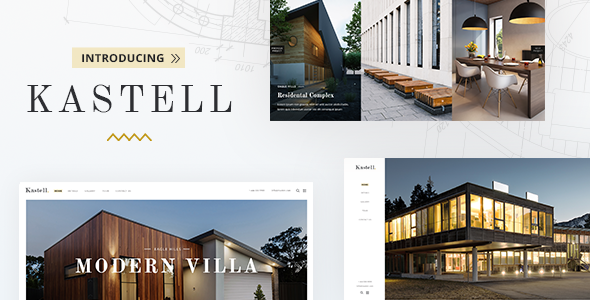
Stuck on your Kastell WordPress theme? Let's fix it.
No endless back-and-forth. Just send us the details and we'll get it done.
No obligation · Replies within 1 hour · Quote within 1 day
Setup · Customization · Bug fixes · WooCommerce integration
About Kastell WP Theme
Kastell is a premium WordPress theme by Mikado-Themes, built for architecture, interior design, and creative portfolio sites. It ships with a clean grid-based layout system, smooth page transitions, and a strong focus on visual presentation. The theme is powered by the Mikado core plugin and integrates with Elementor and WPBakery for page building.
Kastell includes over 20 demo templates covering studios, agencies, and personal portfolios. Typography controls are detailed, and the color system is flexible enough to support both minimal white-space builds and darker editorial aesthetics. WooCommerce support is included for studios that sell prints or products. If you want a theme that puts imagery first without heavy configuration, Kastell is a solid starting point.
Get matched with a Kastell developer in under one day
Tell us about your Kastell project. Small fixes, Kastell theme customization, or a full website build, whatever you need, we've got it covered.
We'll connect you to the right Kastell developers, define the scope, and get everything 100% clear.
You'll get one estimate, hire your preferred developer, and start collaborating.
Kastell has real depth, but that depth creates real friction if you’re not familiar with how Mikado themes are wired together. A developer who has worked inside Kastell before won’t waste time reverse-engineering the options panel or debugging shortcode stacks. Through Codeable, you get matched with vetted WordPress specialists who know premium themes like Kastell well. You post your project, get a clear estimate, and only move forward if it makes sense. No guesswork, no risk.
Pros
- Strong visual hierarchy built for image-heavy portfolio and architecture sites
- 20+ demo templates covering studios, agencies, and personal portfolio use cases
- Detailed typography controls with support for Google Fonts and custom font uploads
- WooCommerce integration included for selling prints, products, or digital files
- Smooth page transitions and scroll animations that work without extra plugins
Cons
- Mikado Options panel is complex and poorly documented for non-technical users
- Heavy reliance on the proprietary Mikado core plugin creates lock-in
- Page builder shortcodes make migrating content to other themes painful
- Default scripts and assets add noticeable page weight that needs active optimization
- Support from Mikado-Themes can be slow for complex or code-level issues
Who is Kastell for?
Architecture Studios
Kastell’s full-width grid layouts and project detail pages are well matched to architecture portfolios. Large hero images, clean project filtering, and structured case study pages give firms a professional presentation without custom development from scratch. A Kastell specialist can configure category-based portfolio views and add inquiry forms tied to specific projects.
Interior Design Practices
Interior designers need a site that sells a visual point of view before the first meeting. Kastell handles before/after galleries, room-by-room project breakdowns, and service pages without looking cluttered. The theme’s whitespace defaults suit high-end residential and commercial practices. Custom layout adjustments are straightforward for an experienced Kastell developer.
Creative Agencies
Agencies using Kastell benefit from the case study structure and flexible homepage layouts. The theme supports team pages, service listings, and client work grids. With some customization from a Kastell expert, you can push it into a full agency site with custom animations, branded color systems, and integrated contact flows.
Photographers and Visual Artists
Photographers get full-screen gallery support, lazy-loaded image grids, and clean single-image detail pages. Kastell handles both editorial and commercial photography portfolios. WooCommerce integration means print sales can live on the same site. Performance optimization matters here given the image volume.
Design Product Shops
Studios that sell design objects, art prints, or homeware can use Kastell’s WooCommerce support to run a shop alongside a portfolio. Product pages inherit the theme’s clean aesthetic, and category pages can be styled to match the rest of the site. A Kastell developer can align the shop templates with custom brand requirements.

Customizing Kastell
Kastell gives you a lot out of the box, but getting it to match a specific brand identity usually takes real theme knowledge. The Mikado Options panel is dense. Settings for headers, footers, scroll behavior, and portfolio layouts are spread across multiple tabs, and changes don’t always behave predictably when demo content isn’t used as a base.
A Kastell expert can rebuild page templates cleanly, wire up custom post types, adjust the shortcode-heavy layouts without breaking them, and extend the theme without touching core files. Custom header styles, sticky navigation tweaks, and hover animations are common requests that need someone who knows how Mikado themes are structured. Hiring a Kastell specialist saves hours of trial and error inside an unfamiliar options framework.
Recommended plugins for Kastell
Kastell works well with plugins that handle what the theme doesn’t. For contact and lead capture, WPForms or Gravity Forms slot in without conflict. WPML handles multilingual setups cleanly. For portfolio filtering, the built-in Ajax works, but some studios add FacetWP for more control.
Performance is worth attention given Kastell’s reliance on multiple scripts and the Mikado core plugin. A proper WordPress performance audit can cut load times significantly. If you’re building a site meant to attract clients through search, pairing Kastell with a structured WordPress SEO strategy will do more than the theme alone ever could.
Not sure which plugins to use? This WordPress plugins directory covers the most popular options with reviews and setup guides.
Kastell common issues
Kastell theme header not showing correctly after update
Header display issues after a Kastell update usually trace back to a conflict between the Mikado core plugin version and the theme version. First, make sure both are updated together. If the header was built using a saved header layout in the Mikado panel, check whether that layout got reset. Clearing any caching plugin after updates is also required. If the problem persists, a WordPress bug fixing specialist can identify whether a child theme, custom CSS, or plugin conflict is the actual cause.
Kastell portfolio filter not working on mobile
Portfolio filter failures on mobile in Kastell are usually a JavaScript conflict. The Isotope-based filtering the theme uses can break when other plugins enqueue conflicting jQuery versions. Check the browser console for JS errors first. Disabling plugins one at a time in a staging environment will isolate the conflict. If custom CSS is hiding the filter controls on smaller breakpoints, that needs a direct fix in the Mikado responsive settings or a child theme stylesheet. A WordPress bug fixing service can trace this quickly.
Kastell page transitions causing blank screen or white flash
White flashes or blank screens during Kastell’s page transitions are typically caused by a script loading order issue or a conflict with a caching plugin. Caching plugins that minify or combine JavaScript often break the transition logic. Test with caching disabled first. If the issue only appears on certain page templates, check whether those pages have custom scripts or third-party embeds that interrupt the transition sequence. Adjusting script loading order in the Mikado settings usually resolves it.
Kastell theme slow to load despite no heavy plugins
Kastell loads the Mikado core plugin, multiple CSS files, and transition scripts by default. Even on a clean install, this adds weight. The main culprits are unminified scripts, render-blocking CSS, and unoptimized images in demo content. Running a proper audit against Google PageSpeed Insights will show the exact bottlenecks. Combining this with server-side caching and a CDN can cut load time substantially. A full performance review is the most reliable path forward.
Kastell FAQ
Kastell supports Elementor alongside WPBakery, but the theme’s demo templates are primarily built using WPBakery shortcodes. You can use Elementor for new pages, but mixing the two builders on the same site can cause inconsistencies. A Kastell developer can advise on the cleanest approach for your specific build, especially if you want to move away from WPBakery over time.
No. The Mikado core plugin handles critical theme functionality including shortcodes, portfolio post types, custom widgets, and several layout features. Deactivating it will break large parts of the site. This is a common concern for long-term site ownership. If reducing plugin dependency matters to your project, discuss it with a Kastell specialist before building.
Kastell includes a one-click demo importer through the Mikado Options panel. Go to Mikado Options, find the Import section, choose your preferred demo, and run the import. Make sure the Mikado core plugin is active before importing. The process creates pages, posts, menus, and widgets automatically. Always import to a clean install to avoid content conflicts.
Yes, Kastell includes WooCommerce support with styled shop, product, cart, and checkout pages. The product page templates match the theme’s visual style reasonably well. Some customization is needed for shops with specific layout requirements, but the out-of-the-box integration is functional for straightforward product and print sales use cases.
Kastell’s code structure is reasonably clean, but the theme’s default script load and page weight can hurt Core Web Vitals scores if left unconfigured. It does not include built-in schema markup beyond basic page structure. Pairing Kastell with a dedicated SEO plugin and a performance-tuned setup will get far better results than relying on the theme alone.
Hire a Kastell Developer for Your WordPress Project
Whether you need a full Kastell build from a demo, custom portfolio layouts, performance fixes, or ongoing changes to an existing site, a dedicated Kastell developer will get it done faster and cleaner than DIY. Work is scoped clearly before anything starts. Get a Free Estimate and see exactly what your project will take before committing to anything.
You'll need a free Codeable account so developers can ask questions and send their quotes.