Brünn WordPress Theme
by Select-Themes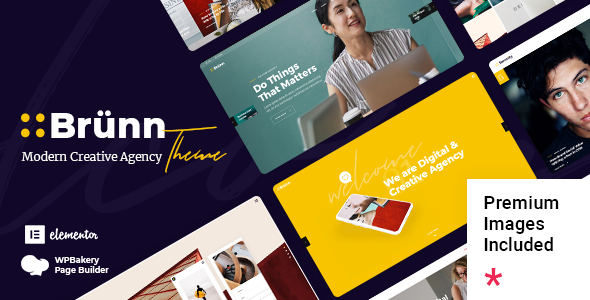
Stuck on your Brünn WordPress theme? Let's fix it.
No endless back-and-forth. Just send us the details and we'll get it done.
No obligation · Replies within 1 hour · Quote within 1 day
Setup · Customization · Bug fixes · WooCommerce integration
About Brünn WP Theme
Brünn is a premium WordPress theme by Select-Themes, built for portfolio and creative agency sites. It ships with a clean grid-based layout, full-screen sliders, and a modular page structure that keeps the focus on visual content. The theme supports Elementor and includes custom post types for projects, making it a practical choice for designers, photographers, and studios who need a polished presentation without starting from scratch.
Select-Themes has a reputation for well-coded, documentation-heavy releases. Brünn follows that pattern, with organised template files and a logical options panel. It works on WordPress 6.x and is compatible with WooCommerce if you need to sell services or digital products alongside your portfolio work.
Get matched with a Brünn developer in under one day
Tell us about your Brünn project. Small fixes, Brünn theme customization, or a full website build, whatever you need, we've got it covered.
We'll connect you to the right Brünn developers, define the scope, and get everything 100% clear.
You'll get one estimate, hire your preferred developer, and start collaborating.
Finding a developer who knows Brünn specifically makes a real difference. Generic WordPress freelancers often waste time reverse-engineering theme structure. Through Codeable, you get matched with vetted WordPress specialists who have hands-on experience with premium themes like Brünn. Projects are scoped properly, estimates are free, and there’s no obligation to proceed. If you need a Brünn developer who won’t guess their way through your site, that’s the right place to start.
Pros
- Clean, well-structured template files that are straightforward to customise
- Built-in portfolio custom post type with filterable grid layouts
- Full Elementor compatibility for visual page building
- Select-Themes provides detailed documentation and regular WordPress core updates
- WooCommerce ready without requiring a separate child theme setup
Cons
- Heavy reliance on full-screen images means performance tuning is essential from day one
- The options panel has a learning curve; non-technical users often need help getting started
- Limited built-in blog styling, so content-heavy sites need extra template work
- Some advanced layout options only work correctly when Elementor is active, creating a page builder dependency
- Portfolio filtering uses jQuery-based scripts that may conflict with aggressive caching configurations
Who is Brünn for?
Freelance Photographer Portfolio
Brünn’s full-screen image support and project grid make it a natural fit for photographers. A Brünn specialist can configure custom gallery templates, set up category filtering by shoot type, and optimise image delivery so large files don’t kill page speed. The result is a portfolio that looks good and loads fast.
Creative Agency Website
Agencies need a site that shows client work clearly and converts visitors into enquiries. Brünn handles the portfolio side well. A Brünn developer can wire up a custom contact flow, add case study templates, and integrate CRM tools without fighting the theme’s layout logic.
Graphic Design Studio
Graphic designers often have varied output, branding, print, digital, and motion. Brünn’s filterable grid lets you separate work by category. A Brünn expert can extend the custom post type fields to include project details, client names, and deliverable lists without touching core theme files.
Architecture Firm
Architecture firms need large imagery and project-based navigation. Brünn’s layout supports this well. A Brünn specialist can build out project archive pages with custom taxonomy filtering, add map integrations for project locations, and keep the visual language consistent with the firm’s brand.
Digital Product Shop with Portfolio
Brünn’s WooCommerce compatibility makes it possible to run a shop alongside a portfolio. A Brünn developer can integrate product pages that match the theme’s design language, keeping the commercial and creative sides of the site visually consistent and technically sound.

Customizing Brünn
Out of the box, Brünn gives you control over typography, colour schemes, header layouts, and portfolio grid styles through the WordPress Customizer. That covers most standard use cases. But if you need something specific, like a custom project archive, a bespoke contact flow, or a child theme built to match a brand guide, you need a Brünn expert who knows the theme’s structure.
Select-Themes uses a combination of custom hooks and template parts, which makes targeted modifications straightforward for a developer familiar with the codebase. A Brünn specialist can extend the theme without breaking update compatibility, keeping your site maintainable long-term. Custom CSS alone won’t cut it for deeper layout changes or new functionality.
Recommended plugins for Brünn
Brünn pairs well with performance and SEO plugins, but those integrations need to be configured properly to deliver results. Lazy loading, image optimisation, and caching all require attention given the theme’s heavy use of full-screen media. A poorly configured setup will hurt load times noticeably.
For speed improvements, see our WordPress performance service. If your Brünn site needs better search visibility, structured data, and on-page optimisation, our WordPress SEO service covers that end-to-end. Both are worth addressing early rather than after launch.
Not sure which plugins to use? This WordPress plugins directory covers the most popular options with reviews and setup guides.
Brünn common issues
Brünn portfolio grid not displaying correctly after WordPress update
Grid display issues after a WordPress update usually point to a JavaScript conflict or a deprecated function in the theme’s rendering logic. Start by deactivating plugins one at a time to isolate the conflict. If the grid uses isotope or masonry scripts, check the browser console for JS errors. For persistent issues, a WordPress bug fixing specialist can trace the root cause and patch it without disrupting your existing content.
Brünn theme full-screen slider not loading on mobile
Full-screen slider failures on mobile are often caused by viewport height conflicts or CSS that doesn’t account for mobile browser chrome. Check the slider’s height settings in the Customizer and test with mobile-specific CSS overrides. If the slider plugin itself has a known mobile bug in its current version, rolling back or switching the slider component may be the fastest fix. A WordPress bug fixing service can handle this efficiently.
Brünn Elementor layout broken after plugin update
Elementor layout breaks after plugin updates are usually tied to deprecated widget APIs or CSS variable conflicts introduced in newer Elementor versions. Regenerate the CSS from Elementor’s tools panel first. If that doesn’t resolve it, compare the affected templates against a working backup. Rebuilding broken sections in the updated Elementor environment is often faster than trying to patch the old markup directly.
Brünn theme custom fonts not loading in WordPress Customizer
Custom font loading failures in the Customizer are typically caused by a Google Fonts API change, a caching layer serving stale CSS, or a content security policy blocking external font requests. Clear all cache layers first, including server-side, CDN, and browser. If you’re self-hosting fonts, verify the font file paths in the theme’s enqueue functions match the actual file locations on your server.
Brünn FAQ
Select-Themes has maintained Brünn with updates that follow WordPress core releases. Check the theme’s changelog on ThemeForest for the most recent update date. If support activity has slowed, a Brünn specialist can audit your installation and handle compatibility updates independently, keeping the theme running on current WordPress versions without relying on the original developer.
Yes, Brünn functions without Elementor for basic pages. Core templates and the portfolio system work independently. However, several layout options and pre-built page structures rely on Elementor widgets to render correctly. If you want to remove the Elementor dependency entirely, a Brünn developer can rebuild those sections using the block editor or custom templates.
Create a new folder in your themes directory, add a style.css with the correct Template header pointing to Brünn, and enqueue the parent theme’s stylesheet in a functions.php file. Select-Themes documents this process in the theme’s documentation. If you’re unfamiliar with child theme setup, a Brünn expert can do this quickly and ensure your customisations survive future theme updates.
Brünn uses clean semantic HTML, which gives it a reasonable SEO baseline. It doesn’t include schema markup or advanced meta handling by default, so you’ll want an SEO plugin like Yoast or Rank Math alongside it. Page speed is the bigger concern given the theme’s image-heavy design. Proper optimisation makes a measurable difference to both rankings and user experience.
Cost depends on the scope. A single bug fix or small customisation typically runs between $100 and $300. A full Brünn build with custom templates and integrations will cost more. Through Codeable, you get a clear estimate before any work begins, so there are no surprises. Rates reflect vetted, experienced developers rather than budget marketplace pricing.
Hire a Brünn Expert Developer
Whether you need a Brünn developer for a one-off fix, a full build, or ongoing customisation work, FoxyConcept connects you with the right person fast. Describe your project and get a free estimate within 24 hours, no commitment required. Get a Free Estimate and see exactly what your Brünn project will cost before you decide anything.
You'll need a free Codeable account so developers can ask questions and send their quotes.