BeautySpot WordPress Theme
by LSVRthemes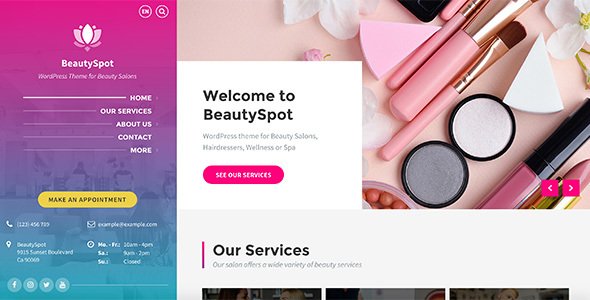
Stuck on your BeautySpot WordPress theme? Let's fix it.
No endless back-and-forth. Just send us the details and we'll get it done.
No obligation · Replies within 1 hour · Quote within 1 day
Setup · Customization · Bug fixes · WooCommerce integration
About BeautySpot WP Theme
BeautySpot is a WordPress theme by LSVRthemes built specifically for beauty salons, spas, barbers, and wellness studios. It ships with a clean layout, appointment booking integration, and service-focused sections designed to convert visitors into clients.
The theme includes a drag-and-drop page builder, pre-built demo content, and WooCommerce support for selling products alongside services. It’s responsive out of the box and designed with beauty industry workflows in mind. Gallery sections, team member profiles, pricing tables, and testimonial blocks all come included. For small to mid-sized beauty businesses that want a professional site without starting from scratch, BeautySpot covers most of the essentials before any custom development work begins.
Get matched with a BeautySpot developer in under one day
Tell us about your BeautySpot project. Small fixes, BeautySpot theme customization, or a full website build, whatever you need, we've got it covered.
We'll connect you to the right BeautySpot developers, define the scope, and get everything 100% clear.
You'll get one estimate, hire your preferred developer, and start collaborating.
LSVRthemes builds clean, focused products, but theme documentation only gets you so far. When you need a real build, a rebrand, or an integration that the theme doesn’t support natively, you need a developer who knows the codebase. Our BeautySpot specialists work through Codeable, a vetted WordPress developer network trusted by thousands of businesses worldwide. Every developer is screened, rated, and accountable. You get a free estimate before committing to anything.
Pros
- Purpose-built for beauty and wellness businesses with relevant pre-built sections
- Includes appointment booking compatibility with popular scheduling plugins
- WooCommerce ready for salons that sell retail products alongside services
- Pre-built demo content makes initial setup significantly faster
- Responsive design with mobile-first layouts suited to local search traffic
Cons
- Default demo styling is generic and requires meaningful customisation to stand out
- Page builder dependency can create bloated markup if not managed carefully
- Limited built-in multi-location support for businesses with more than one branch
- Some advanced booking flows require third-party plugins that add cost and complexity
- Theme updates can occasionally conflict with heavy customisations made outside a child theme
Who is BeautySpot for?
Hair Salons
BeautySpot’s service listing and pricing table sections map naturally to how hair salons present their menus. A BeautySpot developer can configure team profile pages for each stylist, connect an online booking plugin, and set up gallery sections to showcase colour and cut work that attracts new clients through image search.
Beauty Spas and Wellness Centres
Spa and wellness businesses need a calm, visual presentation and a frictionless booking experience. BeautySpot’s layout supports both. A BeautySpot specialist can extend it with treatment menu pages, gift voucher functionality via WooCommerce, and membership options for clients who book regular sessions.
Nail Studios
Nail studios rely heavily on visual portfolios. BeautySpot’s gallery blocks handle this well with the right configuration. A BeautySpot expert can set up filterable galleries by nail type or finish, integrate an appointment system, and build a product shop for nail care retail items sold in-studio.
Barbershops
Barbershops need a site that feels sharp and loads fast on mobile, since most walk-in clients search on their phones. BeautySpot works well here with the right typography and colour choices. A BeautySpot developer can wire up a simple booking flow, add barber profile pages, and keep the layout minimal and on-brand.
Makeup Artists and Beauty Freelancers
Freelance makeup artists and solo beauty professionals need a site that sells their work visually and captures enquiries efficiently. BeautySpot gives them a professional base. A BeautySpot specialist can configure portfolio sections, add a contact or booking form, and set up WooCommerce for digital or physical product sales.

Customizing BeautySpot
BeautySpot gives you a solid starting point, but most beauty businesses need adjustments before the site actually reflects their brand. A BeautySpot expert can rework colour palettes, typography, and layout spacing to match your existing brand identity rather than the default demo look.
Beyond visuals, customisation typically covers booking flow adjustments, custom service pages, staff profile layouts, and WooCommerce product display tweaks. If you want to add features the theme doesn’t include out of the box, such as multi-location support, membership areas, or custom intake forms, a BeautySpot specialist can build those in cleanly without breaking the existing structure. Proper child theme setup ensures your changes survive future theme updates.
Recommended plugins for BeautySpot
BeautySpot pairs well with several plugins that extend its core functionality. Booking plugins like Amelia or Bookly integrate cleanly for appointment scheduling. For retail-focused salons, WooCommerce subscription plugins handle product bundles and repeat orders.
Performance matters for beauty sites with heavy image galleries. A BeautySpot developer can configure caching, image optimisation, and a CDN through our WordPress performance service to keep load times fast. If you want your salon appearing in local search results, structured data and on-page optimisation handled through our WordPress SEO service will give you a real edge over competitors using default settings.
Not sure which plugins to use? This WordPress plugins directory covers the most popular options with reviews and setup guides.
BeautySpot common issues
BeautySpot booking plugin not working after theme update
Booking plugin conflicts after a BeautySpot update usually come down to a JavaScript clash or a changed hook in the theme. Start by deactivating other plugins one at a time to isolate the conflict. Check the browser console for JS errors. If the issue appeared immediately after updating, rolling back the theme temporarily via FTP is a quick way to confirm the cause. For persistent conflicts, our WordPress bug fixing service can diagnose and resolve the issue without disrupting your live bookings.
BeautySpot homepage not displaying correctly on mobile
Mobile layout problems in BeautySpot are often caused by custom CSS that wasn’t written with responsive breakpoints in mind, or by a page builder element with a fixed pixel width. Open Chrome DevTools, switch to mobile view, and inspect which element is overflowing. The fix is usually a max-width or flex adjustment in the child theme stylesheet. If the issue is more complex or affecting multiple pages, our WordPress bug fixing service can sort it quickly.
BeautySpot WooCommerce shop page layout broken
A broken WooCommerce shop layout in BeautySpot is commonly triggered by a WooCommerce update that changed its template structure. BeautySpot, like most themes, includes overridden WooCommerce templates in a woocommerce folder. When WooCommerce updates, those overrides can go out of sync. Check the WooCommerce status screen under Tools for outdated template warnings. A BeautySpot developer can update those template files to match the current WooCommerce version without losing your styling.
BeautySpot page builder content disappeared after update
If BeautySpot page builder content has disappeared, the most likely cause is a plugin deactivation or a builder version conflict that stripped shortcodes or block data. Check your revision history first as this can restore the previous version quickly. If content is genuinely lost, check your database via phpMyAdmin for the post content. Going forward, a BeautySpot specialist can migrate your layouts to a more stable builder or set up proper backups through a WordPress maintenance plan.
BeautySpot FAQ
LSVRthemes maintains BeautySpot and releases updates to keep it compatible with current WordPress versions. That said, compatibility depends on keeping both the theme and your plugins updated in sync. If you’ve fallen several versions behind, a BeautySpot specialist can run a staged update process to bring everything current without breaking your live site.
BeautySpot ships with its own page builder, but it can be used alongside Gutenberg with some configuration. Full Elementor compatibility depends on the specific version and any customisations in place. A BeautySpot developer can assess your setup and migrate page layouts to Elementor or Gutenberg if that’s the direction you want to go.
BeautySpot doesn’t include native multi-location management. You can manually build separate location pages, but anything more structured, like location-based booking or filtered staff directories, requires custom development. A BeautySpot specialist can build that functionality cleanly using a combination of custom post types and compatible plugins.
BeautySpot does not include a built-in booking engine. It’s designed to work alongside dedicated booking plugins like Amelia, Bookly, or Simply Schedule Appointments. A BeautySpot expert can handle the full integration, including styling the booking widget to match your theme and configuring services, staff, and availability settings.
BeautySpot developer rates vary based on the scope of work. A small fix or configuration task might take a couple of hours. A full site build with custom integrations could run to several days. Through Codeable, you post your project, receive a transparent estimate, and decide whether to proceed. There’s no cost to get an estimate.
Hire a BeautySpot Developer
Whether you need a full BeautySpot setup, a custom booking integration, or fixes to an existing build, we can match you with a specialist who has done it before. Work is scoped clearly, priced fairly, and delivered by a developer who knows the theme inside out.
Get a Free Estimate with no obligation. Describe your project and we’ll come back to you within 24 hours.
You'll need a free Codeable account so developers can ask questions and send their quotes.