Mercury WordPress Theme
by ThemeGoods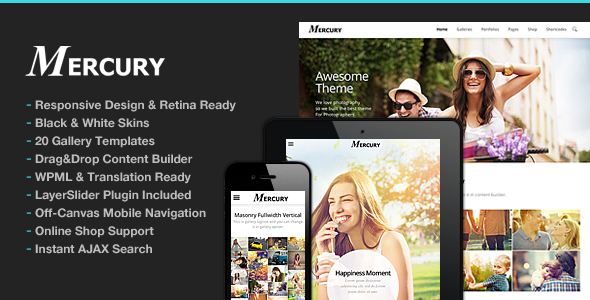
Stuck on your Mercury WordPress theme? Let's fix it.
No endless back-and-forth. Just send us the details and we'll get it done.
No obligation · Replies within 1 hour · Quote within 1 day
Setup · Customization · Bug fixes · WooCommerce integration
About Mercury WP Theme
Mercury is a multi-purpose WordPress theme built by ThemeGoods. It targets creative agencies, portfolios, and businesses that need flexible layouts without heavy page builder lock-in. The theme ships with a visual composer, pre-built demo templates, and a header builder that gives you genuine control over site structure.
Where Mercury stands out is in its typography controls and smooth transition effects. These make it popular with studios and freelancers who want a polished presentation without hiring a designer for every change. The theme is actively maintained, WooCommerce compatible, and supports WPML for multilingual setups. It is sold on ThemeForest and has a solid base of active installations with generally positive ratings for documentation quality and update frequency.
Get matched with a Mercury developer in under one day
Tell us about your Mercury project. Small fixes, Mercury theme customization, or a full website build, whatever you need, we've got it covered.
We'll connect you to the right Mercury developers, define the scope, and get everything 100% clear.
You'll get one estimate, hire your preferred developer, and start collaborating.
Mercury has enough moving parts that small configuration mistakes compound quickly. A misconfigured header builder, a child theme set up incorrectly, or a plugin conflict can take hours to untangle if you are not familiar with how the theme handles its hooks and filters. Codeable connects you with vetted WordPress developers who have hands-on experience with ThemeGoods themes. You get a fixed estimate before any work starts, no hourly surprises, and a developer who knows where Mercury tends to cause problems before they become your problem.
Pros
- Flexible header builder with multiple layout presets that work without custom code
- Clean typography system with Google Fonts integration and per-element font controls
- WooCommerce compatible with styled product pages out of the box
- One-click demo import with a good range of starting templates for agencies and portfolios
- WPML certified and translation-ready for multilingual WordPress sites
Cons
- Bundles Visual Composer which adds licensing complexity and can conflict with newer Gutenberg workflows
- Page load times increase noticeably when multiple sliders and portfolio sections are stacked on a single page
- Theme options panel has a learning curve; some settings only take effect after clearing cache
- Support from ThemeGoods is limited to the ThemeForest comments system, which can be slow for urgent issues
- Child theme is not included by default, so updates can overwrite direct template edits if not set up properly
Who is Mercury for?
Creative Agency Website
Mercury suits agency sites well. The header builder, animated section transitions, and team member layouts give agencies the visual weight they need without a full custom build. A Mercury specialist can configure the portfolio grid, set up case study templates, and wire up lead capture forms to match your sales workflow.
Freelance Portfolio
Freelancers use Mercury to present work cleanly. The portfolio post type handles project galleries, client details, and filterable categories. A Mercury developer can extend this with custom fields, add a testimonials section, and configure the contact page so it feeds directly into your email or CRM without third-party form plugin conflicts.
WooCommerce Design Store
Mercury’s WooCommerce integration covers product pages, cart, and checkout styling consistently with the rest of the theme. For design product sellers, a Mercury expert can customize product gallery layouts, add size guides or downloadable file sections, and optimize checkout flow to reduce drop-off without touching the core WooCommerce files directly.
Photography Studio Site
Photography studios benefit from Mercury’s full-width layout options and smooth image transitions. The theme handles large image files reasonably well when performance is tuned correctly. A Mercury specialist can configure lazy loading, set up client gallery password protection, and build a booking inquiry form that fits the existing design language.
Corporate Business Website
Corporate sites need reliable navigation, clear service sections, and contact options that work across devices. Mercury covers all of this with its mega menu support and flexible row builder. A Mercury developer can build out service pages, configure location-specific landing pages, and integrate a live chat or CRM plugin cleanly within the theme structure.

Customizing Mercury
Mercury offers a lot of customization surface through its theme options panel and the bundled Visual Composer. You can adjust headers, footers, color schemes, and font pairings without touching code. The demo importer makes it straightforward to start from a close match and work outward from there.
That said, deeper changes, such as custom post type layouts, WooCommerce template overrides, or integrating third-party plugins cleanly, often require PHP and CSS knowledge. A Mercury expert can handle these without breaking the existing structure or creating update conflicts. If you need custom shortcodes, child theme setup, or layout modifications that go beyond the options panel, working with a Mercury specialist saves significant time and avoids the trial-and-error that comes with theme-level edits.
Recommended plugins for Mercury
Mercury works with most standard WordPress plugins, but a few integrations are worth planning carefully. WooCommerce, WPML, and contact form plugins generally connect without issues. Performance-wise, Mercury loads several scripts and stylesheets that can slow page speed if left unoptimized. A proper WordPress performance setup makes a measurable difference, especially on image-heavy portfolio or shop pages.
For search visibility, the theme is SEO-friendly in structure but does not replace a dedicated WordPress SEO strategy. Pairing Mercury with Yoast or Rank Math and tuning schema, metadata, and site architecture will get you much further than relying on the theme alone.
Not sure which plugins to use? This WordPress plugins directory covers the most popular options with reviews and setup guides.
Mercury common issues
Mercury theme Visual Composer not loading after update
This usually happens when the bundled Visual Composer version falls out of sync with the installed WordPress version or conflicts with a separately installed Elementor or WPBakery instance. Start by deactivating all plugins except Visual Composer and checking the browser console for JavaScript errors. If the issue persists, the bundled VC may need a manual update by replacing the plugin folder via FTP. If you are not comfortable doing this, a WordPress bug fixing service can resolve the conflict cleanly without data loss.
Mercury WordPress theme slow loading on mobile
Mercury loads multiple CSS files, JavaScript libraries, and slider scripts by default, many of which are not needed on every page. The fix involves minifying and combining assets, deferring non-critical scripts, and enabling proper image lazy loading. Check that your caching plugin is configured to exclude the Visual Composer editor. A WordPress bug fixing specialist can audit the exact requests slowing your site and resolve them without breaking Mercury’s front-end animations.
Mercury theme header layout broken after WordPress update
WordPress core updates can shift how certain hooks fire, which affects Mercury’s header builder output. The most common symptom is a collapsed or unstyled navigation bar. First, clear all caches including server-side and CDN. Then check whether a child theme is in use. If customizations were made directly to the parent theme’s header.php, those changes may have been overwritten. Rebuilding the header in the theme options panel usually restores it without a full reinstall.
Mercury portfolio page not displaying correctly
Portfolio display issues are most often caused by incorrect permalink settings or a missing flush of rewrite rules. Go to Settings, Permalinks, and click Save Changes without changing anything. This forces WordPress to rebuild rewrite rules. If the portfolio still does not display, check whether the portfolio post type is set to show on the assigned page template. Plugin conflicts with SEO tools that alter post type registration can also cause this and need to be isolated individually.
Mercury FAQ
ThemeGoods has released updates to keep Mercury functional on current WordPress versions, but compatibility can vary depending on which version of the theme you are running. Always test updates on a staging site first. If you are running an older Mercury version, a developer can audit compatibility before you apply a major WordPress core update.
Mercury is built around Visual Composer and its own shortcodes, so swapping to Elementor is not a like-for-like switch. You can install Elementor and use it on specific pages, but the two builders do not share layouts. A Mercury specialist can set up a hybrid approach or migrate your content to Elementor templates if you want to move away from Visual Composer entirely.
Create a new folder in wp-content/themes named mercury-child. Add a style.css file with the correct template header pointing to mercury as the parent. Then add a functions.php file that enqueues the parent theme stylesheet. Activate the child theme from the WordPress dashboard. Any template overrides you add to the child theme folder will take priority over the parent without being lost on updates.
Yes. Mercury includes WooCommerce support and styles the core shop, product, cart, and checkout pages to match the theme design. More advanced WooCommerce customization, such as custom product layouts or checkout field modifications, requires template overrides in a child theme. A Mercury developer can handle this without conflicts.
Cost depends on the scope of work. A single layout fix or bug resolution typically runs between $50 and $150. Full site setup or significant customization work ranges higher depending on complexity. The best way to get an accurate number is to get a free estimate by describing your project. There is no obligation to proceed after you receive the quote.
Hire a Mercury WordPress Developer
Whether you need a Mercury theme set up from scratch, a layout customized beyond the options panel, or a specific bug tracked down and fixed, a dedicated Mercury developer gets it done without the back-and-forth of figuring things out on a live site. Get a Free Estimate and describe what you need. You will hear back within 24 hours with a clear scope and price, no obligation to proceed.
You'll need a free Codeable account so developers can ask questions and send their quotes.