Quasar WordPress Theme
by XanderRock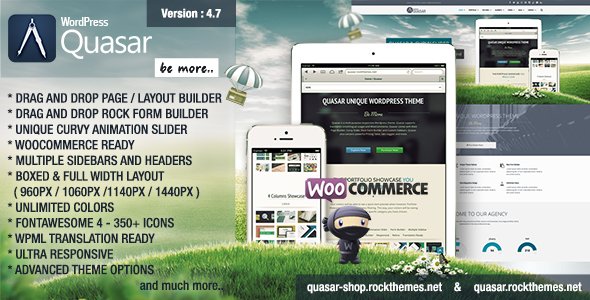
Stuck on your Quasar WordPress theme? Let's fix it.
No endless back-and-forth. Just send us the details and we'll get it done.
No obligation · Replies within 1 hour · Quote within 1 day
Setup · Customization · Bug fixes · WooCommerce integration
About Quasar WP Theme
Quasar is a WordPress theme by XanderRock built for creative agencies, portfolios, and studios that need strong visual impact without sacrificing performance. It ships with a clean grid-based layout, smooth scroll transitions, and full-screen project showcases that let the work speak for itself.
The theme is built on a solid foundation with customizer support, widget areas, and translation-ready files. It works well with the major page builders and integrates cleanly with WooCommerce if you need a shop layer. Quasar is a focused theme with a specific audience in mind, and it does that job well. If you need something beyond the defaults, a Quasar developer can extend it without fighting the codebase.
Get matched with a Quasar developer in under one day
Tell us about your Quasar project. Small fixes, Quasar theme customization, or a full website build, whatever you need, we've got it covered.
We'll connect you to the right Quasar developers, define the scope, and get everything 100% clear.
You'll get one estimate, hire your preferred developer, and start collaborating.
Most Quasar issues come down to customizations that drifted from the theme’s intended structure, or plugin conflicts that only surface in specific configurations. FoxyConcept works with vetted Quasar specialists through Codeable, a platform where only the top tier of WordPress developers are accepted. You get a free estimate before any work starts, and you only pay if you decide to move forward. No risk, no pressure.
Pros
- Full-screen portfolio layouts with smooth scroll transitions built in
- Clean, minimal codebase that doesn't load unnecessary scripts
- WooCommerce compatible with reasonable default styling
- Translation-ready with RTL support included
- Customizer-based options cover most common layout and style changes without code
Cons
- Limited built-in blog layout options compared to multipurpose themes
- Scroll animation effects can conflict with some accessibility settings
- Demo content import can be unreliable depending on server configuration
- Documentation is sparse for advanced template customization
- Child theme is not included, requiring manual setup before making code changes
Who is Quasar for?
Creative Agencies
Quasar’s full-screen project grids and bold typography make it a solid fit for agencies that need to present case studies and campaign work cleanly. A Quasar developer can extend the portfolio custom post type to include client details, project scope fields, and filterable category views that match an agency’s pitch process.
Freelance Photographers
Photographers benefit from Quasar’s image-first layouts and minimal UI chrome. The theme handles large images well, and with the right performance setup, galleries load fast without quality loss. A Quasar specialist can configure lightbox behaviour, custom gallery templates, and a client proofing layer if needed.
Architecture and Interior Design Studios
Architecture and interior design studios need high-impact visuals with structured project pages. Quasar handles both. Custom project templates with before-and-after image support, location metadata, and team credits can be added by a Quasar developer without replacing the theme’s core visual language.
Product Designers and UX Studios
UX studios and product designers can use Quasar’s grid system to present process work, prototypes, and case studies in a format that recruiters and clients actually read. The theme’s clean layout keeps the focus on the work, and a Quasar expert can add password-protected case study pages for NDA-restricted projects.
Independent Artists and Illustrators
Artists and illustrators need a portfolio that doesn’t compete with their work visually. Quasar’s restrained design does that by default. Custom print shop integration via WooCommerce, commission request forms, and filtered gallery pages by medium or series are all achievable with help from a Quasar specialist.

Customizing Quasar
Out of the box, Quasar gives you control over typography, color palettes, header styles, and layout options through the WordPress Customizer. You can switch between portfolio grid styles, adjust spacing, and configure the hero section without touching code.
Beyond that, deeper changes require familiarity with how XanderRock structured the theme. A Quasar expert can handle custom post type integrations, modified archive templates, unique header builds, and WooCommerce styling that matches your brand precisely. Whether you need a child theme built from scratch or targeted modifications to existing templates, working with someone who knows Quasar saves time and avoids breaking core functionality during updates.
Recommended plugins for Quasar
Quasar pairs well with performance plugins like WP Rocket or Perfmatters, but getting the most from them requires tuning. Lazy loading, asset minification, and critical CSS settings all need adjustment to work correctly with the theme’s scroll animations. Visit our WordPress performance service to see how we handle that.
On the SEO side, Quasar’s structure is clean but benefits from proper schema markup, optimised heading hierarchies, and meta configuration through Yoast or Rank Math. Our WordPress SEO service covers all of that for Quasar-based sites.
Not sure which plugins to use? This WordPress plugins directory covers the most popular options with reviews and setup guides.
Quasar common issues
Quasar theme portfolio grid not displaying correctly after update
Portfolio grid display issues after an update usually point to a CSS conflict introduced by a plugin or a customizer setting that got reset. Check whether the issue appears with all plugins disabled. If the grid restores, reactivate plugins one at a time to isolate the conflict. If you have direct CSS overrides in the customizer, those can also be wiped by certain update processes. For persistent cases, our WordPress bug fixing service can diagnose and resolve this quickly.
Quasar WordPress theme scroll animations broken or not working
Quasar’s scroll animations rely on a JavaScript library that can conflict with caching plugins, script optimisation tools, or other JS-heavy plugins. If animations stop working, start by disabling JS minification or concatenation in your caching plugin. Also check browser console errors for script load failures. If the issue is tied to a specific plugin combination, a WordPress bug fix will identify the exact conflict and patch it cleanly.
Quasar theme demo content not importing properly
Demo content import failures in Quasar typically come down to server memory limits, upload size restrictions, or execution time timeouts. Increase memory_limit, max_execution_time, and upload_max_filesize in your PHP configuration. If your host restricts those settings, try importing the XML file manually through Tools > Import after installing the WordPress Importer plugin. Images may still need to be regenerated separately.
Quasar header layout broken on mobile devices
Mobile header issues in Quasar usually involve the hamburger menu not triggering correctly or the header overlapping content on smaller viewports. These often trace back to a CSS specificity conflict with a plugin adding its own header styles, or a custom header height setting that doesn’t scale responsively. Inspect the element in mobile view using browser dev tools to find the conflicting rule and override it in a child theme stylesheet.
Quasar FAQ
Quasar works with Elementor at a basic level, but the theme is built around its own portfolio templates rather than a page builder workflow. Using Elementor for standard pages works fine. For the portfolio and project sections, sticking closer to the theme’s native structure gives more predictable results. A Quasar expert can integrate a page builder cleanly if your project requires it.
Yes, Quasar includes WooCommerce compatibility with styled product pages and cart templates. The default styles are clean but minimal. If you need a heavily customised shop with brand-specific product layouts, a Quasar developer can build out those templates within the theme’s design system rather than fighting against it.
Create a new folder in /wp-content/themes/ named something like quasar-child. Add a style.css file with the correct header referencing Quasar as the template, then create a functions.php that enqueues both the parent and child stylesheets. Activate the child theme from the WordPress admin. Any code changes go in the child theme to survive updates.
Quasar registers a portfolio custom post type by default. Adding further custom post types requires either a plugin like Custom Post Type UI or manual registration in a child theme’s functions.php. A Quasar specialist can set up additional post types with custom fields and archive templates that match the theme’s existing design patterns.
Rates vary depending on project scope and complexity. Simple bug fixes or small customizations tend to be on the lower end, while full custom builds or feature additions take more time. Through Codeable, you get a transparent estimate before committing. There’s no obligation to hire after receiving a quote. Scopes are agreed upfront so there are no surprises.
Hire a Quasar Developer for Your WordPress Project
Whether you need a Quasar expert to build out a custom portfolio layout, fix a bug that appeared after an update, or extend the theme with new functionality, we can match you with the right developer fast. Projects are scoped clearly, estimates are free, and work is delivered through Codeable’s vetted network.
Get a Free Estimate and have a developer reviewing your project within 24 hours.
You'll need a free Codeable account so developers can ask questions and send their quotes.