OrganicFood WordPress Theme
by UnTheme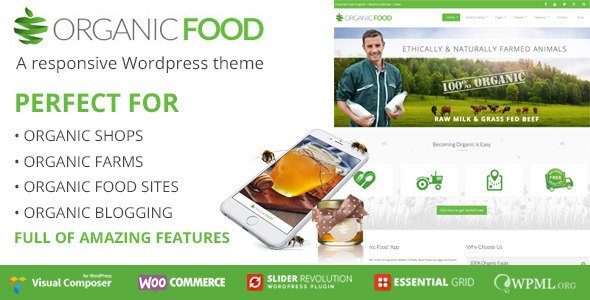
Stuck on your OrganicFood WordPress theme? Let's fix it.
No endless back-and-forth. Just send us the details and we'll get it done.
No obligation · Replies within 1 hour · Quote within 1 day
Setup · Customization · Bug fixes · WooCommerce integration
About OrganicFood WP Theme
OrganicFood is a WordPress theme by UnTheme built specifically for food-related businesses. It ships with a clean, nature-inspired design, WooCommerce compatibility, and a layout structure that works well for farm shops, organic stores, and food delivery sites. The homepage is built around visual product displays, with sections for featured items, recipe highlights, and trust-building elements like certifications and sourcing stories.
Under the hood, OrganicFood uses a widget-based page builder approach, keeping setup relatively accessible. It supports custom post types for recipes and products, and the typography and color palette lean heavily into earthy, fresh tones that suit the organic niche. If your business sells food or promotes healthy living, OrganicFood gives you a solid starting point without needing to build from scratch.
Get matched with a OrganicFood developer in under one day
Tell us about your OrganicFood project. Small fixes, OrganicFood theme customization, or a full website build, whatever you need, we've got it covered.
We'll connect you to the right OrganicFood developers, define the scope, and get everything 100% clear.
You'll get one estimate, hire your preferred developer, and start collaborating.
Most OrganicFood issues come down to one thing: the site works in theory but not quite the way your business actually needs it to. A vetted WordPress developer through Codeable can close that gap. Whether it’s a WooCommerce integration that’s not behaving, a layout that needs rebuilding for mobile, or a full custom feature added on top of the theme, you get a specialist matched to your project within 24 hours. No guesswork, no generalist freelancers.
Pros
- Purpose-built for food and organic product businesses, so the default design is already on-brand for the niche
- WooCommerce-ready out of the box with product display sections built into the homepage layout
- Includes recipe post type support, which is useful for content marketing around food products
- Earthy color palette and typography are well-suited to organic and health-focused brands without heavy restyling
- Widget-based customisation means basic layout changes don't require a developer for straightforward edits
Cons
- Limited flexibility beyond the default layout without custom template overrides or a child theme
- WooCommerce styling is basic and often needs developer work to match the rest of the design properly
- No built-in page builder integration, which can make complex layout changes harder without coding
- Plugin compatibility is not guaranteed for newer or less common WooCommerce extensions
- Documentation from UnTheme is sparse, making troubleshooting and customisation harder for non-developers
Who is OrganicFood for?
Farm Shops and CSA Box Services
OrganicFood suits farm shop websites that need to display seasonal produce, accept online orders, and communicate local sourcing. An OrganicFood developer can set up pickup scheduling, add a CSA subscription plugin, and create custom product categories for weekly box contents. The theme’s visual style fits the farm-to-table aesthetic without heavy redesign work.
Organic Grocery Stores
For online organic grocery stores, OrganicFood provides a strong visual foundation for product listings and category pages. A specialist can build out filtered product archives, set up WooCommerce for variable products, and integrate delivery zone plugins. The theme’s layout works well for stores that want a clean, health-focused storefront rather than a generic e-commerce appearance.
Food Bloggers and Recipe Sites
Food bloggers who also sell products, cookbooks, or courses can use OrganicFood to combine content and commerce. The recipe post type handles editorial content, while WooCommerce handles sales. An OrganicFood specialist can connect the two, add affiliate links to ingredient lists, and ensure the site performs well for SEO-driven traffic from recipe searches.
Meal Kit and Subscription Delivery
Meal kit businesses need subscription management, recurring billing, and flexible delivery options. OrganicFood provides the visual layer, but a developer needs to integrate WooCommerce Subscriptions, set up customer account management, and configure delivery schedules. These are non-trivial builds that benefit from an OrganicFood developer who understands both the theme and WooCommerce internals.
Health Food Brands and Product Lines
Brands selling packaged health food products online can use OrganicFood’s product-focused layout to highlight ingredients, certifications, and sourcing stories. A developer can add custom fields for nutritional information, set up bundle products, and integrate third-party fulfilment or inventory management tools. The theme’s design language matches the premium, natural positioning most health food brands want.

Customizing OrganicFood
Out of the box, OrganicFood covers the basics, but most businesses need more than a default setup. Customizing the theme to match your brand, products, and checkout flow takes real WordPress knowledge. An OrganicFood expert can rework the homepage layout, adjust WooCommerce templates, set up custom product categories, and fine-tune typography and spacing to match your visual identity.
More involved work includes building out custom recipe archives, integrating subscription plugins for CSA boxes or weekly deliveries, and adding custom fields for sourcing information or nutritional data. These changes require template overrides and sometimes custom PHP or JavaScript. Getting this right without breaking existing functionality is where an OrganicFood specialist saves you significant time and frustration.
Recommended plugins for OrganicFood
OrganicFood pairs well with several plugins that extend its core functionality. WooCommerce handles product sales and inventory. Yoast SEO or Rank Math helps with on-page SEO optimisation, which matters a lot for local food businesses competing for search visibility. For speed, image-heavy food sites need caching, lazy loading, and CDN setup to stay fast. A developer can handle WordPress performance tuning to keep your store loading quickly on mobile. Other useful additions include subscription management plugins, recipe card plugins, and local delivery or pickup integrations for physical shop owners.
Not sure which plugins to use? This WordPress plugins directory covers the most popular options with reviews and setup guides.
OrganicFood common issues
OrganicFood theme WooCommerce cart page not styled correctly
WooCommerce cart and checkout pages often fall outside OrganicFood’s default styles, leaving them looking unstyled or mismatched. This happens because the theme doesn’t always include targeted CSS for WooCommerce template pages. The fix involves adding custom styles in a child theme or using the WordPress customiser to target WooCommerce-specific selectors. If the layout is broken structurally, a template override may be needed. For persistent styling issues, a WordPress bug fixing service can diagnose and resolve this properly without affecting other pages.
OrganicFood homepage sections not showing on mobile
Homepage sections disappearing or breaking on mobile is usually a CSS media query issue or a conflict between the theme’s layout and a widget or plugin output. Check whether the problem exists without plugins active first. If it does, it’s a theme CSS issue. If not, isolate the plugin causing the conflict. OrganicFood’s homepage sections may also need explicit responsive overrides if custom content has been added. A developer can add targeted CSS in a child theme or adjust the section markup to behave correctly across screen sizes.
OrganicFood recipe post type not appearing in menu or search
If OrganicFood’s recipe post type isn’t showing in navigation menus or search results, check whether the post type is registered with the correct arguments. Custom post types need show_in_nav_menus and exclude_from_search set correctly. If UnTheme’s registration is hardcoded, a child theme function can override it. Also check that the post type has published content and that your WordPress reading settings aren’t excluding it. A WordPress bug fixing specialist can trace the exact registration and resolve it cleanly.
OrganicFood theme slow loading after adding product images
Image-heavy food sites like those built on OrganicFood are common culprits for slow load times. Large uncompressed product images, missing lazy loading, and no caching setup all compound the problem. Start by compressing existing images with a plugin like ShortPixel, enable lazy loading on images and iframes, and install a caching plugin like WP Rocket or LiteSpeed Cache. If the site is still slow, server-side issues or unoptimised queries from WooCommerce may be the cause. A performance audit will identify the exact bottlenecks.
OrganicFood FAQ
OrganicFood includes WooCommerce support and ships with product display sections designed for food retail. It works for basic stores, but cart, checkout, and account page styling often needs extra work. For a polished WooCommerce experience, especially with variable products or subscriptions, you’ll likely need a developer to extend and style the WooCommerce templates beyond what the theme provides by default.
OrganicFood is not officially built for Elementor or similar page builders. You can use Elementor on pages, but the theme’s core homepage and custom sections are widget-based and sit outside the builder. Some layout conflicts can occur. If you want full Elementor control over your OrganicFood site, a developer can restructure the theme to work alongside the builder without the two fighting each other.
OrganicFood doesn’t include subscription functionality natively. You’d need WooCommerce Subscriptions or a similar plugin added on top. The theme provides the visual layer, but a developer needs to integrate recurring billing, customer account management, and delivery scheduling. It’s a workable setup for CSA boxes or meal kits, but it requires proper configuration to function reliably at checkout and in the customer dashboard.
To create a child theme for OrganicFood, create a new folder in your themes directory, add a style.css file with the correct header referencing OrganicFood as the parent theme, and add a functions.php file that enqueues the parent and child stylesheets. All customisations should go in the child theme to survive updates. If you’re not comfortable with this, a developer can set it up and migrate any existing customisations safely.
Update frequency for UnTheme’s OrganicFood varies, and like many niche WordPress themes, there can be gaps between releases. Before committing to the theme for a new build, check the changelog on ThemeForest or the theme’s official page for the last update date. If the theme hasn’t been updated in over a year, there may be compatibility issues with recent versions of WordPress or WooCommerce that a developer would need to patch manually.
Hire an OrganicFood Developer for Your WordPress Site
If your OrganicFood site needs customisation, fixes, or a feature that the theme doesn’t support out of the box, working with a specialist is the fastest path forward. Through FoxyConcept, you get matched with a vetted OrganicFood developer who knows WooCommerce, UnTheme’s structure, and food business workflows. Get a Free Estimate with no obligation. Your project is reviewed, scoped, and handed to someone who can actually deliver it.
You'll need a free Codeable account so developers can ask questions and send their quotes.