Aqualine WordPress Theme
by like-themes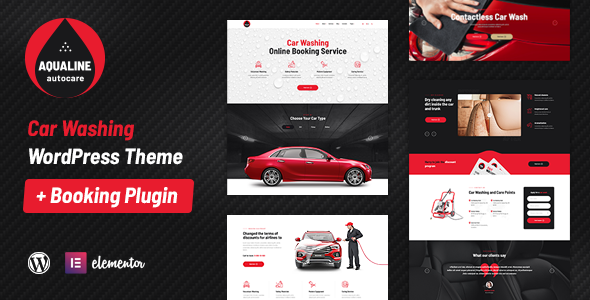
Stuck on your Aqualine WordPress theme? Let's fix it.
No endless back-and-forth. Just send us the details and we'll get it done.
No obligation · Replies within 1 hour · Quote within 1 day
Setup · Customization · Bug fixes · WooCommerce integration
About Aqualine WP Theme
Aqualine is a WordPress theme by Like Themes built for water sports, outdoor adventure, and marine businesses. It ships with a clean, image-forward layout that puts visual content front and center. The theme includes drag-and-drop page building support, custom widgets, and WooCommerce compatibility for selling equipment or booking services online.
Like Themes has a reputation for well-structured code and responsive designs that hold up across devices. Aqualine follows that pattern. It loads fast out of the box and handles portfolio-style galleries without much friction. Whether you’re running a dive school, a surf rental shop, or a yacht charter company, the theme gives you a solid visual foundation to work from without requiring heavy customization to look professional.
Get matched with a Aqualine developer in under one day
Tell us about your Aqualine project. Small fixes, Aqualine theme customization, or a full website build, whatever you need, we've got it covered.
We'll connect you to the right Aqualine developers, define the scope, and get everything 100% clear.
You'll get one estimate, hire your preferred developer, and start collaborating.
Most Aqualine issues come down to customization depth, plugin conflicts, or layout changes that go beyond what the theme options panel allows. That’s where a specialist makes the difference. Through Codeable, you get matched with a vetted WordPress developer who knows themes like Aqualine inside out. No agencies, no guesswork. You post a project, get a clear estimate, and only move forward if it makes sense. The work is guaranteed, and the developer pool is screened, so you’re not rolling the dice on quality.
Pros
- Built specifically for water sports and outdoor businesses, so the default layouts fit the niche without heavy rework
- Clean, image-focused design that showcases photography well without requiring a page builder plugin
- WooCommerce compatible for selling gear, courses, or booking services directly from the site
- Like Themes provides regular updates and documentation, reducing long-term maintenance risk
- Responsive out of the box with mobile layouts that hold up reasonably well on small screens
Cons
- Limited layout flexibility without a page builder or custom development, which restricts complex page structures
- Default color and typography customization options are basic compared to more developer-friendly themes
- Not ideal outside the water sports and outdoor adventure niche without significant visual overhaul
- Some plugin integrations require custom CSS or PHP work to match the theme's visual style
- Community support is smaller than major commercial themes, so troubleshooting resources are limited
Who is Aqualine for?
Surf Schools and Watersports Academies
Aqualine works well for surf and watersports schools that need to display lesson packages, instructor profiles, and a booking form in one clean flow. An Aqualine specialist can build out a structured course catalog with pricing tiers and integrate a scheduling plugin so students can book directly without back-and-forth email.
Yacht and Boat Charter Companies
Charter companies need strong visual presentation and a clear enquiry or booking path. Aqualine’s full-width image support handles vessel galleries well. A developer can add custom boat listing templates, availability calendars, and deposit payment flows through WooCommerce to turn the site into a functional booking platform.
Scuba Diving Centers
Dive centers often need multilingual support, certification course listings, and a way to manage group bookings. Aqualine provides a clean visual base. An Aqualine expert can extend it with WPML for language switching, custom course post types, and a booking plugin configured for group size and skill level filtering.
Outdoor Equipment Rentals
Equipment rental businesses need inventory display, pricing tables, and ideally an online reservation system. Aqualine’s layout handles product-style pages through WooCommerce. A developer can configure rental-specific plugins alongside the theme to let customers select dates, quantities, and pay deposits without leaving the site.
Marine Photography and Portfolio Sites
Marine and underwater photographers benefit from Aqualine’s emphasis on large imagery. Portfolio galleries, print shop integration via WooCommerce, and client proofing tools all fit within the theme’s structure. An Aqualine developer can refine the gallery templates and add lightbox or slideshow behavior tailored to the photographer’s workflow.

Customizing Aqualine
Out of the box, Aqualine covers the basics, but most businesses need more than the defaults. An Aqualine expert can reshape the layout to fit your specific service structure, whether that means adding a multi-step booking form, restructuring the homepage flow, or building out a custom course or package pricing section.
Custom post types for tours, instructors, or rental gear are common requests. So is integrating third-party booking plugins while keeping the design consistent with the rest of the site. An Aqualine developer can also handle child theme setup to keep your changes upgrade-safe, which matters if you rely on Like Themes pushing security or compatibility updates down the line.
Recommended plugins for Aqualine
Aqualine pairs well with several plugins that extend its core functionality. WooCommerce handles equipment sales and deposit-based bookings cleanly. For scheduling, Bookly and Amelia both integrate without major layout conflicts. Contact Form 7 and Gravity Forms work for lead capture and multi-step enquiry flows.
On the technical side, a caching layer like WP Rocket or LiteSpeed Cache makes a measurable difference on image-heavy pages. Proper image optimization is especially important given how much Aqualine leans on full-width photography. If you want to rank in local or niche search, pairing the theme with a structured WordPress SEO setup and a performance optimization pass is worth doing early.
Not sure which plugins to use? This WordPress plugins directory covers the most popular options with reviews and setup guides.
Aqualine common issues
Aqualine theme not displaying header image correctly
Header image display issues in Aqualine usually come from image dimension mismatches or a conflicting plugin overriding header styles. First, check the recommended image size in the theme documentation and re-upload a correctly sized file. If the problem persists, inspect the header CSS in your browser’s developer tools to spot conflicting rules. For persistent or unclear conflicts, the WordPress bug fixing service can isolate and resolve the issue without risking the rest of your layout.
Aqualine WooCommerce layout broken after update
WooCommerce layout breaks after updates often come from CSS conflicts between the theme’s stylesheet and WooCommerce’s updated templates. Aqualine may not have overridden WooCommerce template files immediately after a major WooCommerce version bump. Check the WooCommerce status page for outdated templates, then update or replace them. If you’re not comfortable editing template files directly, a bug fixing specialist can patch the templates inside a child theme so future updates don’t overwrite your fix.
Aqualine theme slow loading on mobile
Slow mobile performance in Aqualine is usually tied to unoptimized images, render-blocking scripts, or missing lazy load configuration. Start by running a PageSpeed Insights test to identify the specific bottlenecks. Compress images, enable lazy loading, and consider a caching plugin if one isn’t active. Aqualine’s full-width image sections can be heavy without proper sizing. A developer can audit and fix the performance stack to bring mobile scores into an acceptable range.
Aqualine menu not working on mobile devices
Mobile menu failures in Aqualine typically point to a JavaScript conflict with another plugin, or a theme script that isn’t loading in the correct order. Open the browser console on a mobile-sized viewport and check for JS errors. Deactivate plugins one at a time to identify the conflict. If the menu toggle button is present but unresponsive, the issue is almost always a script load order or jQuery conflict that a developer can resolve quickly in the theme’s functions file or a child theme.
Aqualine FAQ
Yes. Aqualine is built with water sports and marine businesses in mind, so the layouts and visual style fit dive schools and surf academies without requiring a full redesign. You can add booking plugins and course listing pages on top of the theme’s existing structure. For more complex setups, an Aqualine specialist can extend the functionality significantly beyond the defaults.
Aqualine is WooCommerce compatible, which means you can sell products, courses, or take deposits for bookings. The default WooCommerce templates will inherit the theme’s styling with some adjustments. For rental-specific or booking-focused setups, a developer can integrate dedicated plugins like Amelia or Bookly alongside WooCommerce to handle more complex purchase flows.
Aqualine can work alongside Elementor, but it was not designed as an Elementor-native theme. Some sections may need CSS adjustments to behave correctly inside Elementor’s editor. WPBakery has similar considerations. An Aqualine developer can set up a clean child theme environment and configure the page builder integration so layouts behave predictably before you build out full pages.
The safest approach is always a child theme. Any CSS changes, template overrides, or PHP customizations go into the child theme, which means Like Themes can push updates to the parent theme without wiping your work. If you haven’t set up a child theme yet and have made direct edits, a developer can migrate those changes safely before your next update.
Like Themes has maintained Aqualine and continues to release updates for compatibility with current WordPress versions. That said, update frequency can vary for niche themes. It’s good practice to keep an eye on the changelog and test updates on a staging environment before applying them to a live site. Ongoing WordPress maintenance helps keep the theme and its dependencies stable over time.
Hire an Aqualine Developer for Custom WordPress Work
Whether you need a layout rebuilt, a booking system integrated, or a bug tracked down, working with an experienced Aqualine developer saves time and avoids compounding problems. FoxyConcept connects you with specialists through Codeable’s vetted network. You get a free estimate before committing to anything. Get a Free Estimate and describe your project. No obligation, no risk.
You'll need a free Codeable account so developers can ask questions and send their quotes.