Aalto WordPress Theme
by Edge-Themes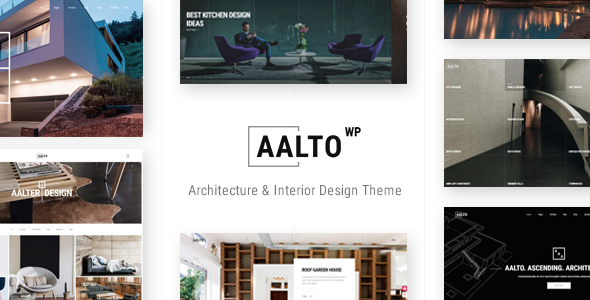
Stuck on your Aalto WordPress theme? Let's fix it.
No endless back-and-forth. Just send us the details and we'll get it done.
No obligation · Replies within 1 hour · Quote within 1 day
Setup · Customization · Bug fixes · WooCommerce integration
About Aalto WP Theme
Aalto is a premium WordPress theme built by Edge-Themes, designed primarily for architecture firms, interior designers, and creative studios. It ships with a clean grid-based layout, full-screen portfolio sections, and a minimalist aesthetic that puts visual work front and center.
The theme integrates with WPBakery Page Builder and includes Edge-Themes’ own shortcode library, giving you a solid set of layout tools out of the box. It supports custom post types for portfolio and team members, smooth page transitions, and a sticky header with multiple style options.
Aalto works well when the site’s job is to showcase projects rather than sell products. The typography choices lean toward editorial, and the whitespace-heavy design suits studios that want an upscale, gallery-like feel without building from scratch.
Get matched with a Aalto developer in under one day
Tell us about your Aalto project. Small fixes, Aalto theme customization, or a full website build, whatever you need, we've got it covered.
We'll connect you to the right Aalto developers, define the scope, and get everything 100% clear.
You'll get one estimate, hire your preferred developer, and start collaborating.
Edge-Themes builds feature-rich themes, but Aalto’s options panel and WPBakery dependency mean the learning curve is real. Small misconfigurations can break portfolio layouts or cause inconsistent spacing across breakpoints.
Working with a vetted Aalto developer through Codeable means you get someone who already knows where the rough edges are. No trial and error, no guesswork on which setting controls what. Post a project, get a free estimate within 24 hours, and only hire if the scope and price make sense for you.
Pros
- Strong visual design suited to architecture, interiors, and creative portfolio sites
- Extensive Edge-Themes options panel covers most layout needs without custom code
- Smooth page transitions and scroll animations work reliably out of the box
- Multiple header styles including transparent, sticky, and split layouts
- Portfolio custom post type with category filtering built in from the start
Cons
- WPBakery Page Builder dependency makes migrating to the block editor difficult
- Options panel is not the native WordPress Customizer, so live preview is limited
- Heavy JavaScript footprint from animations can hurt Core Web Vitals scores
- Mobile layout for complex portfolio grids sometimes needs manual CSS adjustments
- Documentation is adequate but thin on advanced use cases and developer hooks
Who is Aalto for?
Architecture Firms
Aalto’s grid-based portfolio and full-screen project pages suit architecture practices well. Large imagery, clean typography, and structured project pages let firms present built work and concept renders in a format clients and collaborators can navigate without friction.
Interior Design Studios
Interior design relies on strong visual presentation, and Aalto’s whitespace-heavy layouts let room photography breathe. The single portfolio post template works well for before-and-after project breakdowns, and the minimal header keeps attention on the imagery rather than navigation.
Photography Portfolios
Photographers need fast image loading and clean gallery layouts. Aalto’s portfolio grid handles both editorial and commercial work well. A performance-tuned setup with proper image optimisation keeps the site fast while still displaying high-resolution files at full impact.
Creative Agencies
Agencies presenting branding, web, or campaign work benefit from Aalto’s flexible portfolio categories and filterable grid. The theme handles mixed media projects cleanly, and custom project pages can be built out with WPBakery to include video, case study text, and results.
Furniture and Product Design
Product and furniture designers can use Aalto’s portfolio structure to present pieces with multiple angles, material details, and project context. The minimal design keeps the focus on the product rather than the template, and WooCommerce integration allows direct sales alongside portfolio content.

Customizing Aalto
Aalto’s customization lives primarily inside the Edge-Themes options panel, a custom admin interface separate from the WordPress Customizer. From there you can control header styles, footer layout, typography, colors, and portfolio grid behavior without touching code.
WPBakery handles page layout, so building custom page templates means working within that ecosystem. If you need something outside what the panel and WPBakery offer, an Aalto expert can step in to write custom CSS, modify template files, or build child theme overrides that won’t break on updates.
Common customization requests include adjusting the portfolio filter behavior, modifying hover effects, and restructuring the single project layout. An experienced Aalto developer can handle these precisely without introducing layout regressions across the site.
Recommended plugins for Aalto
Aalto pairs with several plugins that expand its default feature set. Contact Form 7 handles inquiries, while WooCommerce can be bolted on if you need to sell prints, services, or products directly from the site.
For studios competing in local or niche search, pairing Aalto with proper WordPress SEO optimisation work makes a real difference, since the theme’s heavy use of images needs structured markup and lazy loading to rank well.
Portfolio-heavy sites also benefit from targeted WordPress performance work. Large image assets and WPBakery’s output can slow load times noticeably, and a performance audit will catch the biggest offenders quickly.
Not sure which plugins to use? This WordPress plugins directory covers the most popular options with reviews and setup guides.
Aalto common issues
Aalto theme portfolio grid not displaying correctly after update
Portfolio grid issues after an update usually come from a conflict between the theme’s JavaScript and a recently updated plugin, or from a missing shortcode parameter that changed between versions. Start by clearing all caches and checking the browser console for JS errors. If the grid was built inside WPBakery, check whether the portfolio element’s settings still match the current shortcode structure. For persistent issues, a WordPress bug fixing specialist can isolate the conflict and restore the layout without disrupting other pages.
Aalto WordPress theme slow loading on mobile
Aalto’s animations and large portfolio images are the main culprits for poor mobile performance. The theme loads several JavaScript files globally, including animation libraries that fire even on pages that don’t use them. Start by auditing with PageSpeed Insights to identify the heaviest assets. Deferring non-critical JS, enabling lazy loading, and compressing images at the server level will have the biggest impact. A WordPress bug fixing service can run a full performance audit and implement fixes that don’t interfere with the theme’s animation triggers.
WPBakery layout broken in Aalto after plugin update
WPBakery layout breaks in Aalto typically happen when the WPBakery plugin updates but the theme’s bundled shortcodes haven’t been updated to match. Check whether Edge-Themes has released a theme update that addresses the WPBakery version change. If the theme is current and the issue persists, the problem is usually a specific element whose CSS class or parameter structure changed. Rebuilding the affected row or element in WPBakery’s backend editor usually resolves it without touching code.
Aalto theme header overlapping page content
Header overlap in Aalto is almost always caused by the transparent header setting combined with a page that doesn’t have a top padding override. Aalto’s options panel includes a per-page header style selector, and setting it to non-transparent on affected pages resolves the overlap without CSS changes. If the overlap persists, check whether a custom page template or a WPBakery full-width section is removing the body padding that Aalto injects to compensate for the sticky header height.
Aalto FAQ
Yes. Aalto was built with architecture and design studios in mind. The portfolio structure, full-screen layouts, and editorial typography all suit firms that lead with visual work. It handles large project photography well and the minimal design keeps attention on the content rather than the template chrome.
Aalto is built around WPBakery, not Elementor. You can install Elementor alongside it, but conflicts between the two page builders are common and support from Edge-Themes won’t cover Elementor-related issues. If you prefer Elementor, a different theme built specifically for it is a cleaner starting point.
Aalto’s options panel includes a Google Fonts selector and fields for custom font imports. For self-hosted fonts, you add the font files to your child theme and reference them via the panel’s custom CSS field or a small functions.php addition. An Aalto specialist can set this up correctly so fonts load efficiently without render-blocking the page.
Technically yes, but the demo content and most page templates are built with WPBakery shortcodes. Without it, those pages render as raw shortcode text. You can build new pages using the block editor, but you lose access to Aalto’s custom elements. Most users keep WPBakery active to maintain the intended layouts.
Cost depends on the scope of work. Small fixes or configuration tasks typically run from a few hundred dollars. Full site builds or complex customisations cost more. Through Codeable, you post your project and receive a free estimate before committing to anything. There’s no obligation to hire after receiving the estimate.
Hire an Aalto WordPress Developer
Whether you need a full site build, a layout fix, or custom functionality added on top of Aalto’s defaults, a specialist gets it done without the back-and-forth that comes with hiring generalists. Projects are scoped clearly before any work begins, and you only pay when you’re ready to move forward.
Get a Free Estimate and describe what you need. An Aalto developer will review the project and come back with a clear plan.
You'll need a free Codeable account so developers can ask questions and send their quotes.