Outgrid WordPress Theme
by UiCore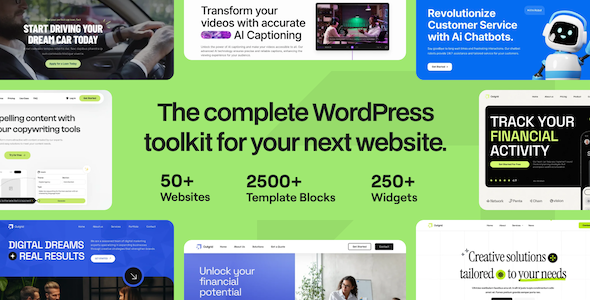
Stuck on your Outgrid WordPress theme? Let's fix it.
No endless back-and-forth. Just send us the details and we'll get it done.
No obligation · Replies within 1 hour · Quote within 1 day
Setup · Customization · Bug fixes · WooCommerce integration
About Outgrid WP Theme
Outgrid is a multipurpose WordPress theme built by UiCore, designed primarily for SaaS products, tech startups, and digital agencies. It ships with the UiCore Builder, a proprietary page builder that handles layout, typography, and global styles from a single panel. The theme includes over 30 demo templates, all of which are import-ready in one click.
Performance is a focus from the start. Outgrid generates clean HTML output, supports lazy loading natively, and keeps third-party script dependencies low. It also integrates tightly with WooCommerce for product and pricing pages, making it useful beyond pure marketing sites.
Outgrid sits in a crowded market, but UiCore’s decision to build their own tools rather than bundle Elementor or WPBakery gives it a leaner codebase than most multipurpose themes. If you are building a tech-facing product site and want a polished starting point without excess plugin weight, Outgrid is worth a close look.
Get matched with a Outgrid developer in under one day
Tell us about your Outgrid project. Small fixes, Outgrid theme customization, or a full website build, whatever you need, we've got it covered.
We'll connect you to the right Outgrid developers, define the scope, and get everything 100% clear.
You'll get one estimate, hire your preferred developer, and start collaborating.
Most Outgrid builds start straightforward and get complicated fast. Custom post types, pricing page logic, dynamic content from ACF, or a WooCommerce setup that does not match any demo all require developer input. UiCore’s ecosystem is well-documented, but implementation still takes real WordPress experience.
The developers at FoxyConcept work through Codeable, a vetted network where every developer is screened before taking client projects. You get an experienced Outgrid developer without the risk of hiring blind. Estimates are free and there is no obligation to proceed.
Pros
- UiCore Builder keeps the codebase lean without Elementor or WPBakery dependency
- One-click demo imports cover SaaS, agency, and startup layouts out of the box
- Global style controls push consistent typography and color changes across the entire site
- Native WooCommerce integration with pre-styled pricing and product page templates
- Built-in modal and popup system removes the need for a separate lead capture plugin
Cons
- Locked into the UiCore Builder, which makes switching page builders later costly
- Demo content quality drops noticeably outside the core SaaS and agency niches
- Advanced header and mega menu configurations require custom code beyond the visual editor
- Community support forums are smaller than Elementor or Divi ecosystems
- Some UiCore Builder blocks have limited responsive breakpoint controls compared to dedicated builders
Who is Outgrid for?
SaaS Product Landing Pages
Outgrid’s demo templates map almost directly onto SaaS marketing conventions: hero sections with CTAs, feature grids, testimonials, and pricing tables. The UiCore Builder makes it straightforward to duplicate and modify these sections without rebuilding from scratch. For a SaaS launch or redesign, Outgrid cuts initial build time significantly compared to starting from a blank theme.
Digital Agency Portfolio Sites
Agencies need a site that looks polished without drawing attention to itself. Outgrid’s typography controls and whitespace management produce clean results quickly. Portfolio grids and case study layouts are available in the demo library. Custom work is usually limited to client-specific color systems and content structure rather than rebuilding core layout logic.
Tech Startup Marketing Sites
Early-stage startups often need a credible marketing site fast, with a clear product pitch, an email capture form, and a pricing section. Outgrid covers all three with minimal configuration. The built-in modal system handles lead magnets and waitlist signups without adding plugin overhead, which matters when the hosting environment is lightweight.
Software Pricing and Feature Pages
Outgrid’s WooCommerce compatibility extends to custom pricing page layouts that go beyond the default product templates. Feature comparison tables and tiered plan displays are available as builder blocks. For software companies that sell directly through WordPress, this removes the need for a separate landing page tool just to handle pricing presentation.
IT Services and Consultancy Firms
IT consultancies and managed service providers need sites that communicate reliability without appearing generic. Outgrid’s service page templates and icon-driven feature sections work well for structured service listings. The global style system makes it practical to maintain brand consistency across service category pages without editing each one individually.

Customizing Outgrid
Outgrid customization runs through the UiCore Builder and a global style system that controls fonts, colors, spacing, and header layouts site-wide. Changes made at the global level push consistently across all pages, which saves time on larger builds and keeps visual consistency intact without manual page-by-page edits.
Section-level controls let you adjust backgrounds, overlays, column gaps, and animations independently. The theme also supports custom CSS injection at both global and per-page levels, which gives developers room to work outside the builder when needed.
For teams without a developer on hand, working with an Outgrid expert makes sense when the built-in controls hit their limits. Custom header logic, conditional content display, and WooCommerce layout overrides typically require hands-on PHP and template work beyond what the visual interface can handle cleanly.
Recommended plugins for Outgrid
Outgrid integrates well with several commonly used WordPress plugins. WooCommerce support is built in with styled product pages and checkout templates. Contact Form 7 and WPForms both render cleanly inside UiCore Builder sections. For popup and lead capture, UiCore includes its own modal system, reducing the need for a separate plugin.
If you need to extend Outgrid beyond marketing pages, pairing it with dedicated tools adds real capability. A caching plugin combined with image optimization will push WordPress performance noticeably further. Adding structured data and meta control through a proper plugin also strengthens your WordPress SEO foundation without fighting the theme.
Not sure which plugins to use? This WordPress plugins directory covers the most popular options with reviews and setup guides.
Outgrid common issues
Outgrid theme demo import not working
Failed demo imports in Outgrid are usually caused by PHP memory limits set too low on the hosting server. The import process pulls content, images, and widget data simultaneously, which can exceed a 128MB limit easily. Raise the PHP memory limit to at least 256MB in your wp-config.php or through your host’s control panel. Also confirm that XML imports are enabled and that the required UiCore plugin is active before starting the import again. If the issue persists, check your WordPress bug fixing options.
Outgrid header not displaying correctly on mobile
Mobile header problems in Outgrid typically trace back to conflicting CSS from a caching plugin outputting minified styles incorrectly, or to custom CSS added in the global style panel that uses fixed pixel widths without mobile breakpoints. Start by clearing all cached files and testing on a fresh browser session. If the issue remains, inspect the header element in browser developer tools to identify which CSS rule is overriding the mobile menu styles. Adjusting the UiCore Builder header settings for tablet and phone breakpoints separately usually resolves it.
UiCore Builder blocks not loading on Outgrid site
When UiCore Builder blocks stop rendering or show only their placeholder outlines, the most common cause is a JavaScript conflict with another active plugin. Deactivate plugins one at a time in a staging environment to isolate the conflict. Also check that your Outgrid theme and UiCore plugin versions are in sync, as mismatched versions after an update can break block registration. Running the latest versions of both and clearing object cache resolves this in most cases without deeper intervention.
Outgrid WooCommerce pricing page layout broken
Broken WooCommerce pricing layouts in Outgrid usually result from a WooCommerce major version update that changed template file structure while the theme’s bundled WooCommerce templates remained on the older version. Navigate to WooCommerce status and check for outdated template warnings specific to Outgrid. Updating the theme or manually copying the revised WooCommerce template files into the theme’s WooCommerce folder restores correct rendering. Consider WordPress maintenance support to catch these conflicts before they reach a live site.
Outgrid FAQ
Outgrid is built around SaaS, tech, and agency use cases. Its demo library and design language reflect that focus. You can use it for other niches, but you will spend more time adapting templates that were not designed with, say, hospitality or retail in mind. For non-tech projects, a more niche-specific theme usually produces a better result with less customization work.
Outgrid is built on the UiCore Builder, not Elementor. The two builders are not compatible, and using Elementor alongside Outgrid would mean maintaining two separate page building systems on the same site. UiCore intentionally keeps its builder proprietary to control output quality. If Elementor is a firm requirement, a different theme that supports it natively is a better fit.
Outgrid developer rates vary depending on project scope. A small customization or bug fix typically costs less than a full site build from a demo. Through Codeable, you receive a clear estimate before committing to anything. Submit your project details to get a scoped estimate from an experienced developer. There is no fee to get an estimate and no obligation to hire.
Migrating an existing WordPress site to Outgrid means rebuilding your current pages inside the UiCore Builder rather than doing a simple theme swap. Your content, posts, and media carry over, but layout work done in another builder or theme will not transfer automatically. The amount of rebuild work depends on how complex your current site is. A developer can scope this accurately before you commit. See WordPress migration support options for more detail.
Outgrid performs better than most multipurpose themes out of the box because it avoids bundling heavy page builders. UiCore generates relatively clean markup and supports lazy loading natively. It is not the fastest theme available, but it is competitive for its category. SEO performance depends heavily on how you configure caching, image optimization, and meta settings through a dedicated plugin rather than the theme itself.
Hire an Outgrid Developer
Whether you need a full Outgrid site built from a demo, a custom layout that does not exist in the template library, or fixes to a build that is not behaving as expected, FoxyConcept delivers through Codeable’s vetted developer network. Projects are scoped clearly, priced fairly, and delivered by developers who know the UiCore ecosystem well.
Get a free estimate with no obligation to hire. Most projects receive a response within 24 hours.
You'll need a free Codeable account so developers can ask questions and send their quotes.