Music Club WordPress Theme
by GoodLayers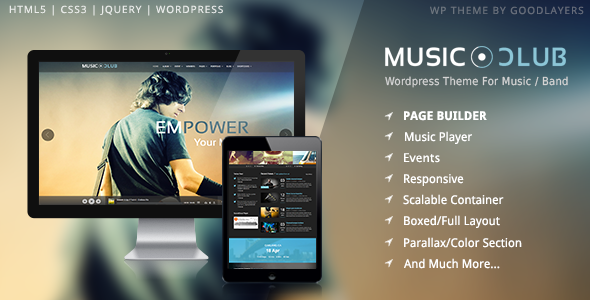
Stuck on your Music Club WordPress theme? Let's fix it.
No endless back-and-forth. Just send us the details and we'll get it done.
No obligation · Replies within 1 hour · Quote within 1 day
Setup · Customization · Bug fixes · WooCommerce integration
About Music Club WP Theme
Music Club is a WordPress theme built by GoodLayers, a developer known for polished niche themes with solid page builder integration. It’s designed for music venues, bands, DJs, record labels, and event promoters who need a site that looks the part without heavy custom development.
The theme ships with GoodLayers’ own GDLR page builder, pre-built demo content, event listings, a discography section, and audio player support. You get a dark, visually rich aesthetic out of the box, with enough layout flexibility to adapt it to different acts or venues.
It’s a ThemeForest theme, so setup is self-managed. That means importing demos, configuring theme options, and wiring up plugins all falls on you. For most musicians or small venue teams, that’s where things slow down. A developer can get a clean, functional site running in a fraction of the time.
Get matched with a Music Club developer in under one day
Tell us about your Music Club project. Small fixes, Music Club theme customization, or a full website build, whatever you need, we've got it covered.
We'll connect you to the right Music Club developers, define the scope, and get everything 100% clear.
You'll get one estimate, hire your preferred developer, and start collaborating.
GoodLayers themes are well-built but not beginner-friendly once you move past the demo. Music Club has its own page builder, custom post types, and a theme options system that takes time to learn properly. Mistakes in that environment can break layouts or wipe customizations on update.
Developers on Codeable are vetted specifically for WordPress work. That means you get someone who has worked inside GDLR themes before, not someone figuring it out on your project. Faster delivery, fewer revisions, cleaner code.
Pros
- Ships with pre-built demo content that covers bands, venues, and DJ setups, reducing initial build time
- Built-in discography and audio player sections, purpose-built for music use cases without extra plugins
- Event listing functionality is included natively, useful for gigs, tours, and residencies
- GoodLayers provides regular theme updates and has a long track record on ThemeForest
- Dark, high-contrast design aesthetic works well for most music genres without heavy restyling
Cons
- The GDLR page builder is not compatible with Gutenberg or Elementor, which limits flexibility and future portability
- Demo import can be unreliable, sometimes requiring manual setup of widgets, menus, and theme options afterward
- Page load times are slow without optimization due to bundled scripts and large image assets in demo content
- Customer support on ThemeForest is forum-based and can be slow for complex or specific issues
- Customizing beyond the theme options requires CSS and PHP knowledge, which is not beginner-friendly
Who is Music Club for?
Live Music Venue
Venues need event listings, ticketing links, and photo galleries front and center. Music Club handles all three natively. You can list upcoming gigs, link to external ticket platforms, and showcase your space with full-width imagery. A developer can wire in The Events Calendar for recurring bookings and connect a Google Maps embed for directions.
Independent Band or Artist
Bands and solo artists need a home base that covers music, shows, and press. Music Club’s discography section handles releases cleanly, and the built-in audio player lets visitors stream tracks without leaving the site. With proper setup, you can also add a mailing list signup and merch store through WooCommerce without the site feeling cluttered.
DJ or Electronic Music Producer
DJs and producers need a site that communicates energy. Music Club’s dark aesthetic and full-screen hero sections suit that well. You can feature mixes, embed SoundCloud or Mixcloud players, list booking dates, and include a contact form for promoter inquiries. The audio integration keeps listeners on the site rather than bouncing to streaming platforms.
Record Label
Labels managing multiple artists need structured content that scales. Music Club can be set up with individual artist pages, separate discography entries per act, and a shared events feed. A developer can extend the custom post types to handle this cleanly. Combined with WooCommerce, you can sell vinyl or digital downloads directly through the same site.
Music Festival or Event Series
Festivals and recurring event series need a site that handles lineups, schedules, and ticket sales clearly. Music Club’s event section provides the foundation, and with developer customization it can support multi-stage schedules, artist bios, and sponsor sections. The visual flexibility in GDLR allows distinct page layouts for each year or edition of an event.

Customizing Music Club
Music Club uses the GDLR page builder for layout control, which works differently from Gutenberg or Elementor. If you’re used to those tools, expect a learning curve. The theme options panel covers typography, colors, header styles, and footer layouts, but making deeper changes, like custom event archive templates or unique artist pages, requires PHP and CSS knowledge.
A Music Club expert can handle the parts that aren’t point-and-click: custom post type adjustments, audio player styling, ticket link integrations, and mobile layout fixes. GoodLayers themes also tend to need CSS overrides to fully match a brand, especially for color-heavy or typography-driven identities.
If you want the theme to look genuinely custom rather than demo-adjacent, working with someone who knows Music Club and the GDLR framework saves a lot of back-and-forth.
Recommended plugins for Music Club
Music Club works with standard WordPress plugins, but a few integrations matter most for music sites. The Events Calendar plugin pairs well with the theme’s built-in event section for more advanced ticketing and recurring events. WooCommerce can handle merch sales. For audio, players like AudioIgniter or Compact WP Audio Player add more control than the default options.
If site speed is a concern, Music Club loads several scripts that can slow things down without proper optimization. A WordPress performance service can cut load times significantly. For bands or venues targeting local search, pairing the theme with structured SEO work through a WordPress SEO service helps drive real traffic to event pages.
Not sure which plugins to use? This WordPress plugins directory covers the most popular options with reviews and setup guides.
Music Club common issues
Music Club theme demo import not working
Demo import failures in Music Club usually come down to server memory limits or PHP max execution time being too low. Before importing, set memory_limit to at least 256MB and max_execution_time to 300 in your php.ini or wp-config.php. If the import still stalls, try importing XML content manually through WordPress Tools, then apply theme options separately. A WordPress bug fixing service can sort this without data loss.
Music Club audio player not showing on mobile
The built-in Music Club audio player sometimes fails to render on mobile due to script loading order or conflicts with caching plugins. Start by disabling your cache plugin and testing. If the player appears, configure the cache to exclude the relevant scripts. If the issue persists, it’s often a CSS visibility rule targeting touch devices. Inspect with browser dev tools on mobile view to identify the exact property being overridden.
Music Club GDLR page builder conflict with plugins
The GDLR page builder bundled with Music Club can conflict with plugins that register their own shortcodes or modify the post editor. Common culprits include page builder plugins, some SEO plugins modifying content output, and certain form builders. Disable plugins one at a time to isolate the conflict. If a specific plugin is essential, a developer can resolve the conflict through a child theme function or plugin filter.
Music Club theme slow loading speed
Music Club loads multiple CSS and JavaScript files that add significant weight. Start with a caching plugin like WP Rocket and enable script minification and combination. Compress images in the demo content, many are oversized by default. Disable unused GDLR modules through the theme options if available. For a more thorough fix, a WordPress performance service can audit and optimize the full stack.
Music Club FAQ
Music Club is built around the GoodLayers GDLR page builder and is not designed to work with Elementor. You can install Elementor, but it won’t integrate with GDLR layouts or theme options. If you need an Elementor-based music site, you’d be better served by a different theme. Mixing both builders on the same site causes layout and script conflicts.
Yes, Music Club is compatible with WooCommerce. Most GoodLayers themes include basic WooCommerce styling. You can add a shop for merchandise or digital downloads. The default WooCommerce pages will inherit the theme’s styles, though some layout adjustments may be needed to match the rest of the site. A developer can align the shop pages with the overall design properly.
Music Club includes a custom Events post type in the theme. To add events, go to the Events section in your WordPress admin, create a new entry, and fill in the date, venue, and ticket link fields. For more control over recurring events or calendar views, pairing Music Club with The Events Calendar plugin gives you additional display and management options without breaking the theme’s existing layout.
Technically yes, but practically it’s limited. The GDLR builder is embedded in the theme and most demo page layouts depend on it. You could use the default WordPress block editor for basic pages, but you’d lose access to the custom row and column layouts that make the demos look the way they do. Stripping out GDLR requires rebuilding layouts from scratch, which defeats the purpose of using Music Club.
GoodLayers has maintained Music Club on ThemeForest and continues to release updates. The theme has been available for several years with a consistent update history. That said, update frequency is slower than managed or subscription-based themes. Before purchasing or building on it, check the ThemeForest listing for the last update date and read recent buyer comments to gauge current support quality.
Hire a Music Club Expert Developer
Whether you need a full Music Club setup, a customization that’s gone sideways, or ongoing changes to events and content layouts, a specialist gets it done right. FoxyConcept connects you with vetted WordPress developers through Codeable. Post your project, get matched within 24 hours, and review a free estimate before committing to anything. Get your free estimate here and start with zero obligation.
You'll need a free Codeable account so developers can ask questions and send their quotes.