MentalPress WordPress Theme
by ProteusThemes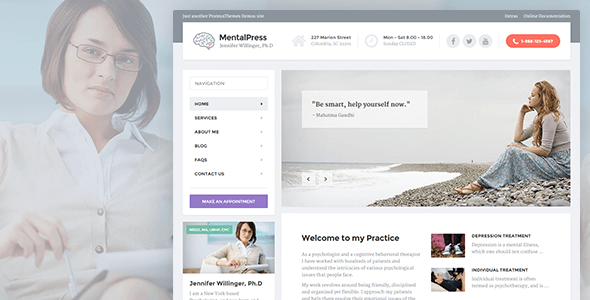
Stuck on your MentalPress WordPress theme? Let's fix it.
No endless back-and-forth. Just send us the details and we'll get it done.
No obligation · Replies within 1 hour · Quote within 1 day
Setup · Customization · Bug fixes · WooCommerce integration
About MentalPress WP Theme
MentalPress is a WordPress theme by ProteusThemes, built specifically for mental health professionals, therapists, counselors, and psychology clinics. It ships with a clean, calming design that puts trust and readability first — exactly what visitors need when they’re looking for mental health support.
The theme includes a drag-and-drop page builder, pre-built demo content, and dedicated sections for therapist profiles, services, appointment booking integration, and testimonials. It works with popular plugins like WooCommerce and contact form tools without any conflicts.
MentalPress targets a very specific niche, which means less generic styling and more design decisions that actually fit a therapy or wellness practice. If you run a private practice, group therapy clinic, or mental wellness platform, it’s one of the more focused options available on the market.
Get matched with a MentalPress developer in under one day
Tell us about your MentalPress project. Small fixes, MentalPress theme customization, or a full website build, whatever you need, we've got it covered.
We'll connect you to the right MentalPress developers, define the scope, and get everything 100% clear.
You'll get one estimate, hire your preferred developer, and start collaborating.
MentalPress is purpose-built for mental health, but that doesn’t mean setup is automatic. Getting the booking flow right, structuring service pages correctly, and making sure everything works on mobile takes real WordPress experience.
The developers available through Codeable have been individually vetted and work exclusively on WordPress. No generalist freelancers, no guesswork. If you want your therapy or counseling site built properly the first time, working with a specialist is the practical choice. See what WordPress development looks like when it’s done right.
Pros
- Purpose-built for mental health and therapy practices — no need to strip out irrelevant features
- Includes pre-built demo content with therapist profiles, services, and appointment sections ready to customize
- Clean, calming design aesthetic that suits the trust-sensitive nature of mental health services
- Compatible with WooCommerce for selling sessions, courses, or digital downloads
- ProteusThemes has a solid track record of maintaining niche professional themes with regular updates
Cons
- Design is quite niche — adapting it for non-mental-health purposes requires significant rework
- Demo import can be heavy, and cleaning up unused content takes time if you only need parts of it
- Advanced booking workflows require third-party plugins that need separate configuration and licensing
- Limited layout variety compared to multipurpose themes — complex custom page structures need developer input
- Support documentation is functional but sparse for edge cases or advanced customizations
Who is MentalPress for?
Private Therapy Practice
Solo therapists and small practices use MentalPress to present their services, credentials, and approach in a format clients find reassuring. The therapist profile sections, testimonial blocks, and contact forms cover everything a private practice typically needs on its website without requiring major customization from scratch.
Psychology Clinic
Multi-therapist clinics can use MentalPress to list staff profiles, display specializations, and organize services by type. The layout handles multiple team members cleanly. With some developer input, you can add filtering by specialty or insurance type, which is genuinely useful for larger practices with varied offerings.
Mental Wellness Coaching
Mental wellness coaches who offer programs, group sessions, or digital resources can pair MentalPress with WooCommerce to sell directly from their site. The theme’s clean aesthetic translates well to coaching, and the appointment booking integrations work just as well for discovery calls as they do for therapy sessions.
Online Therapy Platform
For platforms offering video or text-based therapy, MentalPress provides a credible, calming front end. Integrating a telehealth or scheduling platform requires plugin work or custom development, but the theme gives you a strong starting structure that matches what clients expect from a professional online therapy service.
Psychiatric Services
Psychiatric practices need a site that communicates professionalism and safety clearly. MentalPress handles this well through its design defaults. Adding HIPAA-compliant contact forms, detailed service pages for specific conditions, and insurance information sections is straightforward with the right developer handling the configuration.

Customizing MentalPress
Out of the box, MentalPress gives you color controls, typography settings, and a live customizer. That’s enough for basic branding. But most practices need more — custom intake forms, booking system tweaks, staff profile layouts, or a specific page structure that matches how their services are organized.
That’s where a MentalPress expert makes a real difference. Instead of wrestling with shortcodes and page builder rows, a developer who knows the theme can build exactly what you need without breaking the existing structure. They can also extend the default demo to match your brand properly, not just change the accent color and call it done.
Custom CSS, child themes, and plugin integrations are all faster and cleaner when someone already knows the theme’s architecture.
Recommended plugins for MentalPress
MentalPress pairs well with several plugins that mental health websites commonly need. For appointment booking, plugins like Simply Schedule Appointments or Amelia slot in without major conflicts. For secure client intake, Gravity Forms works reliably with the theme’s layout.
If you want to sell sessions or digital resources, WooCommerce integration is straightforward. For practices focused on organic search, pairing MentalPress with proper on-page SEO work through a WordPress SEO service helps attract local clients. Page weight can creep up with demo content loaded, so WordPress performance optimization is worth considering early.
Not sure which plugins to use? This WordPress plugins directory covers the most popular options with reviews and setup guides.
MentalPress common issues
MentalPress demo content not importing correctly
Demo import failures in MentalPress usually come down to PHP memory limits, max upload size restrictions, or execution timeouts on the server. Check your php.ini or wp-config.php for memory and upload settings. Increase memory_limit to at least 256MB and max_execution_time to 300 seconds. If the issue persists, try importing in stages rather than all at once. A WordPress bug fixing service can resolve this quickly if server access is limited.
MentalPress appointment booking not working
MentalPress doesn’t include a built-in booking system — it relies on third-party plugins. If booking isn’t working, the issue is almost always plugin configuration, not the theme itself. Check that your chosen booking plugin (Amelia, Simply Schedule, etc.) is properly connected to a calendar and that email notifications are configured. Conflict-test by temporarily switching to a default theme to isolate whether the problem is theme-related or plugin-related.
MentalPress page builder layout broken after update
After theme or plugin updates, page builder layouts in MentalPress can break due to deprecated shortcodes or changed class names. First, clear all caches. Then check whether the ProteusThemes page builder plugin is updated to match the theme version. If specific rows or elements are missing, regenerate the page builder assets from the plugin settings. For persistent layout issues, professional bug fixing is faster than manual debugging.
MentalPress mobile menu not opening
A non-functional mobile menu in MentalPress is usually a JavaScript conflict with another plugin. Open your browser console and look for JS errors on mobile. Common culprits are optimization plugins that minify or combine scripts incorrectly. Exclude the theme’s navigation scripts from minification in your caching or optimization plugin settings. Also confirm the menu is assigned correctly under Appearance > Menus for the mobile menu location.
MentalPress FAQ
Yes. MentalPress is one of the few WordPress themes designed specifically for therapists and mental health professionals. It includes therapist profile sections, service listings, testimonial blocks, and a design tone that suits the field. It’s a better starting point than adapting a generic business theme, and it avoids the visual mismatch that often comes from using multi-purpose themes for therapy sites.
MentalPress is compatible with major booking plugins including Amelia, Simply Schedule Appointments, and Bookly. The theme doesn’t include booking functionality natively, so you’ll need to install and configure a plugin separately. Most booking plugins provide shortcodes or blocks that embed cleanly into MentalPress pages without visual conflicts, though some styling adjustments may be needed to match your site’s color scheme.
Basic setup — importing demo content, updating text, and changing colors — can be done without coding. The live customizer and page builder handle most visual changes. However, more specific needs like custom intake forms, modified layouts, or booking integrations typically require some technical knowledge. For anything beyond the basics, working with a MentalPress developer will save time and avoid mistakes.
Migrating an existing therapy site to MentalPress involves moving your content, rebuilding your page layouts in the new theme, and reconfiguring any plugins. It’s not a one-click process. You’ll want to back up your current site first, then rebuild key pages using the MentalPress demo as a base. For a clean migration with no downtime, a WordPress migration service is the most reliable approach.
Yes. Like any WordPress site, a MentalPress installation needs regular plugin and theme updates, security monitoring, and backups. Outdated themes or plugins are the most common source of vulnerabilities and compatibility issues. If you don’t want to manage this yourself, a WordPress maintenance plan covers updates, backups, and uptime monitoring so you can focus on your practice instead.
Hire a MentalPress Developer
Whether you need a full site build, a specific feature added, or something on your current MentalPress site fixed, the right developer makes the process straightforward. Post your project, get matched with a vetted MentalPress expert within 24 hours, and receive a free estimate before you commit to anything. No obligation, no risk.
You'll need a free Codeable account so developers can ask questions and send their quotes.