Mitech WordPress Theme
by ThemeMove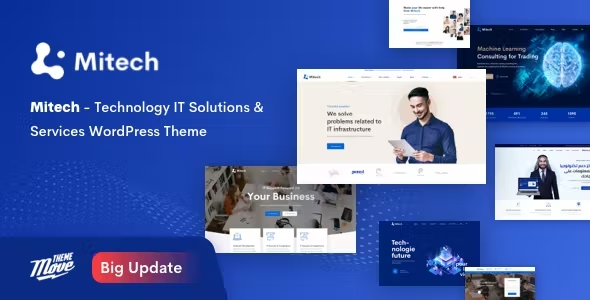
Stuck on your Mitech WordPress theme? Let's fix it.
No endless back-and-forth. Just send us the details and we'll get it done.
No obligation · Replies within 1 hour · Quote within 1 day
Setup · Customization · Bug fixes · WooCommerce integration
About Mitech WP Theme
Mitech is a WordPress theme by ThemeMove built for technology companies, IT service providers, and software agencies. It ships with a large collection of pre-built demo pages covering everything from SaaS landing pages to consulting firm layouts, all built on Elementor.
The theme includes a dedicated mega menu builder, smooth scroll animations, and a set of custom Elementor widgets designed specifically for tech-sector content. It supports WooCommerce, contact form plugins, and integrates cleanly with popular page builders without heavy conflict risks.
Mitech is a solid starting point for any IT or digital agency that wants a professional appearance without building from scratch. The demo content imports cleanly in most cases, giving teams a working visual base to modify rather than starting from a blank canvas.
Get matched with a Mitech developer in under one day
Tell us about your Mitech project. Small fixes, Mitech theme customization, or a full website build, whatever you need, we've got it covered.
We'll connect you to the right Mitech developers, define the scope, and get everything 100% clear.
You'll get one estimate, hire your preferred developer, and start collaborating.
Mitech has a lot of moving parts. The Redux options panel, custom Elementor widgets, mega menu builder, and animation system all interact in ways that can cause unexpected results when modified without context. An experienced developer who knows the theme saves you time debugging layout breaks and plugin conflicts.
Through Codeable, you get matched with vetted WordPress developers who have hands-on experience with themes like Mitech. No generalist freelancers, no back-and-forth over basic tasks. Just a developer who can assess your project and get it done properly the first time.
Pros
- Large library of pre-built tech and IT demo pages that import cleanly
- Built on Elementor, so page editing is accessible without coding knowledge
- Dedicated custom Elementor widgets designed for tech-sector content types
- Mega menu builder included, useful for agencies with large service portfolios
- Active development history with regular updates from ThemeMove
Cons
- Default asset load is heavy, requiring performance optimisation before going live
- Redux Framework options panel can feel unintuitive for non-technical site owners
- Heavy reliance on custom Elementor widgets creates lock-in to both the theme and Elementor
- Demo import occasionally fails or imports incomplete content depending on server configuration
- Documentation covers basics but skips detailed guidance on advanced customisation scenarios
Who is Mitech for?
IT Services Company
Mitech was designed with IT services companies in mind. The theme includes service listing layouts, case study templates, and team pages that fit the typical structure of a managed services or IT support business. The mega menu handles large service catalogues without looking cluttered.
Software as a Service (SaaS) Product
SaaS product pages need clear feature sections, pricing tables, and conversion-focused layouts. Mitech includes dedicated Elementor widgets for all of these. A developer can adapt the SaaS demo to match your product’s branding and connect it to a trial signup or payment flow without significant custom work.
Digital Marketing Agency
Digital marketing agencies can use Mitech’s portfolio and case study templates to present client results. The animated counters, service grid layouts, and testimonial sections are well-suited to agencies that want to demonstrate credibility and scope of work without a fully custom design.
Cybersecurity Firm
Cybersecurity firms need a site that looks credible and loads fast. Mitech’s darker demo variants and icon-heavy service sections work well for this niche. With proper performance configuration and a clear service hierarchy, it can serve as a strong foundation for a security-focused practice site.
Technology Consulting Practice
Technology consultants benefit from Mitech’s combination of professional layout options, clear service descriptions, and prominent contact call-to-action sections. The theme supports blog and insight sections cleanly, which matters for consultants who use content to attract inbound leads.

Customizing Mitech
Mitech offers a Theme Options panel through the Redux Framework, giving you control over typography, color schemes, header layouts, and footer configurations without touching code. Combined with Elementor, most visual changes are straightforward for anyone comfortable with drag-and-drop editing.
That said, deeper customizations, like modifying the mega menu logic, adjusting animation timing, or restructuring section templates to match a specific brand identity, require proper knowledge of how Mitech structures its custom Elementor widgets and child theme setup.
A Mitech expert can handle these modifications without breaking existing demo styles. They can also set up a child theme correctly from the start, so your changes survive future theme updates without manual recovery work every time ThemeMove pushes a new version.
Recommended plugins for Mitech
Mitech works with the standard WordPress plugin ecosystem without major friction. WooCommerce integration is included for teams that sell digital products or software licenses. Contact Form 7 and WPForms both work cleanly with the theme’s styling.
For performance, additional configuration is usually needed. Mitech loads a fair number of assets by default, so pairing it with a caching plugin and a CDN is recommended. See our WordPress performance service for help with that.
If organic search traffic matters to your business, combining Mitech with Yoast or Rank Math and proper technical SEO configuration is worth doing early. Our WordPress SEO service covers that setup end to end.
Not sure which plugins to use? This WordPress plugins directory covers the most popular options with reviews and setup guides.
Mitech common issues
Mitech demo import not working
Demo import failures in Mitech are usually caused by PHP memory limits set too low, an upload size restriction on the server, or a timeout during the import process. Check that your php.ini sets memory_limit to at least 256MB and max_execution_time to 300 seconds. If the import still fails, try using the manual XML import method ThemeMove documents. If you are still stuck, our WordPress bug fixing service can resolve it quickly.
Mitech Elementor widgets not showing
Mitech’s custom Elementor widgets require the theme’s companion plugin, IT Solution Core, to be installed and activated. If that plugin is missing or deactivated, the widgets will not appear in the Elementor panel. Reinstall it from the theme’s recommended plugins screen. Also check that your Elementor version is compatible with the current Mitech release. Version mismatches between Elementor and Mitech are a common cause of missing widgets after an update.
Mitech header layout broken after update
Header layout breaks after a Mitech update are often caused by changes to the theme’s header builder conflicting with saved settings in the Redux panel. Open the Theme Options panel and re-save your header configuration. If you have a child theme, check whether any custom header template files need updating. If the break is more involved and involves the mega menu or sticky header behaviour, a developer familiar with Mitech’s header system will resolve it faster than trial and error.
Mitech site loading slowly
Mitech loads multiple CSS and JavaScript files by default, including animation libraries and icon fonts that are not always needed on every page. Start by running the site through PageSpeed Insights to identify the largest offenders. Use a caching plugin like WP Rocket or LiteSpeed Cache to minify and combine assets. Disable animations on mobile. Consider whether all Elementor widgets on a given page are necessary. Our WordPress performance service handles this kind of audit and optimisation end to end.
Mitech FAQ
Yes. Mitech suits small IT companies well. The pre-built demos give you a professional starting point without a large custom build budget. You get credible service pages, a working contact structure, and a design that fits the sector. The main overhead is configuring performance and adapting the demo content to your specific services, which a developer can handle in a short engagement.
Most of Mitech’s core functionality works with Elementor Free. The theme’s custom widgets are bundled through its own companion plugin rather than requiring Elementor Pro. However, some advanced layout features like the Theme Builder for custom headers and footers are Elementor Pro features. For a standard business site using Mitech’s demos, the free version of Elementor is sufficient.
You can manage content updates and basic design changes through Elementor without coding knowledge. Changing colours, fonts, and text is accessible. Structural changes, like modifying the mega menu, reworking section layouts, or setting up the theme correctly on a fresh install, are harder without development experience. Many clients use a developer for the initial build and then manage content themselves afterward.
Always use a child theme for Mitech customisations. Any CSS or template changes made in the parent theme will be overwritten when ThemeMove releases an update. With a child theme in place, you can update the parent safely. Before any update, take a full backup. After updating, check your header settings and custom widget configurations, as these are the areas most likely to need minor adjustments post-update.
Yes, migrating an existing site to Mitech is possible, but it involves rebuilding your current pages using Elementor and the theme’s layout system rather than a direct transfer. Your content, images, and SEO data can be moved across, but the visual structure needs to be rebuilt in Mitech’s framework. Our WordPress migration service covers this kind of theme switch alongside content and data transfer.
Hire a Mitech Developer
Whether you need a Mitech expert to build out a full site from a demo import, customise the design to match your brand, fix a layout issue, or integrate a third-party tool, we can match you with the right developer through Codeable.
Post your project, get a free estimate within 24 hours, and only proceed if the scope and cost make sense for you. There is no obligation to hire. Get a free estimate today and see exactly what your project will take.
You'll need a free Codeable account so developers can ask questions and send their quotes.