Pelicula WordPress Theme
by Edge-Themes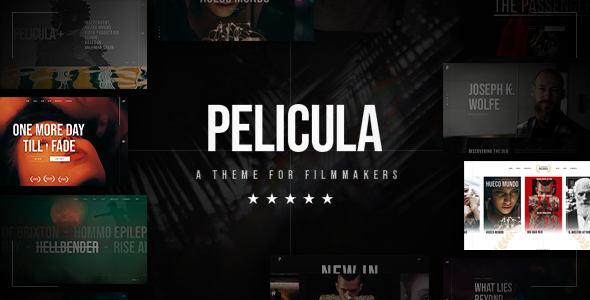
Stuck on your Pelicula WordPress theme? Let's fix it.
No endless back-and-forth. Just send us the details and we'll get it done.
No obligation · Replies within 1 hour · Quote within 1 day
Setup · Customization · Bug fixes · WooCommerce integration
About Pelicula WP Theme
Pelicula is a WordPress theme built by Edge-Themes, designed specifically for film studios, cinemas, movie review sites, and entertainment brands. It ships with a set of pre-built demo pages that cover everything from single film landing pages to full cinema schedules and critic-style review layouts.
The theme runs on Edge-Themes’ proprietary Qode Framework, giving you access to a large library of shortcodes, custom post types for movies and cast members, and a built-in page builder integration. Visually, Pelicula leans into dark, cinematic aesthetics with full-screen video headers, parallax sections, and bold typography that suits entertainment brands well. It is sold and updated through ThemeForest and has an active support team behind it.
Get matched with a Pelicula developer in under one day
Tell us about your Pelicula project. Small fixes, Pelicula theme customization, or a full website build, whatever you need, we've got it covered.
We'll connect you to the right Pelicula developers, define the scope, and get everything 100% clear.
You'll get one estimate, hire your preferred developer, and start collaborating.
Pelicula’s Qode Framework is not standard WordPress. It has its own shortcode library, custom post type setup, and options architecture that takes time to learn properly. A generic WordPress developer will spend hours just orienting themselves. Working with someone who already knows the theme means faster turnaround and fewer mistakes.
Through Codeable, you get matched with vetted WordPress developers who have hands-on experience with complex theme frameworks. No junior freelancers, no guesswork. Post your project and get a clear estimate within 24 hours.
Pros
- Built specifically for film and entertainment sites with relevant custom post types for movies, cast, and schedules
- Dark cinematic design aesthetic with full-screen video headers and parallax sections that suit the industry
- Large library of pre-built demo pages covering cinema schedules, review layouts, and film landing pages
- WooCommerce compatibility allows ticket sales, merchandise, or premium content monetisation
- Active development from Edge-Themes with regular updates and ThemeForest support channel
Cons
- Qode Framework is proprietary, making it harder to switch themes or migrate content later without data loss
- Heavy out-of-the-box with multiple bundled plugins that can slow page load if not configured carefully
- Shortcode-heavy page building creates messy content in the database if you ever want to move away from the theme
- Support is limited to the ThemeForest comments system and can be slow for complex or custom issues
- Steep learning curve for non-developers, particularly around the movie custom post type and schedule modules
Who is Pelicula for?
Independent Cinema Websites
Pelicula’s schedule and showtimes modules make it a practical fit for independent cinemas. You can list films with screening times, trailers, cast details, and ratings without building custom functionality from scratch. The dark visual style matches what cinema audiences expect from a professional venue site.
Film Review and Critic Blogs
The review-focused demo layouts include star ratings, critic quote blocks, and structured movie detail pages. A film review site or solo critic blog can use these templates to publish polished, readable content without heavy customisation. Pairing this with proper SEO setup helps individual reviews rank for specific film titles.
Film Festival Sites
Film festivals need to display schedules, filmmaker profiles, screening venues, and ticketing options in a short window. Pelicula’s event and schedule post types handle this reasonably well. A developer can adapt the existing templates quickly to fit a festival’s specific programme structure and branding requirements.
Movie Production Company Portfolios
Production companies can use Pelicula’s portfolio and project post types to showcase completed films, commercials, or branded content. The full-screen video and image capabilities make project pages visually strong. Custom cast and crew sections can be repurposed to display team bios and production credits.
Streaming or VOD Platforms
With WooCommerce integration, Pelicula can support basic VOD or rental models where users pay to access film content. This requires custom development to connect payment flows with content access controls, but the visual framework and movie post type structure give a developer a solid starting point for the front end.

Customizing Pelicula
Pelicula gives you a lot of options out of the box, but customizing it beyond the demo content requires familiarity with the Qode Framework and its shortcode system. The theme options panel controls fonts, colors, header styles, and footer layouts, but making structural changes or building something that does not match the existing demos takes real effort.
If you need custom movie listing functionality, a modified booking flow, or a layout that diverges from the included templates, working with a Pelicula expert saves significant time. A developer who knows the Qode codebase can extend custom post types, build new page templates, and adjust the theme without breaking future updates. Custom work done directly in the child theme stays clean and maintainable.
Recommended plugins for Pelicula
Pelicula integrates with WooCommerce for ticket or merchandise sales, Contact Form 7 for booking enquiries, and MailChimp for list building. The Qode Framework includes its own slider, portfolio, and gallery modules, so you do not always need third-party plugins for visual elements.
For sites that need stronger search visibility, pairing Pelicula with a dedicated SEO setup is worth considering. If page load times matter, especially with heavy video headers, targeted WordPress performance optimisation can make a real difference. Adding structured SEO work on top of the theme helps film and entertainment sites rank for specific titles and review queries.
Not sure which plugins to use? This WordPress plugins directory covers the most popular options with reviews and setup guides.
Pelicula common issues
Pelicula theme not displaying movie custom post types correctly
This usually happens when the Qode Core plugin is deactivated or outdated. The movie custom post types are registered through the plugin, not the theme itself. Check that Qode Core is active and on the latest version. If post types still do not appear, flushing permalinks under Settings > Permalinks often resolves display issues. If the problem persists after an update, a WordPress bug fix may be needed to trace the conflict.
Pelicula page builder content broken after WordPress update
Pelicula’s shortcodes are rendered by the Qode Framework plugin. If that plugin is disabled or conflicts with another plugin after a core WordPress update, page content can appear as raw shortcode text or break visually. First, update all Qode plugins to their latest versions. If the issue started after a WordPress core update, check the Edge-Themes changelog for a compatibility patch. A developer can audit plugin conflicts quickly if the standard update does not resolve it.
Pelicula theme slow loading with video header
Full-screen video headers are the most common cause of slow Pelicula load times. The theme loads the video on mobile by default in some configurations, which is unnecessary and costly. Disable video on mobile in the theme options, compress the video file to under 5MB using HandBrake, and serve it from a CDN rather than directly from your hosting. Lazy loading other above-the-fold assets also helps. For a full audit, see our WordPress performance service.
Pelicula WooCommerce integration not working
Pelicula’s WooCommerce support is template-based and can break if your WooCommerce version is significantly newer than the theme’s bundled templates. Go to WooCommerce > Status > Tools and check for outdated templates. Update them manually or through a child theme override. If you added WooCommerce after the initial theme setup, also check that the theme’s WooCommerce plugin integration is active inside the Qode dashboard. Persistent cart or checkout issues often need direct developer attention.
Pelicula FAQ
Yes, with the right setup. Pelicula includes schedule modules, movie post types, and trailer support that make it practical for real cinema sites. The main limitation is that some functionality, like live booking system integration, requires custom development on top of the theme. For a straightforward cinema site displaying films, times, and information, it works well without heavy modification.
Basic setup using the included demo content is manageable without coding. Importing a demo, swapping out text and images, and adjusting colors through the theme panel is accessible. However, anything beyond the demo templates, such as custom layouts, modified post type fields, or third-party integrations, will require developer help. The Qode Framework has a learning curve that goes beyond standard WordPress.
Pelicula is built around the Qode Framework and its own page building system, not Elementor. You can technically install Elementor alongside it, but there will be conflicts and redundancy. Edge-Themes does not officially support Elementor with Pelicula. If your workflow depends on Elementor, a different base theme would be a more practical choice than trying to force the two systems to coexist.
Movie listings in Pelicula use a custom post type called Movies, registered by the Qode Core plugin. Go to Movies in your WordPress admin, add a new entry, and fill in the custom fields for title, genre, director, cast, trailer URL, and release date. You then display these on pages using the dedicated Qode shortcodes or widget areas. The theme documentation covers the basic workflow, though the options can be extensive.
Migrating away from Pelicula is not straightforward. Page content built with Qode shortcodes will not transfer cleanly to another theme. Movie post type data may also require manual export and remapping. It is possible with developer help, but plan for significant rebuild work on the content side. If you are considering a WordPress migration, get a proper scoping done before committing to it.
Hire a Pelicula WordPress Developer
Whether you need help setting up your cinema site, customizing the movie listings, or fixing something that has broken after an update, a Pelicula developer can handle it properly. Work is scoped clearly, delivered through Codeable’s vetted network, and backed by a satisfaction guarantee. Get a free estimate with no obligation to hire. You will hear back within 24 hours.
You'll need a free Codeable account so developers can ask questions and send their quotes.