Apicona WordPress Theme
by thememount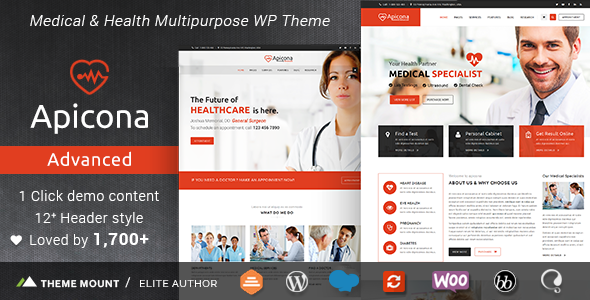
Stuck on your Apicona WordPress theme? Let's fix it.
No endless back-and-forth. Just send us the details and we'll get it done.
No obligation · Replies within 1 hour · Quote within 1 day
Setup · Customization · Bug fixes · WooCommerce integration
About Apicona WP Theme
Apicona is a multipurpose WordPress theme developed by ThemeMound. It’s built for businesses, agencies, and professional services that need a clean, structured layout without a lot of bloat. The theme ships with multiple pre-built demo sites, making it practical for users who want a head start rather than building from scratch.
Apicona works with Elementor, which gives you visual control over pages without touching code. It supports WooCommerce, Contact Form 7, and a range of popular plugins. The theme is lightweight compared to many multipurpose options, which keeps load times reasonable out of the box.
ThemeMound maintains the theme with regular updates, and it follows WordPress coding standards. If you’re running a service business, consultancy, or portfolio site and want something that looks professional without excessive customization overhead, Apicona is a solid starting point.
Get matched with a Apicona developer in under one day
Tell us about your Apicona project. Small fixes, Apicona theme customization, or a full website build, whatever you need, we've got it covered.
We'll connect you to the right Apicona developers, define the scope, and get everything 100% clear.
You'll get one estimate, hire your preferred developer, and start collaborating.
Most WordPress themes look simple until you need them to do something specific. Apicona is no exception. Customizing layouts, fixing plugin conflicts, or building out a WooCommerce store properly takes real development knowledge — not just familiarity with Elementor.
Through Codegen, vetted WordPress developers review your project and provide a clear estimate before any work begins. At ThemeMound’s Apicona theme, working with a specialist through Codeable means you get someone who knows WordPress deeply, not just a theme’s surface settings. The process is straightforward, and you’re never locked in before you’re ready.
Pros
- Clean, lightweight codebase compared to many multipurpose themes
- Multiple pre-built demo sites that cover common business layouts
- Native Elementor support with stable compatibility across updates
- WooCommerce ready with minimal configuration needed for basic stores
- Responsive layouts that hold up well across mobile and tablet screen sizes
Cons
- Limited header and footer layout options without Elementor Pro or custom code
- Demo content import can be slow and occasionally incomplete on certain hosting setups
- Some design options require navigating both the Customizer and Elementor, which feels disjointed
- ThemeMound's support response times can be slow for complex or non-standard issues
- Advanced blog or portfolio layouts need significant customization to stand out from the defaults
Who is Apicona for?
Business & Corporate Services
Apicona’s structured service-page layouts and professional demo options make it a practical choice for law firms, accountants, IT service providers, and other B2B businesses. You can present services, team members, and contact information clearly without needing heavy customization. The clean design keeps focus on content rather than distracting visual elements.
Creative Agency Portfolio
Design studios, marketing agencies, and freelancers can use Apicona’s portfolio section and Elementor flexibility to display work in a clean grid format. The theme supports custom post types for case studies when set up correctly. A developer can extend the portfolio functionality to filter by project type or client industry.
Small E-commerce Store
Apicona’s WooCommerce compatibility makes it viable for shops selling a focused range of products — handmade goods, digital downloads, or service packages. The theme handles basic product pages, cart, and checkout without needing extra plugins. For larger catalogues or advanced filtering, additional customization is recommended to keep performance in check.
Consulting & Professional Services
Consultants, coaches, and independent professionals benefit from Apicona’s straightforward page structure. You can clearly lay out your services, qualifications, and booking or contact options. The theme’s prebuilt sections for testimonials and team bios are useful for building credibility with potential clients visiting the site for the first time.
Nonprofit & Community Organizations
Nonprofits and community groups need a site that’s easy to update and clear for visitors. Apicona’s simple content hierarchy and Elementor editing make it manageable for non-technical staff. You can highlight events, volunteer opportunities, and donation options without complex setups. Custom post types for events or programs can be added by a developer when needed.

Customizing Apicona
Apicona gives you a decent amount of control through the WordPress Customizer and Elementor’s drag-and-drop editor. You can adjust colors, typography, header layouts, and widget areas without writing code. The theme includes section-based page templates that make it straightforward to rearrange content blocks.
That said, deeper customization — custom post types, advanced header behavior, conditional layouts, or integrations with third-party tools — often requires hands-on development work. If you’re trying to get Apicona to behave in a way it wasn’t explicitly designed for, you’ll need someone who knows the theme’s structure.
An experienced Apicona expert can extend the theme cleanly using child themes and custom hooks, keeping your changes upgrade-safe. Whether you need a unique homepage layout, custom Elementor widgets, or a tailored WooCommerce setup, working with a developer who’s familiar with Apicona saves significant time and avoids messy workarounds.
Recommended plugins for Apicona
Apicona pairs well with several plugins that extend its core functionality. Elementor Pro unlocks advanced widgets like forms, popups, and dynamic content, which work reliably within the theme’s layout system. WooCommerce integration is supported natively, making it usable for small to medium product catalogues.
For SEO, plugins like Yoast or Rank Math integrate without conflict. If site speed is a concern, pairing Apicona with a caching plugin and a CDN is recommended — you can also explore WordPress performance optimization to get more out of your setup. For organic growth, a focused WordPress SEO strategy built around the theme’s clean markup can make a real difference.
Not sure which plugins to use? This WordPress plugins directory covers the most popular options with reviews and setup guides.
Apicona common issues
Apicona demo import not working
Demo import failures in Apicona are usually caused by PHP memory limits, execution time limits, or server restrictions on large XML uploads. Start by increasing max_execution_time and memory_limit in your php.ini or wp-config.php. If the import stalls partway through, try importing content sections manually. If server configuration is outside your control, a developer can troubleshoot via WordPress bug fixing or migrate a working environment to your host.
Apicona header not displaying correctly on mobile
Mobile header issues in Apicona typically stem from conflicting Customizer settings and Elementor header overrides, or a missing mobile menu toggle configuration. Check your responsive breakpoints in Elementor and make sure the mobile menu is enabled in the theme’s Customizer header settings. If you’ve built a custom header in Elementor Pro, ensure it has the correct display conditions set for mobile. Clearing cache after changes is essential before testing.
Apicona Elementor widgets missing after update
If Apicona-specific Elementor widgets disappear after a theme or plugin update, the most common cause is a version mismatch between the theme and Elementor or Elementor Pro. First, update all plugins and the theme to their latest versions. If widgets are still missing, deactivate and reactivate the theme. Check the browser console for JavaScript errors that might indicate a conflict. If the issue persists, a WordPress bug fix specialist can isolate the conflict quickly.
Apicona WooCommerce styling broken
Broken WooCommerce styling in Apicona usually appears after a WooCommerce major version update that changes template structure. The theme’s WooCommerce templates may be outdated and overriding the new markup. Navigate to WooCommerce > Status > System Status and check for outdated templates. Updating them manually or via a child theme override is the correct fix. Avoid editing core theme files directly, as changes will be lost on the next theme update.
Apicona FAQ
Yes, Apicona is well-suited for business websites. It includes pre-built layouts for service pages, team sections, testimonials, and contact areas that are common in business sites. It’s clean and professional without being over-designed. For industry-specific requirements or custom functionality, working with a developer will give you more control than the theme settings alone provide.
Apicona is compatible with Elementor Pro and the combination works well for most builds. Elementor Pro adds advanced widgets, custom header and footer building, popup functionality, and form integrations that the free version lacks. If you’re building a serious business site with Apicona, pairing it with Elementor Pro is worth the additional cost for the added flexibility.
ThemeMound updates Apicona periodically, though the release cadence is not as frequent as larger theme developers. It has received compatibility updates for recent versions of WordPress and WooCommerce. Before updating, always back up your site. If you need consistent maintenance and updates handled professionally, a WordPress maintenance plan ensures nothing breaks after updates.
Yes, Apicona supports WooCommerce natively. It works well for small to medium product catalogues with basic storefront requirements. Product pages, cart, and checkout all render correctly with the default setup. For larger stores, advanced filtering, custom product page layouts, or subscription functionality, additional development work is recommended to ensure performance and usability stay on track.
ThemeMound offers support through their item page on ThemeForest, where you can submit tickets. Response times vary. For faster or more technical help — especially for conflicts, broken layouts, or post-update issues — working with an independent WordPress developer is often quicker and more reliable. A specialist can diagnose and fix Apicona issues directly rather than waiting on theme author queues.
Hire an Apicona Developer
Need help building or customizing your Apicona site? Whether it’s a layout that isn’t cooperating, a WooCommerce setup, or a full site build from a demo, a specialist can get it done properly. Post your project and get matched with a vetted Apicona developer within 24 hours. Free estimate, no obligation. Get a free estimate today and see exactly what your project will involve before committing to anything.
You'll need a free Codeable account so developers can ask questions and send their quotes.