Converio WordPress Theme
by ThemeMotive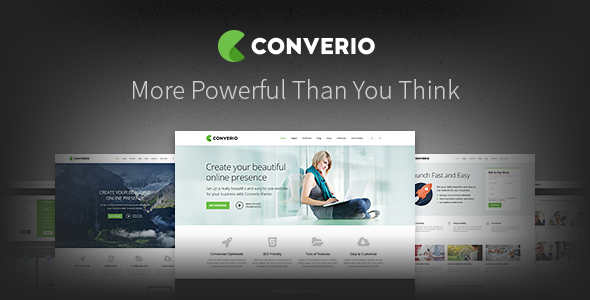
Stuck on your Converio WordPress theme? Let's fix it.
No endless back-and-forth. Just send us the details and we'll get it done.
No obligation · Replies within 1 hour · Quote within 1 day
Setup · Customization · Bug fixes · WooCommerce integration
About Converio WP Theme
Converio is a multipurpose WordPress theme by ThemeMotive, built for businesses that need a clean, professional presence without heavy page-builder overhead. It ships with a drag-and-drop layout system, a solid set of pre-built demo templates, and WooCommerce support out of the box.
The theme targets service businesses, agencies, and consultancies. It is lightweight compared to many multipurpose themes, which helps with initial load times. The demo content importer works well, letting you get a working site up quickly.
ThemeMotive has maintained Converio through several WordPress core updates, so compatibility issues are minimal on current installs. If you want a theme that covers most business use cases without requiring a separate page builder license, Converio is a practical starting point.
Get matched with a Converio developer in under one day
Tell us about your Converio project. Small fixes, Converio theme customization, or a full website build, whatever you need, we've got it covered.
We'll connect you to the right Converio developers, define the scope, and get everything 100% clear.
You'll get one estimate, hire your preferred developer, and start collaborating.
Most Converio sites reach a point where the Customizer is not enough. You need a layout that does not exist in the demos, a custom WooCommerce flow, or integrations that require template-level changes. That is where hiring a specialist makes sense.
All developers at Codeable are vetted and experienced with WordPress themes including Converio. You post your project, get a clear estimate, and decide whether to proceed. No commitment required upfront. Explore our WordPress development services to see what is possible.
Pros
- Lightweight codebase compared to other multipurpose themes, resulting in faster baseline load times
- One-click demo import gets a full working layout live in minutes
- WooCommerce integration is included and functional without extra configuration
- Active ThemeMotive support team with documented update history and regular WordPress compatibility patches
- Section-based homepage builder allows non-technical users to reorder and enable content blocks without code
Cons
- The built-in page builder is less powerful than Elementor or Beaver Builder, limiting complex layout options
- Typography control is limited to Google Fonts only, with no support for self-hosted or premium font files by default
- Mobile menu behavior is basic and requires custom CSS to match more polished navigation patterns
- Blog and archive templates offer minimal layout variation without child theme overrides
- Demo content relies on placeholder images that must be replaced manually, which adds setup time on larger sites
Who is Converio for?
Business Consulting Firms
Converio suits consulting firms that need a professional site with clear service pages, team profiles, and a contact flow. The demo templates cover these sections well. A developer can extend the layout with custom testimonial structures or lead capture integrations tailored to B2B audiences.
Creative Agencies
Agencies can use Converio’s portfolio section and case study layouts to showcase client work. The clean grid design works well for visual portfolios. Custom project post types and filterable galleries are achievable with relatively minor development work on top of the base theme.
Small eCommerce Stores
With WooCommerce support built in, Converio is a reasonable base for stores with smaller product catalogs. The default shop templates are functional. For stores needing custom product pages, bundle logic, or checkout modifications, a developer familiar with WooCommerce template structure is worth bringing in.
SaaS and Software Products
Converio’s feature section and pricing table blocks make it a usable starting point for SaaS landing pages. The homepage builder lets you arrange benefit blocks and calls to action without code. Integrating trial signup forms or subscription billing tools will require developer input beyond the theme defaults.
Nonprofit Organizations
Nonprofits benefit from Converio’s donation-friendly layout options and the ability to highlight mission statements, team members, and event listings. Combined with a plugin like GiveWP for donation processing, the theme supports a complete nonprofit web presence with modest development effort.

Customizing Converio
Converio exposes most visual settings through the WordPress Customizer. You can adjust typography, colors, header layout, and footer columns without touching code. The built-in section builder lets you rearrange homepage blocks and toggle visibility per section.
Beyond those defaults, customization gets more involved. Custom post type layouts, advanced header configurations, and WooCommerce template overrides typically require PHP edits or a child theme. If your project needs anything beyond what the Customizer offers, working with a Converio expert saves you significant time and avoids conflicts during future theme updates.
A child theme is strongly recommended before making any direct template changes. This protects your customizations when ThemeMotive releases updates.
Recommended plugins for Converio
Converio works with most major WordPress plugins without conflicts. WooCommerce, Contact Form 7, and WPML are all compatible. The theme includes basic SEO markup, but pairing it with a dedicated plugin like Yoast or Rank Math gives you proper schema and sitemap control. For deeper WordPress SEO work, those plugins are essential.
On the performance side, Converio responds well to standard optimization setups. Caching plugins, image compression, and a CDN can significantly cut load times, especially on pages with multiple section blocks. See our WordPress performance service if you need structured help there.
Not sure which plugins to use? This WordPress plugins directory covers the most popular options with reviews and setup guides.
Converio common issues
Converio homepage sections not showing after demo import
This usually happens when required plugins are not activated after the demo import. Converio depends on its companion plugins for section content to render. Go to Appearance > Install Plugins and activate all recommended plugins. If sections still do not appear, check the Customizer under the Homepage Settings panel and confirm the correct page is set as the static front page.
Converio theme not compatible with latest WordPress update
ThemeMotive releases compatibility updates for major WordPress versions, but timing varies. First check if a theme update is available in Appearance > Themes. If the issue persists after updating, it is often tied to a specific plugin conflict rather than the theme itself. Disable plugins one at a time to isolate the cause. For persistent issues, our WordPress bug fixing service can resolve this quickly.
Converio mobile menu not working or not opening
Converio’s mobile menu breaks most often due to JavaScript conflicts with other plugins or a caching plugin serving stale scripts. Start by clearing your cache completely. Then check the browser console for JS errors. If a conflict exists, it typically points to a jQuery loading issue. Dequeue conflicting scripts through a child theme function or ask a developer to isolate and fix the specific conflict.
Converio WooCommerce pages showing wrong layout
WooCommerce layout issues in Converio are almost always caused by a mismatch between theme template files and the current WooCommerce version. Converio includes its own WooCommerce templates, which can become outdated after a WooCommerce update. Check WooCommerce > Status > Templates to see which files are outdated, then update them through a child theme. If you are unsure how, a developer can do this safely without breaking existing customizations.
Converio FAQ
Yes, ThemeMotive continues to release updates for Converio. The theme has been updated for compatibility with recent WordPress versions. That said, update frequency is slower than larger theme shops. Always test updates on a staging environment before applying them to a live site to avoid breaking existing customizations.
Converio can work alongside Elementor, but it was not designed specifically for it. The theme has its own section builder for the homepage. Using Elementor for inner pages is straightforward. However, mixing both builders on the same pages can create CSS conflicts. Keeping a clear separation between where each tool is used avoids most problems.
After activating Converio, go to Appearance > Import Demo Data. Select a demo and click Import. The process installs pages, posts, menus, and widgets automatically. Make sure all required plugins are activated first or several sections will import empty. The whole process takes a few minutes depending on your hosting speed.
Converio is compatible with WPML. ThemeMotive has confirmed this in their documentation. String translation for theme-specific text works through WPML’s String Translation module. For complex multilingual setups with WooCommerce and Converio running together, testing each language version thoroughly before launch is strongly recommended.
Migrating an existing site to Converio means rebuilding your content layout within the theme’s section system, which takes planning. Your posts and pages transfer fine, but design recreation takes time. If you are moving from another host or WordPress install at the same time, our WordPress migration service can handle the technical side while you focus on the redesign.
Hire a Converio Developer
If your Converio site needs custom layouts, plugin integrations, WooCommerce modifications, or anything beyond the default theme options, a dedicated developer will get it done correctly. Work is scoped clearly before anything starts, so there are no surprises on cost or timeline.
Get a free estimate with no obligation. You will hear back within 24 hours from a vetted WordPress developer who has worked with themes like Converio before.
You'll need a free Codeable account so developers can ask questions and send their quotes.