Delicieux WordPress Theme
by GoodLayers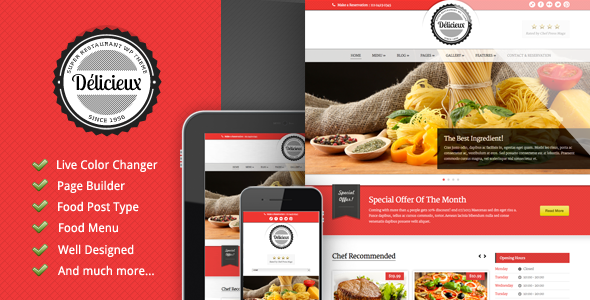
Stuck on your Delicieux WordPress theme? Let's fix it.
No endless back-and-forth. Just send us the details and we'll get it done.
No obligation · Replies within 1 hour · Quote within 1 day
Setup · Customization · Bug fixes · WooCommerce integration
About Delicieux WP Theme
Delicieux is a WordPress theme built by GoodLayers, designed specifically for restaurants, cafes, and food businesses. It ships with a dedicated menu builder, reservation system integration, and a visual page builder that gives you full control over layouts without touching code.
The theme supports multiple homepage styles, full-width gallery sections, and built-in OpenTable or custom booking form options. Typography is clean and food-focused, with warm design presets that work well for fine dining or casual eateries alike.
GoodLayers has a solid track record with hospitality themes. Delicieux follows that pattern: well-documented, regularly updated, and compatible with major plugins like WooCommerce for online ordering and WPML for multilingual menus. It is a practical starting point for any food-related WordPress site.
Get matched with a Delicieux developer in under one day
Tell us about your Delicieux project. Small fixes, Delicieux theme customization, or a full website build, whatever you need, we've got it covered.
We'll connect you to the right Delicieux developers, define the scope, and get everything 100% clear.
You'll get one estimate, hire your preferred developer, and start collaborating.
GoodLayers themes follow their own conventions, and Delicieux is no different. The page builder, theme options, and custom post types all have a learning curve. If you want the site built properly the first time, without digging through documentation or fixing layout conflicts yourself, a vetted WordPress developer through Codeable can handle it. You get an expert who already knows the theme, a clear estimate upfront, and no risk if it does not work out.
Pros
- Built-in restaurant menu post type with category filtering and pricing fields
- Multiple reservation system options including OpenTable integration and custom forms
- GoodLayers Page Builder includes food-specific blocks like chef profiles and gallery grids
- Comes with several polished demo sites covering fine dining, cafes, and bakeries
- WooCommerce compatible for adding online ordering without a separate theme
Cons
- GoodLayers Page Builder is proprietary, making it harder to switch builders later without rebuilding layouts
- Theme options panel is dense and can be confusing for first-time GoodLayers users
- Demo import does not always bring in all sample content cleanly, especially images
- Mobile menu behaviour on some layout variations needs CSS tweaks to look right
- Limited block editor support; the theme is built around the classic editor workflow
Who is Delicieux for?
Fine Dining Restaurant
Delicieux suits upscale restaurants well. The full-width hero sections, dark colour presets, and clean menu grid layouts create a premium feel without heavy custom design work. Reservation integration and chef profile sections cover the main pages a fine dining site needs out of the box.
Cafe or Coffee Shop
Cafes benefit from the gallery-focused layouts and warm typography options in Delicieux. You can build an inviting homepage with daily specials, an Instagram-style photo grid, and a simple contact or booking form. The WooCommerce extension works well for selling retail coffee or merchandise alongside the cafe menu.
Food Delivery or Takeaway Service
With WooCommerce added, Delicieux can function as a food ordering site. Product pages map cleanly to menu items, and the theme layout accommodates category-based browsing for starters, mains, and sides. A developer can set up delivery zones and checkout flows to match your ordering process.
Bakery or Patisserie
Bakeries need strong visual presentation and a clear product display. Delicieux handles both through its gallery sections and menu post type, which doubles as a product showcase. You can list seasonal items, feature specials, and link directly to an order form or WooCommerce product page.
Food Blog with Restaurant Reviews
Food bloggers using Delicieux get a theme that balances editorial content with restaurant-style design. Review posts, recipe layouts, and location guides all fit within the page builder structure. The clean typography keeps long-form content readable while the visual sections break up the page effectively.

Customizing Delicieux
Delicieux includes the GoodLayers Page Builder, which lets you drag and drop sections specific to restaurant sites: menu grids, chef profiles, gallery sliders, and reservation blocks. Most visual changes happen inside the theme options panel without writing a single line of CSS.
That said, deeper customization gets technical fast. Custom post types for menu items, conditional layout logic, and WooCommerce ordering flows often need developer input to get right. A Delicieux expert can build out those details properly, whether that means custom shortcodes, child theme modifications, or third-party plugin integration that fits your exact workflow.
If your site needs more than the default demo provides, working with someone who knows GoodLayers themes well saves a lot of trial and error.
Recommended plugins for Delicieux
Delicieux works well with several plugins that extend its core functionality. WooCommerce adds online ordering. WPML handles multilingual menus for restaurants serving multiple regions. Contact Form 7 or WPForms covers reservation and enquiry forms beyond the built-in options.
For sites that need to perform under traffic, caching plugins like WP Rocket pair well with Delicieux. You can also look at WordPress performance optimisation to improve load times, especially on image-heavy food photography pages. If search visibility matters, a proper WordPress SEO setup ensures your menu pages and location data get indexed correctly.
Not sure which plugins to use? This WordPress plugins directory covers the most popular options with reviews and setup guides.
Delicieux common issues
Delicieux theme menu items not displaying correctly
Menu display issues in Delicieux usually come from the custom post type not being assigned to the right menu category, or a filter widget that has not been configured. Check the Menu section under the theme’s custom post types first. If items are missing, confirm they are published and assigned to an active category. Shortcode placement errors inside the page builder can also cause sections to render blank. A WordPress bug fix can trace the exact cause quickly.
Delicieux page builder layout broken after update
GoodLayers page builder layouts can break after a theme or plugin update if cached shortcode data becomes outdated. First, clear all caches including server-side, plugin-level, and browser. Then check whether the update changed any shortcode names or parameters. Rolling back to the previous theme version via FTP while you diagnose is a safe option. If the issue persists across multiple sections, it is likely a conflict with another plugin loading conflicting scripts.
Delicieux reservation form not sending emails
If the Delicieux reservation form is not sending emails, the most common cause is a server email configuration issue, not the theme itself. Install an SMTP plugin like WP Mail SMTP and connect it to a transactional mail service such as SendGrid or Mailgun. Also check that the form is not being blocked by a spam filter. Test with a different recipient address to confirm delivery. If you are using a third-party booking plugin, verify its own email settings separately.
Delicieux theme slow to load on mobile
Delicieux loads a lot of visual assets, and unoptimised images are the most common cause of poor mobile performance. Run the site through PageSpeed Insights to identify the largest files. Convert hero and gallery images to WebP, enable lazy loading, and use a caching plugin. The GoodLayers builder can also load unused scripts. A developer can audit and remove those. See our WordPress performance service for a full optimisation process.
Delicieux FAQ
GoodLayers has updated Delicieux to maintain compatibility with current WordPress versions. That said, always check the theme changelog before updating WordPress on a live site. Test updates on a staging environment first, especially if you are using the GoodLayers Page Builder with custom layouts. Some older shortcodes may behave differently after major WordPress core updates.
Yes. Delicieux is WooCommerce compatible, and it is a common setup for restaurants adding online ordering. You can map food menu items to WooCommerce products and use the theme’s layout sections to display them. However, configuring delivery options, variable products for customisations, and checkout flow usually benefits from developer input to get right.
Delicieux was built around the classic editor and the GoodLayers Page Builder. Gutenberg block support is limited. You can write post content in the block editor, but theme-specific sections like the restaurant menu, gallery grids, and reservation blocks are managed through the proprietary builder. Switching fully to Gutenberg would require significant rework.
GoodLayers provides a one-click demo importer inside the theme options panel. Go to GoodLayers Options, find the Demo Import section, select your preferred demo, and run the import. It pulls in pages, settings, and placeholder content. Images may not import due to licensing restrictions, so you will need to replace them with your own photography after import.
Yes, migrating an existing restaurant site to Delicieux is possible. Content like posts and pages moves over straightforwardly, but you will need to rebuild layouts in the GoodLayers Page Builder and re-enter menu items into the custom post type. If your current site has complex functionality, a WordPress migration service helps avoid data loss and downtime during the switch.
Hire a Delicieux WordPress Developer
Whether you need a full Delicieux site built from scratch, a demo customised to match your brand, or specific features added to an existing setup, a dedicated developer can get it done faster and cleaner than working through it alone. Post your project and get a free estimate with no obligation to hire. Get your free estimate here and get matched with a Delicieux expert within 24 hours.
You'll need a free Codeable account so developers can ask questions and send their quotes.