Arte WordPress Theme
by CurlyThemes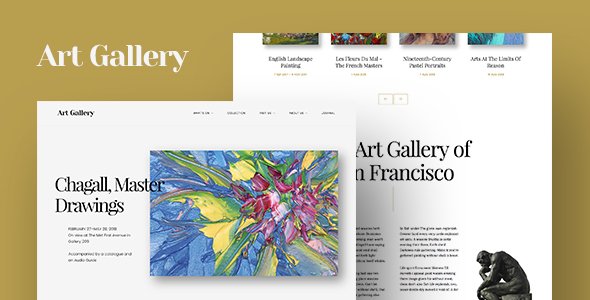
Stuck on your Arte WordPress theme? Let's fix it.
No endless back-and-forth. Just send us the details and we'll get it done.
No obligation · Replies within 1 hour · Quote within 1 day
Setup · Customization · Bug fixes · WooCommerce integration
About Arte WP Theme
Arte is a WordPress theme by CurlyThemes built for artists, photographers, illustrators, and creative professionals who want their work to speak first. It uses a clean, minimal grid layout that keeps the focus on visuals rather than clutter.
The theme supports full-screen galleries, portfolio post types, and smooth transitions between pages. It is built on standard WordPress hooks and filters, which makes it straightforward to extend without fighting the codebase.
Arte works well out of the box with Elementor and the classic editor, and it loads fast on clean installs. Typography options are solid for a creative theme, with Google Fonts integration baked in. If you are an artist tired of themes that bury your work under unnecessary widgets, Arte is worth a serious look.
Get matched with a Arte developer in under one day
Tell us about your Arte project. Small fixes, Arte theme customization, or a full website build, whatever you need, we've got it covered.
We'll connect you to the right Arte developers, define the scope, and get everything 100% clear.
You'll get one estimate, hire your preferred developer, and start collaborating.
Arte looks simple, but creative sites have specific demands: fast image loading, consistent grid behavior across devices, and portfolio structures that actually make sense to clients. Small misconfigurations cause layout breaks or slow galleries.
Through Codeable, you get access to vetted WordPress developers who have worked with Arte and themes like it. No guesswork, no generic fixes. A developer who understands CurlyThemes’ structure can customize, troubleshoot, or extend Arte efficiently, without introducing technical debt into your site.
Pros
- Clean minimal grid layout keeps visual work front and center without distractions
- Portfolio post type is built in, no need for a separate plugin to manage projects
- Fast default load times on clean installs due to lean stylesheet and minimal JavaScript
- Full-screen image and gallery support works reliably across desktop and mobile
- Straightforward template hierarchy makes developer customization predictable and clean
Cons
- Customizer options are limited for advanced layout changes beyond basic color and font adjustments
- WooCommerce styling requires manual CSS work as there are no dedicated shop templates included
- Documentation from CurlyThemes is sparse, which slows down troubleshooting for first-time users
- Blog layout is basic and not well suited for sites that need content publishing alongside portfolio work
- Update frequency from CurlyThemes has been inconsistent, raising long-term compatibility questions
Who is Arte for?
Photographer Portfolio
Arte’s full-screen image support and fast-loading grid make it a natural fit for photographers. You can organise work by project or series using the built-in portfolio type, and the clean layout lets the photography carry the page without competing visual noise. A developer can add client gallery access or download controls on top of the base theme.
Illustrator or Digital Artist
Illustrators benefit from Arte’s precise grid control and strong typography pairing options. Individual project pages give enough space to walk through a body of work in sequence. With some customization, you can add process breakdowns, animated image reveals, or categorized archives filtered by style or medium.
Graphic Designer Showcase
Graphic designers need a portfolio that reflects their attention to layout detail. Arte’s minimal structure provides that without imposing its own strong visual identity. Case study pages can be built out with custom template files, and the clean codebase means a developer can add the structured project narrative layouts designers typically need.
Fine Art or Gallery Artist
Fine artists and gallery-represented creatives need a site that reads as professional without looking like a template. Arte’s whitespace-heavy design suits this well. With developer help, you can add exhibition history pages, press sections, and inquiry forms that connect to your email or CRM without compromising the visual tone of the site.
Freelance Creative Agency
Small creative agencies with two to five team members can use Arte as a starting point for a shared portfolio site. The category and tag system supports filtering by project type or client industry. A developer can extend this with team member profiles, service pages, and a lead capture form while keeping the core aesthetic intact.

Customizing Arte
Arte ships with a useful set of Customizer options, but most serious creative sites will need work beyond the defaults. Color schemes, grid column counts, spacing, and font pairings can all be adjusted without touching code, which covers the basics for most solo artists.
Beyond that, things get technical. Custom portfolio filters, layout variations for different project types, and header modifications typically require PHP template overrides or targeted CSS. An Arte expert knows where CurlyThemes has structured the template hierarchy and can make changes that survive updates cleanly.
If you need a custom lightbox behavior, a client-facing password-protected gallery, or integration with a booking or print-on-demand plugin, working with someone who knows Arte specifically saves significant trial and error.
Recommended plugins for Arte
Arte pairs well with WooCommerce if you want to sell prints or digital downloads directly from your portfolio. Portfolio filter plugins like Ajax Load More slot in cleanly given Arte’s grid structure.
For SEO, Arte’s clean markup gives a strong foundation, but pairing it with a solid WordPress SEO setup ensures your portfolio pages rank for the right searches. On performance, Arte is lean by default, though image-heavy sites still benefit from a proper WordPress performance configuration including image optimization and caching.
Contact form plugins, cookie consent tools, and social feed integrations all work without conflicts on a standard Arte install.
Not sure which plugins to use? This WordPress plugins directory covers the most popular options with reviews and setup guides.
Arte common issues
Arte theme portfolio grid not displaying correctly on mobile
Mobile grid issues in Arte usually come from a CSS conflict with a plugin or a child theme override that was not written with responsive breakpoints in mind. Check the browser console for conflicting stylesheet rules first. If you added custom column count CSS, make sure it includes media queries. In most cases, a targeted fix in the child theme stylesheet resolves this without touching the parent theme files. If the issue appeared after a plugin update, deactivate plugins one at a time to isolate the conflict. For persistent layout problems, our WordPress bug fixing service can diagnose and resolve it quickly.
Arte theme images loading slowly on portfolio pages
Arte does not include built-in image lazy loading or automatic compression, so image-heavy portfolio pages can feel slow without additional configuration. Start by checking image file sizes and make sure you are serving scaled images rather than full-resolution uploads. Add a caching plugin and an image optimization tool. If the site is on shared hosting, server response time may also be a factor. A proper WordPress performance setup for an Arte site typically brings load times down significantly with minimal changes to the theme itself.
Arte WordPress theme not compatible with latest WordPress update
CurlyThemes has not always released updates in sync with WordPress core releases. If Arte breaks after a WordPress update, the most common causes are deprecated functions in the theme’s PHP files or a JavaScript conflict with the updated block editor. Check the site health screen for specific errors. Running the theme in a staging environment before updating production is the safest practice. If the theme is no longer actively maintained, a developer can patch the specific compatibility issues directly in a child theme rather than modifying core theme files.
Arte theme header logo not showing or misaligned
Logo display issues in Arte are most often caused by uploading an image with incorrect dimensions for the header area, or a CSS override from a plugin like Elementor affecting the header template. Go to Customizer, remove the logo, and re-upload a version sized to Arte’s recommended dimensions. If the logo appears but is misaligned, inspect the header markup in your browser and identify which CSS rule is affecting the position. A single targeted rule in the child theme stylesheet is usually enough to fix alignment without broader layout consequences.
Arte FAQ
Yes, Arte works well for photography portfolios. Its full-screen image support, minimal grid layout, and built-in portfolio post type are all suited to image-led sites. The theme stays out of the way visually, which is exactly what most photographers want. For larger portfolios or client gallery features, a developer can extend the default setup without replacing the core theme structure.
Arte is compatible with Elementor and most page builder plugins. The theme’s minimal default styling means Elementor templates render cleanly without major CSS conflicts. That said, building portfolio archive pages with Elementor on top of Arte sometimes requires custom CSS adjustments to maintain the grid consistency CurlyThemes designed into the theme’s native templates.
CurlyThemes has had inconsistent update releases for Arte. The theme functions correctly on recent WordPress versions, but update gaps have raised concerns about long-term support. If you are building a new site, factor in that you may need developer help to patch compatibility issues after major WordPress releases rather than relying solely on theme updates from CurlyThemes.
WooCommerce works on Arte, but the theme does not include dedicated shop templates. Shop pages will use WooCommerce’s own default styling, which will not automatically match Arte’s aesthetic. To sell prints or digital files with a consistent look, you will need custom WooCommerce template overrides. A WordPress developer familiar with Arte can handle this integration without disrupting the portfolio side of the site.
Arte integrates with Google Fonts through the WordPress Customizer, which covers most font needs. To add fonts not available through Google Fonts, you can enqueue them manually in a child theme’s functions.php file and apply them via CSS. If you are using a premium font that requires a license, load it locally rather than from an external CDN to avoid privacy compliance issues and improve load speed.
Hire an Arte WordPress Developer
Whether you need a custom portfolio layout, a WooCommerce integration, or a fix for a specific Arte bug, working with a specialist is faster than going it alone. Our developers know CurlyThemes’ codebase and deliver clean, maintainable work.
Post your project and get a free estimate within 24 hours. No obligation to hire. Get your free Arte estimate today and see exactly what your project needs before committing.
You'll need a free Codeable account so developers can ask questions and send their quotes.