Lounge WordPress Theme
by QODE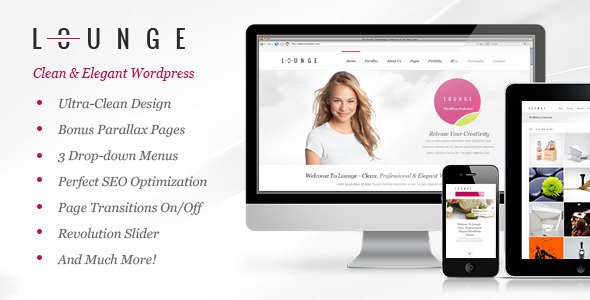
Stuck on your Lounge WordPress theme? Let's fix it.
No endless back-and-forth. Just send us the details and we'll get it done.
No obligation · Replies within 1 hour · Quote within 1 day
Setup · Customization · Bug fixes · WooCommerce integration
About Lounge WP Theme
Lounge is a WordPress theme built by QODE, designed for hospitality businesses, bars, restaurants, and upscale venues. It ships with a clean visual design, full-screen sliders, reservation-focused layouts, and multiple homepage demos that suit different venue types.
Built on QODE’s own framework, Lounge includes the Visual Composer page builder, customizable menu sections, event listings, and gallery options suited for showcasing ambiance and offerings. It’s a solid starting point for any hospitality brand that needs a polished web presence without building from scratch.
The theme is actively maintained by QODE and includes access to their support forum. Setup is guided by detailed documentation, though getting beyond the demo setup typically requires some hands-on configuration or developer help.
Get matched with a Lounge developer in under one day
Tell us about your Lounge project. Small fixes, Lounge theme customization, or a full website build, whatever you need, we've got it covered.
We'll connect you to the right Lounge developers, define the scope, and get everything 100% clear.
You'll get one estimate, hire your preferred developer, and start collaborating.
QODE themes like Lounge have their own framework logic, custom shortcodes, and theme-specific settings that behave differently from standard WordPress setups. Generic WordPress advice often doesn’t apply directly.
FoxyConcept works with vetted Lounge developers through Codeable, the professional WordPress developer network. Every developer on Codeable is screened and rated. You post your project, get matched with specialists, and receive a clear estimate before any work begins. No guessing, no back-and-forth with generalists.
Pros
- Multiple pre-built homepage demos tailored to different hospitality venue types
- Built-in Visual Composer page builder included with the theme license
- Dedicated sections for food/drink menus, events, and gallery presentations
- Full-screen video and image background support for strong visual impact
- Active QODE support forum with regular theme updates
Cons
- Heavily tied to QODE's custom framework, making plugin conflicts harder to diagnose
- Visual Composer is bundled, not the latest Elementor standard most developers now expect
- Demo import can be unreliable and may require manual cleanup after setup
- Page load times suffer without deliberate performance optimisation due to theme weight
- Customising beyond the demo layout often requires knowledge of QODE-specific shortcodes
Who is Lounge for?
Cocktail Bars and Nightclubs
Lounge’s dark, atmospheric design options make it well-suited for bar and nightlife brands. Full-screen backgrounds, event listings, and gallery sections let venues show off their space and promote upcoming nights. A developer can wire in a ticketing plugin or link to your booking platform cleanly.
Upscale Restaurants
Restaurant owners get dedicated menu sections with custom typography and food category layouts. The theme handles reservation call-to-actions well and supports OpenTable embeds. With the right images and a clean page structure, it presents high-end dining in a way that matches the experience.
Hotel and Boutique Accommodation
Hotels and boutique stays benefit from Lounge’s room showcase layouts and full-width gallery support. You can feature amenities, local attractions, and booking prompts across well-structured pages. Custom header options help create a branded experience that feels distinct from generic hospitality templates.
Event Venues and Private Hire
Event spaces need to communicate capacity, atmosphere, and availability clearly. Lounge handles photo-heavy venues well and can be structured around inquiry forms and availability calendars. A developer can set up contact routing so different event types go to the right team member.
Coffee Shops and Café Brands
Cafés and specialty coffee brands can use Lounge’s lighter demo variants for a warm, inviting feel. Menu sections work well for showcasing seasonal offerings. Paired with a loyalty plugin or WooCommerce for merchandise, it covers most of what a growing café brand needs from its website.

Customizing Lounge
Out of the box, Lounge covers the basics well. The theme options panel lets you control fonts, colors, headers, and footers without touching code. Visual Composer handles most layout work through drag-and-drop blocks.
Where it gets more complex is when you want to move beyond the demo and build something specific to your brand. Custom menu layouts, booking integrations, multilingual setups, or unique section animations often need custom CSS or PHP work.
A Lounge expert who knows QODE’s framework can save you hours of trial and error. Whether you need a full custom build or targeted adjustments to an existing site, working with someone who knows this theme’s structure means cleaner output and fewer surprises.
Recommended plugins for Lounge
Lounge works with most standard WordPress plugins. For reservations, OpenTable and Resy embed cleanly. WooCommerce can be added for merchandise or ticketed events. Contact Form 7 and WPForms both integrate without conflict.
If you’re running a venue site, page load speed matters. Large image galleries and full-screen video backgrounds can slow things down if not properly optimised. Pairing Lounge with a caching layer and a CDN makes a real difference. For organic traffic, on-page technical work also pays off. See our WordPress performance service and WordPress SEO service for details.
Not sure which plugins to use? This WordPress plugins directory covers the most popular options with reviews and setup guides.
Lounge common issues
Lounge theme demo import not working
Demo import failures in Lounge are common and usually caused by PHP memory limits or server timeout settings. Start by increasing max_execution_time and memory_limit in your php.ini or via wp-config.php. If the import still fails partway, try importing the XML content manually through WordPress’s built-in importer, then apply the theme settings separately. If you’re stuck, our WordPress bug fixing service can resolve this quickly.
Lounge theme slow loading on mobile
Lounge loads several scripts and large background assets by default, which causes poor mobile performance. Start by converting hero images to WebP and lazy loading anything below the fold. Disable unused Visual Composer elements via the VC settings panel. Add a caching plugin and minify scripts. If your Lighthouse mobile score is still below 60, a deeper audit is worth running. See our WordPress performance service for structured help.
Visual Composer shortcodes showing as plain text in Lounge
If Visual Composer shortcodes appear as raw text on the front end, the plugin is likely deactivated or the bundled version has a license conflict. Go to Plugins and check whether Visual Composer (WPBakery) is active. If it was recently updated, a theme-plugin version mismatch may be the cause. Try deactivating and reactivating the plugin. If that doesn’t help, rolling back to the version QODE’s current theme release was tested against usually fixes it.
Lounge theme header not displaying correctly after update
Header display issues after a Lounge update are typically caused by changes to QODE’s header builder logic conflicting with saved custom settings. First, clear your caching plugin and browser cache. Then go to Lounge Options and manually re-save your header settings. If you have custom CSS targeting header elements, check whether QODE changed class names in the update changelog. Reverting to the previous theme version via FTP while you investigate is a safe interim step.
Lounge FAQ
Yes, Lounge is a practical choice for restaurant sites. It includes dedicated food and drink menu sections, reservation call-to-action placements, and gallery layouts suited to showcasing a dining space. The pre-built demos cover different restaurant styles. You’ll likely want a developer to customise it beyond the demo and integrate a booking system properly.
Lounge is built around WPBakery (Visual Composer), not Elementor. You can technically install Elementor alongside it, but you’ll likely run into conflicts with QODE’s custom post types and shortcodes. It’s generally better to work within the theme’s intended builder or rebuild the site in a different theme if you’re committed to Elementor.
Lounge doesn’t ship with a native booking system. The most practical options are embedding an OpenTable or Resy widget, or installing a plugin like Bookly or Restaurant Reservations. Placement and styling of the booking form usually needs CSS adjustments to match the theme’s design. A developer familiar with Lounge can handle this without breaking the layout.
Migrating content to the Lounge theme is possible but requires planning. Posts and pages transfer via standard WordPress export tools, but layout work built in another page builder won’t carry over. You’ll need to rebuild pages in Visual Composer. Our WordPress migration service handles this kind of transition cleanly.
QODE continues to release updates for Lounge and provides support through their forum. The theme receives compatibility updates for new WordPress versions. That said, response times on the support forum can vary. For urgent or technical issues, working with an independent Lounge developer is often faster than waiting on theme support.
Hire a Lounge WordPress Developer
Need help with your Lounge theme? Whether it’s a new build, a design refresh, or a specific fix, a dedicated Lounge developer gets the job done without the back-and-forth of working with someone unfamiliar with QODE’s setup.
FoxyConcept connects you with experienced Lounge specialists through Codeable. Get a free estimate today. No obligation, no risk. You’ll hear back within 24 hours.
You'll need a free Codeable account so developers can ask questions and send their quotes.