Depot WordPress Theme
by Mikado-Themes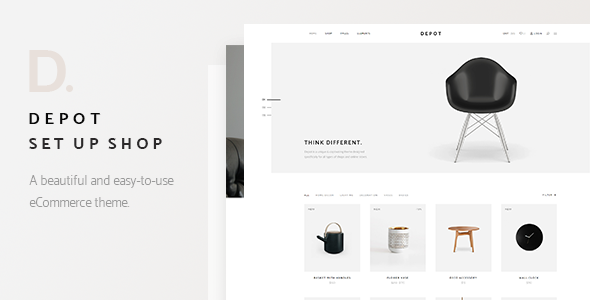
Stuck on your Depot WordPress theme? Let's fix it.
No endless back-and-forth. Just send us the details and we'll get it done.
No obligation · Replies within 1 hour · Quote within 1 day
Setup · Customization · Bug fixes · WooCommerce integration
About Depot WP Theme
Depot is a WooCommerce theme by Mikado-Themes built specifically for online stores. It ships with a clean, minimal aesthetic that works well for fashion, lifestyle, and specialty retail brands. The theme includes over 20 pre-built demos, each with a distinct visual style you can import in one click.
Under the hood, Depot uses the Mikado core plugin and Mikado Slider for most of its visual functionality. It supports WooCommerce out of the box, with custom product layouts, AJAX filtering, and a quick view feature. The theme is compatible with WPML for multilingual stores and integrates with popular payment and shipping plugins. Page building is handled through Elementor or the bundled Visual Composer, giving you layout flexibility without writing code.
Get matched with a Depot developer in under one day
Tell us about your Depot project. Small fixes, Depot theme customization, or a full website build, whatever you need, we've got it covered.
We'll connect you to the right Depot developers, define the scope, and get everything 100% clear.
You'll get one estimate, hire your preferred developer, and start collaborating.
Depot is feature-rich, but getting it to behave exactly how you want takes real WooCommerce and PHP knowledge. Customizing templates, fixing checkout flow issues, or integrating third-party plugins without breaking the theme’s styling requires hands-on experience. Our developers work through Codeable, a vetted platform where every developer is pre-screened. You get a fixed estimate before any work starts, and you only pay when you’re satisfied with the result. No guesswork, no hourly surprises.
Pros
- One-click demo import makes initial setup fast and predictable
- Multiple header and product page layout options built into the theme panel
- AJAX cart and quick view features improve the shopping experience without extra plugins
- WPML compatible for running a multilingual WooCommerce store
- Clean code output that works well with SEO and caching plugins
Cons
- Relies on the Mikado core plugin, which creates a tight dependency on the developer's ecosystem
- Visual Composer inclusion adds bloat if you prefer Elementor or block-based editing
- Demo content imports can be slow and occasionally require manual cleanup
- Update cadence from Mikado-Themes can lag behind major WooCommerce releases
- Deep customizations require child theme work and WooCommerce template knowledge
Who is Depot for?
Fashion and Apparel Stores
Depot’s lookbook-style demos and large image-focused product layouts suit fashion stores well. The quick view feature and wishlist support are standard for clothing retail. Multiple gallery layouts let you show products in context without extra plugins. A Depot developer can configure size guide modals, filter by attribute, and set up variation swatches to match your brand.
Home Decor and Furniture Retailers
Home decor stores benefit from Depot’s full-width imagery and minimal grid layouts. The theme handles large product catalogs cleanly with AJAX filtering by category, price, and custom attributes. You can build room scene pages using the bundled page builder, then link directly to individual product listings. Works well for stores selling both individual items and curated collections.
Beauty and Skincare Brands
Beauty brands need clean product presentation and clear ingredient or detail sections. Depot supports tabbed product descriptions, custom fields, and multiple image angles per product. The minimal demos available in the theme are well suited to skincare aesthetics. A developer can extend this with subscription product support and custom packaging option add-ons through WooCommerce Product Add-Ons.
Specialty Food and Beverage Shops
Specialty food shops often need product bundles, local delivery options, and subscription boxes. Depot’s WooCommerce foundation supports all of these through compatible extensions. The theme’s visual flexibility lets you build a brand-focused storefront without it looking like a generic shop. Adding weight-based shipping or subscription billing is handled at the plugin level, with Depot’s templates adapting cleanly.
Electronics and Gadget Stores
Electronics stores need comparison features, detailed spec tables, and trust signals near the add-to-cart button. Depot supports custom tab sections on product pages where specs can be structured clearly. With a child theme and some custom template work, a Depot developer can add comparison tables and badge overlays for sale or stock status without relying on heavy third-party plugins.

Customizing Depot
Depot’s customization options are split between the WordPress Customizer and a dedicated theme options panel. You can control typography, color schemes, header layouts, and footer structure from one place. The theme ships with multiple header styles including sticky, transparent, and minimal variants.
For product pages, you can choose from several gallery layouts, adjust the cart behavior, and configure upsell placement. Category pages support both grid and list views with AJAX loading. If you need changes beyond what the panel offers, a Depot expert can modify templates directly, adjust WooCommerce hooks, or extend the theme’s PHP filters without breaking future updates. Custom CSS works fine for minor tweaks, but structural layout changes usually require template overrides handled at the child theme level.
Recommended plugins for Depot
Depot works with most major WooCommerce extensions including WooCommerce Subscriptions, Product Add-Ons, and WooCommerce Bookings. For marketing, it integrates cleanly with Yotpo, Klaviyo, and Mailchimp for WooCommerce. The theme also supports WooCommerce Points and Rewards for loyalty programs.
On the performance side, Depot is compatible with caching plugins like WP Rocket and object caching setups. For SEO, it outputs clean markup and works with Yoast and Rank Math without conflicts. If you need help optimizing a Depot store’s speed or search visibility, see our WordPress performance service and WordPress SEO service.
Not sure which plugins to use? This WordPress plugins directory covers the most popular options with reviews and setup guides.
Depot common issues
Depot theme not loading styles after update
This usually happens when the Mikado core plugin is out of sync with the theme version. After updating Depot, always update the bundled plugins immediately. If styles are still broken, clear your caching plugin’s cache, then check whether a child theme’s enqueued styles are conflicting. If you’ve added custom CSS via a plugin rather than the child theme, it may have been overwritten. Our WordPress bug fixing service can trace the exact conflict and restore your layout.
Depot WooCommerce product images not displaying correctly
Product image display issues in Depot are often caused by WooCommerce thumbnail regeneration not being run after setup or after switching themes. Go to WooCommerce > Status > Tools and run Regenerate Thumbnails. If images are still cropped incorrectly, check the image size settings in your theme options panel under Shop. In some cases, the Mikado core plugin’s image settings override WooCommerce defaults and need to be adjusted manually.
Depot AJAX filter not working on shop page
AJAX filtering on Depot’s shop page depends on the Mikado core plugin’s filter widget being configured correctly. First, confirm the widget is placed in the correct sidebar and that AJAX is enabled in the theme’s shop options. Conflicts with caching plugins are common. Make sure your cache is set to exclude shop, product category, and product tag URLs. If the filter loads but results don’t update, a JavaScript conflict with another plugin is likely the cause.
Depot theme slow loading speed on mobile
Depot loads several scripts and stylesheets from the Mikado core plugin, which adds to page weight on mobile. Start by enabling script minification and combining CSS files through a plugin like WP Rocket. Lazy load product images, especially on category pages. The theme’s built-in sliders can be heavy on mobile, so consider disabling animations or switching to a lighter slide format for smaller screens. See our WordPress performance service for a full audit.
Depot FAQ
Yes. Depot is built specifically for WooCommerce and includes custom product page layouts, AJAX filtering, quick view, and wishlist functionality out of the box. It’s compatible with major WooCommerce extensions including subscriptions, bookings, and product add-ons. For serious stores, it’s a solid starting point, though complex customizations will need a developer familiar with both Depot and WooCommerce template structure.
Depot includes compatibility with Elementor, but its core demos and most pre-built layouts are designed around Visual Composer. You can use Elementor for custom pages, but you may find some Depot-specific shortcodes and elements only work through Visual Composer. If you want to rebuild Depot layouts entirely in Elementor, a developer can migrate the structure while keeping your WooCommerce settings and styling intact.
After activating Depot and installing the required plugins, go to Mikado Options > Import in your WordPress dashboard. Choose a demo from the list and click Import. The process imports content, widgets, and settings. Make sure your server has enough memory allocated, as imports can fail on low-resource hosting. Always run the import on a fresh WordPress install to avoid content conflicts with existing pages or settings.
Technically yes, but it’s not straightforward. The bundled demos are built with Visual Composer, so removing it means rebuilding those pages. For new pages you create yourself, you can use Elementor or the WordPress block editor instead. Some Depot shortcodes rely on Visual Composer to render, so any demo content using those elements will break if Visual Composer is deactivated. A developer can help you migrate cleanly.
Mikado-Themes continues to release updates for Depot, though the update frequency is not as regular as some larger theme shops. Major WooCommerce version updates sometimes take a few weeks to be reflected in a Depot patch. Before updating WooCommerce on a live Depot store, check the Mikado-Themes changelog and test on a staging site first. Our WordPress maintenance service can handle this process for you.
Hire a Depot Expert Developer
Whether you need a complete Depot store setup, a specific feature added, or a bug fixed, our developers can help. Work is scoped clearly before it starts, so you know exactly what you’re getting. Get a free estimate with no obligation to hire. Projects are matched within 24 hours through Codeable, and every developer on the platform has been individually vetted for WordPress and WooCommerce expertise.
You'll need a free Codeable account so developers can ask questions and send their quotes.