Medilink WordPress Theme
by RadiusTheme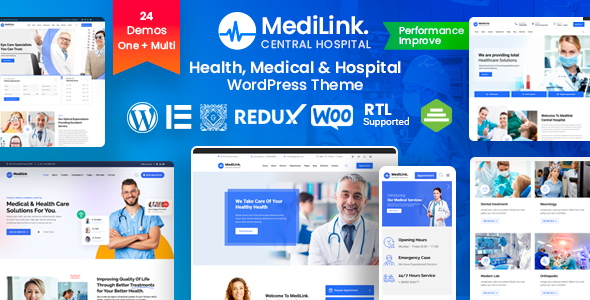
Stuck on your Medilink WordPress theme? Let's fix it.
No endless back-and-forth. Just send us the details and we'll get it done.
No obligation · Replies within 1 hour · Quote within 1 day
Setup · Customization · Bug fixes · WooCommerce integration
About Medilink WP Theme
Medilink is a medical and healthcare WordPress theme built by RadiusTheme. It targets clinics, hospitals, dental practices, and individual practitioners who need a professional web presence without starting from scratch.
The theme ships with Elementor page builder compatibility, a pre-built appointment booking section, department and doctor listing templates, and multiple homepage layouts. It supports WooCommerce for selling health products or services online.
Medilink uses a clean, clinical design style with well-structured typography and a color system suited for healthcare branding. It is translation-ready and WPML compatible, which matters if you serve multilingual patient bases. Built on a lightweight foundation, it avoids the performance drag common in bloated medical themes.
Get matched with a Medilink developer in under one day
Tell us about your Medilink project. Small fixes, Medilink theme customization, or a full website build, whatever you need, we've got it covered.
We'll connect you to the right Medilink developers, define the scope, and get everything 100% clear.
You'll get one estimate, hire your preferred developer, and start collaborating.
Medilink is straightforward to install but complex to configure properly. Getting doctor listings, booking flows, and department pages working together takes real WordPress experience. A developer who knows the theme’s template structure can build exactly what your clinic needs without hacks or workarounds.
Through Codeable, you get access to vetted WordPress developers who have worked on healthcare sites before. Post your project and receive a free estimate within 24 hours, with no obligation to proceed.
Pros
- Multiple pre-built homepage layouts designed specifically for medical and healthcare niches
- Built-in doctor and department listing templates with structured post types
- Elementor compatibility gives non-technical users reasonable control over layout editing
- WPML ready and translation-compatible for multilingual clinic websites
- WooCommerce support allows product or service sales without a separate ecommerce theme
Cons
- Appointment booking relies on third-party plugins, nothing functional ships natively
- Heavy use of Elementor widgets increases page weight if not carefully managed
- Default color scheme requires customization to match specific clinic or hospital branding
- Some inner page templates are visually underdeveloped compared to the homepage demos
- Support from RadiusTheme can be slow during high-demand periods
Who is Medilink for?
General Medical Clinic
Medilink suits general practices well. The doctor listing templates and department pages give patients clear navigation to find the right service. A developer can connect an appointment plugin and configure service area pages to target local search traffic for your clinic.
Dental Practice
Dental offices benefit from Medilink’s clean layout and service-focused templates. Treatment pages, team bios, and a booking form integrate naturally. With the right customization, a dental site built on Medilink can handle new patient registration and appointment requests without a separate software solution.
Private Hospital
Larger hospital sites need careful structure. Medilink’s department and specialist templates handle this reasonably well. A developer will need to extend the default setup with custom post types and filtered search so patients can locate the right department or consultant quickly.
Physiotherapy Center
Physio centers need clear service descriptions and easy appointment booking. Medilink’s layout adapts to this without much friction. Adding a booking plugin like Amelia, configuring therapist profiles, and setting up a contact form covers most of what a physiotherapy website requires.
Health Product Store
If your health business sells physical or digital products alongside services, Medilink’s WooCommerce compatibility makes it a practical choice. You get a healthcare-styled storefront without switching themes. A developer can integrate the shop cleanly into the existing site structure.

Customizing Medilink
Out of the box, Medilink gives you a solid starting point, but most healthcare sites need adjustments that go beyond the theme panel. Doctor profile layouts, custom appointment forms, insurance information pages, and specific department structures all require hands-on work.
A Medilink expert can rework the default templates, connect third-party booking plugins like Amelia or Bookly, adjust the color scheme to match your clinic branding, and configure the header and footer for proper navigation. If you need custom post types for services or staff, or want to modify how patient testimonials display, that work goes beyond what drag-and-drop alone can achieve.
Getting the right developer saves time and avoids the trial-and-error that comes from working in an unfamiliar theme structure.
Recommended plugins for Medilink
Medilink pairs well with several plugins that extend its core functionality. Amelia and Bookly both integrate cleanly for appointment scheduling. WooCommerce handles product sales if your clinic sells supplements or health kits. For contact and intake forms, WPForms or Gravity Forms work reliably with the theme’s layout.
If you want to improve visibility in search results, pairing Medilink with proper WordPress SEO work makes a real difference for local healthcare searches. Similarly, WordPress performance optimization ensures the theme loads fast for patients browsing on mobile.
Not sure which plugins to use? This WordPress plugins directory covers the most popular options with reviews and setup guides.
Medilink common issues
Medilink appointment form not working
The appointment section in Medilink demos is visual only. It does not process bookings without a connected plugin. If your form is broken, first confirm a booking plugin is installed and properly configured. Check for plugin conflicts by temporarily disabling others. If the form relies on a contact plugin like WPForms, verify the form ID in the theme settings matches the actual form. For persistent issues, a WordPress bug fixing service can diagnose the problem quickly.
Medilink doctor listing page layout broken
A broken doctor listing page usually comes from a missing or misconfigured custom post type, a template file conflict after a theme update, or a plugin that alters archive layouts. Start by checking if the doctor custom post type is still registered. Clear any caching plugin. If the layout only broke after an update, restore from backup and test the update in staging. A developer can rebuild the template if it cannot be recovered cleanly.
Medilink theme slow loading on mobile
Medilink built with Elementor can accumulate significant CSS and JavaScript. Check your page speed using Google PageSpeed Insights to identify the main bottlenecks. Compress and lazy-load images. Reduce unused Elementor widgets by cleaning up hidden sections. Use a caching plugin and a CDN. If the theme itself is loading oversized assets, a developer can queue scripts conditionally. Detailed WordPress performance optimization addresses this at the root.
Medilink Elementor widgets not displaying correctly
Elementor widget display issues in Medilink often come from a version mismatch between the theme and Elementor or Elementor Pro. Update both and test. If the issue appears only on certain pages, check for CSS overrides in the theme’s custom CSS field. Disable child theme customizations temporarily to isolate the source. If widgets appear in the editor but not on the frontend, a caching or server-side rendering issue is likely the cause.
Medilink FAQ
Yes, Medilink is built for use with Elementor and works with Elementor Pro. Most of the demo content relies on standard Elementor widgets. Elementor Pro adds form widgets and additional layout tools that work within Medilink’s structure. Keep both the theme and Elementor updated to avoid compatibility gaps that can break layouts or widgets on live pages.
Both Bookly and Amelia integrate with Medilink. The theme does not provide native appointment processing, so you need one of these plugins to handle actual booking functionality. Amelia is generally recommended for medical sites due to its service and staff management features. A developer can embed the booking form cleanly into Medilink’s page templates for a consistent visual result.
Medilink includes department listing templates suited to multi-specialty setups. For a large hospital, you will likely need custom post types extended beyond the defaults, filtered navigation, and possibly a custom search function. The base theme handles small to medium clinic structures well. Larger hospital builds benefit from a developer configuring the structure properly from the start.
Medilink uses a custom post type for doctors. In your WordPress dashboard, look for a Doctors or Team section added by the theme. Create a new entry, add the name, specialty, photo, and bio, then assign it to the relevant department. The listing pages pull this automatically. If the section is missing, the theme may require the RadiusTheme companion plugin to be active.
Medilink itself is a theme and does not handle data processing. GDPR compliance for a healthcare site depends on your forms, cookies, booking plugins, and how you store patient data. You need a cookie consent plugin, a clear privacy policy, and compliant form handling. If you process patient information, consult a legal professional. A WordPress maintenance service can help keep compliance tools updated.
Hire a Medilink Developer
Whether you need a full Medilink site built from scratch or specific changes to an existing setup, working with an experienced developer gets it done correctly. From appointment system integration to custom doctor profile pages, a qualified developer handles the details.
Get a free estimate through our WordPress development service. You describe the project, we match you with the right developer, and you decide whether to proceed. No cost, no commitment.
You'll need a free Codeable account so developers can ask questions and send their quotes.