Boldman WordPress Theme
by ThemetechMount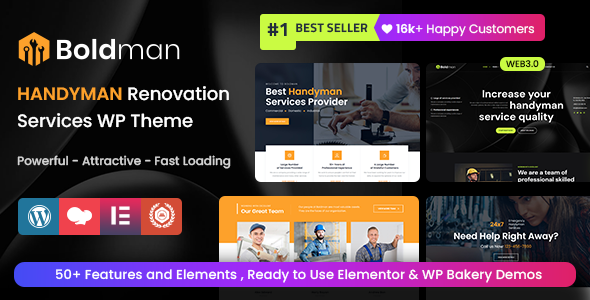
Stuck on your Boldman WordPress theme? Let's fix it.
No endless back-and-forth. Just send us the details and we'll get it done.
No obligation · Replies within 1 hour · Quote within 1 day
Setup · Customization · Bug fixes · WooCommerce integration
About Boldman WP Theme
Boldman is a WordPress theme built by ThemetechMount, aimed at businesses, agencies, and creative professionals who want a clean, bold visual presence without heavy customization overhead. It ships with a block-based layout system, multiple homepage demos, and pre-built inner pages that cover most standard business needs.
The theme is Elementor-compatible, which means most layout work can be done without touching code. It also includes WooCommerce support, making it a reasonable starting point for small shops. Performance is acceptable out of the box, though some optimization work is typically needed before going live. ThemetechMount provides documentation and support, but turnaround can vary. For teams or freelancers who need a polished site fast, Boldman covers the basics reliably.
Get matched with a Boldman developer in under one day
Tell us about your Boldman project. Small fixes, Boldman theme customization, or a full website build, whatever you need, we've got it covered.
We'll connect you to the right Boldman developers, define the scope, and get everything 100% clear.
You'll get one estimate, hire your preferred developer, and start collaborating.
Finding a developer who knows Boldman specifically is not always easy. FoxyConcept works through Codeable, a vetted network of WordPress specialists. Every developer on the platform is screened, so you’re not rolling the dice on quality. You post your project, get matched with a developer who has relevant experience, and receive a clear estimate before any work starts. No retainers, no surprise invoices.
Pros
- Ships with multiple pre-built demos that cover agency, business, and portfolio use cases
- Full Elementor compatibility means most layout changes don't require code
- WooCommerce support included for basic shop and product page needs
- One-click demo import speeds up initial setup significantly
- Responsive layouts work across mobile and tablet without extra configuration
Cons
- Elementor dependency adds page weight that needs active optimization
- ThemetechMount support response times can be slow during high-volume periods
- Demo content requires significant replacement work before the site feels original
- Limited native block editor (Gutenberg) support compared to full-site editing themes
- Advanced WooCommerce customization like custom checkout flows requires developer work
Who is Boldman for?
Creative Agency
Boldman’s bold typography and grid-based service sections make it a solid fit for creative and digital agencies. You get portfolio layouts, team sections, and a strong above-the-fold impact without building everything from scratch. A developer can wire up custom filtering for case studies and connect a contact form to your CRM.
Freelance Portfolio
Freelancers in design, photography, or development can use Boldman’s portfolio demo as a starting point. The project grid and single project templates are clean and minimal. With some targeted customization, it can reflect a personal brand rather than the default theme aesthetic. Light, fast, and easy to maintain.
Small Business Website
Local businesses benefit from Boldman’s pre-built service pages, team sections, and contact layouts. The theme handles the standard pages most small business sites need without requiring a developer for every change. For more complex requirements like booking integration or multi-location setup, professional help is worthwhile.
Startup Landing Page
Boldman’s full-width hero sections and call-to-action blocks make it a practical base for startup landing pages. You can build a focused single-page layout using Elementor sections from the demo. A developer can strip out unused templates, tighten the performance, and connect lead capture forms to your email platform.
Online Shop
With WooCommerce support built in, Boldman can run a straightforward product catalog and checkout. It suits shops with a small to medium product range. For custom product displays, size guides, subscription products, or complex tax configurations, you’ll want a WooCommerce-experienced developer involved early in the build.

Customizing Boldman
Boldman gives you a reasonable set of controls through the WordPress Customizer and Elementor. You can adjust typography, colors, header layouts, and footer columns without writing CSS. The pre-built demo sections are modular, so swapping content in is straightforward.
Where things get more specific, a Boldman expert will save you time. Custom post type integrations, conditional header setups, WooCommerce template overrides, and child theme work all require hands-on development experience. If you need Boldman to behave differently from its defaults, whether that’s a custom mega menu, a filtered portfolio layout, or a bespoke pricing section, working with a developer who knows the theme structure will get you there faster and with fewer workarounds.
Recommended plugins for Boldman
Boldman works with the plugin ecosystem most WordPress sites already rely on. WooCommerce is supported for product pages and cart flows. Contact Form 7 and WPForms both integrate without conflicts. For SEO, pairing the theme with Yoast or Rank Math is straightforward. You can read more about WordPress SEO setup if that’s a priority.
On the performance side, Boldman benefits from caching plugins like WP Rocket and image optimization tools. A developer can also reduce unused CSS and script bloat from Elementor. See our WordPress performance service for details on what that process looks like.
Not sure which plugins to use? This WordPress plugins directory covers the most popular options with reviews and setup guides.
Boldman common issues
Boldman theme header not showing correctly after update
Header display issues in Boldman after an update are usually caused by a conflict between the theme’s header builder and an outdated Elementor or plugin version. First, clear your cache and test in an incognito window. If the issue persists, deactivate plugins one by one to isolate the conflict. A child theme also helps insulate your customizations from future updates. If this keeps recurring, our WordPress bug fixing service can trace and resolve it properly.
Elementor sections broken or missing in Boldman
Broken Elementor sections in Boldman typically happen after a WordPress core, Elementor, or theme update changes a widget or template structure. Start by regenerating Elementor CSS via Elementor > Tools > Regenerate Files. If specific sections are missing, check whether the Elementor template library still has those blocks available. Rolling back via a staging environment is safer than editing live. A developer can restore and rebuild affected sections cleanly.
Boldman WooCommerce shop page layout not displaying properly
Boldman’s WooCommerce shop page can lose its layout if theme template files conflict with WooCommerce’s own templates after an update. Check whether you’re using the theme’s custom WooCommerce templates or WooCommerce defaults. Clearing cache and running the WooCommerce system status check is a good starting point. If the layout is still off, a developer familiar with WooCommerce template hierarchy can fix it without breaking other pages. See our bug fixing service for help.
Boldman theme loading slowly on mobile
Boldman with Elementor can push a lot of CSS and JavaScript to mobile users who don’t need it. Start by running the site through PageSpeed Insights to see what’s blocking render. Common fixes include deferring non-critical scripts, lazy loading images, and using a caching plugin like WP Rocket. Removing unused Elementor widget CSS also helps. For a more thorough audit and fix, our WordPress performance service covers the full process.
Boldman FAQ
Yes, Boldman is built with Elementor compatibility as a core feature. Most of the demo layouts are constructed using Elementor page builder. You will need the free version of Elementor installed for the theme to function as intended. Some advanced widgets may require Elementor Pro depending on the template you’re using.
Yes, Boldman includes WooCommerce support. The theme provides styled templates for the shop page, product pages, cart, and checkout. Basic store setups work without additional development. For custom product layouts, filtered catalogs, or checkout modifications, developer involvement is recommended to avoid template conflicts.
Yes, and using a child theme with Boldman is strongly recommended. It keeps your customizations safe when the parent theme updates. ThemetechMount’s documentation covers basic child theme setup. If you need a child theme built with specific overrides already in place, a WordPress developer can handle that as part of a broader project.
Boldman includes a one-click demo importer available in the theme options panel after activation. You select the demo you want, and it imports pages, settings, and placeholder content. Make sure required plugins like Elementor are installed first. Some demo assets like images are replaced with placeholders due to licensing restrictions.
Boldman has partial Gutenberg support, but the theme is primarily designed around Elementor. Core pages and posts can use the block editor for basic content, but the pre-built demo layouts rely on Elementor. If you prefer a full Gutenberg or full-site editing workflow, Boldman may not be the right fit for that approach.
Hire a Boldman Developer
Whether you need a full site build, a specific feature added, or something broken fixed, a Boldman developer through FoxyConcept can help. Work is scoped clearly upfront and delivered through Codeable’s secure platform. Get a free estimate and explain what you need. No obligation to hire, and you’ll hear back within 24 hours.
You'll need a free Codeable account so developers can ask questions and send their quotes.