Kids Zone WordPress Theme
by designthemes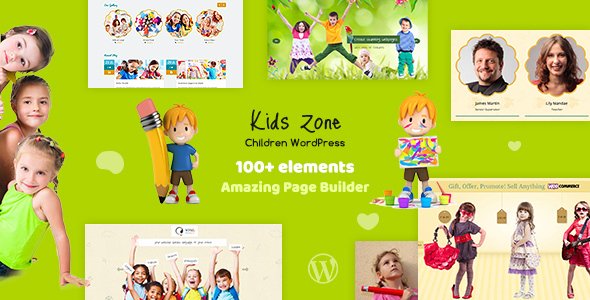
Stuck on your Kids Zone WordPress theme? Let's fix it.
No endless back-and-forth. Just send us the details and we'll get it done.
No obligation · Replies within 1 hour · Quote within 1 day
Setup · Customization · Bug fixes · WooCommerce integration
About Kids Zone WP Theme
Kids Zone is a WordPress theme by designthemes built specifically for children-focused websites. It ships with a bright, playful design and a set of pre-built demo layouts covering schools, kindergartens, daycare centers, children’s activity clubs, and kids’ online stores.
The theme is built on the WPBakery Page Builder, so you get drag-and-drop page editing without touching code. It includes custom post types for events, courses, and team members, which covers the core needs of most educational or activity-based sites. Responsive out of the box, it handles mobile browsing well. WooCommerce compatibility means you can add a shop for merchandise, courses, or digital downloads without switching themes. Kids Zone suits site owners who want a child-friendly aesthetic without building from scratch.
Get matched with a Kids Zone developer in under one day
Tell us about your Kids Zone project. Small fixes, Kids Zone theme customization, or a full website build, whatever you need, we've got it covered.
We'll connect you to the right Kids Zone developers, define the scope, and get everything 100% clear.
You'll get one estimate, hire your preferred developer, and start collaborating.
Kids Zone has enough moving parts that small mistakes in customization or plugin configuration can break the layout or slow the site down. Working with a vetted developer through Codeable means you get someone who has handled these issues before. Codeable only accepts around 2% of developer applicants, so the quality bar is high. You post your project, get a clear estimate within 24 hours, and only proceed if it makes sense for your budget. No risk, no obligation.
Pros
- Multiple pre-built child-friendly demo layouts covering schools, daycares, and kids' activity sites
- Built-in custom post types for events, courses, and team members save setup time
- WooCommerce compatible so you can sell merchandise or paid courses without a theme switch
- WPBakery Page Builder included, making layout changes accessible without coding knowledge
- Responsive design handles mobile and tablet browsing without additional configuration
Cons
- WPBakery shortcodes lock your content to the theme, making future migrations harder
- Demo import can be heavy and requires a server with adequate PHP memory limits
- Design customization beyond the Customizer options requires CSS or developer help
- Theme updates can sometimes conflict with WPBakery or plugin versions already in use
- Support quality from designthemes varies and response times can be slow for complex issues
Who is Kids Zone for?
Primary School Website
Kids Zone gives primary schools a clean, structured site with pages for classes, staff, events, and a contact form. The event post type handles term dates and school open days. A developer can wire up a parent enquiry form and map the layout to the school’s branding so it doesn’t look like a generic template.
Kindergarten or Nursery
Nurseries and kindergartens benefit from the warm, colourful design Kids Zone ships with. Pre-built sections for daily routines, team introductions, and gallery displays suit this audience well. Adding an enrollment enquiry form and a fees page rounds out what most nursery sites need, and both are straightforward with this theme.
Children's Activity Club
Swimming lessons, football academies, dance schools, and art clubs all need event listings, class schedules, and a way to collect bookings. Kids Zone’s events and courses post types cover the basics. Pair it with a booking plugin and WooCommerce to handle paid class registrations directly on the site.
Online Kids' Store
A children’s clothing, toy, or book shop fits Kids Zone’s visual style well. WooCommerce integration means you can add a product catalog, manage stock, and accept payments without rebuilding the site. The playful design keeps the storefront looking appropriate for the target audience without heavy customization work.
Children's Educational Platform
If you offer online courses, worksheets, or video lessons for children, Kids Zone can be set up with a learning plugin like LearnDash or LifterLMS. The course post type gives you a starting structure. A developer can build out the membership logic, protect content, and create a clean lesson browsing experience for parents and students.

Customizing Kids Zone
Kids Zone gives you a decent starting point, but most sites need changes that go beyond the Theme Customizer. Font pairs, color palettes, layout spacing, and section order all require hands-on work to feel right for a specific brand.
A Kids Zone expert can take one of the bundled demos and reshape it into something that matches your school’s or club’s identity. That means custom headers, branded color schemes, tailored homepage sections, and tweaks to the WPBakery components that ship with the theme. If you need custom post type templates, a members-only area, or integration with a booking plugin, that work goes beyond what the theme handles alone. Hiring someone who knows Kids Zone well saves time and avoids breaking the layout during edits.
Recommended plugins for Kids Zone
Kids Zone works alongside several common WordPress plugins. The Events Calendar adds a full event management system. WooCommerce turns any page into a shop for classes, merchandise, or digital products. Contact Form 7 or WPForms handle enquiry and enrollment forms. WPML adds multilingual support if you serve families in more than one language.
For speed, pairing Kids Zone with a caching plugin and an image optimizer makes a real difference on mobile. Want to go further? A WordPress performance review can identify what’s slowing your site down. If organic search matters to your school or club, a WordPress SEO setup gets the basics locked in.
Not sure which plugins to use? This WordPress plugins directory covers the most popular options with reviews and setup guides.
Kids Zone common issues
Kids Zone demo import not working
Demo import failures in Kids Zone are usually caused by PHP memory limits or execution time limits set too low on the server. Start by increasing memory_limit to at least 256MB and max_execution_time to 300 in your php.ini or via your host’s control panel. Also confirm the Required Plugins listed by the theme are installed before running the import. If it still fails, import the XML file manually via Tools > Import. A WordPress bug fixing service can handle this cleanly if the issue persists.
Kids Zone page builder content not displaying correctly
If WPBakery elements appear broken or missing, the most common cause is a plugin conflict or an outdated version of WPBakery bundled with the theme. Check that the version included with Kids Zone matches what WPBakery expects. Deactivate other page builder or optimization plugins one at a time to isolate conflicts. Clearing your caching plugin and browser cache often resolves visual glitches that appear after editing. If shortcodes are showing as raw text on the frontend, WPBakery is likely deactivated or misconfigured.
Kids Zone theme slow on mobile
Kids Zone loads several scripts and stylesheets that can add up on mobile. Start by running the site through Google PageSpeed Insights to identify specific assets causing delays. Enable lazy loading for images, minify CSS and JS via a plugin like WP Rocket or LiteSpeed Cache, and convert images to WebP format. The theme’s full-width sliders and background images are common culprits. A targeted WordPress performance audit will find what matters most for your setup.
Kids Zone WooCommerce shop page broken after update
WooCommerce shop page issues after a theme or WooCommerce update usually come down to template overrides inside the theme that are now out of date. Kids Zone may include its own WooCommerce templates in a woocommerce folder. After updating WooCommerce, check the System Status page inside WooCommerce for outdated template warnings. Update those templates manually or via a child theme. If the layout is broken and you’re not comfortable editing PHP templates, a WordPress bug fix is the safest path.
Kids Zone FAQ
Yes, Kids Zone is a practical choice for school websites. It includes custom post types for events, courses, and staff, which covers what most primary school or nursery sites need. The demo layouts are aimed at this audience. You will likely need a developer to adjust the branding, add an enquiry form, and fine-tune the layout to match your school rather than just using the demo out of the box.
Kids Zone is WooCommerce compatible. You can add a product catalog for merchandise, uniforms, or paid digital resources. Class or course payments also work through WooCommerce with the right booking plugin layered on top. After major WooCommerce updates, check for outdated theme templates via the WooCommerce System Status page to avoid layout issues on the shop or product pages.
Technically yes, but the demo content and most pre-built sections are built using WPBakery shortcodes. If you deactivate WPBakery, those pages will show raw shortcode text instead of the designed layout. You would need to rebuild your pages using a different editor, such as Gutenberg or Elementor, which means significant rework. Most Kids Zone users stick with WPBakery to keep the demo layouts intact.
After activating Kids Zone and installing the required plugins, go to Appearance > Import Demo Data and choose the layout you want. Your server needs at least 256MB PHP memory and sufficient upload limits for the import to complete. If the import fails or times out, raise those limits via your hosting control panel or ask your host to do it. Always test on a staging site before importing over a live site.
Migrating away from Kids Zone is possible but not straightforward. Because content is built with WPBakery shortcodes, switching themes will break your page layouts. Text content is safe, but you will need to rebuild pages in the new theme’s editor. If you are considering a migration, plan for significant rebuild time or hire a developer. A WordPress migration service can help manage the process and reduce data loss risk.
Hire a Kids Zone Developer
Need a Kids Zone expert to set up, customize, or fix your site? FoxyConcept works through Codeable, where vetted WordPress developers handle projects of all sizes. Whether you need a full site build, a layout adjustment, or a plugin integration, you can get a free estimate with no obligation to hire. Describe your project and hear back within 24 hours. It costs nothing to find out what your build will take.
You'll need a free Codeable account so developers can ask questions and send their quotes.