Fashion WordPress Theme
by Opal_WP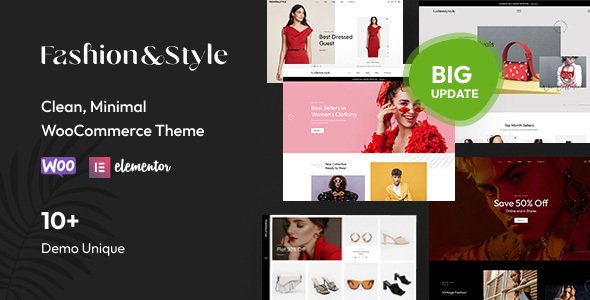
Stuck on your Fashion WordPress theme? Let's fix it.
No endless back-and-forth. Just send us the details and we'll get it done.
No obligation · Replies within 1 hour · Quote within 1 day
Setup · Customization · Bug fixes · WooCommerce integration
About Fashion WP Theme
Fashion is a WooCommerce-ready WordPress theme built by Opal_WP, designed for clothing boutiques, apparel brands, and online fashion retailers. It ships with a clean, image-forward layout that puts products front and center without visual clutter.
The theme includes multiple homepage layouts, a built-in mega menu, product quick-view, and AJAX-powered cart and filtering. It works with Elementor, so you can edit pages without touching code. WooCommerce integration covers everything from product grids to lookbook-style galleries.
Opal_WP has built several niche retail themes, and Fashion follows that pattern: solid WooCommerce defaults, decent mobile responsiveness, and enough pre-built demo content to get a store running quickly. It is not a minimal theme. It is built for stores that need visual impact and standard e-commerce functionality out of the box.
Get matched with a Fashion developer in under one day
Tell us about your Fashion project. Small fixes, Fashion theme customization, or a full website build, whatever you need, we've got it covered.
We'll connect you to the right Fashion developers, define the scope, and get everything 100% clear.
You'll get one estimate, hire your preferred developer, and start collaborating.
Fashion from Opal_WP is a capable WooCommerce theme, but most store owners run into limits quickly: layout conflicts, plugin incompatibilities, or customizations that the Customizer simply cannot handle.
Working through Codeable, FoxyConcept connects you with vetted WordPress developers who know WooCommerce themes inside out. Whether you need a single fix or a full store build, you get a developer matched to your project within 24 hours. No generalist freelancers, no guesswork.
Pros
- Ships with multiple pre-built demo layouts designed specifically for fashion and apparel stores
- Elementor-based page editing means most layout changes do not require custom code
- Built-in mega menu supports large product category structures common in fashion retail
- AJAX filtering and quick-view work out of the box without additional plugins
- WooCommerce lookbook feature lets you tag products directly on lifestyle images
Cons
- Relies on Opal_WP's companion plugin, which creates a dependency that limits flexibility if you ever switch themes
- Demo import can be unreliable and sometimes requires manual cleanup after installation
- Some template sections are built with hardcoded styles that override your Customizer settings
- Update frequency has slowed, which raises compatibility questions with newer versions of WooCommerce
- Documentation is thin, making it difficult to troubleshoot or extend without developer experience
Who is Fashion for?
Women's Clothing Boutique
Fashion’s image-forward grid layouts and lookbook feature suit boutique stores well. You can display curated seasonal collections, link outfit images to individual products, and use the mega menu to organize items by category, size, or season without any custom development work.
Streetwear & Urban Apparel Brand
The theme’s bold typography options and full-width banner sections work well for streetwear brands that rely on strong visual identity. Pair it with a custom color palette and product-focused Elementor sections to build a storefront that matches the brand’s aesthetic without starting from scratch.
Luxury Fashion Retailer
Luxury retailers need clean whitespace and precise typography control. Fashion supports single-product layouts that can be customized to show high-quality imagery, detailed material descriptions, and size guides. A developer can strip back the busier elements and refine the WooCommerce templates for a premium feel.
Multi-brand Fashion Marketplace
Multi-brand stores need strong filtering and category structures. Fashion’s AJAX filtering and mega menu handle this reasonably well at launch. For larger catalogs with multiple vendors, a developer can extend the setup with WooCommerce-compatible marketplace plugins that integrate with the theme’s existing layout.
Sustainable & Ethical Fashion Store
Sustainable fashion stores often need custom storytelling sections alongside their product listings. Fashion’s Elementor integration means you can build out brand mission pages, material sourcing sections, and ethical production content without switching templates. Product tags and categories can be structured around values rather than just product type.

Customizing Fashion
Fashion gives you access to the WordPress Customizer for global settings like fonts, colors, header layout, and footer structure. Elementor handles page-level editing, and most sections in the demo are built with Elementor widgets rather than shortcodes, which makes them easier to work with long-term.
The theme includes custom widgets for product categories, lookbooks, banners, and Instagram feeds. For serious customization, a Fashion expert will go further: adjusting WooCommerce templates directly, writing custom CSS for brand-specific styling, or extending Elementor sections with ACF-driven dynamic content.
Opal_WP includes its own companion plugin for some theme-specific features. A developer familiar with this pattern can work around plugin dependency issues or rebuild those features independently if needed.
Recommended plugins for Fashion
Fashion works with the standard WooCommerce plugin stack: WooCommerce Subscriptions, Bookings, and most payment gateway plugins install without conflicts. YITH plugins for wishlist, compare, and size guides integrate cleanly with the theme’s product layout.
For performance, a developer can pair it with caching plugins and image optimization tools. Check out our WordPress performance service if your fashion store is loading slowly under product-heavy pages.
If organic search matters to your store, the theme is compatible with Rank Math and Yoast. We also offer a dedicated WordPress SEO service to handle structured data, product schema, and category page optimization.
Not sure which plugins to use? This WordPress plugins directory covers the most popular options with reviews and setup guides.
Fashion common issues
Fashion theme mega menu not working after update
Mega menu issues in Fashion usually trace back to a conflict with the Opal_WP companion plugin after a theme or WordPress update. First, confirm the companion plugin is updated to match the current theme version. If the menu still breaks, check for JavaScript errors in your browser console. A caching plugin serving stale scripts is a common culprit. If you need a proper fix, our WordPress bug fixing service can resolve this without breaking other parts of your store.
Fashion by Opal_WP WooCommerce products not displaying correctly
Product display issues in Fashion are often caused by WooCommerce template overrides in the theme folder that have not been updated to match newer WooCommerce versions. Go to WooCommerce > Status > Tools and check for outdated templates. If the theme’s override files are flagged, they need to be manually updated. Editing those files requires PHP knowledge. Our WordPress bug fixing service handles this type of WooCommerce template conflict directly.
Fashion theme slow loading on mobile with large product catalog
Mobile slowness on the Fashion theme typically comes from unoptimized images in the lookbook or banner sections, and from scripts loaded by the Opal_WP companion plugin that are not deferred. Start by compressing product images and enabling lazy loading. Then check which scripts are blocking render on mobile using PageSpeed Insights. For a full audit and fix, visit our WordPress performance service to get the store loading properly on mobile devices.
Elementor sections broken after WordPress update on Fashion theme
When Elementor sections break after a WordPress update, it usually means a structural change in WordPress or WooCommerce has conflicted with how Fashion’s Elementor widgets are registered. Clear all caches first, then deactivate and reactivate the Opal_WP companion plugin. If sections are still broken, regenerate the Elementor CSS via Elementor > Tools > Regenerate Files. If the layout is still off, a developer will need to check the widget registration and fix any deprecated function calls causing the conflict.
Fashion FAQ
Compatibility depends on the current theme version. Opal_WP has not always kept pace with WooCommerce major releases. Before updating WooCommerce, check the theme’s changelog and test on a staging environment. Outdated template files are the most common issue and will need manual updates if the theme has not addressed them in a recent release.
Some features in Fashion, including certain homepage widgets and the mega menu configuration, depend on the Opal_WP companion plugin. You can deactivate it, but you will likely lose functionality. A developer can rebuild those features using standard WordPress tools if you want to remove the plugin dependency entirely and future-proof your setup.
Yes. Fashion uses standard WooCommerce product templates, so variable products with size, color, and other attribute-based variations work as expected. The theme includes basic variation swatches styling. For more advanced swatch displays or custom variation logic, you would need an additional plugin or custom development work.
Fashion includes a one-click demo importer through the theme panel. It installs pages, products, menus, and widgets from the demo. Results vary depending on your server configuration. Missing images, broken sliders, or incomplete widget areas are common after import and usually need manual adjustment before the site looks like the demo preview.
Yes, migrating an existing WooCommerce store to the Fashion theme is possible. Products, orders, and customer data stay in WooCommerce and are not theme-dependent. The work involved is rebuilding your page layouts using Fashion’s templates and Elementor. For a clean migration without losing data or SEO, see our WordPress migration service.
Hire a Fashion WordPress Developer
Need help setting up, customizing, or fixing your Fashion theme store? Our WordPress developers work specifically with WooCommerce and Elementor-based themes like Fashion by Opal_WP. From fixing layout bugs to building out a full product catalog, we scope the work clearly before anything starts.
Get a free estimate through Codeable. No obligation, no upfront payment, and you only move forward if the scope and price make sense for your project.
You'll need a free Codeable account so developers can ask questions and send their quotes.