Megaphone WordPress Theme
by meks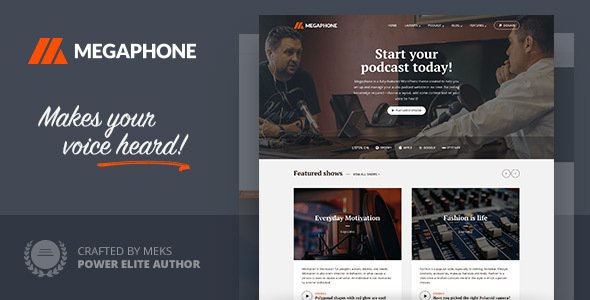
Stuck on your Megaphone WordPress theme? Let's fix it.
No endless back-and-forth. Just send us the details and we'll get it done.
No obligation · Replies within 1 hour · Quote within 1 day
Setup · Customization · Bug fixes · WooCommerce integration
About Megaphone WP Theme
Megaphone is a WordPress theme built by Meks, a development studio known for clean code and media-focused designs. The theme targets podcasters, radio stations, and audio content creators who need a professional online presence without heavy customisation work.
It ships with a dedicated podcast player, episode archive layouts, and tight integration with podcast-specific plugins. The design is minimal but structured, keeping audio content front and centre. Built on a solid foundation, Megaphone supports custom post types for episodes, sponsor listings, and show notes out of the box.
Meks themes are known for straightforward setup and reliable updates. Megaphone fits sites that need to launch fast and look credible from day one, particularly for independent podcasters, broadcast networks, and online radio shows looking for a theme that understands their content type.
Get matched with a Megaphone developer in under one day
Tell us about your Megaphone project. Small fixes, Megaphone theme customization, or a full website build, whatever you need, we've got it covered.
We'll connect you to the right Megaphone developers, define the scope, and get everything 100% clear.
You'll get one estimate, hire your preferred developer, and start collaborating.
Megaphone is a niche theme built for audio content. When something breaks or you need a custom feature, you need someone who understands both WordPress and how Meks structures its themes. Generic developers often underestimate the episode post type setup and player integration specifics.
Through Codeable, you get matched with vetted WordPress developers who have worked with Meks themes before. Post your project, get a free estimate, and only hire if the fit is right. No risk, no obligation.
Pros
- Built specifically for podcast and audio content, not adapted from a generic theme
- Comes with episode custom post type and archive layouts ready to use out of the box
- Meks provides consistent updates and maintains compatibility with current WordPress versions
- Clean, lightweight codebase that loads faster than feature-heavy multipurpose themes
- Integrates well with major podcast plugins like Seriously Simple Podcasting and PowerPress
Cons
- Limited page builder support makes deep layout customisation harder without developer help
- Design flexibility is narrower than multipurpose themes, which can feel restrictive for non-podcast content
- The built-in player styling options are basic and often need CSS work to match brand colours precisely
- WooCommerce and membership plugin integration works but requires additional styling to look consistent
- Smaller community compared to themes like Astra or GeneratePress, so fewer tutorials and third-party resources
Who is Megaphone for?
Independent Podcasters
Megaphone gives solo podcasters a credible home base without requiring a web developer to launch. Episode archives, show notes, and an embedded player are all handled by the theme structure. Add a subscribe button and a sponsor page and the site is functional from day one.
Online Radio Stations
Radio stations need organised programme schedules and easy access to archived shows. Megaphone’s episode post type and archive layout handles this cleanly. Pair it with a scheduling plugin and you have a functional station site that keeps regular listeners oriented.
Podcast Networks
Networks running multiple shows can use Megaphone as a hub site. Individual show pages, host profiles, and episode listings across different series are manageable within the theme’s structure. A developer can extend this with custom taxonomies to keep shows clearly separated.
Audio Journalism and News Shows
News organisations producing audio content need a site that presents episodes alongside written summaries and transcripts. Megaphone handles the audio side well, and the clean typography keeps long-form show notes readable. SEO for individual episodes is straightforward to set up.
Educational Audio Courses
Course creators delivering content through audio can use Megaphone as a course hub. Episodes work as lessons, and membership plugins restrict access to paid subscribers. The archive layout organises modules clearly, making it easy for students to track progress through the material.

Customizing Megaphone
Megaphone works with the WordPress Customizer for basic visual adjustments including typography, colour schemes, header layout, and widget areas. Most changes are straightforward, but deeper modifications, such as custom episode layouts, unique player styling, or sponsor page templates, require PHP and CSS knowledge.
If you want to go beyond the default settings, a Megaphone expert can rebuild sections properly without breaking podcast functionality. Common customisation requests include custom homepage designs, branded audio players, and integration with membership plugins for premium content.
Page builder compatibility is limited compared to multipurpose themes, so custom work often means direct template editing. Getting a developer familiar with Meks theme structure saves significant time and avoids conflicts with the episode custom post type system.
Recommended plugins for Megaphone
Megaphone pairs well with podcast-specific plugins like Seriously Simple Podcasting and PowerPress. For membership-gated episodes, Memberpress or Restrict Content Pro integrate cleanly. WooCommerce can be added for merchandise or paid subscriptions, though it may need styling work to match the theme.
Performance improvements are achievable with proper caching and image optimisation. Check our WordPress performance service if your audio archive pages load slowly. For search visibility of episode content, structured data and XML sitemaps matter, and our WordPress SEO service covers both.
Not sure which plugins to use? This WordPress plugins directory covers the most popular options with reviews and setup guides.
Megaphone common issues
Megaphone theme audio player not showing on episode pages
This is usually caused by a conflict between Megaphone’s built-in player and a podcast plugin that also outputs a player shortcode. Check whether your podcast plugin settings are set to auto-insert a player, which can duplicate or override the theme’s output. Disable the plugin’s auto-insert feature and let the theme handle display. If the player still doesn’t show, check for JavaScript errors in your browser console. A missing or dequeued script is often the cause. Our WordPress bug fixing service can trace and resolve this quickly.
Megaphone WordPress theme episode layout broken after update
Megaphone uses a custom post type for episodes, and theme updates occasionally change template file names or restructure query logic. If the layout broke after an update, check whether your child theme is overriding an outdated template file. Compare your child theme templates against the updated parent theme files. Missing or mismatched template parts are the most common cause. If you’re not using a child theme and made direct edits to theme files, those changes will have been overwritten by the update entirely.
Megaphone theme not compatible with Elementor or page builder
Megaphone is not designed as a page builder-compatible theme. Elementor will work for standard WordPress pages but won’t give you control over episode templates, the player area, or archive layouts. These are handled by theme PHP templates, not block or drag-and-drop systems. If you need custom layouts for episode pages, they need to be built directly in the theme templates. A Megaphone developer can create custom templates that match your design without relying on a page builder.
Megaphone podcast theme slow loading on archive pages
Slow archive pages on Megaphone are usually caused by unoptimised images attached to episode posts, no page caching, or external player scripts loading on every page. Install a caching plugin like WP Rocket or LiteSpeed Cache and enable lazy loading for images. If you’re embedding external audio files from a hosting service, check whether their player script loads asynchronously. Our WordPress performance service can audit and fix these issues systematically.
Megaphone FAQ
Yes, Megaphone was built specifically for podcasters. It includes an episode custom post type, archive layouts designed for audio content, and built-in player support. It’s one of the few themes that treats podcast episodes as a native content type rather than adapting a generic blog structure. For a dedicated podcast site, it’s a solid and focused choice.
Megaphone and Seriously Simple Podcasting can be used together, but you need to configure which one handles the audio player output. If both are set to auto-insert a player, you’ll see duplicate players on episode pages. Turn off the plugin’s auto-insert option and let Megaphone handle the display, or vice versa. The two work well once that setting is sorted.
Yes, Megaphone supports child themes. If you plan to make any customisations to templates or CSS, creating a child theme first is strongly recommended. Direct edits to the parent theme will be overwritten on every update. A child theme keeps your changes safe and lets you update Megaphone without losing customisation work.
Go to Appearance, then Customizer, then Site Identity. Upload your logo file there. Megaphone respects standard WordPress logo upload functionality. If your logo isn’t displaying at the right size, you may need a small CSS adjustment to control the max-width. This is a quick change that can be added to the Additional CSS field in the Customizer.
Meks actively maintains their theme portfolio and Megaphone receives updates for WordPress compatibility. Check the Meks website or the theme’s changelog for the latest release date. If you’re running an older version, updating is recommended to avoid compatibility issues with current WordPress and PHP versions. Our WordPress maintenance service keeps themes and plugins updated on a regular schedule.
Hire a Megaphone WordPress Developer
Whether you need a custom episode layout, a branded audio player, or help fixing a conflict with your podcast plugin, a dedicated Megaphone developer can handle it properly. Work is scoped clearly before anything starts, so you know exactly what you’re getting.
Get a free estimate today. No obligation to hire, and you’ll hear back within 24 hours.
You'll need a free Codeable account so developers can ask questions and send their quotes.