Kinsley WordPress Theme
by bslthemes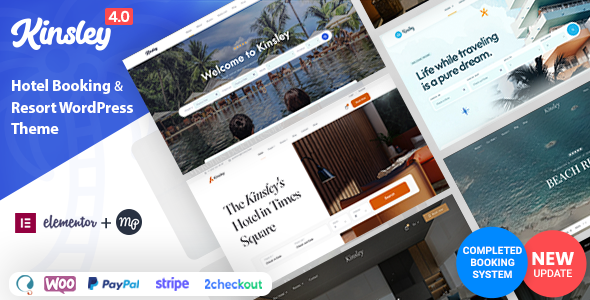
Stuck on your Kinsley WordPress theme? Let's fix it.
No endless back-and-forth. Just send us the details and we'll get it done.
No obligation · Replies within 1 hour · Quote within 1 day
Setup · Customization · Bug fixes · WooCommerce integration
About Kinsley WP Theme
Kinsley is a feminine WordPress theme developed by BST Themes, designed for lifestyle bloggers, photographers, and creative professionals. It ships with a clean typographic layout, soft colour palettes, and a focus on imagery-driven content presentation.
The theme is built on a lightweight codebase and integrates with WooCommerce, making it suitable for bloggers who also run small online shops. Kinsley supports Elementor and the WordPress block editor, giving you flexibility in how you build pages. It includes multiple header and footer layouts, sticky navigation, and a filterable portfolio section out of the box.
BST Themes keeps Kinsley regularly updated, which means compatibility with current WordPress versions is generally maintained. It is a solid starting point for creative personal brands that want a polished look without heavy configuration.
Get matched with a Kinsley developer in under one day
Tell us about your Kinsley project. Small fixes, Kinsley theme customization, or a full website build, whatever you need, we've got it covered.
We'll connect you to the right Kinsley developers, define the scope, and get everything 100% clear.
You'll get one estimate, hire your preferred developer, and start collaborating.
Kinsley looks straightforward until you need something specific. Custom layouts, WooCommerce tweaks, plugin conflicts, or a full brand build on top of the theme all take time to do properly. The developers at FoxyConcept work through Codeable, a vetted network where every developer is screened before taking client projects. You get a free estimate before committing, and the work is backed by Codeable’s money-back guarantee. No guesswork, no freelancer lottery.
Pros
- Clean, typography-focused design that suits lifestyle and photography blogs immediately
- WooCommerce compatible out of the box, useful for bloggers adding a small shop
- Works with Elementor and the block editor, giving layout flexibility
- Multiple header and footer layouts included without needing a separate plugin
- Lightweight codebase compared to multipurpose themes, which helps baseline performance
Cons
- Customizer options are limited for complex layout changes beyond basic colour and font adjustments
- Heavy use of images by design means performance requires active management with optimisation plugins
- Primarily aimed at feminine or lifestyle aesthetics, which limits fit for other brand types
- Documentation from BST Themes is thin in places, making advanced customisation harder to self-serve
- Child theme setup is not guided in the theme itself, so updates can overwrite custom CSS edits
Who is Kinsley for?
Lifestyle Blog
Kinsley’s typography and sidebar layouts are built around long-form blog content. Category pages, author archives, and a grid-style homepage make it easy to organise posts by topic. For lifestyle bloggers covering travel, wellness, or home decor, the theme’s visual hierarchy keeps content readable without heavy customisation from the start.
Photography Portfolio
The theme’s full-width image support and portfolio grid make it a practical base for photographers showing client work. Gallery pages load cleanly, and the minimal navigation keeps focus on the images. Adding a contact form and a simple booking plugin covers most of what a working photographer needs from a portfolio site.
Fashion & Beauty Brand
Kinsley’s soft colour palette and editorial-style layouts align with fashion and beauty branding. WooCommerce integration means you can run product pages alongside editorial content. The filterable portfolio section works well for lookbooks or seasonal collections without needing a separate plugin to manage the layout.
Food Blog with Shop
Food bloggers who want to sell products like ebooks, recipe cards, or physical goods can use Kinsley’s WooCommerce support alongside standard blog posts. Recipe content displays well with the theme’s image-forward layout, and the shop pages require minimal styling work to look consistent with the rest of the site.
Creative Personal Brand
Coaches, consultants, and creative freelancers who want a personal site with a polished look can use Kinsley without it feeling like an obvious template. The flexible header options and Elementor compatibility mean a custom homepage is achievable. Adding a booking plugin and a clear services page covers the functional side of a personal brand site.

Customizing Kinsley
Kinsley comes with a decent range of Customizer options covering typography, colours, header styles, and layout widths. For most users, these controls cover day-to-day adjustments without touching code. But custom landing pages, brand-specific layouts, or WooCommerce modifications usually require hands-on development work.
A Kinsley expert can handle tasks like building custom page templates, adjusting CSS for specific breakpoints, integrating third-party plugins cleanly, or restructuring the homepage layout to match a brief. Child theme development is strongly recommended before making any code-level changes to avoid losing work on theme updates.
If the Customizer options have hit their limit for your project, working with someone who knows Kinsley well is faster and safer than working through it yourself.
Recommended plugins for Kinsley
Kinsley pairs well with several common WordPress plugins. WooCommerce handles shop functionality. Yoast SEO or Rank Math slot in without conflicts. Elementor Pro extends layout control beyond what the Customizer offers natively.
For site speed, image optimisation plugins like Imagify and caching via WP Rocket are worth adding early. Kinsley’s design is image-heavy by nature, so performance tuning matters more than it would on a text-focused theme. If you are planning organic growth, pairing Kinsley with a proper SEO setup from the start saves rework later.
Not sure which plugins to use? This WordPress plugins directory covers the most popular options with reviews and setup guides.
Kinsley common issues
Kinsley theme menu not showing on mobile
Mobile menu issues in Kinsley usually trace back to a JavaScript conflict with another plugin, or a missing script dependency after a theme update. Start by deactivating plugins one at a time to isolate the conflict. If the menu works after deactivating a plugin, that plugin needs a compatibility fix or replacement. If the issue persists, check that your child theme is not overriding the header template incorrectly. A WordPress bug fixing service can identify the source quickly if you are not comfortable reading browser console errors.
Kinsley WooCommerce shop page layout broken
Broken WooCommerce shop layouts after a theme or plugin update are common when template files fall out of sync. Kinsley includes WooCommerce template overrides, and these need to be updated manually when WooCommerce releases a new version. Go to WooCommerce > Status > Tools and check for outdated templates. If the layout is still off after updating, the theme’s CSS may need adjustments. A developer familiar with Kinsley can resolve this without breaking other parts of the site. See our bug fixing service for help.
Kinsley homepage slider not displaying images correctly
Slider display problems in Kinsley are often caused by image size mismatches or a conflict with a lazy loading plugin. First, check that your uploaded images meet the theme’s recommended dimensions. Then, disable any lazy loading plugins temporarily to see if that restores the display. If sliders were working before and broke after an update, a cached version of the page may be serving outdated assets. Clear your site cache and CDN cache, then test again in a private browser window before assuming a deeper issue.
Kinsley theme slow loading on mobile devices
Kinsley’s image-heavy design puts extra pressure on mobile performance. Start with image compression using a plugin like Imagify or ShortPixel. Enable lazy loading for images if it is not already active. A caching plugin like WP Rocket or LiteSpeed Cache will handle page caching and reduce server response time. Check Google PageSpeed Insights to identify the biggest bottlenecks. If scores remain low after these steps, a WordPress performance audit will give you specific fixes for your setup.
Kinsley FAQ
Yes, Kinsley is compatible with Elementor. You can use the free version of Elementor for basic page building, and Elementor Pro for advanced features like popups, forms, and theme builder sections. Some Kinsley sections are built with its own page builder options, so mixing both tools on the same page can occasionally create layout conflicts worth testing before going live.
Kinsley includes WooCommerce support out of the box. Product pages, cart, checkout, and account pages are all styled to match the theme. However, WooCommerce template files in Kinsley need to be kept up to date manually when WooCommerce updates, or shop layouts may break. Always test after plugin updates.
Create a new folder in your wp-content/themes/ directory named something like kinsley-child. Add a style.css file with the correct child theme header referencing Kinsley as the parent. Then add a functions.php file to enqueue the parent stylesheet. Activate the child theme from the WordPress dashboard. All custom CSS and template changes go in the child theme, not in Kinsley directly.
Kinsley’s default styling is clearly aimed at lifestyle and feminine aesthetics. Colours, fonts, and layout choices reflect that. It is possible to customise it for other brand types through CSS and Elementor, but you would be working against the theme’s defaults rather than with them. For brands outside that niche, a more neutral base theme may save significant development time.
BST Themes has kept Kinsley updated through recent WordPress versions, but update frequency is not as consistent as larger theme shops. Check the theme’s changelog on ThemeForest or the BST Themes site before purchasing or building a long-term project on it. Active WordPress maintenance is recommended to catch compatibility issues early regardless of the theme you use.
Hire a Kinsley WordPress Expert
Whether you need a full Kinsley build, a specific customisation, or help fixing something that broke, FoxyConcept can scope the work and give you a clear plan. Work is matched through Codeable within 24 hours, and you only move forward if the estimate works for you. Get a free estimate with no obligation and see exactly what your project needs before spending anything.
You'll need a free Codeable account so developers can ask questions and send their quotes.