Diamond WordPress Theme
by GT3themes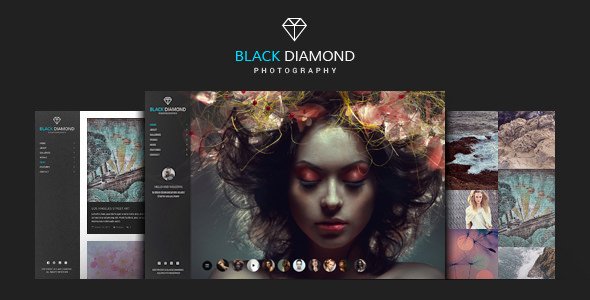
Stuck on your Diamond WordPress theme? Let's fix it.
No endless back-and-forth. Just send us the details and we'll get it done.
No obligation · Replies within 1 hour · Quote within 1 day
Setup · Customization · Bug fixes · WooCommerce integration
About Diamond WP Theme
Diamond is a WordPress theme built by GT3themes, aimed at creative agencies, photographers, and portfolio-focused businesses. It ships with a drag-and-drop page builder, a collection of pre-built demo layouts, and a visual options panel that keeps most customization out of code.
GT3themes has a reputation for clean, well-structured themes with regular updates. Diamond fits that pattern. It supports WooCommerce for light shop setups, includes custom post types for portfolio work, and works with popular plugins without obvious conflicts out of the box.
The theme is suited to small businesses and freelancers who want a polished visual result without hiring a developer from scratch. That said, deeper customization, performance tuning, or layout changes beyond the demo still typically require someone who knows WordPress well.
Get matched with a Diamond developer in under one day
Tell us about your Diamond project. Small fixes, Diamond theme customization, or a full website build, whatever you need, we've got it covered.
We'll connect you to the right Diamond developers, define the scope, and get everything 100% clear.
You'll get one estimate, hire your preferred developer, and start collaborating.
Diamond looks straightforward until you need it to do something the demo doesn’t show. Custom layouts, plugin conflicts, child theme builds, performance problems — these take time to solve without knowing the theme’s internals.
FoxyConcept connects you with vetted Diamond developers through Codeable, a curated network where every developer is screened before they take a project. You get a free estimate, no obligation to move forward, and a developer who has worked inside GT3themes builds before. Faster, less risk.
Pros
- Multiple pre-built demo layouts that import in one click, covering agencies, photography, and portfolios
- Built-in page builder reduces reliance on third-party builders for standard layout work
- WooCommerce compatible out of the box for basic shop or digital product setups
- GT3themes provides regular updates and responds to support tickets with documented fixes
- Clean code structure makes child theme creation and targeted CSS overrides straightforward
Cons
- Page builder is proprietary, so layouts don't transfer easily if you switch themes later
- Demo content import can leave placeholder images and dummy posts that require manual cleanup
- Default font and icon loading adds requests that need manual optimization for fast performance scores
- Limited built-in mega menu options — complex navigation structures require custom work or a plugin
- Support is ticket-based with no live chat, so turnaround on complex issues can take 24 to 48 hours
Who is Diamond for?
Creative Agency
Diamond’s agency demo includes service sections, team grids, and case study layouts. An agency can present its work through portfolio post types with minimal setup. A developer can extend this with custom project filters, client logo sliders, and inquiry forms tied to a CRM for lead tracking.
Freelance Photographer
The theme’s full-width image sections and gallery post types work well for photography portfolios. Grid and masonry layouts are included. A Diamond developer can configure lightbox behavior, add password-protected client galleries, and optimize image delivery so large photo files don’t slow the site.
Interior Design Studio
Interior design studios need strong visual layouts with project category filtering. Diamond supports this through its portfolio system. A developer can build custom taxonomy pages, add before-and-after image comparisons, and set up a contact flow that collects project brief details before the first consultation.
Small E-commerce Store
Diamond’s WooCommerce integration covers product pages, cart, and checkout with theme-consistent styling. For a focused product catalog — prints, presets, physical goods — it works cleanly. A developer can extend it with custom product tabs, upsell sections, and payment gateway configuration.
Personal Portfolio
Diamond suits freelancers who want a single-page or minimal portfolio without a large plugin stack. Skills, work samples, testimonials, and a contact section fit into one scrollable layout. Setup is fast, and a developer can tighten the design to match personal branding without touching the core theme files.

Customizing Diamond
Diamond gives you a live customizer panel, theme options for typography and color, and section-level controls inside the page builder. For most users, this covers basic branding and layout adjustments without touching code.
But real customization goes further. A Diamond expert can modify the theme’s template files to change how portfolio grids, headers, or archive pages render. They can add custom post types, adjust the builder output, or override styles without breaking future updates.
If you need a layout that doesn’t exist in the demo library, or want to integrate a third-party tool cleanly, working with someone who knows Diamond’s structure saves significant time. Custom PHP hooks, child theme setup, and targeted CSS overrides are standard work for an experienced Diamond developer.
Recommended plugins for Diamond
Diamond works well with a focused plugin stack. WooCommerce adds shop functionality for product listings or digital downloads. WPML handles multilingual sites if you’re reaching international audiences. Contact Form 7 or WPForms fit naturally into the contact and lead capture sections.
For performance, pairing Diamond with a caching plugin and an image optimization tool makes a measurable difference. A developer can also help with WordPress performance tuning to reduce load times across Diamond’s image-heavy layouts.
If search visibility matters, WordPress SEO work alongside Yoast or Rank Math ensures Diamond’s structure supports indexing correctly.
Not sure which plugins to use? This WordPress plugins directory covers the most popular options with reviews and setup guides.
Diamond common issues
Diamond theme page builder not loading in WordPress editor
This usually comes from a JavaScript conflict with another active plugin. Start by deactivating plugins one by one while testing the builder. Also confirm your PHP version meets GT3themes’ minimum requirement. Clearing the browser cache and disabling any minification plugins often resolves script loading issues. If the builder still doesn’t load, a WordPress bug fix can isolate the conflict quickly.
Diamond theme demo import failing or stopping halfway
Demo import failures in Diamond are typically caused by server memory limits or execution time limits being too low. Ask your host to raise max_execution_time and memory_limit in PHP settings. If the import stops partway, run it again — it usually resumes without duplicating content. A developer can also run the import manually via WP-CLI to bypass timeout restrictions entirely.
Diamond theme header layout broken after WordPress update
Header layout breaks after core WordPress updates often trace back to deprecated template hooks or a CSS conflict introduced in the update. Check the GT3themes changelog for a patch first. If none is available, a child theme override of the header template is the safest fix. Avoid editing the parent theme files directly. A developer can apply a targeted fix that holds through future updates without touching core files.
Diamond theme slow loading speed on mobile
Diamond’s mobile performance issues usually come from unoptimized images, render-blocking scripts, or unused CSS from the builder. Start with an image compression plugin and enable lazy loading. A developer can defer non-critical scripts, reduce HTTP requests from icon libraries, and configure a caching layer. For deeper work, WordPress performance optimization addresses the root causes rather than surface symptoms.
Diamond FAQ
GT3themes has updated Diamond to maintain compatibility with recent WordPress releases. Always check the changelog on ThemeForest or the GT3themes site for the latest version before updating. Running a staging site before pushing updates to production is the safest approach. If compatibility issues appear after an update, a developer can identify whether the conflict is theme-side or plugin-side.
Diamond includes its own page builder, and using Elementor alongside it can create conflicts and bloat. It is technically possible to disable the native builder and use Elementor, but you lose the demo layouts and theme-specific widgets. A developer can set this up cleanly, but it’s worth considering whether switching builders is worth the rebuild time for your specific project.
Yes. Diamond supports WooCommerce with styled product pages, cart, and checkout templates that match the theme design. It handles standard shop setups well. Complex WooCommerce needs — custom product types, advanced filtering, subscription products — may require additional plugins or developer work to integrate properly with Diamond’s layout system.
Create a new folder in wp-content/themes/ with a style.css file that includes the Template: diamond header and a functions.php that enqueues the parent stylesheet. Activate the child theme from the WordPress dashboard. All custom CSS and template overrides go into the child theme so updates to Diamond don’t overwrite your changes.
Yes, a Diamond site can be migrated without breaking layouts if the database, files, and URL references are all handled correctly. The builder stores layout data in the database, so a proper export and import process is required. WordPress migration work covers this end to end, including updating serialized URLs and testing the builder output on the new server before going live.
Hire a Diamond WordPress Developer
Whether you need a Diamond theme set up from scratch, customized beyond the demos, or fixed after something broke, a specialist gets it done faster than trial and error. Our developers know GT3themes builds and work through Codeable for full accountability.
Get a free estimate — describe your project, receive a quote within 24 hours, and only hire if it fits. No risk, no commitment upfront.
You'll need a free Codeable account so developers can ask questions and send their quotes.