Grafik WordPress Theme
by Select-Themes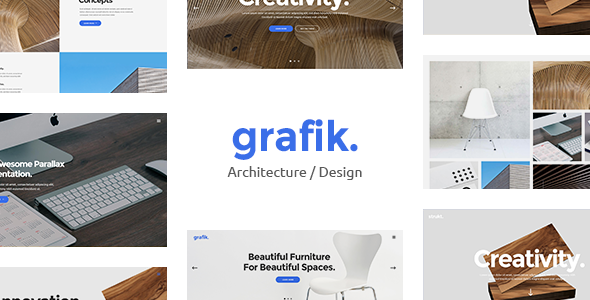
Stuck on your Grafik WordPress theme? Let's fix it.
No endless back-and-forth. Just send us the details and we'll get it done.
No obligation · Replies within 1 hour · Quote within 1 day
Setup · Customization · Bug fixes · WooCommerce integration
About Grafik WP Theme
Grafik is a WordPress theme built by Select-Themes, aimed at creative agencies, studios, and freelance designers who want a portfolio-focused site with a clean, minimal aesthetic. It ships with a grid-based layout system, full-width project pages, and smooth page transitions that give client work the space it deserves.
The theme is built on solid HTML5 and CSS3 foundations, with attention paid to typography and whitespace. It supports the WordPress block editor and includes custom post types for portfolio projects. Grafik is a practical choice if you want a professional-looking creative site without starting from scratch or paying for a bespoke build. That said, getting it configured exactly to your spec still takes time and some technical know-how.
Get matched with a Grafik developer in under one day
Tell us about your Grafik project. Small fixes, Grafik theme customization, or a full website build, whatever you need, we've got it covered.
We'll connect you to the right Grafik developers, define the scope, and get everything 100% clear.
You'll get one estimate, hire your preferred developer, and start collaborating.
Grafik is clean and well-structured, but getting it production-ready for a client project takes more than clicking through the Customizer. Typography tuning, layout overrides, custom post type work, and plugin integration all require hands-on development. Working with a vetted WordPress developer through Codeable means you get someone who has actually worked inside themes like Grafik, not someone learning as they go. You post your project, receive estimates within 24 hours, and only move forward if the scope and price make sense. No risk, no obligation.
Pros
- Clean minimal design that suits creative and agency portfolios without heavy customisation
- Grid-based portfolio layouts with full-width project pages built in
- Smooth CSS page transitions included out of the box, no plugin needed
- Custom portfolio post type comes pre-configured, saving setup time
- Well-structured template files make developer customisation predictable
Cons
- Limited layout variety beyond the default grid, significant changes require custom CSS or PHP
- Customizer options are relatively sparse compared to newer multipurpose themes
- No built-in mega menu or advanced navigation options for complex site structures
- Page builder compatibility is inconsistent, some blocks may not render as expected
- Documentation from Select-Themes is thin in places, making troubleshooting harder without developer experience
Who is Grafik for?
Creative Agency Portfolio
Grafik suits multi-person creative agencies that need to showcase client work in a structured grid. Projects get their own full-width pages with space for process shots, results, and client context. A developer can add filterable categories so visitors sort work by industry or service type.
Freelance Graphic Designer Website
Freelancers can use Grafik to build a focused portfolio without a bloated theme slowing things down. The minimal aesthetic keeps attention on the work. Adding an ACF-powered case study template and a Gravity Forms contact section gives clients everything they need to make a hiring decision.
Photography Studio Site
Photography sites need large image support and fast load times. Grafik’s full-width project pages work well for photo series, and a developer can configure lazy loading and image optimisation to keep page speed acceptable even with high-resolution files in every portfolio entry.
Architecture or Interior Design Firm
Architecture and interior design firms rely on strong visual presentation. Grafik’s whitespace-first layout keeps the focus on photography and renders project pages cleanly across devices. A custom post type for completed projects, with fields for location, scope, and year, maps naturally onto the theme’s structure.
Digital Product or Print Shop
With WooCommerce integrated, Grafik can serve as the base for selling prints, digital assets, or design services. The theme’s clean lines complement a product catalogue. A developer handles the WooCommerce template overrides needed to keep the shop pages visually consistent with the rest of the site.

Customizing Grafik
Out of the box, Grafik gives you the WordPress Customizer for colours, fonts, and layout options. But most agencies need more than defaults. A Grafik expert can extend the theme properly, whether that means adding a custom project filter, restructuring the portfolio grid, modifying the header layout, or integrating a contact form that matches the overall design.
Child theme setup is strongly recommended before touching anything. This keeps your changes safe through Select-Themes updates. A developer familiar with Grafik will also know where the theme’s CSS lives, how its JavaScript handles transitions, and which template files to override without breaking anything. Custom post type adjustments, ACF field groups, and WooCommerce integration are all common requests handled at this level.
Recommended plugins for Grafik
Grafik pairs well with several plugins depending on your goals. Advanced Custom Fields adds flexible content areas to portfolio entries. WooCommerce turns the site into a shop for prints, digital downloads, or services. Contact Form 7 or Gravity Forms handle enquiries cleanly. For speed, pairing Grafik with a caching plugin and a CDN makes a real difference on image-heavy pages. A developer can also connect the theme to WordPress performance optimisation workflows or wire up SEO tooling to improve how portfolio pages rank.
Not sure which plugins to use? This WordPress plugins directory covers the most popular options with reviews and setup guides.
Grafik common issues
Grafik theme portfolio grid not displaying correctly
Portfolio grid issues in Grafik usually come from a post count or column setting mismatch in the theme options, or a conflict with a caching plugin serving a stale layout. Check that the portfolio page template is correctly assigned under Page Attributes. If columns display unevenly, inspect the CSS for the .portfolio-grid class. A plugin conflict is also common. Deactivate plugins one at a time to isolate the cause. If the issue persists after standard checks, professional bug fixing will resolve it faster.
Grafik WordPress page transitions not working
Grafik’s page transitions rely on JavaScript that can conflict with caching plugins, script optimisation tools, or certain CDN configurations. Start by disabling any script minification or concatenation in your caching plugin and testing again. Also check the browser console for JavaScript errors pointing to the transition script. If another plugin is loading a conflicting jQuery version, that will break transitions site-wide. A developer can isolate the conflict and implement a fix without disabling performance tooling entirely.
Grafik theme custom logo not showing in header
If your custom logo is not appearing in the Grafik header, first confirm it is uploaded and saved under Appearance > Customizer > Site Identity. Some Select-Themes builds cache header output aggressively. Clear all caches after making changes. If the logo displays in the Customizer preview but not on the live site, a theme or child theme CSS rule may be hiding the image element. Inspect with browser dev tools and override the offending rule in your child theme stylesheet.
Grafik theme slow loading on mobile
Grafik loads full-resolution images by default, which causes slow performance on mobile connections. Start by running the site through PageSpeed Insights to identify the largest offenders. Install an image optimisation plugin and enable WebP conversion. Lazy loading for below-the-fold images helps significantly on portfolio pages. If the theme is loading unused CSS or JavaScript on mobile, a developer can conditionally dequeue scripts that are not needed on smaller viewports. See our WordPress performance service for a full audit.
Grafik FAQ
Select-Themes does release updates for Grafik, though the release cadence is slower than large commercial theme shops. Check your WordPress dashboard or the Select-Themes website for the current version. Before updating, test in a staging environment, especially if you have made direct theme file edits. Running a child theme ensures updates do not overwrite your customisations.
Grafik has partial compatibility with Elementor, but it was not designed with page builder integration as a priority. Some layout sections may conflict with Elementor’s full-width containers or the theme’s own template structure. Gutenberg block editor support is more reliable. If you need heavy page builder use, a developer should assess compatibility before you commit to a full build on this theme.
Yes, WooCommerce can be installed on a Grafik-based site. However, WooCommerce’s default templates may not match the theme’s design without customisation. A developer will need to create WooCommerce template overrides inside a child theme to keep the shop pages visually consistent. Basic store functionality works without this, but the design gap is usually noticeable.
Create a new folder in your /wp-content/themes/ directory, name it something like grafik-child, add a style.css file with the correct Template: grafik header, and create a minimal functions.php that enqueues the parent theme’s styles. Activate the child theme from Appearance > Themes. All customisations go into the child theme files from that point forward.
Migrating an existing site to Grafik means rebuilding content inside the theme’s structure, particularly portfolio items and custom post types. A straight content migration is possible, but design and layout work is usually needed to fit existing content into Grafik’s templates. If you are moving from another host or WordPress installation at the same time, a WordPress migration service handles the technical transfer cleanly before redesign work begins.
Hire a Grafik WordPress Developer
Need a Grafik developer who can configure, extend, or troubleshoot your site without guesswork? FoxyConcept works through Codeable, connecting you with vetted WordPress specialists who know their way around Select-Themes builds. Whether you need a child theme set up, a custom portfolio layout, or a full site build using Grafik as the base, the process is straightforward. Get a free estimate and hear back within 24 hours. No commitment required.
You'll need a free Codeable account so developers can ask questions and send their quotes.