Capri WordPress Theme
by Select-Themes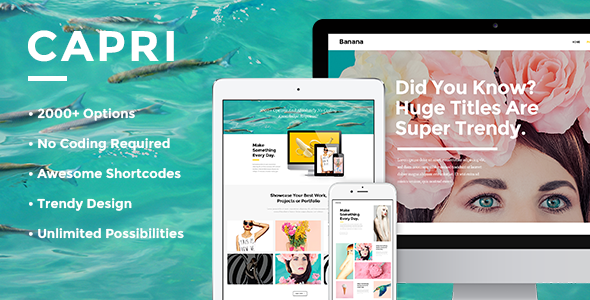
Stuck on your Capri WordPress theme? Let's fix it.
No endless back-and-forth. Just send us the details and we'll get it done.
No obligation · Replies within 1 hour · Quote within 1 day
Setup · Customization · Bug fixes · WooCommerce integration
About Capri WP Theme
Capri is a WordPress theme by Select-Themes, built for creative businesses, portfolios, and agencies. It ships with a clean, minimal design that puts visual content front and centre. The theme supports the Elementor page builder, giving you drag-and-drop control over layouts without touching code.
Select-Themes has a solid track record of well-coded, regularly updated themes. Capri follows that pattern. It includes multiple homepage demos, WooCommerce support, and a header builder that covers most use cases out of the box.
Performance is reasonable on a clean install. The theme is translation-ready and works with popular SEO and caching plugins. If your project involves a visually driven site — photography, design studio, boutique agency — Capri is a credible starting point worth evaluating.
Get matched with a Capri developer in under one day
Tell us about your Capri project. Small fixes, Capri theme customization, or a full website build, whatever you need, we've got it covered.
We'll connect you to the right Capri developers, define the scope, and get everything 100% clear.
You'll get one estimate, hire your preferred developer, and start collaborating.
Getting Capri to production quality takes more than activating a demo. A developer who knows Select-Themes’ codebase can customise layouts cleanly, avoid plugin conflicts, and build features that hold up over time.
Through Codeable, you get matched with vetted WordPress developers who have real experience with themes like Capri. No agencies, no guesswork. Post your project, get an estimate within 24 hours, and only move forward if it makes sense. Every project on Codeable is backed by a satisfaction guarantee.
Pros
- Clean, minimal design that works well for visual and creative projects
- Native Elementor support with pre-built sections and homepage demos
- Built-in WooCommerce compatibility with styled product and shop pages
- Header builder included, covering sticky, transparent, and split header variations
- Actively maintained by Select-Themes with regular compatibility updates
Cons
- Demo content import can be slow and occasionally requires manual cleanup
- Deep customisation requires Elementor Pro, which is an additional cost
- Typography options in the free Customizer are limited compared to Elementor-heavy setups
- Select-Themes support is limited to forums; no live chat or priority ticket system
- Out-of-the-box page speed scores drop noticeably once demo images and sliders are loaded
Who is Capri for?
Photography Portfolio
Capri’s fullscreen image sections and minimal UI make it a strong fit for photographers. Gallery layouts display work without visual clutter, and the theme’s grid options handle both portrait and landscape shots cleanly. A developer can set up custom album structures and lightbox integrations to give clients a polished browsing experience.
Creative Agency Website
Agencies need a site that communicates credibility fast. Capri’s homepage demos include service sections, team grids, and case study layouts that translate well to agency use. With Elementor Pro, you can build out a full services architecture, contact flows, and client showcase sections without custom development from scratch.
Boutique eCommerce Store
Capri’s WooCommerce styling suits small shops selling premium or design-led products. Product pages are clean and conversion-focused. A developer can customise the catalogue layout, add filtering by attribute, and style the checkout to match your brand. It works best for shops with a curated, smaller product range.
Interior Design Studio
Interior design studios need a theme that lets the work do the talking. Capri’s wide image blocks and project grid layouts suit before-and-after showcases, room-by-room portfolios, and service breakdowns. The minimal typography system keeps focus on visuals, which is exactly what interior design clients expect when browsing a studio site.
Freelance Designer Portfolio
Freelancers need a portfolio that loads fast, looks sharp, and converts visitors into enquiries. Capri covers the basics well — project showcases, an about section, and a contact form setup. A developer can tailor the layout to highlight specific disciplines, set up a case study template, and connect a contact form to your preferred CRM or email tool.

Customizing Capri
Capri gives you a solid foundation, but most serious projects need work beyond the demo content. Customising the header layout, adjusting the typography system, or building out custom page templates typically requires someone who knows the theme’s structure well.
A Capri expert can wire up custom Elementor sections, modify the theme’s CSS without breaking future updates, and integrate third-party plugins cleanly. If you need WooCommerce customisation — custom product layouts, checkout styling, or catalogue filtering — that’s where hands-on expertise pays off.
Select-Themes provides documentation, but getting from a demo install to a production-ready site that matches your brand takes more than reading docs. Working with a developer who has built on Capri before saves significant time and avoids common setup mistakes.
Recommended plugins for Capri
Capri works well with several plugins that extend its core functionality. Elementor Pro unlocks popups, forms, and dynamic content that pair naturally with the theme’s layout system. WooCommerce adds a full shop layer with minimal friction on a fresh install.
For speed, pairing Capri with a caching plugin and optimising images through a CDN makes a measurable difference. If organic traffic matters to your project, a proper WordPress SEO setup is worth doing early. For sites expecting growth, investing in WordPress performance optimisation before launch prevents issues later.
Not sure which plugins to use? This WordPress plugins directory covers the most popular options with reviews and setup guides.
Capri common issues
Capri theme demo import not working
Demo import failures in Capri usually come down to server memory limits or PHP timeout settings. Your host’s default configuration may not meet the theme’s requirements. Start by increasing memory_limit to at least 256MB and setting max_execution_time to 300 in your php.ini or wp-config.php. If the importer still stalls, try importing XML content manually through WordPress’s built-in importer and set up widgets and settings separately. If problems persist, a WordPress bug fixing service can resolve environment-specific issues quickly.
Capri header not showing correctly on mobile
Mobile header issues in Capri typically stem from conflicting Elementor header templates or custom CSS that targets desktop breakpoints only. First, check the Capri header builder settings under Appearance and confirm mobile header options are enabled. If you have an Elementor Pro header template overriding the theme, check its display conditions and mobile visibility settings. Clear all caches after making changes. If the issue appears only on specific devices, inspect the element in browser dev tools to trace the conflicting rule. A developer can resolve this in under an hour.
Capri WooCommerce product page layout broken
Broken WooCommerce layouts in Capri are often caused by plugin version mismatches or a missing theme compatibility file. Select-Themes periodically releases WooCommerce compatibility updates, so check that your theme is on the latest version. If a recent WooCommerce update broke the layout, the theme may not yet support the new template structure. Temporarily switch to a child theme and copy the updated template file into it. For persistent issues, the WordPress bug fixing service can identify whether it’s a theme or plugin conflict.
Capri theme slow loading after adding Elementor sections
Page speed drops with Capri and Elementor are common and usually fixable. Start by auditing which Elementor widgets are loading scripts globally — disable unused widgets through Elementor’s performance settings. Optimise all images before upload and use a CDN. Minify CSS and JavaScript through a caching plugin like WP Rocket or LiteSpeed Cache. Capri’s slider sections are the biggest culprits for render-blocking resources; consider replacing heavy sliders with static hero sections. For a structured approach, see the WordPress performance optimisation service.
Capri FAQ
Yes. Capri is built with Elementor support as a core feature. The free version of Elementor works with the theme, and most of the demo layouts are built using Elementor sections. Elementor Pro unlocks additional widgets — forms, dynamic content, popups — that significantly extend what you can build. The theme and Elementor are kept in sync through Select-Themes’ update schedule.
Yes. Capri includes WooCommerce styling for product pages, shop archives, cart, and checkout. It is not a dedicated WooCommerce theme, so heavy catalogue builds or complex shop setups may need developer customisation. For straightforward stores with a clean product range, Capri works well out of the box with minimal adjustment needed after activation.
You can use Capri with the free version of Elementor, and many of the core layout features work without Pro. However, certain demo sections use Elementor Pro widgets. If you want to replicate those sections exactly, you need the paid version. For simpler builds — portfolio, agency intro, basic shop — the free tier is often sufficient alongside Capri’s built-in Customizer options.
Always use a child theme before customising Capri. Any CSS or template changes made directly to the parent theme will be overwritten during updates. Store custom CSS in the child theme’s stylesheet or in the WordPress Customizer’s additional CSS field. Before any update, back up the site and review the theme changelog for template changes. A WordPress maintenance plan can handle updates safely on a regular schedule.
Capri is a solid choice for photography portfolios. Its fullscreen image blocks, minimal UI, and grid layouts are well-suited to visual content. It handles both gallery pages and individual project showcases cleanly. For professional photographers who need client proofing, print ordering, or password-protected galleries, you would need additional plugins on top of the theme’s base functionality.
Hire a Capri WordPress Developer
Whether you need a full Capri site built from scratch, a demo customised to your brand, or specific features added to an existing install, a specialist can deliver it cleanly and on schedule.
Post your project on Codeable through FoxyConcept and get matched with a vetted Capri developer within 24 hours. Get a free estimate with no obligation to hire. The entire process is risk-free.
You'll need a free Codeable account so developers can ask questions and send their quotes.