Fleur WordPress Theme
by Mikado-Themes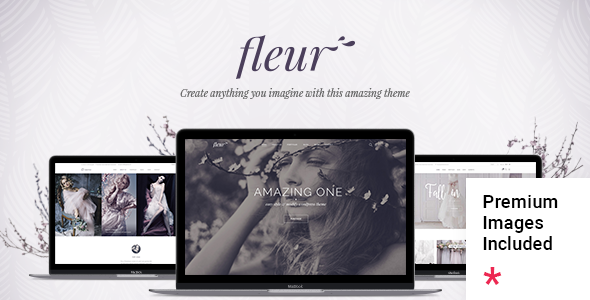
Stuck on your Fleur WordPress theme? Let's fix it.
No endless back-and-forth. Just send us the details and we'll get it done.
No obligation · Replies within 1 hour · Quote within 1 day
Setup · Customization · Bug fixes · WooCommerce integration
About Fleur WP Theme
Fleur is a WordPress theme built by Mikado Themes, designed for florists, wedding planners, event stylists, and boutique lifestyle brands. It ships with a soft, elegant aesthetic — pastel tones, script typography, and generous whitespace — that suits businesses where visual presentation drives conversions.
The theme is built on Mikado’s own framework and includes the WPBakery Page Builder, Mikado Slider, and a suite of custom shortcodes. Out of the box, Fleur includes multiple pre-built demo pages covering shop layouts, portfolio grids, and contact forms. It supports WooCommerce for online selling and integrates with popular plugins like WPML for multilingual sites. If you run a product-driven or service-based business in the wedding or floral industry, Fleur gives you a polished starting point without needing to design from scratch.
Get matched with a Fleur developer in under one day
Tell us about your Fleur project. Small fixes, Fleur theme customization, or a full website build, whatever you need, we've got it covered.
We'll connect you to the right Fleur developers, define the scope, and get everything 100% clear.
You'll get one estimate, hire your preferred developer, and start collaborating.
Fleur is built on Mikado’s proprietary framework, not a standard parent theme. That means generic WordPress advice often doesn’t apply. A developer who knows the theme’s hook structure, shortcode library, and WPBakery implementation will work faster and make fewer mistakes.
Through Codeable, you get matched with vetted WordPress developers who have real experience with themes like Fleur. No job boards, no guessing. Post your project and receive a clear estimate, usually within 24 hours.
Pros
- Purpose-built for floral and wedding businesses with matching visual style out of the box
- Includes multiple complete demo layouts that can be imported in one click
- WooCommerce compatible with pre-styled shop and product page templates
- Supports WPML for multilingual site builds without major configuration work
- Mikado Themes provides regular updates and has a long track record of theme support
Cons
- WPBakery is bundled rather than Gutenberg-native, creating a steeper learning curve for new users
- Mikado's custom framework makes it harder for non-specialist developers to modify safely
- Page load times can suffer on budget hosting due to multiple custom scripts loading globally
- Demo content requires manual cleanup after import — placeholder images and dummy text are not removed automatically
- Limited block editor support means future WordPress core updates may cause compatibility friction
Who is Fleur for?
Florists and Flower Shops
Fleur’s soft colour palette and elegant product layouts suit flower shops selling online or showcasing seasonal arrangements. WooCommerce integration handles order management, and the portfolio grid works well for arrangement galleries. A developer can set up product categories, delivery zones, and checkout customisations to match how a local florist actually operates.
Wedding Planners
Wedding planners need a site that feels premium and converts enquiries into consultations. Fleur’s full-width image sections, testimonial layouts, and contact form support make it a natural fit. A Fleur developer can customise the enquiry flow, add a booking form, and adjust typography to match a planner’s specific brand identity.
Event Stylists and Decorators
Event stylists rely on portfolio presentation to win clients. Fleur’s masonry and grid gallery options display styled shoots and real events effectively. With the right developer setup, you can filter by event type, link to vendor credits, and create separate pages for corporate versus private event work without cluttering the main navigation.
Boutique Gift Shops
Small gift shops benefit from Fleur’s WooCommerce templates, which are styled to feel boutique rather than generic. Product pages, featured collections, and a clean checkout flow all work within the theme’s design language. A developer can add gift wrapping options, custom upsells, or a loyalty plugin without breaking the visual consistency.
Photography Studios
Photography studios that focus on weddings, newborns, or lifestyle sessions fit Fleur’s aesthetic well. The full-width hero sections and minimal portfolio layouts keep the focus on images. A developer can configure password-protected client galleries, pricing page layouts, and session booking forms that integrate with scheduling tools like Calendly or Acuity.

Customizing Fleur
Fleur comes with a theme options panel that covers fonts, colours, header styles, and footer layouts. Most visual changes are handled inside WPBakery, which uses a drag-and-drop interface. That works well until you need something outside the default grid — at that point, custom CSS or PHP edits become necessary.
A Fleur expert can save you significant time here. Adjusting the mega menu, modifying the shop loop template, or adding custom post type layouts all require digging into Mikado’s theme structure, which differs from standard WordPress conventions. Hiring a developer who already knows Fleur’s codebase means fewer trial-and-error hours and cleaner output. Whether you need a single-page tweak or a full site build, working with someone experienced in Fleur specifically produces better results than a generalist starting from scratch.
Recommended plugins for Fleur
Fleur pairs naturally with WooCommerce if you sell products, and Mikado’s own shortcode library handles most layout needs. Beyond that, a few additions are worth considering.
For speed, image optimisation and caching plugins make a real difference — Fleur loads several custom scripts that can slow things down on shared hosting. See our WordPress performance service for specifics. For search visibility, the theme’s markup is clean but metadata and schema still need attention — our WordPress SEO service covers that. WPML works well with Fleur if you serve multiple language markets. Gravity Forms and Mailchimp integrations are straightforward and commonly used on Fleur sites.
Not sure which plugins to use? This WordPress plugins directory covers the most popular options with reviews and setup guides.
Fleur common issues
Fleur theme demo import not working
Demo import failures in Fleur are usually caused by PHP memory limits set too low on your hosting account. The recommended minimum is 256MB. Check your wp-config.php for the WP_MEMORY_LIMIT value and increase it if needed. Also confirm that the required plugins — WPBakery and Mikado Slider — are activated before running the importer. If errors persist, importing the XML file manually through the WordPress importer is a reliable fallback.
Fleur WooCommerce shop page layout broken
Broken WooCommerce layouts in Fleur often appear after a WooCommerce update that conflicts with Mikado’s custom shop templates. Check whether Fleur’s WooCommerce template files are outdated via Appearance > Theme Check or a plugin like WP Health. Updating those files to match the current WooCommerce version usually resolves column and spacing issues. If the problem involves the cart or checkout, a WordPress bug fixing service can pinpoint the conflict quickly.
Fleur theme header not displaying correctly on mobile
Mobile header issues in Fleur typically stem from custom CSS overriding the responsive breakpoints Mikado set in the theme. Open browser DevTools on a mobile viewport and inspect which styles are conflicting. Common culprits include custom logo sizing, sticky header settings in the theme options panel, or third-party header plugins that duplicate functionality. Disable sticky header and test first. If a child theme is in use, check for overriding rules in style.css.
Fleur theme slow loading after adding plugins
Fleur loads several global scripts by default, including WPBakery’s front-end assets even on pages that don’t use the builder. Adding plugins on top increases HTTP requests noticeably. Start by enabling caching and deferring non-critical JavaScript. Then audit which WPBakery scripts can be disabled per page. For a structured approach, our WordPress performance service covers script management, image optimisation, and hosting-level improvements specific to theme-heavy setups like Fleur.
Fleur FAQ
Fleur was built around WPBakery and Mikado’s own shortcode system, not Gutenberg. Basic posts and pages work fine in the block editor, but the pre-built demo layouts rely on WPBakery. Full block editor support is not part of the current design. If Gutenberg compatibility is a hard requirement, that limitation is worth factoring into your decision before purchasing.
Technically yes, but you lose most of the demo layouts. Fleur’s pre-built pages are constructed with WPBakery shortcodes, which render as raw code if the plugin is deactivated. You can build pages using only the Classic Editor or Gutenberg, but you will be starting from scratch visually. Most users working with Fleur keep WPBakery active for layout editing.
Yes. Fleur includes custom WooCommerce templates for shop, product, cart, and checkout pages. These are styled to match the theme’s overall aesthetic. Standard WooCommerce features like variable products, coupons, and payment gateways work as expected. After major WooCommerce updates, it is worth checking whether Mikado has released a corresponding theme update to keep the templates in sync.
Always use a child theme before making any code changes. Theme updates from Mikado overwrite files in the parent theme, so customisations made directly there will be lost. Keep your child theme’s style.css and functions.php for overrides. Before updating, back up your site. Our WordPress maintenance service handles update management if you prefer not to do this manually.
Yes, migrating content to Fleur is possible but requires planning. Existing page layouts built in another builder will not transfer directly. Content migrates cleanly via XML export, but pages will need to be rebuilt using Fleur’s templates or WPBakery. If you are moving a WooCommerce store, product data, images, and orders migrate separately. Our WordPress migration service covers both content and design transitions.
Hire a Fleur WordPress Developer
Need help building, customising, or fixing a Fleur-based site? Whether it’s a layout adjustment, a WooCommerce integration, or a full site setup from a demo import, a dedicated Fleur developer handles it faster than figuring it out yourself.
Get a free estimate through Codeable. Describe your project, get matched with a vetted developer, and decide if you want to proceed. No payment required until you hire.
You'll need a free Codeable account so developers can ask questions and send their quotes.