Resca WordPress Theme
by ThimPress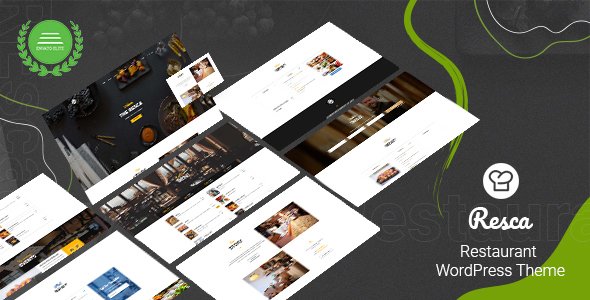
Stuck on your Resca WordPress theme? Let's fix it.
No endless back-and-forth. Just send us the details and we'll get it done.
No obligation · Replies within 1 hour · Quote within 1 day
Setup · Customization · Bug fixes · WooCommerce integration
About Resca WP Theme
Resca is a WordPress theme built by ThimPress, primarily designed for restaurants, cafes, and food-related businesses. It ships with a clean layout, a built-in menu section, reservation forms, and gallery support — everything a food business needs without heavy custom development.
The theme integrates with Elementor, making page building more visual and flexible. It also works with WooCommerce if you want to sell products or gift cards directly from your site. ThimPress has a solid track record with education and hospitality themes, and Resca reflects that experience. The code is well-structured, the design is modern without being overdone, and the bundled demo content makes initial setup faster than most competing themes in this niche.
Get matched with a Resca developer in under one day
Tell us about your Resca project. Small fixes, Resca theme customization, or a full website build, whatever you need, we've got it covered.
We'll connect you to the right Resca developers, define the scope, and get everything 100% clear.
You'll get one estimate, hire your preferred developer, and start collaborating.
Resca is approachable for DIY setup, but most restaurant owners hit a wall when requirements get specific. Payment flows, custom menu layouts, booking system conflicts, or mobile display issues all need someone who knows the theme’s structure. Through Codeable, you get matched with a vetted WordPress developer with relevant experience — not a generalist freelancer from a bidding platform. Work is scoped clearly, priced fairly, and backed by a platform that only accepts the top tier of applicants. For a business where first impressions matter, that standard of work makes a difference.
Pros
- Built-in restaurant menu builder with category support and pricing fields
- Elementor compatibility gives full visual control over page layouts
- WooCommerce integration supports online ordering and product sales
- Demo content import makes initial setup significantly faster
- ThimPress provides regular updates and maintained documentation
Cons
- Relies on Elementor heavily, which adds page builder dependency and load overhead
- Bundled plugins sometimes conflict with independently installed versions
- Reservation functionality is basic without third-party plugin support
- Limited header and footer layout options without custom coding
- Some demo sections are difficult to replicate without the exact bundled content
Who is Resca for?
Independent Restaurants
Resca was built with independent restaurants in mind. The menu builder handles starters, mains, and desserts cleanly. Combined with a reservation plugin, you get a professional site that covers the core jobs: showing your menu, taking bookings, and presenting your location and hours without needing a custom build from scratch.
Cafes and Coffee Shops
Cafes benefit from Resca’s gallery sections and event-style layouts. Showcasing seasonal drinks, posting weekly specials, or building an about page with a warm aesthetic all work well within the theme’s design language. The lighter page structures suit businesses that don’t need full table reservation systems but still want a polished online presence.
Food Delivery Services
With WooCommerce active, Resca can support a food delivery workflow. Product listings for meal options, checkout with delivery notes, and order confirmation emails are all manageable. A developer can extend this further with delivery zone restrictions or time-slot ordering — functionality that goes beyond the theme’s defaults but fits within its architecture.
Catering Companies
Catering companies need to communicate scale, professionalism, and service variety. Resca’s flexible page layouts work well for presenting packages, corporate menus, and past event photography. An inquiry form or quote request flow can be added without major structural changes, making it a practical base for service-based food businesses.
Bars and Cocktail Lounges
Bars and cocktail lounges can adapt Resca’s visual style to a darker, moodier aesthetic through color customization. The menu builder works just as well for cocktail lists and drink pairings. Event sections support gig nights or themed evenings. The theme won’t cover every edge case, but the foundations are solid for hospitality venues of this type.

Customizing Resca
Out of the box, Resca gives you decent control through the WordPress Customizer and Elementor. You can adjust colors, fonts, header layouts, and homepage sections without touching code. The restaurant menu builder lets you organize items by category with pricing and descriptions.
Beyond that, things get more technical. Custom booking flows, third-party reservation plugin integration, multilingual setup, or any non-standard layout change will require developer work. A Resca expert can modify the theme’s page templates, extend its WooCommerce integration, or rebuild sections in Elementor with custom widgets. If your restaurant has specific operational needs — online ordering, table management, event listings — having a developer tailor Resca to fit is far more reliable than working around its defaults.
Recommended plugins for Resca
Resca works well with several plugins that extend its core functionality. For reservations, it pairs with plugins like OpenTable integration or WP Restaurant Reservations. WooCommerce handles online ordering or gift card sales. WPML or Polylang cover multilingual menus for international restaurants.
On the technical side, pairing Resca with a solid caching setup and image optimization is worth doing early — food photography tends to be heavy. Check out WordPress performance optimization to keep load times low. If you need better search visibility for local dining searches, WordPress SEO services can help structure your content and schema markup correctly.
Not sure which plugins to use? This WordPress plugins directory covers the most popular options with reviews and setup guides.
Resca common issues
Resca reservation form not sending emails
This is usually a WordPress email delivery problem, not a Resca-specific bug. The site’s default PHP mail often gets blocked by hosting providers. Install a transactional email plugin like WP Mail SMTP and connect it to an SMTP service such as SendGrid or Mailgun. Test the form again after setup. If emails still fail, check your spam folder and verify the form’s recipient address is correctly configured in the reservation plugin settings. WordPress bug fixing can resolve this quickly if the issue persists.
Resca menu section not displaying correctly on mobile
Menu display issues on mobile usually come from custom CSS overrides or Elementor column settings that don’t stack correctly on smaller screens. Open the page in Elementor, switch to mobile preview mode, and check each column’s padding, font size, and visibility settings. If the issue appeared after a theme or plugin update, check the changelog for layout changes. Clearing your cache after any CSS adjustment is also necessary before testing again.
Resca Elementor widgets missing after theme update
Missing Elementor widgets after a Resca update typically means the theme’s bundled Elementor addon wasn’t updated alongside the core theme. Go to Appearance > Install Plugins and check if any bundled plugins show an available update. Reinstalling the ThimPress Elementor addon usually restores the missing widgets. If the widgets are still absent, deactivate and reactivate the addon plugin to force it to re-register its components with Elementor.
Resca WooCommerce checkout page layout broken
A broken WooCommerce checkout layout in Resca often results from a CSS conflict between the theme’s styles and WooCommerce’s default stylesheet. First, check if the issue appears with all plugins deactivated except WooCommerce. If the layout is fine then, reactivate plugins one at a time to find the conflict. If it’s a theme-level CSS issue, adding targeted fixes in a child theme’s stylesheet is the right approach rather than editing the parent theme directly. Ongoing WordPress maintenance helps catch these conflicts early.
Resca FAQ
Resca is available in both free and premium versions. The free version is available on the WordPress theme directory and covers basic restaurant site needs. The premium version from ThimPress unlocks additional demos, more customization options, priority support, and bundled plugin access. For a serious restaurant site, the premium version is worth the cost given the additional functionality it provides.
Yes, Resca is built around Elementor and uses it as its primary page builder. Most of the demo content is built with Elementor templates, and the theme includes custom Elementor widgets for restaurant-specific sections like menus and reservations. You will need Elementor installed and active to get the full experience the demo content demonstrates.
It can work for food delivery with some setup. Resca includes WooCommerce compatibility, so you can list food items as products and handle checkout. However, advanced delivery features like zone-based pricing, time-slot selection, or driver tracking require additional plugins. A developer can integrate purpose-built delivery plugins into the Resca framework if those features are important to your operation.
Resca doesn’t include a full reservation system by default. You add one through a compatible plugin such as WP Restaurant Reservations, Bookly, or a similar booking tool. These plugins provide reservation forms, email notifications, and backend management. You then embed the form into your Resca pages using a shortcode or Elementor widget. Configuration varies by plugin, so check compatibility before committing to one.
Resca follows standard WordPress SEO practices — it outputs clean HTML, supports SEO plugins like Yoast and Rank Math, and loads reasonably fast with proper hosting. However, theme SEO alone isn’t enough for competitive local restaurant searches. You’ll need structured data for restaurant schema, optimized page titles, and local citations. An SEO service can handle the technical setup that the theme itself doesn’t cover.
Hire a Resca Expert Developer
Need help setting up Resca, customizing its templates, fixing layout issues, or integrating a reservation system? Our WordPress developers have hands-on experience with ThimPress themes and restaurant site builds. You get a clear estimate before any work starts, no obligation to proceed. Get a free estimate and describe what you need — most projects are scoped and matched within 24 hours.
You'll need a free Codeable account so developers can ask questions and send their quotes.