Medin WordPress Theme
by p-themes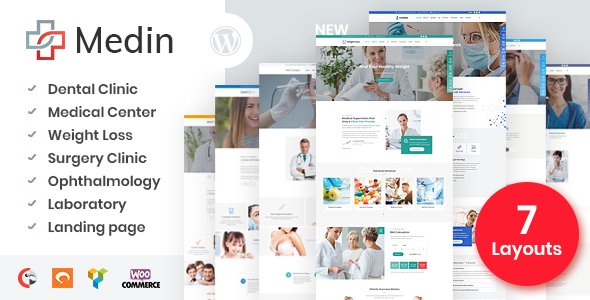
Stuck on your Medin WordPress theme? Let's fix it.
No endless back-and-forth. Just send us the details and we'll get it done.
No obligation · Replies within 1 hour · Quote within 1 day
Setup · Customization · Bug fixes · WooCommerce integration
About Medin WP Theme
Medin is a medical WordPress theme developed by p-themes, built specifically for clinics, hospitals, doctors, and healthcare professionals. It ships with a clean, professional layout designed to build trust with patients from the first visit.
The theme includes appointment booking functionality, department pages, doctor profile templates, and service sections — all structured with healthcare visitors in mind. Page sections are well-organised, and the design avoids the generic business theme feel that plagues many medical sites.
Medin works with Elementor, making layout edits accessible without touching code. It also includes WooCommerce compatibility for practices that sell health products or supplements. For clinics that need a fast setup with a professional result, Medin is a practical starting point.
Get matched with a Medin developer in under one day
Tell us about your Medin project. Small fixes, Medin theme customization, or a full website build, whatever you need, we've got it covered.
We'll connect you to the right Medin developers, define the scope, and get everything 100% clear.
You'll get one estimate, hire your preferred developer, and start collaborating.
Medin is a capable theme, but getting it to work exactly the way a clinic needs takes real WordPress knowledge. From custom booking integrations to structured data for medical practices, the details matter. Developers on Codeable are vetted, experienced, and matched to your project within 24 hours. You get a free estimate with no obligation — so there is no risk in finding out what your project would actually cost.
Pros
- Purpose-built for medical and healthcare sites with relevant templates included
- Elementor compatibility makes layout editing accessible without coding
- Includes doctor profile, department, and appointment page templates out of the box
- WooCommerce ready for clinics that sell products alongside services
- Clean, trust-focused design that suits patient-facing healthcare brands
Cons
- Appointment booking requires a third-party plugin — nothing functional is built in
- Demo import can be slow or incomplete depending on hosting environment
- Limited layout variety without significant Elementor customisation
- No built-in HIPAA or GDPR data handling — compliance needs separate configuration
- Child theme not included by default, making updates risky if custom CSS is added to the parent
Who is Medin for?
General Practice and Family Clinics
Medin works well for GP and family clinic sites that need clear service listings, doctor profiles, and a way for patients to book appointments. The layout communicates credibility and makes it easy for visitors to find opening hours, contact details, and the right department quickly.
Dental Surgeries
Dental practices benefit from Medin’s service page structure and professional visual style. Sections for treatments, team bios, and patient testimonials map cleanly onto what most dental sites need. Booking plugin integration handles appointment requests without heavy custom development.
Specialist Consultant Practices
Consultants running private practices can use Medin’s doctor profile templates to present credentials, specialisms, and availability. A focused single-practitioner setup is straightforward to build, and the theme’s design avoids the cluttered look common in medical site builders.
Physiotherapy and Allied Health
Physiotherapy and allied health businesses need service pages, practitioner profiles, and clear calls to action. Medin covers all three well. Adding an intake form or booking plugin is a natural extension that a developer can configure without rebuilding the site from scratch.
Private Hospitals and Multi-Department Facilities
Larger facilities with multiple departments and dozens of practitioners can use Medin as a base, though this use case will need custom development. Department taxonomy, advanced filtering for doctors, and complex navigation structures go beyond the default theme setup.

Customizing Medin
Out of the box, Medin covers the basics well — but most clinics have specific needs that go beyond the demo content. Custom appointment flows, integrated booking systems like Amelia or Bookly, multilingual setups, or custom doctor filtering all require development work.
Colour schemes, typography, and layout adjustments are manageable in Elementor, but deeper changes — custom post types for departments, conditional forms, or HIPAA-aware data handling — need a Medin expert who understands both the theme structure and healthcare requirements.
Working with a developer who knows Medin saves time and avoids the trial-and-error that comes with modifying unfamiliar theme files. Custom CSS patches and child theme work keep your changes safe through updates.
Recommended plugins for Medin
Medin pairs well with several plugins that extend its core functionality. Bookly and Amelia both integrate cleanly for appointment scheduling. WPML or Polylang work for multilingual clinics. WooCommerce adds an online shop for health products.
For sites that need to rank locally, pairing Medin with a solid WordPress SEO setup makes a real difference in patient acquisition. If your site is running slowly after adding plugins, a WordPress performance audit can identify what is causing the drag and get load times back down.
Not sure which plugins to use? This WordPress plugins directory covers the most popular options with reviews and setup guides.
Medin common issues
Medin theme appointment booking not working
Medin does not include built-in booking functionality. You need a plugin like Amelia or Bookly to handle appointments. If booking forms are not working, the most common causes are plugin conflicts, misconfigured form settings, or email delivery failures. Check your SMTP setup and review plugin error logs. If the problem persists, a WordPress bug fixing service can identify the root cause quickly.
Medin WordPress theme slow loading after plugin install
Slow load times after adding plugins to a Medin site are usually caused by unoptimised images, render-blocking scripts, or a lack of caching. Start by checking which plugins are adding the most weight using Query Monitor or GTmetrix. A WordPress performance review will give you a clear picture of what to fix and in what order to make the biggest difference.
Medin demo import failed or incomplete
Failed demo imports in Medin are often caused by low PHP memory limits, upload size restrictions, or a timeout during the import process. Increase max_execution_time, memory_limit, and upload_max_filesize in your PHP configuration. If your host does not allow those changes, importing content manually page by page is a reliable fallback. A developer can also import and configure the demo for you directly.
Medin theme doctor profile page layout broken
Broken doctor profile layouts in Medin are usually caused by a missing plugin dependency, a conflict with a recently updated plugin, or a custom CSS change that has overridden a layout rule. Open the page in Elementor and check whether any widgets are showing errors. Disabling recently added plugins one at a time will help isolate the conflict. If the layout was working before an update, checking the changelog for Medin or Elementor is a good starting point.
Medin FAQ
Medin is a solid choice for small to mid-sized medical clinics. It includes purpose-built templates for doctors, departments, and services, and the design communicates professionalism clearly. For larger facilities with complex requirements, you will need custom development on top of the base theme to handle multi-department structures and advanced filtering.
Yes, Medin is built to work with Elementor. Most page sections are editable using the Elementor drag-and-drop editor, which means you can adjust layouts, swap images, and update content without writing code. For deeper customisation, such as custom post type templates or conditional layouts, a developer can extend what Elementor provides.
Medin does not include booking functionality on its own. Plugins like Amelia, Bookly, or Simply Schedule Appointments can be added to handle online booking. Each has different features and pricing. A developer can integrate your preferred booking system and make sure it matches the rest of your site’s design and workflow.
Migrating an existing site to Medin involves moving your content, reconfiguring your pages in Elementor, and connecting any existing plugins. It is not a one-click process. A WordPress migration handled by a developer ensures your content, SEO settings, and functionality transfer correctly without downtime or data loss.
Yes. If you plan to add custom CSS or modify template files in Medin, a child theme is essential. Without one, any customisation made directly to the theme files will be overwritten when p-themes releases an update. A developer can set up a child theme quickly and move any existing custom code into it safely.
Hire a Medin WordPress Developer
Whether you need a Medin site built from scratch, a custom feature added, or an existing site cleaned up, working with the right developer saves weeks of frustration. Our developers know the theme inside out and have built healthcare sites across clinics, specialist practices, and hospitals. Get a free estimate and describe what you need — no commitment required, and you will hear back within 24 hours.
You'll need a free Codeable account so developers can ask questions and send their quotes.