Rentit WordPress Theme
by Jthemes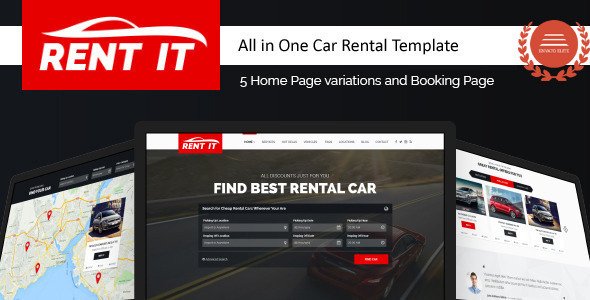
Stuck on your Rentit WordPress theme? Let's fix it.
No endless back-and-forth. Just send us the details and we'll get it done.
No obligation · Replies within 1 hour · Quote within 1 day
Setup · Customization · Bug fixes · WooCommerce integration
About Rentit WP Theme
Rentit is a WordPress rental theme by Jthemes, built for businesses that list items or properties for hire. It ships with a booking system, search filters, and listing pages designed around rental workflows. The theme targets car rentals, equipment hire, vacation properties, and similar inventory-based businesses.
Built on a custom framework by Jthemes, Rentit includes front-end submission forms, availability calendars, pricing options, and category filtering. It works with WooCommerce for payment processing and supports multiple listing types out of the box.
The design is clean and conversion-focused, with prominent search bars and clear call-to-action placement. It suits business owners who need a functional rental site without building everything from scratch.
Get matched with a Rentit developer in under one day
Tell us about your Rentit project. Small fixes, Rentit theme customization, or a full website build, whatever you need, we've got it covered.
We'll connect you to the right Rentit developers, define the scope, and get everything 100% clear.
You'll get one estimate, hire your preferred developer, and start collaborating.
Rentit is not a simple theme to customise. The booking logic, listing templates, and pricing structures all interact with each other. A small change in the wrong place can break availability or pricing display across the site.
Hiring through Codeable connects you with vetted WordPress developers who have worked on rental and booking sites. You post your project, get matched within 24 hours, and receive a free estimate before committing. No risk, no obligation. If your Rentit site needs work, this is the fastest way to get it done properly.
Pros
- Purpose-built for rental businesses with booking, availability, and pricing built in from the start
- Supports multiple rental categories out of the box including vehicles, equipment, and properties
- Front-end listing submission forms allow vendors or admins to add inventory without backend access
- WooCommerce integration handles payments, invoices, and order management without extra plugins
- Availability calendar is included and works reliably for single and multi-day booking scenarios
Cons
- Theme options panel is not as intuitive as Elementor or Divi, steeper learning curve for non-developers
- Template files follow Jthemes conventions rather than standard WordPress structure, making child theming harder
- Mobile styling on listing detail pages needs manual CSS fixes in some layouts
- Documentation is limited for edge cases like custom pricing tiers or deposit-based bookings
- Plugin compatibility outside the Jthemes ecosystem is inconsistent and may require developer intervention
Who is Rentit for?
Car and Vehicle Rental
Rentit is well-suited to car rental businesses. You can list vehicles by category, set daily rates, show availability, and take bookings with deposit or full payment options. The search filters let customers narrow by type, location, or date. For fleets with complex pricing rules, a developer will need to extend the default setup.
Holiday and Short-Term Property Rentals
Short-term rental operators can use Rentit to list properties with photo galleries, amenity lists, availability calendars, and nightly pricing. It works for individual hosts or multi-property managers. The front-end submission form is useful if you manage listings for third-party property owners who need to update their own content.
Equipment and Tool Hire
Equipment hire companies benefit from Rentit’s category and inventory structure. You can list tools or machinery with specifications, daily or weekly rates, and availability windows. Bulk import via WP All Import speeds up setup for large catalogues. Custom deposit logic or damage waiver options need developer customisation.
Boat and Recreational Vehicle Rentals
Boat hire, jet ski rentals, and motorhome bookings fit naturally into Rentit’s listing format. The booking system handles single-day or multi-day hire periods. Seasonal pricing is possible but requires configuration. For businesses with specific insurance or licence requirement fields, custom listing fields need to be added manually.
Party and Event Equipment Hire
Party hire companies renting tables, chairs, marquees, or AV equipment can use Rentit to manage their catalogue and take bookings online. The WooCommerce integration makes it straightforward to handle multiple items in one booking. Quantity-based availability tracking, however, needs plugin additions or custom development beyond the default theme setup.

Customizing Rentit
Rentit gives you a lot of options in the theme settings panel, but getting things to look exactly right takes time. The layout system is fairly rigid in places, and customising the booking flow or listing templates usually means editing PHP files or overriding CSS directly.
If you want a custom pricing model, a non-standard search filter setup, or changes to how availability is displayed, a Rentit expert will save you hours of trial and error. Things like integrating a third-party payment gateway, modifying the booking confirmation emails, or adding custom fields to listings are common requests that go beyond what the theme panel can handle on its own.
Working with a developer who knows Rentit and Jthemes structure means fewer broken layouts and faster delivery.
Recommended plugins for Rentit
Rentit pairs well with several plugins that extend its core functionality. WooCommerce handles payments and order management. WPML adds multilingual support for rental businesses serving multiple regions. WP All Import works well for bulk uploading inventory listings.
For site speed, caching plugins like WP Rocket help offset the theme’s heavier script load on listing pages. Pair this with image optimisation to keep load times acceptable. Check our WordPress performance service if page speed is a priority.
For organic traffic, structured data for rental listings and local SEO matter. See our WordPress SEO service for help there.
Not sure which plugins to use? This WordPress plugins directory covers the most popular options with reviews and setup guides.
Rentit common issues
Rentit booking calendar not showing availability correctly
Availability display issues in Rentit usually come from conflicting booking records in the database or a caching plugin blocking calendar script updates. First, clear all caches including server-level cache. Then check if completed orders are updating the availability table correctly under the Rentit booking settings. If the calendar still shows incorrect dates, the issue is likely a JavaScript conflict. Disable plugins one by one to isolate it. Persistent cases need a developer review. See our WordPress bug fixing service for hands-on help.
Rentit search filter not returning results
When Rentit search returns no results or incorrect results, the most common causes are permalink structure issues or taxonomy mismatches. Go to Settings > Permalinks and resave without changing anything. This flushes rewrite rules. If the problem continues, check that your listings are assigned to the correct rental category and that custom fields used by the search filter are populated. A corrupted search widget configuration is also possible. Rebuilding the search widget from scratch in a test environment often confirms the source.
Rentit WooCommerce checkout not completing booking
If WooCommerce checkout completes payment but does not register a booking in Rentit, the connection between the WooCommerce order and the Rentit booking system has broken. This often happens after a WooCommerce update that changes order hooks. Check the Rentit changelog for a compatible version update. If none exists, a developer needs to review the hook integration manually. Also confirm that the Rentit booking product type is correctly assigned in WooCommerce. Incorrect product type assignment is a common cause of this disconnect.
Rentit listing images not displaying on mobile
Listing images failing to display on mobile in Rentit are usually caused by incorrect image size registration or a lazy load plugin conflicting with the theme’s gallery script. Check that your featured image dimensions match the sizes Rentit registers. Go to Settings > Media and verify. Then run a thumbnail regeneration using the Regenerate Thumbnails plugin. If images still break on mobile, inspect the element in a browser dev tool to find whether the src attribute is empty or returning a 404. A missing upload or a path issue after a site migration is often the root cause.
Rentit FAQ
Jthemes updates Rentit periodically, but update cycles do not always match WordPress core release schedules. Before updating WordPress, check the Rentit changelog on ThemeForest for confirmed compatibility. Running an outdated version of Rentit on a current WordPress install is a common source of booking and display bugs. Keep both updated and test on a staging site before pushing changes live.
Rentit is not built for Elementor. It uses its own page builder logic and custom templates. You can install Elementor alongside it, but it will not control the listing, booking, or search templates. Those pages are rendered by Rentit’s own system. Trying to rebuild rental functionality inside Elementor on top of Rentit usually creates conflicts. A developer can advise whether your specific use case warrants a different approach.
Rentit relies on WooCommerce for payments, so multi-currency support depends on a WooCommerce-compatible currency plugin such as CURCY or WooCommerce Payments with multi-currency enabled. Rentit itself does not include native multi-currency switching. Display currency in listing prices needs additional configuration. If your business operates in multiple currencies with separate pricing, this setup needs careful planning to avoid display inconsistencies.
Migrating an existing rental site to Rentit involves moving listings, images, booking history, and customer data. The process varies depending on your current platform. WP All Import handles bulk listing migration from CSV or XML. Booking history migration is manual in most cases. For a full site migration with minimal downtime, see our WordPress migration service.
The core listing and availability features of Rentit work without WooCommerce, but payment processing does not. If you remove WooCommerce, customers can view listings and check availability but cannot complete a paid booking through the site. Rentit is designed with WooCommerce as a required dependency for the checkout flow. Running it without WooCommerce is only practical for enquiry-based sites that handle payments offline.
Hire a Rentit Developer
Need help setting up, customising, or fixing your Rentit site? Our developers have hands-on experience with Jthemes products, rental booking systems, and WooCommerce integration. Whether it is a layout change, a broken booking flow, or a full build from scratch, we can help.
Get a free estimate with no obligation. You will hear back within 24 hours and only move forward if the proposal works for you.
You'll need a free Codeable account so developers can ask questions and send their quotes.