Gaea WordPress Theme
by imithemes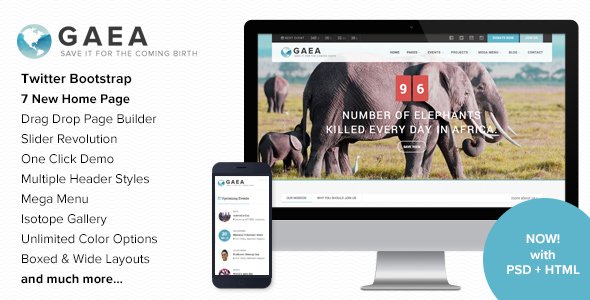
Stuck on your Gaea WordPress theme? Let's fix it.
No endless back-and-forth. Just send us the details and we'll get it done.
No obligation · Replies within 1 hour · Quote within 1 day
Setup · Customization · Bug fixes · WooCommerce integration
About Gaea WP Theme
Gaea is a WordPress theme developed by imithemes, built for nature-focused brands, eco businesses, and outdoor lifestyle websites. It ships with a clean, earthy visual style and a page builder-compatible layout system that makes it practical for non-technical site owners.
The theme includes pre-built demo content, a customizable header and footer, WooCommerce support, and integration with Elementor. Typography and color controls are handled through the WordPress Customizer, so you can match your brand without touching code.
Gaea suits businesses that want a polished, nature-inspired look without building from scratch. It performs well out of the box, though like most multipurpose themes, getting the most out of it usually takes some configuration work beyond the initial demo import.
Get matched with a Gaea developer in under one day
Tell us about your Gaea project. Small fixes, Gaea theme customization, or a full website build, whatever you need, we've got it covered.
We'll connect you to the right Gaea developers, define the scope, and get everything 100% clear.
You'll get one estimate, hire your preferred developer, and start collaborating.
Gaea works well when it is set up correctly. Most issues come from demo imports that do not transfer cleanly, plugin conflicts, or customizations that break on theme updates. A developer who knows the theme structure can get you further in a few hours than days of self-troubleshooting.
FoxyConcept matches you with vetted Gaea specialists through Codeable. You post your project, get a clear estimate, and only move forward if the scope and price make sense. No guesswork, no risk.
Pros
- Clean, nature-inspired design that works out of the box for eco and outdoor brands
- Full Elementor compatibility for drag-and-drop page building without custom code
- WooCommerce ready with styled product pages included in the demo
- WordPress Customizer controls for colors, fonts, and layout without a steep learning curve
- Bundled demo content makes initial setup faster compared to starting from scratch
Cons
- Demo import does not always transfer images and settings cleanly on every host
- Limited niche flexibility outside nature, eco, and outdoor-related businesses
- Advanced layout changes require Elementor Pro or custom CSS beyond the free feature set
- Theme update history from imithemes is inconsistent, which creates long-term maintenance risk
- Documentation is thin on edge cases like multilingual setup or custom post type integration
Who is Gaea for?
Eco Brand or Sustainable Products Shop
Gaea’s earthy color palette and WooCommerce support make it a practical fit for brands selling sustainable or eco-friendly products. You get styled product pages, a shop layout, and a visual identity that matches the values of the brand without needing a custom design from scratch.
Outdoor Adventure or Travel Blog
The theme handles blog layouts well, with strong typography and featured image support. For travel or outdoor content sites, the visual hierarchy keeps long-form posts readable. Adding a custom category structure or featured destinations page is straightforward with Elementor.
Organic Food or Farm Business
Farm and organic food businesses benefit from the natural aesthetic Gaea provides by default. A developer can extend the theme to include seasonal menus, a CSA signup form, or a local delivery area map without needing a fully custom theme build.
Environmental NGO or Non-Profit
Non-profits focused on environmental causes can use Gaea’s layout structure to build out a clear mission page, donation integration, and event listings. The theme does not include these out of the box, but it integrates with standard plugins that handle them without design conflicts.
Wellness and Nature Retreat
Retreat centers, yoga studios, and wellness businesses with an outdoor focus fit the Gaea aesthetic closely. Booking plugin integration, a services page, and a gallery layout are all achievable with the theme’s existing structure and some targeted customization work.

Customizing Gaea
Gaea gives you a solid starting point, but most projects need customization beyond what the demo offers. Adjusting the layout, building out custom post types, or modifying how WooCommerce displays products all require familiarity with how imithemes structures their themes.
A Gaea expert can handle the parts that slow down most site owners: fixing demo import issues, customizing Elementor templates, setting up a product catalog, or making the theme work with third-party plugins without breaking the design.
Custom CSS, child theme development, and hook-based modifications are common requests. If you need changes that go beyond the Customizer, working with someone who knows the Gaea codebase will save time and avoid the usual trial-and-error that comes with theme customization.
Recommended plugins for Gaea
Gaea works with Elementor for page building and WooCommerce for online shops. You can also add standard WordPress plugins for forms, SEO, and caching without compatibility issues in most cases.
For site speed, pairing Gaea with a caching plugin and an image optimization tool makes a measurable difference. If your site grows, a WordPress performance audit can identify bottlenecks specific to your setup. For organic traffic, integrating Gaea with a proper WordPress SEO strategy is worth the investment early on.
Not sure which plugins to use? This WordPress plugins directory covers the most popular options with reviews and setup guides.
Gaea common issues
Gaea theme demo import not working
Demo import failures in Gaea are usually caused by server memory limits, missing required plugins, or a timeout during XML processing. Start by setting memory_limit to at least 256MB in your wp-config.php. Install all required plugins before running the import. If images are missing after import, use a plugin like Import External Images to pull them in separately. If the issue persists, a developer can run a manual import. Visit our WordPress bug fixing service for help.
Gaea WordPress theme not displaying correctly on mobile
Mobile display issues in Gaea often come from Elementor sections with fixed widths or column padding that does not scale correctly. Open the affected section in Elementor, switch to mobile view, and check for overriding desktop values. Custom CSS using !important added during earlier edits can also block responsive styles. Clear all caches after making changes. If the layout breaks across multiple pages, a theme or Elementor update may have introduced the conflict.
Gaea theme WooCommerce pages not styled
WooCommerce pages like cart, checkout, and single products pull styles from both the theme and WooCommerce itself. If Gaea’s WooCommerce styles are not loading, check that the theme’s WooCommerce support is declared, which is usually done in functions.php. A missing add_theme_support( 'woocommerce' ) call breaks styling. If you are using a child theme, make sure it inherits this declaration. Plugin conflicts with page builders can also strip WooCommerce template styles.
Gaea theme slow loading after Elementor edits
Elementor adds DOM bloat through nested divs and inline styles, which increases page weight over time. In Gaea, this tends to compound if you have added widgets across many sections without removing unused ones. Start by enabling Elementor’s built-in CSS print method set to external file. Minify CSS and JS through a caching plugin. Run an image audit since oversized images are often the bigger issue. For deeper fixes, a WordPress performance review will identify the specific bottlenecks.
Gaea FAQ
Yes, Gaea is compatible with Elementor and works with Elementor Pro. The theme’s templates were built with Elementor in mind, so most layout editing happens through the page builder. Elementor Pro gives you access to additional widgets like forms, popups, and dynamic content, all of which work within Gaea’s structure without requiring extra CSS adjustments in most cases.
Gaea includes WooCommerce support with styled templates for the shop, product, cart, and checkout pages. The integration is functional out of the box when you import the demo content. Custom WooCommerce layouts, product filters, or checkout modifications will need additional development work, but the base compatibility is solid and does not require workarounds to function.
To install Gaea’s demo content, install all required plugins first, then go to Appearance and look for the theme’s import option or use a one-click demo import plugin if bundled. Make sure your server’s PHP memory limit is set to at least 256MB before starting. Importing on a fresh WordPress install gives the cleanest result and avoids conflicts with existing content or settings.
Gaea does not include built-in multilingual support, but it is compatible with WPML and Polylang. You would need to translate page templates, Elementor content, and WooCommerce product data separately through those plugins. Setup requires some configuration and testing, particularly if you are using Elementor for page layouts. A developer familiar with multilingual WordPress setups can reduce the time this takes significantly.
Update frequency from imithemes has been inconsistent based on public records. Before committing to Gaea for a long-term project, check the theme’s changelog on ThemeForest for recent activity. If updates have stalled, factor in the cost of ongoing WordPress maintenance to keep the site secure and compatible with current versions of WordPress and its plugins.
Hire a Gaea WordPress Developer
Whether you need a full site build, a specific customization, or help fixing something that is not working, a Gaea developer can handle it. FoxyConcept works through Codeable, so every developer is vetted before they touch your project.
Post your project and get a free estimate within 24 hours. You only hire if the proposal fits your needs. Get a free estimate now and get matched with a Gaea expert today.
You'll need a free Codeable account so developers can ask questions and send their quotes.