Dør WordPress Theme
by Mikado-Themes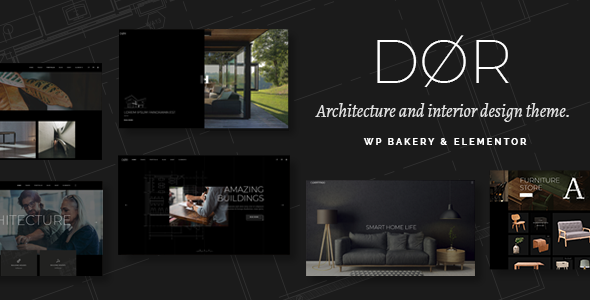
Stuck on your Dør WordPress theme? Let's fix it.
No endless back-and-forth. Just send us the details and we'll get it done.
No obligation · Replies within 1 hour · Quote within 1 day
Setup · Customization · Bug fixes · WooCommerce integration
About Dør WP Theme
Dør is a WordPress theme built by Mikado-Themes, designed primarily for architecture firms, interior designers, and creative studios. It takes a minimal, editorial approach to layout, letting photography and project work carry the visual weight. The theme ships with a set of pre-built demo sites, a drag-and-drop page builder, and Mikado’s own options panel for controlling typography, colors, and header styles without touching code.
Dør supports WooCommerce, making it usable for studios selling prints, products, or merchandise alongside their portfolio. The theme uses clean, structured markup and is built on a responsive grid that holds up well on mobile. Mikado-Themes maintains it with regular updates, and it includes access to their premium plugins bundled at no extra cost, including their portfolio and slider tools.
Get matched with a Dør developer in under one day
Tell us about your Dør project. Small fixes, Dør theme customization, or a full website build, whatever you need, we've got it covered.
We'll connect you to the right Dør developers, define the scope, and get everything 100% clear.
You'll get one estimate, hire your preferred developer, and start collaborating.
Dør is a well-built theme, but Mikado’s proprietary framework has quirks that take time to learn. Small customizations can ripple into layout breaks if you don’t know where the theme’s CSS is structured. Working with a developer through Codeable means you get someone who has worked inside themes like Dør before and knows how to make changes cleanly, without hacking core files or creating technical debt that causes problems at the next update.
Pros
- Clean minimal design that suits architecture, photography, and design studio portfolios
- Bundled Mikado portfolio and slider plugins included with purchase at no extra cost
- Multiple pre-built demo sites covering different creative niches, importable in one click
- WooCommerce compatible with theme-styled product pages out of the box
- Regular updates from Mikado-Themes with ongoing support through their ticket system
Cons
- Mikado's proprietary page builder creates lock-in, making it harder to switch themes later
- Options panel is large and can be overwhelming to navigate for first-time users
- Heavy use of JavaScript for animations can affect page speed scores if not optimized
- Support quality is inconsistent, with slower response times on complex technical issues
- Customizing layouts beyond the demos requires solid CSS and PHP knowledge
Who is Dør for?
Architecture Firms
Dør’s structured grid and large image support make it a natural fit for architecture practices. Project galleries can be displayed in full-width layouts, and the portfolio post type handles categorization by project type or location. The minimal typography keeps focus on the work itself rather than competing visual elements.
Interior Design Studios
Interior designers need a theme that lets room photography breathe. Dør’s whitespace-heavy layouts do exactly that. You can build dedicated project pages with before-and-after galleries, service breakdowns, and client testimonials using the bundled page builder without needing a developer for basic setup.
Photography Portfolios
Photographers benefit from Dør’s full-screen gallery options and clean portfolio grid. The theme supports multiple gallery styles, lazy loading, and lightbox display. It handles large image files reasonably well, though adding a CDN and image compression plugin is recommended for sites with extensive photo libraries.
Creative Agencies
Creative agencies can use Dør to present case studies, team profiles, and service pages within a single cohesive design system. The demo sites include agency-specific layouts with client logo sections, services grids, and contact configurations that reduce initial build time significantly.
Design Product Shops
Studios selling prints, merchandise, or digital products can combine Dør’s portfolio presentation with a WooCommerce storefront. The theme’s product page templates fit the overall aesthetic without requiring heavy CSS overrides, making it viable to run a shop alongside a creative portfolio on the same site.

Customizing Dør
Out of the box, Dør gives you solid control through its admin panel. You can adjust header layouts, set custom fonts via Google Fonts, switch color schemes, and configure footer columns without writing a line of CSS. For most small studios, this is enough to get a polished site live quickly.
Beyond the basics, customization gets more technical. Custom post type layouts, advanced grid adjustments, WooCommerce template overrides, and modifications to the Mikado page builder elements all require PHP and CSS knowledge. If you want a layout that differs meaningfully from the included demos, you will want a Dør expert who knows how Mikado’s framework is structured. Trying to force changes through the options panel alone often leads to conflicts or visual inconsistencies that take time to untangle.
Recommended plugins for Dør
Dør works with the standard WordPress plugin ecosystem. It bundles Mikado’s portfolio plugin and slider, which handle most creative agency needs. For shops, WooCommerce integrates cleanly with the theme’s product templates.
If you plan to run paid ads or build organic traffic, pairing Dør with a dedicated WordPress SEO setup is worth doing early. Similarly, image-heavy portfolio sites can slow down without proper caching and optimization, so reviewing your WordPress performance stack before launch will save headaches later.
Not sure which plugins to use? This WordPress plugins directory covers the most popular options with reviews and setup guides.
Dør common issues
Dør theme page builder elements not displaying correctly after update
This usually happens when Mikado’s bundled plugins fall out of sync with the theme version. Go to Appearance > Install Plugins and update all Mikado plugins to match the current theme version. If elements are still broken, clear your cache and check for CSS conflicts with any third-party plugins you have installed. If the problem persists after these steps, a WordPress bug fixing service can isolate the conflict quickly.
Dør WordPress theme slow loading on mobile
Dør’s animation and parallax scripts load on every page by default. Disable features you are not using inside the Mikado Options panel under the Performance section. Install a caching plugin and serve images in WebP format. Also check whether your hosting is adequately resourced for an image-heavy portfolio site. Shared hosting often struggles with themes of this size under real traffic conditions.
Dør portfolio grid not showing all posts
The most common cause is a misconfigured portfolio filter or a post count limit set in the shortcode or widget. Check the portfolio element settings inside the page builder and verify that the category filter matches the categories assigned to your portfolio posts. Also confirm that your portfolio posts are published and not stuck in draft. If pagination is enabled, check that your WordPress reading settings are not overriding the post count.
Dør theme WooCommerce product page layout broken
A broken WooCommerce layout in Dør is usually triggered by a WooCommerce major version update that changes template files the theme has customized. Check which WooCommerce templates are outdated under WooCommerce > Status > System Status. Update or rebuild those template overrides to match the current WooCommerce version. If you are not comfortable editing PHP templates, this is a good task to hand to a WordPress developer.
Dør FAQ
Yes. Dør is purpose-built for creative portfolios. It handles project galleries, case study layouts, and filtered portfolio grids well. The minimal design keeps the focus on visual work. It suits architecture firms, photographers, interior designers, and agencies better than it fits content-heavy sites like blogs or news publications.
Dør is built around Mikado’s own page builder, not Elementor. You can technically install Elementor alongside it, but expect conflicts and layout inconsistencies. Mikado does not officially support Elementor with this theme. If you prefer building with Elementor, choosing a theme designed around it from the start will save you significant troubleshooting time.
After activating the theme, go to Mikado Options and look for the Demo Import section. Select your preferred demo, click import, and the theme will pull in pages, settings, and media. Make sure your server meets the memory and upload size requirements listed in the theme documentation before starting the import to avoid partial installs.
Yes. Dør includes WooCommerce support with styled product and shop page templates. It works best for studios selling a curated range of products like prints or merchandise. For large catalogues with complex filtering, variable products, or custom checkout flows, you may need developer help to extend the default WooCommerce setup within the theme’s framework.
Basic customization, fonts, colors, header layout, and homepage sections is manageable through the Mikado Options panel without coding. Beyond that, achieving a design that differs from the included demos requires CSS and PHP skills. Most users can handle surface-level changes, but structural layout work or custom functionality needs a developer familiar with Mikado’s framework.
Hire a Dør WordPress Expert
Whether you need a full Dør site built from scratch, a demo customized to match your brand, or a specific feature added to an existing site, FoxyConcept connects you with vetted WordPress developers through Codeable. You get a free estimate with no obligation to hire. Post your project and get a free estimate today.
You'll need a free Codeable account so developers can ask questions and send their quotes.