Vino WordPress Theme
by Elated-Themes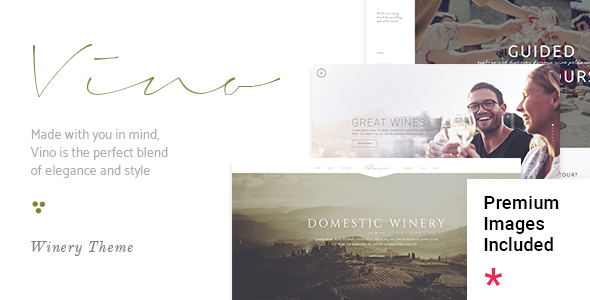
Stuck on your Vino WordPress theme? Let's fix it.
No endless back-and-forth. Just send us the details and we'll get it done.
No obligation · Replies within 1 hour · Quote within 1 day
Setup · Customization · Bug fixes · WooCommerce integration
About Vino WP Theme
Vino is a WordPress theme by Elated Themes built specifically for wineries, wine bars, and wine shops. It ships with a polished visual style that puts full-width imagery and rich typography front and center, making bottles and vineyards look the part without heavy customisation out of the box.
The theme includes a purpose-built wine list section, reservation form integration, event listings, and a WooCommerce-ready shop layout for selling bottles or memberships online. It uses Elated’s own page builder elements alongside Elementor compatibility, giving you layout flexibility without needing to write code.
Vino is built on Elated’s well-maintained framework, which means regular updates, clean code output, and solid documentation. If you run a vineyard, wine club, or tasting room and want a site that looks professional from day one, Vino covers most of the ground before a developer even touches it.
Get matched with a Vino developer in under one day
Tell us about your Vino project. Small fixes, Vino theme customization, or a full website build, whatever you need, we've got it covered.
We'll connect you to the right Vino developers, define the scope, and get everything 100% clear.
You'll get one estimate, hire your preferred developer, and start collaborating.
Elated Themes builds solid products, but every theme has a learning curve and limits. When a client needs something that goes beyond Vino’s defaults — a custom wine club portal, a multilingual shop, or a redesigned product archive — guesswork gets expensive fast.
FoxyConcept works with vetted WordPress developers through Codeable. Every developer on the platform has passed a strict vetting process, so you get someone who knows WordPress deeply, not someone figuring it out on your project. Post your brief, get a free estimate, and only pay if you decide to move forward.
Pros
- Pre-built wine list and menu sections designed specifically for wineries and wine bars
- WooCommerce integration works well for selling bottles, cases, and wine club memberships
- Full-width hero layouts make vineyard and product photography look strong without extra plugins
- Elated Themes maintains regular updates and provides written documentation covering most setup tasks
- Events and reservation modules are built in, reducing the number of third-party plugins needed at launch
Cons
- Elated's custom shortcodes and elements create vendor lock-in that complicates switching themes later
- Page builder elements can produce bloated markup that slows load times without performance tuning
- Theme Options panel is extensive but not always intuitive, and finding specific settings can take time
- WooCommerce template overrides inside the theme can conflict with WooCommerce major version updates
- Support from Elated Themes is forum-based and response times can be slow for complex issues
Who is Vino for?
Winery and Vineyard Websites
Vino’s full-width image sections and vineyard-specific layouts make it a natural fit for estate wineries. You can showcase varietals, tell your origin story, and direct visitors toward bookings or shop pages without the site feeling generic. A developer can extend this with custom vintage archive pages or region-filtered wine lists.
Wine Bar and Tasting Room Sites
Wine bars need clear menus, atmosphere-setting photography, and easy reservation access. Vino covers all three out of the box. The built-in reservation module works for simple enquiry forms, and a developer can connect it to OpenTable or Resy if you need live table availability rather than a basic contact form.
Online Wine Shops
Vino’s WooCommerce integration supports product pages, category archives, and checkout without heavy styling work. You can sell bottles, mixed cases, or tasting packs. A developer can add filtered search by region or grape variety, improve the product page layout, or set up age verification before checkout loads.
Wine Club Membership Sites
Wine clubs need recurring billing, member-only content, and account management. Vino provides the visual framework, but you’ll want WooCommerce Subscriptions and a membership plugin like MemberPress layered on top. A developer can wire these together and build a member portal that fits within the Vino design.
Wine Events and Festival Pages
Harvest dinners, vertical tastings, and festival appearances need event pages that handle dates, ticketing, and RSVPs cleanly. The Events Calendar integrates with Vino’s layouts. A developer can build ticketed event pages using WooCommerce or connect to Eventbrite if you manage external ticket sales.

Customizing Vino
Vino gives you a detailed Theme Options panel where you control fonts, colours, header styles, and footer layouts globally. Most cosmetic changes are straightforward, but the real customisation work starts when you need the theme to match a specific brand identity or workflow.
Adjusting Vino’s wine list templates, building custom reservation flows, or integrating a third-party booking system like OpenTable typically requires PHP and CSS knowledge. The same applies to modifying WooCommerce templates for a wine shop or adding age verification gates.
A Vino expert can handle these jobs cleanly without introducing technical debt. Rather than pasting in workaround CSS or fighting the theme framework, a developer who knows Elated Themes’ structure can build child theme overrides, write targeted hooks, and deliver changes that survive updates without breaking.
Recommended plugins for Vino
Vino works well with a focused set of plugins. WooCommerce handles bottle sales, subscriptions, or wine club memberships. WPForms or Gravity Forms suits reservation and enquiry pages. The Events Calendar slots in cleanly for tasting events and harvest dinners.
For performance, image-heavy wine sites benefit from a CDN and proper caching configuration. Getting these right on a Vino build is covered in detail on our WordPress performance service page. If you plan to attract local or national search traffic for your winery, pairing Vino with a solid schema and content strategy is worth reading about on our WordPress SEO page.
Not sure which plugins to use? This WordPress plugins directory covers the most popular options with reviews and setup guides.
Vino common issues
Vino theme header not displaying correctly on mobile
Mobile header issues in Vino usually trace back to conflicting CSS from a child theme or plugin, or an incorrect setting in the theme’s Header Options panel. Check the sticky header and mobile menu breakpoint settings first. If those look correct, open browser dev tools and identify which rule is overriding the mobile styles. In most cases a targeted CSS fix in the child theme resolves it. If you’d rather not dig through the code, our bug fixing service can handle this quickly.
Vino WooCommerce shop page layout broken after update
WooCommerce major updates sometimes break theme template overrides because Vino bundles its own WooCommerce templates. After a WooCommerce update, go to WooCommerce > Status > System Status and check for outdated templates. You’ll likely need to update the overrides inside the theme’s woocommerce folder to match the new WooCommerce template files. This requires careful diffing of the old and new files. A developer can do this cleanly without breaking your existing shop styling.
Vino reservation form not sending emails
When Vino’s built-in reservation form stops sending emails, the issue is almost always server-level email delivery rather than the form itself. WordPress’s default PHP mail function is blocked by many hosts. Install WP Mail SMTP and connect it to a transactional mail service like SendGrid or Mailgun. Set up SPF and DKIM records on your domain. Once those are in place, form submissions will deliver reliably. Our maintenance service covers this kind of configuration.
Vino theme loading slowly on image-heavy pages
Vino pages with large hero images and multiple full-width sections can be slow without proper optimisation. Start by compressing images before upload and enabling lazy loading. Add a caching plugin like WP Rocket and configure it to minify CSS and JS. Serve images via a CDN. For bigger gains, a developer can audit the page builder output and remove unnecessary scripts that Vino loads globally. See our performance service for a full approach.
Vino FAQ
Yes. Vino includes WooCommerce-compatible layouts for product pages, category archives, and checkout. You can sell bottles, cases, or memberships. For more complex requirements like subscription wine clubs, filtered search by region, or age verification before checkout, you’ll want a developer to configure the right plugins and adjust the templates to match your shop’s needs.
Vino is built on Elated’s own shortcode and element system, but it does offer Elementor compatibility. You can use Elementor to build and edit pages within the Vino framework. That said, mixing Elated’s native elements with Elementor widgets on the same page can create conflicts. It’s worth keeping your approach consistent and testing across devices when combining both systems.
Vino does not include an age verification gate by default. You need a dedicated plugin like Age Gate or Age Verification for WooCommerce. Install the plugin, configure the minimum age and cookie duration, then style the gate overlay to match Vino’s design. A developer can handle the CSS integration so the gate looks like part of the theme rather than a bolted-on plugin screen.
Yes, migrating an existing winery site to Vino is possible. The main work involves rebuilding your existing pages inside Vino’s layout system and transferring content, products, and media. If you’re also changing hosting or domain at the same time, that adds steps. Our migration service covers the full process and makes sure nothing is lost or broken in the move.
Elated Themes does maintain Vino with updates, including compatibility fixes for new WordPress and WooCommerce versions. Update frequency is reasonable, though not as fast as some larger theme shops. Always test updates on a staging site before applying them to your live site, since Vino’s template overrides can break after WooCommerce major releases without a manual review of the changed files.
Hire a Vino WordPress Developer
Whether you need help setting up Vino from scratch, fixing a layout issue, or building custom functionality on top of the theme, we can match you with the right developer. Work is handled through Codeable, so you get a vetted WordPress specialist, a clear estimate upfront, and no risk if you decide not to proceed.
Get a free estimate — describe your project and hear back within 24 hours.
You'll need a free Codeable account so developers can ask questions and send their quotes.