Kraft WordPress Theme
by CaliberThemes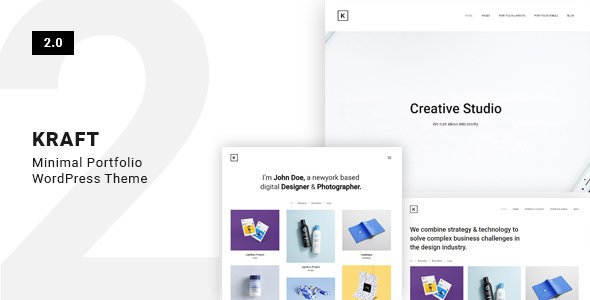
Stuck on your Kraft WordPress theme? Let's fix it.
No endless back-and-forth. Just send us the details and we'll get it done.
No obligation · Replies within 1 hour · Quote within 1 day
Setup · Customization · Bug fixes · WooCommerce integration
About Kraft WP Theme
Kraft is a WordPress theme built by CaliberThemes, designed for small businesses, agencies, and portfolio sites that want a clean, minimal look without sacrificing flexibility. It ships with a drag-and-drop page builder, pre-built demo content, and a layout focused on readability and conversion.
The theme targets professionals who need a polished site fast. Installation is straightforward, demo import takes a few clicks, and the admin options cover typography, colors, header styles, and footer layouts without requiring any code. Kraft supports WooCommerce, making it usable for simple product or service shops as well. It works with most major plugins and performs reasonably well out of the box on standard hosting.
CaliberThemes built Kraft with a focus on business-oriented sites, and that shows in the section layouts and call-to-action placements throughout the default demos.
Get matched with a Kraft developer in under one day
Tell us about your Kraft project. Small fixes, Kraft theme customization, or a full website build, whatever you need, we've got it covered.
We'll connect you to the right Kraft developers, define the scope, and get everything 100% clear.
You'll get one estimate, hire your preferred developer, and start collaborating.
Kraft is approachable for DIY users, but business sites usually need more than the defaults. If you’re spending hours in the Customizer or hitting limits with the page builder, it’s worth bringing in someone who already knows the theme.
FoxyConcept connects you with vetted Kraft developers through Codeable, a platform built specifically for WordPress professionals. Every developer is screened, and you get a fixed estimate before any work begins. No hourly surprises, no offshore guesswork. Just focused WordPress work from people who do this every day. See how our WordPress development service works.
Pros
- Clean, minimal design that works well for service businesses and agencies without heavy customisation
- One-click demo import gets a full site up in minutes with real content placeholders
- WooCommerce support is built in, covering shop, product, and cart page styling
- WordPress Customizer integration makes basic branding changes accessible to non-developers
- Compatible with major page builders and most commonly used business plugins
Cons
- Page builder dependency means layouts can break or look outdated if you switch builders later
- Limited built-in blog styling options compared to themes focused on content publishing
- Some advanced layout changes require editing template files or writing custom CSS
- Demo content can feel generic without significant copy and image replacement
- Update frequency from CaliberThemes is slower than larger theme shops, which can create compatibility delays
Who is Kraft for?
Agency or Creative Studio
Kraft’s project and portfolio sections suit agencies that need to show client work clearly. The grid layouts display case studies and visual work without clutter. Combined with a custom colour scheme and brand fonts, an agency site built on Kraft can look purpose-built rather than template-based with relatively little extra development work.
Small Business Services
For consultants, tradespeople, or local service businesses, Kraft provides the sections most needed: a clear value statement, service listings, a team block, and contact details. The call-to-action placement in the default demos is conversion-aware, which reduces the need to rework the structure from scratch for typical service pages.
Freelance Portfolio
Freelancers who want a professional online presence without managing a complex theme will find Kraft practical. The portfolio layouts handle image-heavy work well, and the minimal typography keeps the focus on the work itself. Setting up a contact form and a few project pages takes an afternoon with the demo content as a starting point.
Simple WooCommerce Shop
Kraft’s WooCommerce compatibility makes it a workable choice for small product catalogues. It handles standard shop and product page layouts cleanly. It’s suited to shops with under 50 products rather than large catalogues that need filtered search or complex category structures, where a dedicated WooCommerce theme would serve better.
Startup Landing Page
Startups that need a clean single-page or few-page site to present a product or service before a full build can use Kraft effectively. The hero section, features block, and CTA layouts in the default demo provide exactly the structure most landing pages need, without requiring a separate landing page plugin.

Customizing Kraft
Kraft gives you a solid starting point, but most business sites eventually need changes that go beyond what the theme options panel offers. That’s where a Kraft expert saves you time.
Common customization requests include custom header layouts, unique homepage section arrangements, adjusted typography scales, and WooCommerce styling that matches brand guidelines. Kraft uses the WordPress Customizer alongside its own options panel, which means changes can interact in ways that aren’t always predictable without hands-on experience.
A developer familiar with Kraft knows where the theme overrides styles, how child themes behave with CaliberThemes updates, and how to extend functionality without breaking the existing layout. Whether you need a one-off tweak or a full buildout from a Kraft demo, working with a Kraft expert avoids the trial-and-error most site owners run into when editing theme files directly.
Recommended plugins for Kraft
Kraft works with the plugins most business sites rely on. WooCommerce integration is built in, covering basic shop pages, product layouts, and cart styling. Contact Form 7 and WPForms both drop in without conflicts.
For performance, caching plugins like WP Rocket and LiteSpeed Cache work well with Kraft’s structure. If your site handles traffic or runs a shop, pairing Kraft with proper WordPress performance optimisation makes a measurable difference in load times.
Kraft also works with popular SEO plugins. Yoast and Rank Math both integrate cleanly. For deeper on-page work, a WordPress SEO service can cover schema, technical audits, and content structure alongside your theme setup.
Not sure which plugins to use? This WordPress plugins directory covers the most popular options with reviews and setup guides.
Kraft common issues
Kraft theme header not displaying correctly after update
Header display issues after a Kraft update are usually caused by a conflict between theme updates and a child theme or cached styles. Start by clearing your site and browser cache. If you’re using a caching plugin, flush it completely. Check whether the issue appears with the parent theme active and no child theme. If the header breaks only with your child theme active, the update likely changed a template file your child theme was overriding. Comparing the updated header template against your child theme file usually identifies the conflict. For persistent issues, a WordPress bug fixing service can resolve it quickly.
Kraft WordPress theme custom CSS not applying
When custom CSS isn’t applying in Kraft, the most common cause is specificity. Kraft’s own stylesheets may be using more specific selectors than your custom rules, so they win. Use your browser’s inspector to identify the exact selector Kraft uses for the element you’re targeting, then match or increase the specificity of your custom CSS. Also confirm you’re adding CSS in the right place. The WordPress Customizer’s Additional CSS field applies after the theme styles, which is correct. Adding CSS inside a plugin that loads before the theme will not override theme styles reliably.
Kraft demo import not working or incomplete
Failed or partial demo imports in Kraft are typically caused by server memory limits, PHP timeout settings, or missing required plugins. Before importing, confirm all plugins listed in the demo requirements are installed and active. Check your hosting environment’s PHP memory limit and max execution time, as demo imports can require 256MB and 300 seconds or more. If the import stops partway, try importing XML content, widgets, and Customizer settings separately rather than all at once. Some hosts block large XML imports by default, in which case importing via WP CLI or adjusting server settings is necessary.
Kraft theme fonts not loading or changing in Customizer
Font changes not saving or displaying in Kraft usually point to a caching issue or a conflict with a font optimisation plugin. Start by clearing all caches, then test the font change in an incognito window to rule out browser caching. If you’re using a performance plugin that minifies or combines CSS, it may be overriding or delaying font load. Temporarily disable it to confirm. Google Fonts changes in the Customizer can also fail if your server blocks external requests. Check for firewall or proxy settings that might prevent outbound connections to fonts.googleapis.com.
Kraft FAQ
Kraft suits small to mid-size business sites well. The default demo layouts cover the sections most service businesses need: hero, features, services, team, and contact. It’s not the right choice for large content-heavy sites or complex ecommerce, but for agencies, consultants, and local businesses building a professional online presence, it provides a solid structural starting point without heavy customisation.
Kraft is compatible with Elementor and works with Gutenberg’s block editor. Elementor is the more commonly used combination, as it gives more layout control than the theme’s native builder. Gutenberg works for content pages but may produce inconsistent spacing with some Kraft-specific section styles. Testing each page type in your chosen editor before committing to a full build is advisable.
Creating a child theme for Kraft follows the standard WordPress process. Create a new folder in wp-content/themes, add a style.css file with the correct Template header pointing to the Kraft parent theme, and add a functions.php that enqueues the parent stylesheet. Any template files or styles you add to the child theme will override the parent without affecting updates. Using a child theme is strongly recommended before making any code changes to Kraft.
Migrating an existing site to the Kraft theme is possible but involves rebuilding your page layouts to match Kraft’s structure. Content, posts, and media transfer cleanly. Page layouts built on another theme or page builder will need to be rebuilt. If you’re considering switching themes on a live site, a WordPress migration service can handle the transition without downtime or content loss.
CaliberThemes continues to list and update Kraft, but update frequency is slower compared to larger theme marketplaces. The theme remains functional on current WordPress versions, but if you’re starting a new project, verify compatibility with the latest WordPress release and any plugins you plan to use. For ongoing updates and maintenance, a WordPress maintenance plan ensures your Kraft site stays current and secure.
Hire a Kraft WordPress Expert
Need help setting up, customising, or fixing your Kraft theme? FoxyConcept matches you with a vetted Kraft developer through Codeable. You describe the work, get a clear estimate, and decide whether to proceed. There’s no obligation and no payment until you’re ready to start. Get a free estimate today and have a developer ready to start within 24 hours.
You'll need a free Codeable account so developers can ask questions and send their quotes.