Katen WordPress Theme
by ThemeGer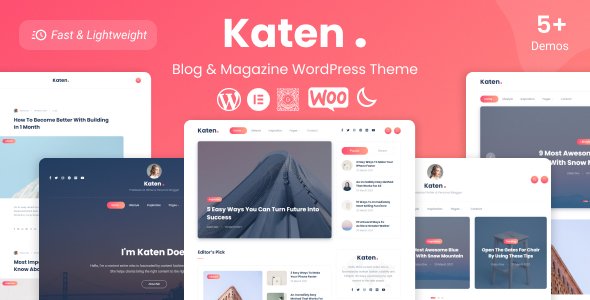
Stuck on your Katen WordPress theme? Let's fix it.
No endless back-and-forth. Just send us the details and we'll get it done.
No obligation · Replies within 1 hour · Quote within 1 day
Setup · Customization · Bug fixes · WooCommerce integration
About Katen WP Theme
Katen is a WordPress news and magazine theme built by ThemeGer. It ships with a clean, editorial layout designed for content-heavy sites that need to load fast and stay readable. The theme supports multiple homepage layouts, a sticky header, dark mode, and a well-organised category system out of the box.
Katen is block-editor compatible and works without a page builder for most use cases. It pulls in posts cleanly, handles featured images well, and keeps ad placements sensible. The free version on WordPress.org is genuinely usable. The Pro version adds widget areas, more layout options, and additional customizer controls. If you run a news site, blog network, or niche publication, Katen gives you a solid starting point without unnecessary overhead.
Get matched with a Katen developer in under one day
Tell us about your Katen project. Small fixes, Katen theme customization, or a full website build, whatever you need, we've got it covered.
We'll connect you to the right Katen developers, define the scope, and get everything 100% clear.
You'll get one estimate, hire your preferred developer, and start collaborating.
Most Katen issues come down to layout conflicts, slow load times on archive pages, or customizations that outgrow what the Customizer can handle. Fixing these yourself takes time. Fixing them wrong costs more later.
Through Codeable, you get matched with a vetted WordPress developer who knows themes like Katen well. Post your project, get a free estimate within 24 hours, and only pay if you decide to move forward. No risk, no wasted time.
Pros
- Clean editorial layout that works well for news and magazine sites without heavy configuration
- Dark mode included out of the box, which many competing free themes still lack
- Block editor compatible with no page builder dependency, keeping the setup lean
- Free version on WordPress.org is genuinely functional, not just a stripped demo
- Fast base performance with lightweight markup that responds well to caching plugins
Cons
- Limited layout flexibility without upgrading to Pro or adding custom development
- WooCommerce support is minimal, making it a poor choice for any shop functionality
- Customizer options in the free version are thin, especially for typography and color control
- Documentation is sparse, which makes troubleshooting slower for non-technical users
- Some widget areas and homepage sections are Pro-only, which limits free users significantly
Who is Katen for?
News and Current Affairs Blog
Katen handles high post volumes well. The archive layouts display featured images and category labels clearly, and the sticky header keeps navigation accessible on long-read articles. If you publish daily or multiple times a week, Katen’s post grid and list views scale without getting visually cluttered.
Niche Magazine Site
Whether you cover food, travel, finance, or fitness, Katen’s category system makes it easy to segment content visually. You can assign different featured posts per category and use the homepage widget blocks to highlight each niche section. It works better with tight editorial focus than broad generalist content.
Personal Multi-Topic Blog
Katen suits personal bloggers who want a professional-looking multi-topic layout without building a custom theme. The dark mode, clean typography, and post widgets give a polished feel. It works best when you have enough content to fill the homepage sections, so it suits established blogs more than brand-new ones.
Tech or Gaming Publication
Tech and gaming sites benefit from Katen’s review-style layouts and featured post highlighting. The dark mode is a natural fit for gaming audiences. You can structure content around hardware, software, or game genres using the category and tag system without needing custom post types for most use cases.
Content Marketing Hub
Brands that publish regular editorial content for SEO can use Katen to give their blog a proper magazine feel. The clean markup helps with indexing, and the layout puts recent and popular content front and center. Pair it with a solid SEO plugin and a caching layer for best results in organic search.

Customizing Katen
Out of the box, Katen gets you far. But most publishers eventually need something the Customizer alone cannot deliver. That might be a custom homepage section, a modified post template, a specific ad slot placement, or a category page that looks different from the default grid.
A Katen expert can handle these without breaking theme updates or writing messy overrides. Common customization work includes child theme setup, custom widget areas, typography adjustments, color scheme changes per category, and homepage layout edits. More involved projects might require custom post types, archive page redesigns, or integrating a newsletter tool into the header or footer. Getting a Katen expert involved early saves time and avoids technical debt later.
Recommended plugins for Katen
Katen works well with a focused plugin stack. For performance, pairing it with a caching plugin and an image optimization tool makes a visible difference, especially on post archives with large featured images. See our WordPress performance service if your Katen site is running slow.
For SEO, Katen outputs clean markup but you still need a proper SEO plugin for meta control, schema, and sitemaps. Our WordPress SEO service covers this fully. WooCommerce is not a natural fit for Katen since it is built for publishing, not selling. Stick to news, magazine, and blog-oriented plugins for the best results.
Not sure which plugins to use? This WordPress plugins directory covers the most popular options with reviews and setup guides.
Katen common issues
Katen theme homepage sections not showing
Homepage sections in Katen are widget-driven. If a section is blank, open Appearance > Widgets and check that the relevant homepage widget area has active widgets assigned. If you are on the free version, some sections only appear in Katen Pro. Also confirm you are using the correct homepage template under Settings > Reading. If widgets are assigned but still not showing, a caching plugin may be serving a stale page. Our bug fixing service can diagnose this quickly.
Katen theme featured image not displaying correctly
Katen uses specific image size ratios for different layout areas. If featured images look cropped oddly or fail to display, the most likely cause is that images were uploaded before the theme was activated and have not been regenerated. Install the Regenerate Thumbnails plugin and run it across your media library. Also check that your images meet the minimum resolution Katen expects for the post format you are using.
Katen Pro widgets missing after update
After a Katen Pro update, widget settings occasionally reset or disappear if the update process was interrupted. First check that the Pro plugin or Pro child theme is still active under Appearance > Themes. If widgets are missing from the widget areas entirely, deactivate and reactivate the Pro version. If the issue persists, check for PHP errors in your debug log. A developer on our bug fixing service can trace the root cause without data loss.
Katen theme loading slow on mobile
Slow mobile performance on Katen usually comes from unoptimized images, render-blocking scripts, or no caching in place. Start by compressing featured images before uploading. Add a caching plugin like WP Rocket or LiteSpeed Cache. Check whether any third-party scripts like ad networks or analytics tools are loading synchronously. Katen’s base theme is lightweight, so slow mobile scores almost always point to the plugin stack or unoptimized media rather than the theme itself.
Katen FAQ
Katen has a free version available on WordPress.org that is fully functional for news and magazine sites. ThemeGer also sells Katen Pro, which adds more widget areas, homepage layout options, and customizer controls. The free version is not a demo. It works for real publishing sites, though you will hit limits if you need heavy layout customization.
The Pro version unlocks additional homepage sections, more widget areas, extended color and typography controls, and extra post layout styles. The free version covers the core publishing layout well. If you need more control over how sections are arranged or want to differentiate category pages visually, Pro is worth considering. A Katen developer can also extend the free version with custom code if Pro is not the right fit.
Katen is designed around the native WordPress block editor and its own widget system. Elementor will work technically, but the theme is not optimized for it, and using a page builder adds overhead that contradicts one of Katen’s main strengths. For landing pages or one-off layouts, a block-based approach within Katen’s framework is cleaner and faster than layering a page builder on top.
Yes. Switching to Katen from another theme is straightforward if your content is standard posts and pages. Your posts, images, and categories carry over automatically. What needs attention is the homepage layout, widget areas, and menu structure, since these are theme-specific. Our WordPress migration service can handle the switch cleanly without disrupting your existing content or SEO.
Katen outputs clean HTML with a logical heading structure, which gives it a solid SEO baseline. It does not bloat the DOM unnecessarily, and pages load reasonably fast on a decent host. That said, the theme alone does not handle meta tags, schema, or sitemaps. You still need an SEO plugin like Yoast or Rank Math. For a full setup, our WordPress SEO service covers both technical and on-page factors.
Hire a Katen Developer
Whether you need a quick fix or a full site build on Katen, FoxyConcept connects you with experienced WordPress developers through Codeable. Work is scoped clearly, delivered on time, and backed by Codeable’s satisfaction guarantee. Get a free estimate and describe what you need. No commitment required. Most projects get matched within 24 hours.
You'll need a free Codeable account so developers can ask questions and send their quotes.