King WordPress Theme
by KingThemes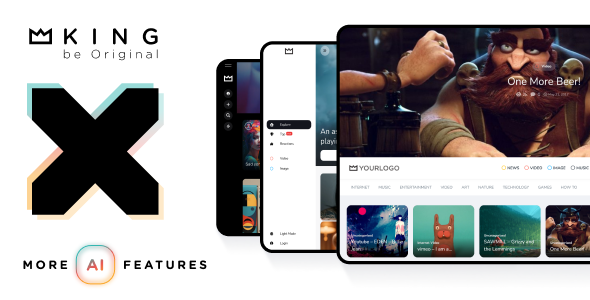
Stuck on your King WordPress theme? Let's fix it.
No endless back-and-forth. Just send us the details and we'll get it done.
No obligation · Replies within 1 hour · Quote within 1 day
Setup · Customization · Bug fixes · WooCommerce integration
About King WP Theme
King is a WordPress theme built by KingThemes, designed for magazines, news portals, and content-heavy websites. It ships with a drag-and-drop homepage builder, multiple pre-built layouts, and a flexible widget system that makes it easy to organise large volumes of content across categories.
The theme integrates tightly with popular plugins like WooCommerce and bbPress, making it suitable for sites that need more than just editorial features. Typography controls, ad placement zones, and sticky sidebars are baked in rather than bolted on. King is built on clean, semantic HTML and follows WordPress coding standards, which keeps it stable across updates. If you run a multi-author publication or a niche content site and want full control over layout without writing code, King is a practical starting point.
Get matched with a King developer in under one day
Tell us about your King project. Small fixes, King theme customization, or a full website build, whatever you need, we've got it covered.
We'll connect you to the right King developers, define the scope, and get everything 100% clear.
You'll get one estimate, hire your preferred developer, and start collaborating.
King has enough moving parts that getting a custom build right takes real theme knowledge. A developer who has worked with KingThemes products understands where the template hierarchy bends, how the widget zones interact, and which customizations are safe to make without creating upgrade headaches.
Through Codeable, every developer is vetted and reviewed. You post your project, get matched with a King developer, and receive a clear estimate before any work begins. No guesswork on cost, no chasing freelancers. Just a straightforward path to a site that’s built properly from the start.
Pros
- Built-in homepage drag-and-drop builder reduces reliance on third-party page builders
- Dedicated ad placement zones make monetization setup straightforward
- Multiple pre-built demos cover news, magazine, and blog layouts out of the box
- Tight WooCommerce integration allows editorial and shop content to coexist cleanly
- Active update history from KingThemes means compatibility with recent WordPress versions
Cons
- The native homepage builder is powerful but has a steep learning curve for non-technical users
- Heavy widget usage on the homepage can slow load times without proper caching in place
- Mobile layout customization is limited within the Customizer and often needs custom CSS
- Documentation is sparse in places, particularly for advanced template overrides
- Some design elements feel dated compared to newer magazine themes released in recent years
Who is King for?
Online News Portal
King’s category management and multi-column front page layout make it a practical choice for news portals publishing across several topics. The breaking news ticker, sticky header, and ad zones cover the essentials without custom development. A developer can extend this further with custom taxonomies and author archive templates suited to a larger editorial team.
Niche Blog Network
For sites covering a specific subject in depth, King’s tag and category widgets help surface related content across the sidebar and footer. The theme’s archive templates are clean and easy to modify. Adding a custom homepage section for a particular content vertical takes minimal development work when the theme’s hook system is used correctly.
Product Review Site
King supports custom rating systems and structured review layouts through its post format options and widget areas. Pairing it with a dedicated review plugin gives you star ratings and schema markup. The sidebar ad zones work well for affiliate links. A King developer can set up custom post types specifically for product reviews with consistent templating across the archive and single views.
Community Forum with Editorial Content
King includes bbPress compatibility, which makes it one of the few magazine themes that can handle a forum layer without a full rebuild. Editorial content and community discussion can live side by side. Navigation between the two sections needs careful planning, but a King expert can structure the menus and templates so both areas feel like one cohesive site.
WooCommerce Magazine Shop
WooCommerce integrates into King without requiring a separate shop theme. Product pages inherit the site’s typography and color scheme. For publishers who also sell digital products, courses, or branded merchandise, this setup avoids the disconnected feel of bolting a separate shop onto an editorial site. Custom WooCommerce templates within King’s file structure keep styling consistent.

Customizing King
King offers a solid base, but most serious sites need changes that go beyond the built-in Customizer options. Adjusting the homepage grid, modifying the mega menu, or building a custom category template requires working directly with PHP template files and the theme’s widget areas.
A King expert can reconfigure the layout system to match your editorial structure, add custom post types for reviews or listings, and tighten up the mobile experience without breaking the existing design logic. KingThemes provides hooks and filters throughout the codebase, which makes targeted customization cleaner than overriding core files. Working with someone who knows the theme’s architecture means faster delivery and fewer conflicts when KingThemes releases updates. The difference between a generic King site and one that actually works for your audience usually comes down to how well the customization was planned.
Recommended plugins for King
King works well with a focused set of plugins. WooCommerce adds a shop layer without much friction. Elementor or WPBakery can extend the page builder capabilities beyond the native homepage builder. For ad management, AdSanity and Advanced Ads both slot in cleanly.
If site speed is a concern, pairing King with proper caching and image optimization makes a measurable difference. You can read more about that on the WordPress performance page. For content-driven sites, structured SEO setup matters from day one. The WordPress SEO optimisation service covers that end of things. Keep the plugin count lean. King handles a lot natively, so adding duplicate functionality creates bloat.
Not sure which plugins to use? This WordPress plugins directory covers the most popular options with reviews and setup guides.
King common issues
King theme homepage builder not saving changes
This usually comes down to a JavaScript conflict or a caching layer serving a stale version of the page. Start by deactivating all plugins except the theme’s required plugins and testing the builder again. If it saves correctly, reactivate plugins one at a time to identify the conflict. Also clear your server cache and browser cache before each test. If the issue persists, check the browser console for JS errors pointing to a specific plugin or script. Our WordPress bug fixing service can trace and resolve this quickly.
King theme mega menu not working after update
Mega menu failures after a theme update are often caused by a JavaScript file not loading correctly or a CSS class that changed in the new version. Check the browser console for 404 errors on theme script files. Also verify that the menu location is still assigned correctly under Appearance > Menus. If you have a child theme, check whether any overridden menu templates need updating to match the new parent theme markup. Rolling back to the previous theme version temporarily will confirm whether the update caused the break.
King theme slow loading on mobile
King’s homepage builder generates a lot of widget output, and on mobile this can stack into a slow, heavy page. Start by running the site through PageSpeed Insights to identify the specific bottlenecks. Common culprits are unoptimized images in the homepage slider, render-blocking scripts from ad plugins, and uncached database queries from multiple widget areas loading simultaneously. Enabling a caching plugin and a CDN will reduce load time significantly. For deeper fixes, visit the WordPress performance service page.
King theme widgets not displaying in sidebar
If widgets appear in the WordPress admin but not on the frontend, the first thing to check is whether the sidebar is actually registered and called in the template file for that page or post type. King uses multiple sidebar locations, and some templates only call specific ones. Also check for PHP errors in the error log that might be silently stopping widget output. Deactivating recently added plugins is worth doing too, as some widget plugins conflict with King’s sidebar registration. If the WordPress maintenance side of things has been neglected, outdated plugins are a likely cause.
King FAQ
KingThemes has maintained King through several major WordPress releases. As of recent updates, it is compatible with current WordPress versions. That said, compatibility depends on keeping both the theme and your plugins up to date. Running an outdated version of King on a newer WordPress install is where conflicts typically appear. Always test updates on a staging environment before applying them to a live site.
You can use Elementor on individual pages within a King theme site, but the two systems can conflict on the homepage if King’s native builder is also active. The cleanest approach is to decide upfront whether you want King’s builder or Elementor handling page layouts, then stick to one. A King developer can configure this properly so both tools coexist without stepping on each other across the site.
Yes. King has built-in WooCommerce support and includes styled templates for shop pages, product archives, and single product pages. The integration is not pixel-perfect out of the box for every layout, but it is functional and consistent with the theme’s design language. Custom WooCommerce template files can be added to a child theme to refine the appearance without modifying the parent theme directly.
Create a new folder in your wp-content/themes directory, add a style.css file with the correct header declaring King as the parent theme, and add a functions.php file that enqueues the parent theme’s stylesheet. That gives you a working child theme where you can safely override templates and add custom CSS. Any changes you make in the child theme will survive King updates without being overwritten.
King theme itself migrates cleanly because its layout logic is stored in the database as widget and Customizer settings. What sometimes breaks is the homepage builder configuration, which stores widget area data that can be serialized differently across environments. Running a proper search and replace on the database for the old domain, and using a reliable migration plugin, covers most cases. The WordPress migration service handles this end to end.
Hire a King WordPress Developer
Whether you need a full King theme setup, a specific layout built out, or an existing site cleaned up and optimized, working with a developer who knows the theme saves time and avoids costly mistakes. Post your project and get a free estimate with no obligation to hire. Get a free estimate and get matched with a vetted King expert within 24 hours.
You'll need a free Codeable account so developers can ask questions and send their quotes.