Boutique WordPress Theme
by kutethemes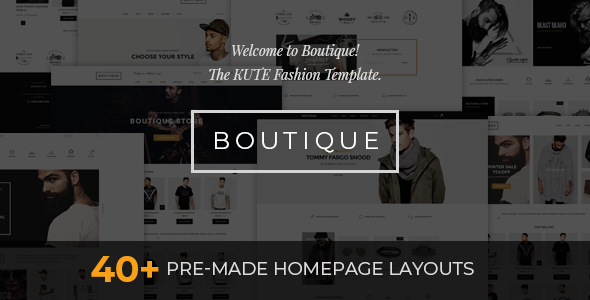
Stuck on your Boutique WordPress theme? Let's fix it.
No endless back-and-forth. Just send us the details and we'll get it done.
No obligation · Replies within 1 hour · Quote within 1 day
Setup · Customization · Bug fixes · WooCommerce integration
About Boutique WP Theme
Boutique is a WooCommerce theme by KuteThemes built specifically for fashion, clothing, and lifestyle stores. It ships with a clean grid-based layout, multiple homepage demos, and a visual drag-and-drop page builder. The theme is optimised for product discovery, with sticky headers, mega menus, and quick-view functionality built in.
Setup is straightforward. You import a demo, swap in your branding, and your store is live in hours rather than days. KuteThemes keeps the codebase relatively light, which helps with page speed compared to heavier multi-purpose themes. It supports WooCommerce product variations, filters, and AJAX cart out of the box. If you run a small-to-medium fashion or accessories store and want something purpose-built rather than a bloated theme adapted for ecommerce, Boutique is a practical starting point.
Get matched with a Boutique developer in under one day
Tell us about your Boutique project. Small fixes, Boutique theme customization, or a full website build, whatever you need, we've got it covered.
We'll connect you to the right Boutique developers, define the scope, and get everything 100% clear.
You'll get one estimate, hire your preferred developer, and start collaborating.
Boutique is a well-structured theme, but custom work always surfaces edge cases. KuteThemes uses its own hooks and filter system, and not every plugin or customisation fits without adjustment. Codeable connects you with vetted WordPress developers who have worked with WooCommerce themes like Boutique before. You get a fixed estimate upfront, no bidding wars, and no risk. If the first developer is not the right fit, Codeable makes it simple to find another. It is a faster, lower-risk route than hiring a freelancer cold.
Pros
- Purpose-built for fashion and lifestyle WooCommerce stores, not a general theme adapted for ecommerce
- Multiple one-click demo imports speed up initial setup significantly
- Built-in AJAX cart, quick view, and wishlist support without needing extra plugins
- Mega menu included natively, useful for stores with large product category structures
- Reasonably lightweight codebase compared to multipurpose themes like Avada or BeTheme
Cons
- Documentation is thin in places and some advanced options are not explained clearly
- Elementor compatibility is uneven on inner page templates and product archive pages
- Support from KuteThemes can be slow during peak periods, with forum-based responses rather than live chat
- Child theme is not included by default, so updates can overwrite custom CSS if you are not careful
- Plugin conflicts with certain page builders and YITH plugins require manual CSS or PHP fixes
Who is Boutique for?
Women's Fashion Boutique
Boutique’s grid layouts and product filtering work well for stores with seasonal clothing collections. The mega menu handles broad category trees cleanly, and the lookbook-style homepage demos suit a fashion-forward brand. Pair it with a size guide plugin and you have a functional women’s fashion store with minimal custom work required.
Streetwear and Sneaker Store
For streetwear and limited-drop stores, Boutique handles product variations and inventory well through WooCommerce. Quick view and AJAX cart keep the buying experience fast. You will likely want custom product page tweaks to show sizing charts and product story sections, which a developer can add without touching the core theme files.
Handmade Jewellery Shop
Handmade jewellery shops benefit from Boutique’s clean white-space layouts that let product photography do the work. The theme supports product galleries well, and integrating a custom enquiry form or made-to-order flow is straightforward with the right plugin setup. Works well for Etsy sellers moving to their own WooCommerce store.
Home Decor and Lifestyle Brand
Home decor brands need strong visual storytelling alongside standard ecommerce. Boutique’s homepage builder supports full-width image sections, promotional banners, and featured category blocks that suit this type of brand. Custom font choices and a warm colour palette applied through the customizer can shift the default look significantly.
Children's Clothing Retailer
Children’s clothing retailers need clear size navigation and age-based filtering. Boutique’s filter and category structure supports this well with the right WooCommerce attribute setup. The theme’s playful layout flexibility, combined with a bright colour scheme, suits a family-friendly brand without needing a full custom build from scratch.

Customizing Boutique
Boutique’s built-in customizer covers the basics: fonts, colours, header styles, and layout widths. For anything beyond that, you will need to write custom CSS or PHP, or work with a Boutique expert who knows the theme’s template structure.
Common customisation requests include modifying the product card layout, building custom category landing pages, adjusting the mega menu structure, and integrating third-party plugins that do not always play nicely with the theme out of the box. The Elementor compatibility is useful but not always consistent across all inner pages.
If you have specific design requirements or need functionality that goes past the theme options panel, bringing in a Boutique expert saves significant time. Trying to reverse-engineer KuteThemes’ custom hooks without prior experience adds unnecessary risk, especially on a live store.
Recommended plugins for Boutique
Boutique works with most major WooCommerce plugins without heavy configuration. Popular additions include WooCommerce Subscriptions, YITH Wishlist, WooCommerce Bookings, and advanced filter plugins like FacetWP or WOOF.
For site speed, combining Boutique with a caching plugin and a CDN makes a measurable difference. Check out the WordPress performance service if your store pages are loading slowly. If organic traffic matters to your store, pairing the theme with proper structured data and technical SEO work is worth doing early. The WordPress SEO service covers that side of things.
Not sure which plugins to use? This WordPress plugins directory covers the most popular options with reviews and setup guides.
Boutique common issues
Boutique theme mega menu not working on mobile
Mobile mega menu issues in Boutique usually come down to a JavaScript conflict with another plugin or a CSS breakpoint problem introduced after a theme or WooCommerce update. Start by disabling plugins one by one to isolate a conflict. If the menu was working before an update, check the changelog for any navigation-related changes. A developer can trace the JS error in browser console tools and patch it cleanly inside a child theme without breaking future updates.
Boutique WooCommerce product page layout broken after update
Product page layout breaks after an update are common when customisations have been made directly in theme files rather than through a child theme. When KuteThemes pushes an update, those changes get overwritten. The fix involves rebuilding your customisations in a child theme and checking which template files were modified. If you need help recovering a broken product page, the WordPress bug fixing service can sort it quickly.
Boutique theme checkout page not displaying correctly
Checkout display issues in Boutique are often caused by plugin conflicts, particularly with payment gateway plugins or checkout customisation tools like WooCommerce Checkout Field Editor. A missing or incorrectly loaded CSS file can also strip the layout on specific page templates. Clear your cache first. If the issue persists, check the browser console for 404 errors on stylesheet files and verify your WooCommerce template override files are up to date with the current WooCommerce version.
Boutique theme slow loading on mobile devices
Boutique can load slowly on mobile when large unoptimised images are used in homepage sliders or full-width banners. The theme does not apply lazy loading aggressively by default. Start by compressing images and enabling lazy load through a plugin like Smush or ShortPixel. Disabling unused homepage section scripts also helps. For a full audit and fix, the WordPress performance service covers image optimisation, caching, and Core Web Vitals improvements specific to WooCommerce stores.
Boutique FAQ
Yes, Boutique is built specifically for WooCommerce. It includes product quick view, AJAX cart, wishlist support, and category mega menus out of the box. It works best for fashion, accessories, and lifestyle stores. Larger stores with complex filtering needs may need additional plugins like FacetWP to extend the default WooCommerce filter functionality.
Boutique has partial Elementor compatibility. It works reasonably well on standard pages and posts, but product archive templates and some inner page layouts can behave inconsistently inside the Elementor editor. If you plan to build heavily with Elementor, test your key page types on a staging site first before committing to that workflow across the whole store.
KuteThemes does not include a pre-built child theme in the Boutique package. You need to create one manually or use a plugin like Child Theme Configurator. Creating a child theme before making any customisations is important. Without it, any code changes you make directly to Boutique’s files will be overwritten the next time you update the theme.
Yes, migrating to Boutique from another WooCommerce theme is possible without losing product data. WooCommerce stores products in the database independently of the theme, so switching themes does not delete products, orders, or customers. You will need to rebuild your homepage layout and menu structure inside Boutique. For a clean migration with minimal downtime, the WordPress migration service handles this process end to end.
Boutique is compatible with WPML for multilingual stores and WooCommerce Currency Switcher plugins for multi-currency. Neither is built into the theme, so you will need separate plugins for both. WPML integration usually requires some string translation work inside the theme’s language files to get everything displaying correctly across all languages.
Hire a Boutique WordPress Developer
Need help setting up, customising, or fixing your Boutique theme? Our developers know WooCommerce and KuteThemes’ codebase well. Whether you need a full store build, a specific feature added, or a bug sorted, you can get a free estimate with no obligation to hire. Work is scoped clearly before anything starts, so you know exactly what you are paying for. Most projects get matched with a developer within 24 hours.
You'll need a free Codeable account so developers can ask questions and send their quotes.