TopPic WordPress Theme
by kotofey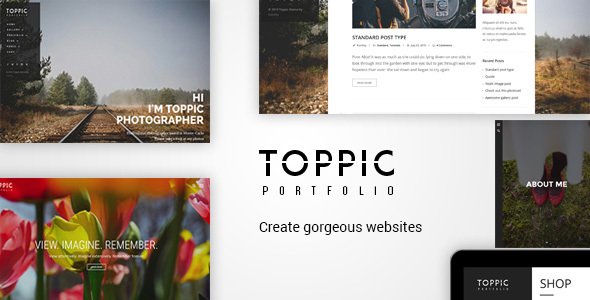
Stuck on your TopPic WordPress theme? Let's fix it.
No endless back-and-forth. Just send us the details and we'll get it done.
No obligation · Replies within 1 hour · Quote within 1 day
Setup · Customization · Bug fixes · WooCommerce integration
About TopPic WP Theme
TopPic is a photography-focused WordPress theme developed by kotofey. It’s built for photographers, visual artists, and agencies who want a clean, image-first layout without a lot of setup overhead.
The theme puts full-width imagery front and center, using minimal typography and whitespace to let photos do the talking. Portfolio grids, gallery pages, and a straightforward navigation structure make it easy to present work professionally.
TopPic is well-suited for freelance photographers, studio portfolios, and anyone whose site depends on strong visual presentation. It supports standard WordPress customizer options, works with most gallery plugins, and keeps the codebase light enough that page load times stay reasonable without heavy optimization work.
Get matched with a TopPic developer in under one day
Tell us about your TopPic project. Small fixes, TopPic theme customization, or a full website build, whatever you need, we've got it covered.
We'll connect you to the right TopPic developers, define the scope, and get everything 100% clear.
You'll get one estimate, hire your preferred developer, and start collaborating.
Most TopPic issues aren’t theme problems. They’re configuration, compatibility, or customization problems that need someone who knows WordPress well. The developers on Codeable are vetted and work with themes like TopPic regularly. You get a real developer, not a support ticket queue. Whether it’s a layout fix, a new feature, or a full custom build on top of TopPic, you can post your project and get an honest estimate within 24 hours, with no obligation to proceed.
Pros
- Clean, image-first layout designed specifically for photography portfolios
- Lightweight codebase keeps page performance manageable without heavy optimization
- Simple WordPress Customizer integration means basic setup doesn't require code
- Full-width image support works well for showcasing high-resolution photography
- Minimal design style means it ages well without frequent visual overhauls
Cons
- Limited built-in layout options compared to multipurpose portfolio themes
- No dedicated support forum or active community for troubleshooting
- Customization beyond basic settings requires direct PHP or CSS edits
- Not tested or certified for the latest WordPress releases on an ongoing basis
- Fewer built-in widget areas restrict sidebar and footer layout flexibility
Who is TopPic for?
Freelance Photographer Portfolio
TopPic works well for freelancers who need a clean, fast-loading portfolio without building something from scratch. The full-width image layouts make individual projects stand out. Add a contact form and a simple about page, and you have a professional site that’s easy to maintain and doesn’t compete visually with your work.
Photography Studio Website
Studios with multiple photographers or service categories can use TopPic as a base. Custom post types for team members, separate gallery sections by shoot type, and a booking or inquiry form make it practical for a working studio site. A developer can extend these features without replacing the theme entirely.
Visual Artist Showcase
For visual artists who want the work to lead, TopPic’s minimal chrome and whitespace-forward design keeps the focus on images. It handles mixed media reasonably well. If you need video embeds or audio alongside photography, a developer can add that support while keeping the clean visual style intact.
Stock Photography Storefront
Photographers selling prints or licenses can add WooCommerce to a TopPic build. The theme’s clean layout actually works in favor of product pages when customized correctly. You’ll likely need a developer to align the WooCommerce templates with TopPic’s design language, but the underlying compatibility is solid.
Photography Blog
TopPic can support a photography-focused blog where image quality matters more than text density. Posts with large featured images look strong in this theme. For bloggers who publish tutorials, gear reviews, or behind-the-scenes content alongside their portfolio, it provides a clean reading experience without a heavy content theme feel.

Customizing TopPic
Out of the box, TopPic covers the basics. But most photographers want something that reflects their specific brand: custom color palettes, adjusted typography, modified grid layouts, or a homepage that doesn’t look like every other portfolio site.
That’s where a TopPic expert makes a real difference. Small changes to the theme’s CSS can dramatically alter the feel of a site. A developer familiar with TopPic knows which template files handle which sections, how the grid system behaves across screen sizes, and where to add custom functionality without breaking the theme on updates.
Whether you want a subtle tweak or a fully customized build on top of TopPic, working with someone who knows the theme saves time and avoids the trial-and-error that comes with DIY modifications.
Recommended plugins for TopPic
TopPic pairs well with several additions that expand what it can do. WooCommerce lets photographers sell prints or digital downloads directly from their site. Contact Form 7 or WPForms handles client inquiries cleanly. Envira Gallery or FooGallery add more control over how images are displayed and organized.
For sites that need better search visibility, an SEO plugin like Yoast or Rank Math integrates without conflict. If image-heavy pages are loading slowly, a performance audit covering lazy loading, image compression, and caching can bring load times down significantly.
Not sure which plugins to use? This WordPress plugins directory covers the most popular options with reviews and setup guides.
TopPic common issues
TopPic theme images not displaying correctly on mobile
Mobile image display problems in TopPic usually come down to missing responsive CSS rules or images that weren’t sized correctly on upload. Check that your images meet the theme’s recommended dimensions. If the layout breaks at specific breakpoints, the fix is usually a targeted CSS rule added through a child theme or the Additional CSS field in the Customizer. If the issue appeared after a WordPress update, a bug fix may be needed to reconcile deprecated code.
TopPic WordPress theme not compatible with latest WordPress version
TopPic is not actively maintained by kotofey, so it may not have been updated to address changes introduced in newer WordPress releases. Common symptoms include PHP warnings, broken admin screens, or missing functionality. Running the theme on current WordPress without compatibility testing is risky. A developer can audit the theme files, patch deprecated functions, and confirm stability before you push updates to a live site.
How to change fonts and colors in TopPic theme
TopPic’s Customizer options are limited. For font changes, you’ll either need a plugin like Custom Fonts or Google Fonts Typography, or direct CSS edits. Color changes beyond what the Customizer exposes require editing the stylesheet. The safest approach is using a child theme so your changes survive theme updates. If you’re not comfortable with CSS, a developer can make these changes quickly and document what was done.
TopPic portfolio grid layout broken after plugin update
Grid layout breaks after plugin updates usually point to a JavaScript conflict or a CSS collision between TopPic and the updated plugin. Open your browser’s developer console and look for JS errors. Disable plugins one at a time to isolate the conflict. If the issue is CSS-based, it can often be patched with a few targeted rules. Persistent layout issues that reappear may need a more thorough diagnostic review.
TopPic FAQ
TopPic by kotofey does not appear to receive regular updates or active support. This means compatibility with current WordPress versions is not guaranteed. If you’re using it on an existing site, it’s worth testing on a staging environment before updating WordPress core. For new projects, factor in the lack of ongoing maintenance when deciding whether to build on it long-term.
TopPic wasn’t built with page builders in mind. Elementor can be installed alongside it, but you may encounter layout conflicts, especially with full-width sections and the theme’s native image templates. A developer can resolve most conflicts, but expect some CSS work to get everything aligned. Using a child theme before installing a page builder is strongly recommended.
TopPic typically uses standard WordPress pages combined with gallery shortcodes or a portfolio custom post type depending on the version. The exact method depends on your installed version. Check the theme documentation if available, or inspect the theme’s template files directly. If the default portfolio setup doesn’t meet your needs, a developer can build a custom solution on top of the existing theme structure.
TopPic’s clean, lightweight markup gives it a reasonable SEO foundation, but the theme alone doesn’t handle structured data, XML sitemaps, or meta optimization. You’ll need an SEO plugin like Yoast or Rank Math to cover those bases. Image SEO, including alt text and file naming, also matters significantly for photography sites and isn’t automated by the theme.
Yes, migrating away from TopPic to a different theme is possible. Your content, images, and posts stay in WordPress regardless of theme. The main work involves rebuilding layouts in the new theme, since design customizations don’t transfer. If you also need to move hosts or domains during the switch, a migration service can handle both at the same time.
Hire a TopPic WordPress Developer
Need a TopPic developer who can hit the ground running? FoxyConcept works through Codeable, a vetted network of WordPress professionals. You post your project, describe what you need, and get matched with a developer who has relevant experience. No guessing, no bidding wars, no wasted time. Get a free estimate and see what’s possible with your TopPic site.
You'll need a free Codeable account so developers can ask questions and send their quotes.