Ozeum WordPress Theme
by ThemeREX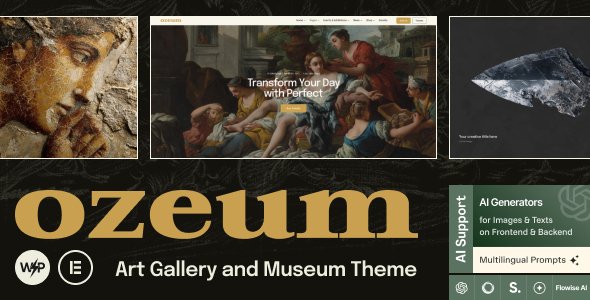
Stuck on your Ozeum WordPress theme? Let's fix it.
No endless back-and-forth. Just send us the details and we'll get it done.
No obligation · Replies within 1 hour · Quote within 1 day
Setup · Customization · Bug fixes · WooCommerce integration
About Ozeum WP Theme
Ozeum is a WordPress theme built by ThemeREX, designed specifically for museums, galleries, art centers, and cultural institutions. It ships with a clean visual layout that puts image-heavy content front and center without cluttering the interface.
The theme includes multiple pre-built demo layouts, WPBakery Page Builder compatibility, and built-in support for events, exhibitions, and collections. It handles portfolio-style content well and gives cultural organizations a polished starting point without requiring a custom build from scratch.
ThemeREX has a solid track record with niche vertical themes, and Ozeum reflects that. The design is intentional, the typography is strong, and the overall structure suits institutions that need to present artwork, schedules, and ticketing information clearly and professionally.
Get matched with a Ozeum developer in under one day
Tell us about your Ozeum project. Small fixes, Ozeum theme customization, or a full website build, whatever you need, we've got it covered.
We'll connect you to the right Ozeum developers, define the scope, and get everything 100% clear.
You'll get one estimate, hire your preferred developer, and start collaborating.
Ozeum is a niche theme with specific conventions around its post types, shortcodes, and template hierarchy. A general WordPress developer may spend hours figuring out what an Ozeum specialist already knows. Through Codeable, FoxyConcept connects you with vetted developers who have hands-on experience with ThemeREX themes. You get an accurate estimate, a clear scope, and work done by someone who won’t charge you for their learning curve. That’s the practical difference.
Pros
- Purpose-built for museums and galleries with dedicated exhibition and collection post types
- Multiple pre-built demo layouts that cover different types of cultural institutions
- Strong typographic defaults suited to editorial and arts content
- WooCommerce compatible for ticket sales, memberships, or museum shop products
- WPML compatible for multilingual cultural organizations with international audiences
Cons
- WPBakery Page Builder is included instead of a more modern block-based editor, which creates long-term dependency
- Heavily reliant on shortcodes that can break or become difficult to manage after theme updates
- Page load times can suffer without optimization due to the theme's image-heavy design patterns
- Limited community support compared to mainstream themes, so troubleshooting relies on ThemeREX documentation or developers
- Theme Options panel has many settings, but documentation on advanced use cases is sparse
Who is Ozeum for?
Art Museums
Ozeum’s collection post type and exhibition archive templates map well to how museums organize and present work. A developer can configure taxonomy structures for artists, periods, and media types, giving visitors logical browsing paths through a large permanent collection alongside rotating exhibitions.
Private Art Galleries
Private galleries need a site that sells the work, not just displays it. Ozeum combined with WooCommerce lets galleries list pieces with price, dimensions, and availability. An Ozeum developer can set up inquiry forms, custom artwork detail pages, and filtered portfolio views that match how galleries present inventory.
Cultural Centers
Cultural centers run events, workshops, screenings, and exhibitions simultaneously. Ozeum’s event integration and flexible homepage layouts can handle a busy content calendar. A developer can configure The Events Calendar, set up categories for different program types, and build archive pages that help visitors find what’s relevant to them.
Photography Studios and Exhibitions
Photography exhibitions need a theme that handles full-bleed images without compression artifacts or layout shifts. Ozeum is designed for this. A developer can configure gallery layouts, optimize image delivery, and set up project archive pages that give each series the space and presentation quality it deserves.
Auction Houses
Auction houses need lot listings, bidding schedules, and result archives. Ozeum’s custom post type structure can be extended by a developer to handle lot entries, upcoming sale dates, and past auction records. Combined with WooCommerce or a dedicated auction plugin, it becomes a functional sales platform.

Customizing Ozeum
Ozeum ships with a reasonable set of options, but most serious builds need customization beyond what the Theme Options panel offers. Fonts, color schemes, and layout adjustments are straightforward, but anything beyond that, like custom exhibition archive templates, filtered collection pages, or integrated ticketing flows, requires developer work.
WPBakery is included, but building complex layouts with it takes time and knowledge of how Ozeum structures its shortcodes and page templates. An Ozeum expert will know where the theme’s CSS is organized, how its custom post types work, and how to extend it without breaking update compatibility.
Custom header styles, sticky navigation tweaks, and mobile layout fixes are among the most common requests. Having someone who has worked with Ozeum before saves significant back-and-forth.
Recommended plugins for Ozeum
Ozeum works with several plugins that extend its functionality for cultural sites. The Events Calendar integrates cleanly for exhibition schedules. WooCommerce can be added for ticket sales or merchandise. WPML support is available for multilingual museum sites.
If site speed is a concern, pairing Ozeum with proper caching and image optimization is important given its visual weight. For institutions that need search visibility, structured data for events and exhibitions can be added through SEO plugins. See our WordPress performance service and WordPress SEO service for support with both.
Not sure which plugins to use? This WordPress plugins directory covers the most popular options with reviews and setup guides.
Ozeum common issues
Ozeum theme slider not working after update
Slider issues after a ThemeREX update are usually caused by a conflict between the theme’s bundled slider plugin version and the currently installed version. Check the required plugin versions listed in the theme changelog. Deactivating and reactivating the slider plugin often resolves display failures. If the issue persists, a JavaScript console error will point to the specific conflict. Our bug fixing service can diagnose and resolve this quickly.
Ozeum WPBakery elements not displaying correctly
WPBakery display issues in Ozeum are commonly caused by a cached version of the page conflicting with updated shortcode output, or a plugin conflict affecting WPBakery’s front-end scripts. Clear all caches first. If elements are still broken, switch to the default WordPress theme temporarily to isolate whether the issue is theme-specific or plugin-related. ThemeREX shortcodes sometimes need a theme-specific WPBakery extension to render correctly.
Ozeum theme loading slowly on mobile
Ozeum loads large image assets by default, which hurts mobile performance. Start by enabling lazy loading for images, compressing assets with a plugin like Imagify or ShortPixel, and removing unused WPBakery elements from pages. A caching plugin with mobile-specific rules helps significantly. For a full audit and fix, see our WordPress performance service.
Ozeum custom fonts not applying to headings
Custom fonts failing to apply to headings in Ozeum usually means the font is selected in Theme Options but the CSS selector for that heading level isn’t targeted correctly. Check whether a child theme or additional CSS is overriding the font-family property. Also confirm the Google Fonts API is loading correctly, as some hosting environments block external font requests. Clearing theme cache after changing font settings is required for changes to take effect.
Ozeum FAQ
ThemeREX continues to maintain Ozeum, though update frequency is lower than mainstream multipurpose themes. The theme receives compatibility updates for major WordPress releases and WooCommerce versions. Before purchasing or building on it, check the ThemeForest changelog to confirm recent activity. If you’re already using it and support is a concern, a developer can help maintain compatibility independently.
Ozeum is built around WPBakery and uses its shortcode system throughout the demo content. Switching to Elementor is possible but requires rebuilding pages and losing compatibility with ThemeREX’s bundled shortcodes. It’s not a simple swap. Most developers working with Ozeum stick with WPBakery to stay within the theme’s supported ecosystem unless a full rebuild is planned.
Yes. Ozeum is WooCommerce compatible and can be used to sell prints, originals, or merchandise. Basic product pages work out of the box, but styling them to match the theme’s aesthetic and setting up custom artwork listing fields typically requires developer work. A developer can also configure inquiry-based purchasing flows if you prefer that over direct checkout.
Ozeum uses custom post types for exhibitions. To add new exhibition categories or types, you work through the built-in taxonomy system or register additional taxonomies with a small code snippet or plugin. A developer can set this up cleanly and ensure archive pages and filters reflect the new structure without breaking existing content.
Ozeum supports WPML, which is the standard solution for multilingual WordPress sites. You’ll need a WPML license and some configuration work to translate custom post types like exhibitions and events correctly. For institutions serving international audiences, this is a workable setup. See our WordPress migration service if you’re moving an existing multilingual site to Ozeum.
Hire an Ozeum Developer
Whether you need a full Ozeum setup, a design customization, or help fixing a specific issue, FoxyConcept delivers through Codeable’s vetted developer network. You describe your project, get a free estimate within 24 hours, and only move forward if you’re satisfied with the plan. No obligation, no risk. Get your free estimate here and have an Ozeum expert review your project today.
You'll need a free Codeable account so developers can ask questions and send their quotes.