Nooni WordPress Theme
by skygroup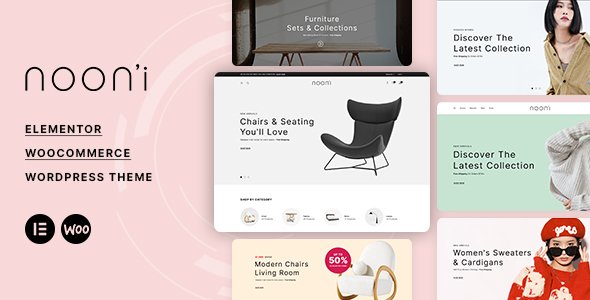
Stuck on your Nooni WordPress theme? Let's fix it.
No endless back-and-forth. Just send us the details and we'll get it done.
No obligation · Replies within 1 hour · Quote within 1 day
Setup · Customization · Bug fixes · WooCommerce integration
About Nooni WP Theme
Nooni is a premium WooCommerce theme built by skygroup, designed specifically for fashion and lifestyle stores. It ships with a clean, minimal aesthetic that puts products front and center. The layout is mobile-first, with fast-loading pages and a checkout experience built to reduce friction.
Out of the box, Nooni includes multiple homepage demos, a mega menu, an AJAX cart, a wishlist, and product quick view. It integrates tightly with WooCommerce and supports popular plugins like WPML, MailChimp, and Contact Form 7.
The theme is built on a solid codebase with regular updates from skygroup, making it a reliable choice for store owners who want a polished storefront without starting from scratch. It suits boutique brands, clothing shops, and beauty retailers looking for a professional presence without heavy custom development.
Get matched with a Nooni developer in under one day
Tell us about your Nooni project. Small fixes, Nooni theme customization, or a full website build, whatever you need, we've got it covered.
We'll connect you to the right Nooni developers, define the scope, and get everything 100% clear.
You'll get one estimate, hire your preferred developer, and start collaborating.
Nooni looks simple to set up, but getting it to perform well as a real store takes more than importing a demo. Layout conflicts, plugin clashes, and mobile display issues are common once you move beyond the defaults.
FoxyConcept connects you with vetted Nooni developers through Codeable, where every specialist has passed a rigorous vetting process. You get a developer who has worked with WooCommerce themes like Nooni many times, not someone learning on your project. Browse our WordPress development services to see what we can handle for you.
Pros
- Clean, minimal design that works well for fashion, beauty, and lifestyle brands without heavy customization
- Includes AJAX cart, wishlist, and product quick view out of the box, features most stores need from day one
- Multiple homepage demo layouts with one-click import, making initial setup faster than building from scratch
- Regular updates from skygroup keep compatibility with current WooCommerce and WordPress versions
- Mega menu and flexible header options give you solid navigation control without extra plugins
Cons
- Limited layout flexibility outside the provided demos without custom PHP or child theme work
- No built-in page builder integration, so advanced custom pages require code or a compatible plugin setup
- Support quality from skygroup varies and complex issues often need a third-party developer to resolve
- Some bundled plugins like WPBakery or Revolution Slider add page weight if not properly managed
- Checkout and cart template overrides can conflict with WooCommerce updates if customizations are not handled in a child theme
Who is Nooni for?
Fashion Boutique
Nooni’s editorial-style layouts and large image support make it a natural fit for fashion boutiques. You can showcase seasonal collections, run lookbooks, and highlight new arrivals without custom design work. The built-in wishlist and quick view keep the shopping experience smooth for style-focused customers.
Beauty and Skincare Store
Clean whitespace and minimal typography let product photography do the work, which matters for beauty and skincare brands. Nooni handles ingredient-heavy product descriptions well, and its AJAX cart reduces the friction that costs beauty stores conversions. A developer can also add custom ingredient filters or skin-type sorting.
Jewellery and Accessories Shop
High-resolution image display and a refined layout make Nooni suitable for jewellery and accessories. Product zoom, quick view, and multiple gallery images per product are all supported. You can set up collections by material, style, or occasion with proper category and filter configuration.
Home Decor and Lifestyle Brand
Nooni’s grid and masonry layouts work well for home decor stores that need to display varied product sizes and styles. The mega menu supports deep category structures, which is useful when you carry furniture, textiles, and decorative accessories under one roof. Demo layouts translate well to a lifestyle brand aesthetic.
Multi-brand Clothing Retailer
Multi-brand retailers need strong filtering and clear category navigation. Nooni supports layered navigation through WooCommerce and compatible filter plugins, making it easier for shoppers to find products by brand, size, or price. A Nooni developer can extend the default filter setup to handle larger catalogs cleanly.

Customizing Nooni
Nooni gives you a decent starting point through the WordPress Customizer, where you can adjust colors, fonts, header layouts, and footer options without touching code. The theme also includes demo import, so you can replicate any of the pre-built layouts in a few clicks.
That said, real customization often requires going deeper. Changing the product card layout, adjusting mobile breakpoints, or modifying checkout styles typically means editing PHP templates or adding custom CSS. A Nooni expert can handle this cleanly without breaking future updates.
FoxyConcept works with experienced Nooni developers who know the theme’s structure inside out. Whether you need a custom mega menu, a tailored product filter, or a homepage built to your brand guidelines, a dedicated Nooni expert delivers faster and cleaner results than trial-and-error DIY edits.
Recommended plugins for Nooni
Nooni works well with a focused set of plugins. For filtering, FacetWP or WooCommerce Product Filter adds the layered navigation fashion shoppers expect. Currency switcher plugins like CURCY or WOOCS handle multi-currency for international stores.
To improve speed, combining Nooni with a caching plugin and image optimization goes a long way. Check our WordPress performance service for hands-on help there. For search visibility, structured data and proper SEO configuration matter, and our WordPress SEO service covers both. Nooni also works cleanly with Yoast SEO and Rank Math out of the box.
Not sure which plugins to use? This WordPress plugins directory covers the most popular options with reviews and setup guides.
Nooni common issues
Nooni theme not displaying correctly after WooCommerce update
WooCommerce updates frequently change template files, and Nooni’s custom cart, checkout, or product templates can fall out of sync. The fix usually means updating the outdated template files in your child theme to match the current WooCommerce versions. Avoid editing core theme files directly. If you are unsure which templates are outdated, our WordPress bug fixing service can audit and resolve conflicts without breaking your store.
Nooni mega menu not working on mobile
Mobile menu issues in Nooni are often caused by JavaScript conflicts with other plugins or by CSS overrides that break the toggle behavior on small screens. Start by deactivating plugins one by one to isolate the conflict. Check the browser console for JS errors. If the issue persists after plugin testing, a child theme CSS fix targeting the mobile breakpoint usually resolves it. A developer can apply this cleanly and test across devices.
Nooni product quick view showing blank or broken popup
A broken quick view popup in Nooni usually points to a jQuery conflict or a missing script dependency. This often happens after a plugin update or when a caching plugin serves an outdated script. Try clearing all caches first. If that does not fix it, disable plugins in groups to find the conflict. Our WordPress bug fixing service handles exactly these kinds of plugin and script conflicts without disrupting your live store.
Nooni theme slow loading speed on product pages
Nooni ships with several bundled scripts and stylesheets that load on every page, including product pages. Slow load times are usually tied to unoptimized images, unminified scripts, or third-party plugins adding render-blocking resources. Start with image compression and a caching plugin. Disabling unused theme features like sliders or animations also helps. For a full audit and hands-on fixes, see our WordPress performance service.
Nooni FAQ
Yes, Nooni is built specifically for WooCommerce. It includes custom templates for the shop, product, cart, and checkout pages, plus built-in features like AJAX cart, quick view, and wishlist. It works well for fashion and lifestyle stores that need a polished WooCommerce setup without starting from a blank theme.
Nooni is not built as an Elementor-native theme, but it can work alongside Elementor for page building on standard pages. For WooCommerce product templates and core theme sections, Nooni uses its own template system. Mixing Elementor deeply with Nooni can cause conflicts, so testing on a staging site before applying changes to your live store is strongly recommended.
After installing the Nooni theme and the required plugins, go to Appearance and look for the demo import option in the theme panel. Select the demo you want, click import, and wait for the process to finish. Make sure the required plugins are all activated first. If the import fails, it is usually a PHP memory limit or execution timeout issue on your hosting.
Basic setup and customization through the WordPress Customizer is manageable without coding. You can change colors, fonts, and layout options. More specific changes, like adjusting product card layouts, custom filters, or checkout modifications, will require CSS or PHP knowledge. A Nooni developer is worth bringing in for anything beyond surface-level adjustments.
Yes, Nooni is WPML compatible, which is the most widely used solution for multilingual WordPress and WooCommerce stores. It also supports RTL languages. If you need a fully translated store with currency switching and localized checkout, a developer can configure WPML and a compatible currency plugin to work cleanly with the theme.
Hire a Nooni Expert Developer
Need help setting up, customizing, or fixing your Nooni store? FoxyConcept matches you with a vetted Nooni developer through Codeable. You get a free estimate within 24 hours and no obligation to proceed. Projects range from single-page redesigns to full store builds.
Every developer we work with has real WooCommerce experience and knows the Nooni theme structure. No guesswork, no wasted budget. Get your free estimate today and have a developer lined up before the end of the week.
You'll need a free Codeable account so developers can ask questions and send their quotes.