EvnTalk WordPress Theme
by RadiusTheme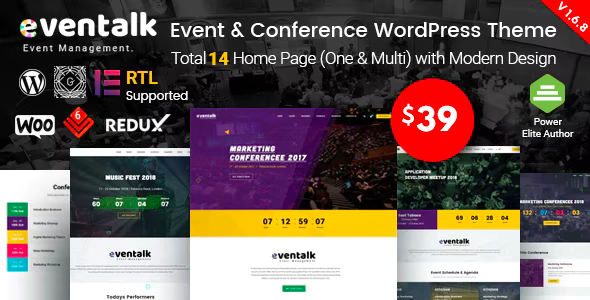
Stuck on your EvnTalk WordPress theme? Let's fix it.
No endless back-and-forth. Just send us the details and we'll get it done.
No obligation · Replies within 1 hour · Quote within 1 day
Setup · Customization · Bug fixes · WooCommerce integration
About EvnTalk WP Theme
EvnTalk is a WordPress theme by RadiusTheme built specifically for event management websites. It ships with layouts for conferences, meetups, seminars, and ticketed events. The theme integrates tightly with The Events Calendar plugin and supports WooCommerce for ticket sales directly on the site.
Out of the box you get speaker profile pages, schedule or agenda layouts, countdown timers, and sponsor sections. The design is clean and structured around the practical needs of event organizers rather than generic portfolio aesthetics. RadiusTheme built it on Elementor, so all major sections are editable without touching code. It works well for single events or recurring series and handles both free and paid event formats without needing heavy plugin stacks.
Get matched with a EvnTalk developer in under one day
Tell us about your EvnTalk project. Small fixes, EvnTalk theme customization, or a full website build, whatever you need, we've got it covered.
We'll connect you to the right EvnTalk developers, define the scope, and get everything 100% clear.
You'll get one estimate, hire your preferred developer, and start collaborating.
EvnTalk is straightforward to install but harder to get production-ready without development experience. Customizing speaker templates, fixing Elementor conflicts, integrating payment flows, or building a members-only attendee area all require real WordPress knowledge.
FoxyConcept works through Codeable, a vetted network of WordPress developers. You post your project, get a clear estimate within 24 hours, and only pay if you decide to move forward. No risk, no pressure. Get a free estimate today.
Pros
- Built specifically for event sites, not adapted from a generic theme
- Native integration with The Events Calendar and WooCommerce Tickets
- Elementor-based layouts make visual edits accessible without code
- Includes dedicated sections for speakers, sponsors, schedules, and countdowns
- Clean, focused design that loads faster than multipurpose event themes
Cons
- Heavily dependent on Elementor, which creates lock-in if you want to switch page builders later
- Advanced ticketing flows still require WooCommerce configuration knowledge
- Limited built-in demo content makes initial setup slower without developer help
- Some layout sections are rigid and need CSS overrides to match off-template designs
- Support response from RadiusTheme can be slow during peak periods
Who is EvnTalk for?
Tech Conferences
EvnTalk handles multi-track conference schedules well. Speaker bios, session listings, sponsor tiers, and venue maps are all supported in the theme structure. For a tech conference selling tiered passes, pairing it with WooCommerce Tickets and a custom registration flow makes the checkout experience clean and professional.
Workshops and Training Events
Training providers running paid workshops benefit from EvnTalk’s agenda layout and ticket integration. You can list individual workshop sessions, set attendance limits, and collect payments without a third-party booking platform. A custom post type for trainers mirrors the speaker template and keeps the site consistent.
Music and Arts Festivals
Festival organizers need lineup pages, stage schedules, and ticket tiers. EvnTalk’s visual structure works well for this when combined with Elementor Pro for flexible content blocks. Countdown timers and sponsor grids are already built in, which reduces custom development time compared to starting from a generic theme.
Corporate Seminars
Corporate event teams hosting seminars or summits need a professional layout that reflects brand standards. EvnTalk’s clean design adapts well to corporate color schemes. Registration forms, agenda downloads, and speaker pages cover the typical corporate event content structure without needing a custom build from scratch.
Nonprofit and Community Events
Community organizations running free or low-cost events can use EvnTalk without the WooCommerce stack by relying on The Events Calendar’s free tier. The theme still provides a polished event listing and detail page structure. Donation or sponsorship sections can be added with minimal development work.

Customizing EvnTalk
EvnTalk gives you a solid starting point, but most event sites need adjustments before they go live. Speaker grids, agenda layouts, registration forms, and ticket pages often need structural changes that go beyond what Elementor widgets cover out of the box.
An EvnTalk expert can rework section templates, build custom post types for speakers or sponsors, wire up payment gateways for ticketing, and tighten up the mobile experience. If you need a specific countdown behavior, a restricted attendee area, or a multi-event archive with filtering, that requires custom development work. RadiusTheme provides documentation, but configuration decisions around The Events Calendar, WooCommerce Tickets, and Elementor Pro can get complicated quickly. Getting an EvnTalk expert involved early saves time and avoids layout conflicts later.
Recommended plugins for EvnTalk
EvnTalk pairs well with The Events Calendar Pro for recurring events, venue management, and calendar views. WooCommerce with Event Tickets Plus handles paid registrations. Elementor Pro unlocks form widgets, popup builders, and dynamic content useful for speaker or sponsor detail pages.
For site speed, image optimization and caching are worth addressing early since event pages tend to be media-heavy. Learn more about WordPress performance optimization. If you need organic traffic from event searches, structured data and meta setup matter from day one. See our WordPress SEO service for details.
Not sure which plugins to use? This WordPress plugins directory covers the most popular options with reviews and setup guides.
EvnTalk common issues
EvnTalk countdown timer not showing correctly
The countdown timer in EvnTalk relies on a correctly set event date in the theme settings or connected plugin fields. If it shows zero or the wrong time, check the event date format against your WordPress timezone setting under Settings > General. A mismatch between UTC offset and the date input format is the most common cause. Clearing your caching plugin after fixing the date is also necessary before testing again.
EvnTalk events not displaying with The Events Calendar
EvnTalk is built to work alongside The Events Calendar, but the theme’s own event post type can conflict with it if both are active without proper configuration. Make sure you are using The Events Calendar’s post type as the primary source and that EvnTalk’s template files are pointing to it. Check the theme documentation for the correct template hierarchy. If archive or single event pages still show blank, a WordPress bug fixing service can trace the template conflict quickly.
EvnTalk Elementor widgets broken after update
Elementor widget breakage after an EvnTalk or Elementor update usually means a registered widget class has changed names or a dependent plugin version no longer matches. Open Elementor > Tools > Regenerate CSS and clear all editor caches first. If specific widgets still fail to load, check the browser console for JavaScript errors. Conflicts with Elementor Pro versus the free version are also common. Rolling back the theme update temporarily confirms whether the theme or Elementor caused the break.
EvnTalk WooCommerce ticket checkout not working
When EvnTalk ticket checkout via WooCommerce fails, the issue is usually a payment gateway misconfiguration or a conflict between WooCommerce and a caching or security plugin. Test checkout in an incognito window with caching disabled. Check WooCommerce > Status > Logs for transaction errors. If you are using Event Tickets Plus, ensure the WooCommerce integration is enabled in its settings. SSL misconfiguration on the checkout page is also worth checking if the issue only affects live payment methods.
EvnTalk FAQ
EvnTalk is a premium theme sold by RadiusTheme. It is not available for free on the official WordPress theme directory. You purchase it directly from RadiusTheme’s website or through ThemeForest. The license includes updates and support for a set period. Renewal is required for continued official support after that period ends.
Yes, EvnTalk is designed to work with The Events Calendar by Modern Tribe. It uses the plugin’s event post type and calendar functionality as its primary event management layer. Some features require The Events Calendar Pro for full functionality, including recurring events and additional calendar views. Always check version compatibility before updating either the theme or the plugin.
Yes, EvnTalk supports ticket sales through WooCommerce. For tighter event-to-ticket integration, Event Tickets Plus by Modern Tribe connects WooCommerce to The Events Calendar directly. Basic free ticket registration can be handled with the free Event Tickets plugin. Setting up paid ticketing correctly requires WooCommerce configuration and a working payment gateway.
EvnTalk is built on Elementor and works with both the free and Pro versions. Elementor Pro unlocks additional widgets like forms, popups, and dynamic content fields that are useful for event detail pages and speaker profiles. Some of EvnTalk’s demo templates may assume Pro features are active, so check before purchasing if you plan to stay on the free version.
Speakers in EvnTalk are typically managed as a custom post type included with the theme. You add a new speaker entry, fill in the bio, photo, and social links, then assign them to an event. The speaker archive and individual profile pages are handled by the theme’s templates. If the custom post type is missing, it may need to be registered manually or via a small plugin.
Hire an EvnTalk Developer
Whether you need a full EvnTalk setup, a specific feature built, or a problem fixed, FoxyConcept can help. We handle everything from theme configuration and payment integration to custom Elementor templates and performance work.
Work is done through Codeable, so you get a transparent estimate before anything starts. Submit your project and get a free estimate with no obligation to hire.
You'll need a free Codeable account so developers can ask questions and send their quotes.