Gym WordPress Theme WordPress Theme
by SkatDesign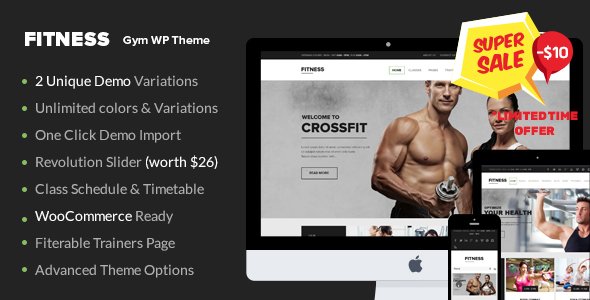
Stuck on your Gym WordPress Theme WordPress theme? Let's fix it.
No endless back-and-forth. Just send us the details and we'll get it done.
No obligation · Replies within 1 hour · Quote within 1 day
Setup · Customization · Bug fixes · WooCommerce integration
About Gym WordPress Theme WP Theme
Gym WordPress Theme by SkatDesign is a fitness-focused theme built for gyms, personal trainers, CrossFit boxes, and sports clubs. It ships with a layout designed around class schedules, membership plans, trainer profiles, and equipment showcases. The theme is built on a clean codebase and integrates with popular page builders, making it usable without touching code.
SkatDesign has focused on mobile responsiveness and load speed, which matters for fitness businesses where most traffic comes from phones. The design leans toward bold typography, dark backgrounds, and strong imagery, which suits the visual nature of gym marketing. It supports WooCommerce for selling memberships or merchandise directly from the site.
Out of the box, you get pre-built demo content covering fitness studios, personal training, and sports academies. Installation is straightforward and the documentation covers the basics, though more complex customizations will need developer input.
Get matched with a Gym WordPress Theme developer in under one day
Tell us about your Gym WordPress Theme project. Small fixes, Gym WordPress Theme theme customization, or a full website build, whatever you need, we've got it covered.
We'll connect you to the right Gym WordPress Theme developers, define the scope, and get everything 100% clear.
You'll get one estimate, hire your preferred developer, and start collaborating.
Most gym owners buy this theme expecting to launch in a weekend. Then reality hits: the demo doesn’t match the business, the booking plugin conflicts, or the schedule layout breaks on mobile. That’s where a vetted WordPress developer saves time and money.
Through Codeable, you get matched with developers who have been tested and reviewed, not random freelancers. Post your project, get an estimate, and decide from there. No commitment until you’re ready. Our team at FoxyConcept works through Codeable and handles Gym WordPress Theme builds regularly. See our WordPress development services for more.
Pros
- Pre-built demo content covers multiple fitness niches, reducing setup time significantly
- Built-in class schedule layout works well for studios that run fixed weekly timetables
- WooCommerce compatibility allows membership or product sales without extra setup
- Bold, high-contrast design suits gym branding and performs well with strong photography
- Mobile-first layout means trainer and class pages display cleanly on phones without manual adjustments
Cons
- The options panel is not the most intuitive, and some settings require trial and error to understand
- Demo import can pull in unnecessary content that takes time to clean up before launch
- No native booking system, so class scheduling requires a third-party plugin and extra configuration
- Font and color customization is limited without editing the child theme CSS directly
- Documentation covers setup basics but lacks detail on advanced customization or plugin conflicts
Who is Gym WordPress Theme for?
Independent Gym or Fitness Studio
The Gym WordPress Theme is a strong fit for independent gyms that need to showcase memberships, class schedules, and facilities. The pre-built membership plan layout presents pricing tiers clearly, and the homepage hero sections work well for promotion campaigns. Adding WooCommerce handles online sign-ups without a separate platform.
Personal Trainer Website
Personal trainers can use this theme to build a lead-generating site with trainer bios, transformation galleries, service packages, and contact forms. The layout supports single-trainer branding well. Pairing it with a booking plugin like Amelia lets clients schedule sessions directly, reducing back-and-forth over email or phone.
CrossFit Box
CrossFit boxes need a site that communicates intensity and community. The theme’s dark, bold visual style fits that tone. The class schedule section can be configured to show WODs or weekly programming. Membership plan sections help convert visitors who are comparing boxes before committing to a trial.
Yoga or Pilates Studio
Yoga and Pilates studios benefit from the clean instructor profile layouts and class timetable sections. The theme can be softened with lighter color palettes applied through a child theme. Booking integration via a plugin like Amelia or SimplyBook.me fits the appointment-based model most studios run on.
Sports Club or Martial Arts Academy
Sports clubs and martial arts academies can use the trainer profile and schedule sections to present coaches, belt ranks, and class levels. The event sections support tournaments or grading days. WooCommerce handles gi or gear sales alongside class memberships, keeping everything within one WordPress install.

Customizing Gym WordPress Theme
Customizing the Gym WordPress Theme goes well beyond swapping colors and uploading a logo. Fitness businesses often have specific needs: custom class timetables, membership tiers, booking integrations, and trainer bio layouts. Getting those right takes more than the built-in options panel.
A Gym WordPress Theme expert can restructure the homepage to lead with conversion goals, wire up a booking plugin to the schedule section, and adjust the WooCommerce membership flow to match how your gym actually sells. Custom post types for trainers and classes can be extended to include certifications, availability, or specialisms.
Theme updates from SkatDesign can also overwrite child theme modifications if not handled carefully. Working with a developer from the start helps you avoid that. They can set up a proper child theme, document changes, and make sure your customizations survive future updates without breaking the site.
Recommended plugins for Gym WordPress Theme
The Gym WordPress Theme pairs well with several plugins that extend its core functionality. For class bookings, Amelia or BookingPress integrates cleanly. For membership management, MemberPress or Paid Memberships Pro adds the billing and access control logic a real gym needs. WooCommerce handles merchandise or one-off session sales.
Contact Form 7 or WPForms works for lead capture on landing pages. For speed, pairing the theme with a caching plugin and a CDN makes a real difference, especially on image-heavy fitness pages. If you want to improve search visibility, structured SEO work on top of the theme setup helps significantly. See our WordPress performance service or WordPress SEO service for both.
Not sure which plugins to use? This WordPress plugins directory covers the most popular options with reviews and setup guides.
Gym WordPress Theme common issues
Gym WordPress Theme class schedule not displaying correctly
Schedule display issues usually come from a plugin conflict or a custom post type that wasn’t imported correctly during setup. First, check whether the schedule shortcode or block is placed correctly on the page. If data is missing, re-import the demo or manually add class entries. If a booking plugin is involved, confirm it’s compatible with the theme version installed. A WordPress bug fixing service can isolate the exact conflict quickly.
Gym WordPress Theme demo import not working
Failed demo imports are common with fitness themes that include large image files. The most frequent causes are PHP memory limits set too low, max execution time timeouts, or upload size restrictions on the server. Increase memory_limit, max_execution_time, and upload_max_filesize in php.ini or via wp-config.php. If the one-click importer keeps failing, try a manual import using the WordPress importer and the provided XML file.
Gym WordPress Theme mobile menu broken or not opening
A broken mobile menu on the Gym WordPress Theme is usually caused by a JavaScript conflict with another plugin or a cached version of an old script. Start by clearing the site cache and browser cache, then deactivate plugins one by one to identify the conflict. If the issue appeared after an update, check whether the child theme CSS is overriding mobile navigation styles unintentionally. Enqueue scripts in the correct order in functions.php if needed.
Gym WordPress Theme WooCommerce membership page layout broken
WooCommerce layout breaks on membership or product pages often happen when the theme’s WooCommerce template files are outdated. After a WooCommerce update, go to Appearance > Theme Check or the WooCommerce status page to see which template files need updating. Copy the updated templates into the child theme’s WooCommerce folder rather than editing core files. If layout issues persist, a developer can rework the template to match the current WooCommerce structure.
Gym WordPress Theme FAQ
Gym WordPress Theme by SkatDesign is generally compatible with Elementor, though not all sections are built as native Elementor widgets. You can use Elementor on standard pages, but the theme-specific sections like class schedules or trainer profiles may require shortcodes or custom templates. Testing in a staging environment before switching your main editor is recommended.
Yes, the theme supports WooCommerce. You can use it to sell membership plans, class passes, or physical products like gym gear. The product and cart pages inherit the theme’s styling. For more advanced membership logic, including recurring billing and content access control, pairing WooCommerce with MemberPress or Paid Memberships Pro works well on top of this theme.
The theme doesn’t include a native booking system, but it works with third-party plugins. Amelia, Bookly, and SimplyBook.me are commonly used options. Each adds a class or appointment booking interface that can be embedded via shortcode on any page. Some configuration is needed to match the theme’s styling, and a developer can help if the default appearance doesn’t fit.
Basic color and font changes are available through the WordPress Customizer or the theme’s options panel. For more specific changes like section backgrounds, heading weights, or button styles, you’ll need to add custom CSS. The safest place to add this is through a child theme stylesheet, so your changes aren’t lost when the parent theme updates.
The theme has a reasonably clean code structure, which helps with technical SEO. However, the theme itself doesn’t handle on-page SEO. You’ll need a plugin like Yoast SEO or Rank Math for meta tags, schema, and sitemaps. Page speed also matters for rankings, and fitness sites with lots of images benefit from optimization work. See our WordPress SEO service for help.
Hire a Gym WordPress Theme Developer
Need a Gym WordPress Theme expert to handle setup, customization, or integrations? We work through Codeable, so you get a vetted developer and a clear estimate before any work starts. Whether it’s a full build from demo content or targeted fixes to an existing site, we can scope it out quickly. Get a free estimate and describe what you need. No obligation, no upfront payment, and you’ll hear back within 24 hours.
You'll need a free Codeable account so developers can ask questions and send their quotes.